


Building reliable software systems requires more than just writing functional code. It demands a clear understanding of how the system behaves under various conditions. State Machine Diagrams, often referred to simply as State Diagrams, provide the blueprint for this behavior. They map out the distinct modes a system can occupy and the rules governing transitions between them. However, as systems grow in complexity, the likelihood of logical errors increases. Debugging these issues requires a structured approach, deep insight into the underlying logic, and a methodical elimination of variables.
This guide outlines the essential strategies for identifying and resolving logic errors within state-based architectures. By understanding the anatomy of state transitions and common pitfalls, engineers can maintain system integrity without relying on guesswork.
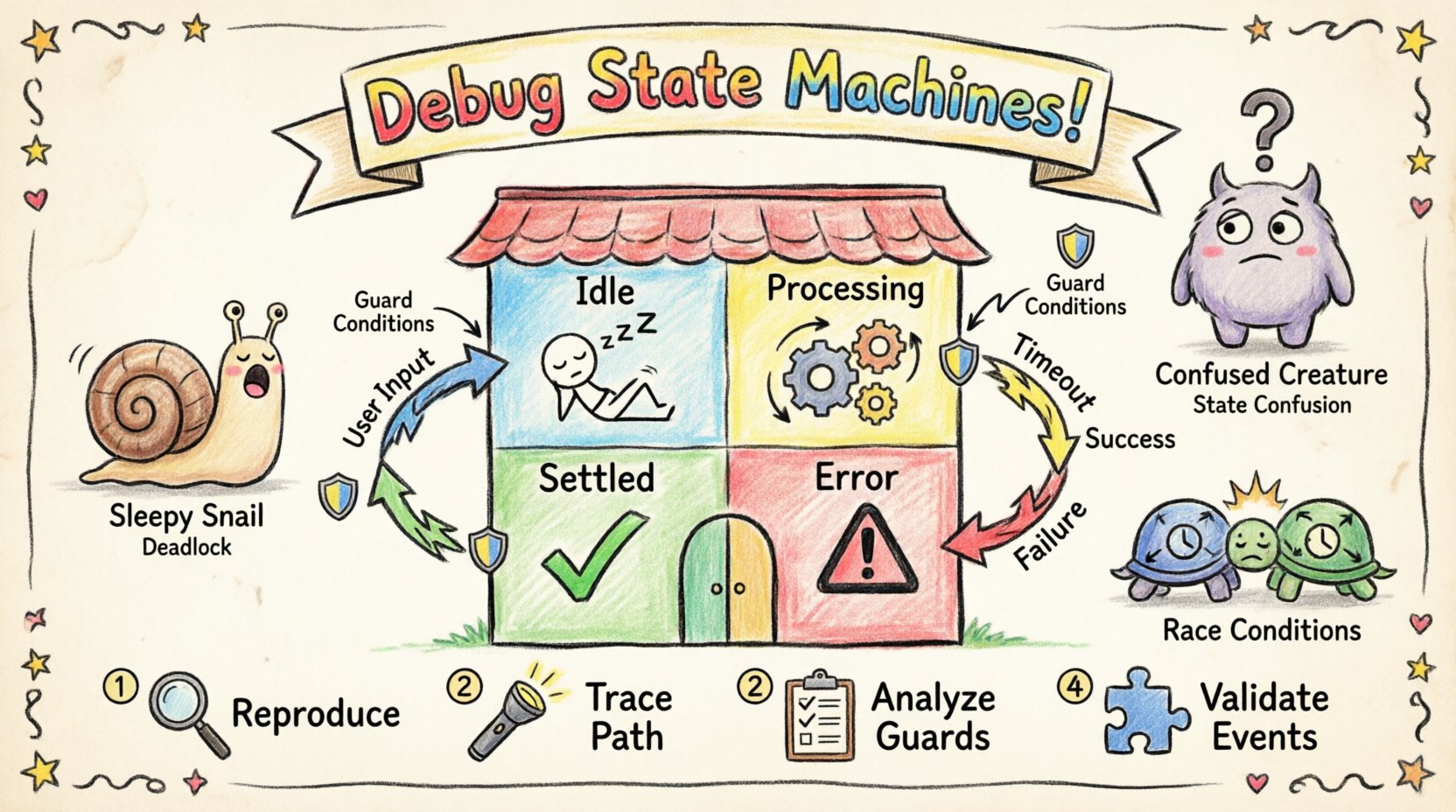
🔍 Understanding the Anatomy of a State Machine
Before troubleshooting, one must understand the components that drive the state machine. A state diagram is not merely a visual representation; it is a logical contract defining the system’s lifecycle. Every element serves a specific purpose in controlling flow and data.
- States: Distinct modes or conditions the system can exist in. Examples include Idle, Processing, or Error.
- Transitions: The paths connecting states. A transition occurs when a specific event triggers a change from one state to another.
- Events: Signals or actions that trigger transitions. These can be internal actions or external inputs.
- Guards: Boolean conditions evaluated during a transition. The transition only occurs if the guard evaluates to true.
- Actions: Operations performed upon entering, exiting, or during a transition. These might include logging, data updates, or triggering external services.
- Initial/Final States: The starting point and the termination point of the lifecycle.
When debugging, it is crucial to verify that these components interact correctly. A logic error often stems from a mismatch between the expected behavior defined in the diagram and the actual behavior in the runtime environment.
🚨 Common Logic Errors and Their Symptoms
Complex systems frequently suffer from specific types of logical failures. Recognizing the symptoms early can save significant time during the debugging process. The table below categorizes common issues, their observable symptoms, and the likely root causes.
| Error Type | Symptom | Root Cause |
|---|---|---|
| Spurious Transitions | System moves to an unexpected state without a clear trigger. | Missing guard conditions or overlapping event handlers. |
| Deadlocks | System halts and does not respond to valid inputs. | No outgoing transitions from a specific state for certain events. |
| Unreachable States | Certain states are never entered during normal operation. | Incorrect entry paths or logic that bypasses specific states. |
| State Confusion | System behaves differently in the same state depending on history. | Failure to reset context or manage history states correctly. |
| Concurrent Race Conditions | Conflicting actions occur simultaneously in parallel states. | Lack of synchronization between concurrent sub-machines. |
🧪 Step-by-Step Debugging Methodology
Resolving state machine issues requires a disciplined workflow. Ad-hoc fixes often introduce new bugs. Follow this systematic approach to isolate and fix logic errors.
1. Reproduce the Issue
Before attempting a fix, you must reliably reproduce the error. If the issue is intermittent, document the sequence of events leading to the failure.
- Identify the specific input or event that triggers the incorrect behavior.
- Record the current state of the system before the event occurs.
- Record the state the system enters after the event.
- Check if the issue occurs consistently or only under specific conditions (e.g., specific data values).
2. Trace the Execution Path
Use logging mechanisms to trace the execution path. Every transition should be logged with relevant context.
- Entry/Exit Logging: Log when a state is entered and exited.
- Transition Logging: Log the event that triggered the transition.
- Guard Evaluation: Log whether guard conditions passed or failed and why.
- Action Logging: Log when actions are executed and their output.
This data creates a timeline of events. Compare this timeline against the state diagram. Look for discrepancies where the code deviates from the design.
3. Analyze Guard Conditions
Guard conditions are frequent sources of logic errors. A transition might appear available in the diagram, but a hidden condition prevents it from firing.
- Review all guard conditions associated with the problematic transition.
- Verify that the variables used in the guard match the data available at the time of the event.
- Check for side effects in guard evaluation that might alter state unexpectedly.
- Ensure guards are not too restrictive, blocking valid transitions.
4. Validate Event Handling
Events are the catalysts for change. If an event is not handled correctly, the system may ignore it or handle it in the wrong state.
- Check if the event name matches exactly between the source and the state machine.
- Verify that the event is dispatched to the correct instance of the state machine.
- Ensure that the event is not consumed by a parent state when a child state should handle it.
- Confirm that the event queue processes events in the expected order.
🔄 Handling Concurrency and Parallel States
Advanced state machines often utilize concurrent states. This allows multiple independent state machines to run simultaneously within a composite state. While powerful, this introduces complexity regarding synchronization and data sharing.
1. Synchronization Points
In concurrent environments, transitions must be synchronized to prevent race conditions. A transition in one parallel state might depend on the completion of a transition in another.
- Define clear synchronization barriers where parallel states must align.
- Use flags or status variables to indicate the readiness of parallel branches.
- Ensure that final states in parallel branches are reached before the composite state completes.
2. Shared Data Integrity
Parallel states often access shared resources. If two states modify the same data simultaneously, corruption can occur.
- Implement locking mechanisms when accessing shared state variables.
- Use immutable data structures where possible to prevent accidental modification.
- Audit all action functions to determine if they modify global or shared state.
🛡️ Verification and Validation Techniques
Debugging is reactive; verification is proactive. Implementing strategies to validate the state machine before deployment reduces the burden of troubleshooting.
1. Static Analysis
Static analysis tools can scan the state diagram definition without executing the code. They can identify structural issues.
- Check for unreachable states.
- Identify transitions that cannot be triggered by any event.
- Verify that all states have valid exit paths.
- Ensure that all events are handled (no unhandled event errors).
2. Model Checking
Model checking involves mathematically verifying that the state machine satisfies specific properties. This is particularly useful for safety-critical systems.
- Define properties such as “the system never enters a deadlocked state”.
- Run algorithms to verify these properties against the state transition graph.
- Use these tools to validate complex concurrency scenarios.
3. Unit Testing for State Machines
Each state and transition should be tested independently where possible.
- Write tests that place the system in a specific state and fire a specific event.
- Assert that the system transitions to the correct next state.
- Assert that the expected actions are triggered.
- Test boundary conditions, such as firing an event in a state where it should not be allowed.
📝 Documentation for Future Maintenance
A state machine that is hard to understand is hard to debug. Clear documentation ensures that future engineers can troubleshoot effectively without reversing-engineering the logic.
- Comment the Code: Add inline comments explaining complex transitions or non-obvious guard conditions.
- Maintain Diagrams: Keep the visual state diagrams synchronized with the code. An outdated diagram is a liability.
- Document Edge Cases: Record known limitations or specific scenarios that the machine handles differently.
- Version Control: Treat state definitions as code. Use version control to track changes to the logic over time.
⚙️ Real-World Scenario: The Payment Processing Pipeline
Consider a payment processing system. The state machine manages the lifecycle of a transaction: Initiated, Authorized, Settled, or Failed.
Imagine a scenario where a transaction enters the Settled state but the database indicates it is still Authorized. This is a classic state inconsistency error.
- Diagnosis: The transition from Authorized to Settled was triggered, but the state update logic failed to commit the change to the persistent store.
- Impact: The user sees success, but the backend expects the funds to be reserved.
- Fix: Implement a transaction wrapper that ensures the state update and the database commit happen atomically.
- Prevention: Add a reconciliation job that checks the state machine state against the database state periodically.
🔧 Advanced Troubleshooting Tools
While manual tracing is effective, certain tools can accelerate the debugging process.
- Interactive State Visualizers: Tools that allow you to step through states visually in real-time.
- Log Aggregators: Centralized logging systems that allow filtering by state ID or event type.
- Debug Protocols: Interfaces that allow external systems to query the current state of the machine without restarting it.
- Simulation Environments: Sandboxes where you can replay event sequences to reproduce bugs safely.
🧠 Cognitive Load and State Complexity
As the number of states increases, the cognitive load required to maintain the logic grows exponentially. This is known as the state explosion problem.
- Modularize: Break large state machines into smaller, manageable sub-machines.
- Abstract: Use composite states to hide complexity from the higher-level logic.
- Limit: Strictly limit the number of concurrent states to reduce synchronization overhead.
- Refactor: Regularly review the state diagram to identify redundant or overlapping states.
🛑 Handling Unexpected Inputs
Robust systems must handle inputs that are not defined in the state diagram. This is often referred to as the “Error State”.
- Default Transitions: Define a catch-all transition for events that occur in unexpected states.
- Logging: Log unexpected events with high severity to alert developers.
- Recovery: Ensure that the system can recover from an error state, rather than crashing.
- Notification: Notify the user or the monitoring system when an unexpected event occurs.
📊 Metrics for State Machine Health
To maintain a healthy system, track specific metrics related to the state machine.
- Transition Frequency: How often specific transitions occur. Sudden changes might indicate a bug.
- State Duration: How long the system stays in a specific state. Long durations might indicate a stall.
- Error Rate: The percentage of events that result in error transitions.
- Deadlock Count: The number of times the system enters a state with no outgoing transitions.
🚀 Conclusion on System Integrity
Maintaining the integrity of a state machine is an ongoing process. It requires vigilance, clear documentation, and a deep understanding of the logic flow. By following the methodologies outlined above, engineers can effectively debug logic errors and ensure that complex systems behave predictably.
Remember that the goal is not just to fix the immediate bug, but to improve the overall robustness of the architecture. A well-designed state machine is self-documenting and resilient to change. Invest time in the design phase to reduce the cost of troubleshooting later.
Apply these principles consistently. Review your diagrams regularly. Test your transitions thoroughly. With discipline, you can manage complexity and deliver stable, reliable software.
Related posts:
 State Diagram Basics: A Beginner’s Quick Start Guide to Visualizing System Logic
 State Diagrams vs. Flowcharts: Key Differences for Systems Analysis Students
How to Build State Diagrams Step-by-Step: From Concept to Final Diagram
State Diagrams vs. Flowcharts: Key Differences for Systems Analysis Students
How to Build State Diagrams Step-by-Step: From Concept to Final Diagram
 Common State Diagram Mistakes That Confuse Beginners and How to Fix Them