


Designing system architecture requires more than just drawing boxes and arrows. It demands precision, clarity, and an understanding of how data flows between services. Communication diagrams, often utilized to map interactions between objects or components, serve as a blueprint for backend engineers. When these diagrams contain errors or ambiguities, the ripple effect can disrupt development cycles, introduce technical debt, and create confusion during the implementation phase. 😟
This guide explores the frequent pitfalls found in communication diagrams. By identifying these issues, architects and designers can ensure their documentation translates cleanly into robust code. We will examine specific errors, their consequences, and how to avoid them without relying on specific tools or platforms. 💡
Why Communication Diagrams Matter for Backend Engineering 🛠️
Backend teams rely on visual documentation to understand the lifecycle of a request. Unlike a class diagram that shows static structure, a communication diagram depicts dynamic behavior. It shows how one object sends a message to another and how that object responds. This flow is critical for implementing APIs, handling asynchronous jobs, and managing state. When the diagram is unclear, the code written to match it often diverges from the intended logic. 📉
A well-constructed diagram acts as a contract between the design phase and the coding phase. It reduces the cognitive load on developers by visualizing dependencies. However, when mistakes creep in, the contract is broken. This leads to:
- Misunderstood data payloads 📦
- Incorrect error handling logic ⚠️
- Unexpected latency issues ⏱️
- Difficult maintenance and debugging 🔍
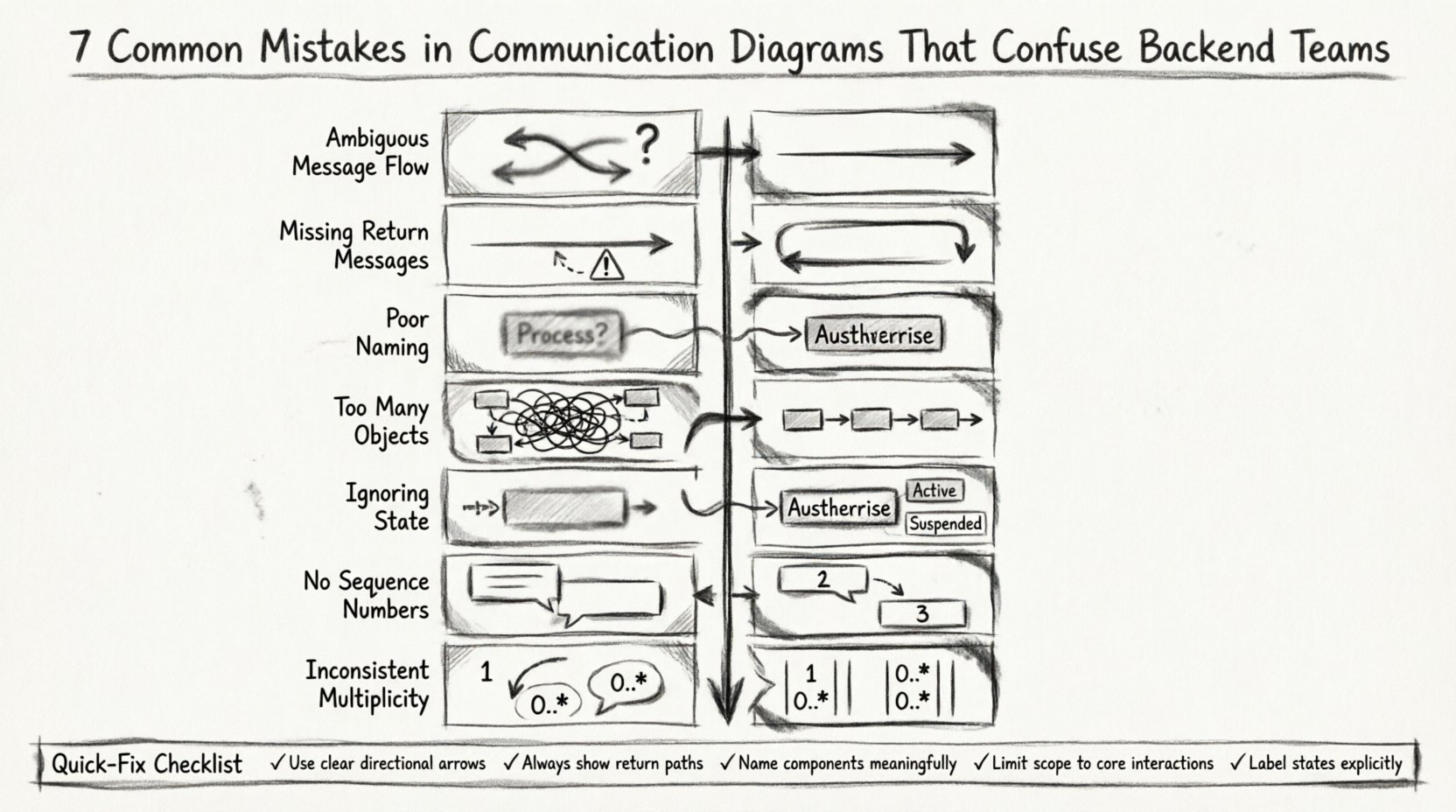
Mistake 1: Ambiguous Message Flow Directions 🔄
One of the most common errors involves the directionality of messages. In a communication diagram, arrows indicate the flow of control or data. If an arrow points from Object A to Object B, it signifies A is calling B. If the arrow is bidirectional, it implies a two-way handshake or a return value. Confusion often arises when designers mix synchronous calls with asynchronous triggers without clear notation. 🤔
Backend developers need to know if a call is blocking or non-blocking. If the diagram shows a message from a Controller to a Service, but does not specify if the Controller waits for a response, the backend team might implement a blocking HTTP request when a fire-and-forget pattern was intended. This mismatch causes performance bottlenecks.
The Impact on Implementation
- Blocking vs. Non-blocking: Developers may use synchronous HTTP calls for tasks that should be background jobs, freezing the main thread.
- Timeout Handling: If the flow direction is unclear, error timeouts may be set incorrectly, leading to premature failures.
- Circular Dependencies: Unclear directionality can hide circular references, making the system unstable.
Mistake 2: Missing Return Messages 🚫
Communication diagrams often focus heavily on the request path. Designers draw the line from the initiator to the target but forget to draw the return path. While some notations imply a return, explicit return messages are safer for complex systems. Without a return message, it is unclear if data is being passed back or if the interaction is one-way. 📭
For backend teams, knowing what data comes back is vital for constructing response models. If a diagram shows a message sent but no message returned, developers might assume an empty response or a status code only. In reality, the system might expect a complex JSON object. This leads to deserialization errors or incomplete data structures in the frontend. 🚫
Why This Causes Confusion
- Response Schema: API schema definitions (like OpenAPI) will be incomplete if the return path is missing.
- State Updates: If a message triggers a state change, the diagram should show the confirmation. Missing this implies the state change is optional.
- Transaction Management: In distributed systems, knowing if a transaction commits requires seeing the acknowledgement message.
Mistake 3: Poor Object Naming Conventions 🏷️
Labels on objects and messages define the semantic meaning of the interaction. Using generic names like “Process”, “Handle”, or “Data” creates immediate friction. Backend engineers expect specific terms related to their domain, such as “AuthService”, “OrderProcessor”, or “InventoryService”. Vague names force developers to reverse-engineer the intent. 🤷♂️
When object names do not match the actual class or module names in the codebase, it increases the time required for onboarding. Developers have to guess the mapping between the diagram and the repository structure. This is particularly dangerous in large systems where multiple teams share the same diagram. 🏗️
Best Practices for Naming
- Use Domain Language: Adopt the ubiquitous language of the business domain.
- Consistent Prefixes: Ensure object names follow a consistent pattern (e.g., all services end in “Service”).
- Avoid Abbreviations: Spell out acronyms unless they are universally understood within the team.
Mistake 4: Overcomplicating with Too Many Objects 🎢
A communication diagram should focus on the specific interaction being documented. However, designers sometimes include every object in the system to provide “complete context”. This results in a spaghetti diagram where the core flow is lost among irrelevant dependencies. 🌪️
Backend teams need to understand the critical path. If a diagram shows 50 objects, the developer cannot quickly identify the 5 objects that matter for the specific feature. This leads to analysis paralysis. They might waste time reading interactions that have no bearing on the current task. Simplification is key to effective communication. 🔍
Strategies for Simplification
- Focus on the Scenario: Only include objects involved in the specific use case.
- Abstract External Systems: Represent third-party APIs as a single external object rather than detailing their internal logic.
- Use Inclusion Boxes: If a sub-process is complex, encapsulate it in a box and link to a separate detailed diagram.
Mistake 5: Ignoring Lifecycle and State 🔄
Objects have states. A user object might be “Active”, “Suspended”, or “Deleted”. A communication diagram that ignores state transitions can lead to logic errors. For instance, a message might be sent to an object that, according to its current state, cannot process it. This is often called an “invalid state transition”. ⛔
Backend engineers implement state machines based on these diagrams. If the diagram does not show the preconditions for a message, the code will need defensive programming to handle invalid states. This adds unnecessary complexity and potential bugs to the system. 🐞
State Considerations
- Preconditions: Show what state an object must be in to receive a message.
- Postconditions: Indicate what state the object enters after processing the message.
- Guard Clauses: If a message is conditional, mark the diagram with the condition.
Mistake 6: Lack of Sequence Numbers 📑
When multiple messages are sent between the same two objects, the order matters. Without sequence numbers, it is impossible to determine which message happens first. This is crucial for operations that depend on initialization. For example, a “Login” message must precede a “FetchProfile” message. 📝
Backend teams rely on sequence numbers to implement logic flow control. If the order is ambiguous, developers might assume a specific order that does not match the diagram. This can lead to race conditions or initialization errors. In asynchronous systems, sequence numbers help track the order of events. 🕒
Mistake 7: Inconsistent Multiplicity 📊
Multiplicity defines how many instances of an object participate in the interaction. A “1” means one instance, “0..*” means zero or more. If a diagram shows a message from one object to a collection of objects, the multiplicity must be clear. Inconsistent notation here leads to confusion about whether the system handles single items or batches. 📦
Backend logic often changes based on multiplicity. A single item request might return a direct response. A batch request might return a summary or a list of IDs. If the diagram does not specify this, the API endpoint might be designed incorrectly. This results in a mismatch between the expected payload and the actual response. 🚫
Summary of Common Errors and Fixes 📋
The table below summarizes the mistakes discussed and provides actionable fixes for architects and designers.
| Mistake | Impact on Backend Team | Recommended Fix |
|---|---|---|
| Ambiguous Flow | Incorrect blocking vs. async implementation | Use distinct arrowheads for requests and responses |
| Missing Returns | Undefined response schemas and data structures | Explicitly draw return arrows with data labels |
| Poor Naming | Difficulty mapping design to codebase | Use standard domain-specific terminology |
| Too Many Objects | Analysis paralysis and lost focus | Limit scope to the specific interaction scenario |
| Ignoring State | Invalid state transitions in code | Include state labels on objects and transitions |
| No Sequence Numbers | Race conditions and logic errors | Number messages sequentially along the flow |
| Inconsistent Multiplicity | Incorrect batch vs. single item handling | Clearly denote cardinality (1, 0..*, 1..*) |
The Ripple Effect on Development 🌊
When a communication diagram is flawed, the cost of fixing it grows exponentially as the project progresses. A mistake caught during the design phase is a simple edit. A mistake caught during the backend implementation phase requires code refactoring. A mistake caught in production requires hotfixes and potential downtime. 📉
Backend engineers spend a significant portion of their time validating assumptions. If the diagram is wrong, they must spend time clarifying with the architects. This communication overhead slows down the velocity of the team. Clear diagrams reduce the need for back-and-forth questions. ⏳
Ensuring Clarity for Distributed Teams 🌍
In modern development, teams are often distributed across different time zones. A communication diagram serves as a primary source of truth that everyone can consult asynchronously. If the diagram relies on verbal context or undocumented conventions, it fails this purpose. 🗺️
Every symbol, line, and label must be self-explanatory. If a backend engineer from a different team looks at the diagram, they should understand the flow without needing to ask the original designer. This standardization is crucial for scaling engineering organizations. 📈
Technical Considerations for Backend Architects 🏛️
When reviewing communication diagrams, backend architects should look for specific technical details:
- Data Types: Are the data types specified for each message? (e.g., String, Integer, Object)
- Error Codes: Does the diagram show what happens when a message fails?
- Security: Are authentication tokens shown where they are needed?
- Performance: Are there loops or recursive calls that could cause stack overflows?
Final Thoughts on Diagram Quality 🎯
A communication diagram is a tool for thinking, not just drawing. Its value lies in the clarity it brings to complex interactions. By avoiding common mistakes, you empower your backend teams to build systems that are robust, maintainable, and performant. Precision in design leads to precision in execution. 🔧
Regularly audit your diagrams against the checklist provided. Encourage feedback from the developers who will use them. Treat the documentation as a living artifact that evolves with the system. This collaborative approach ensures that the blueprint remains accurate and useful throughout the lifecycle of the project. 🔄
Key Takeaways 📌
- Clarity in message flow prevents blocking vs. async confusion.
- Explicit return messages ensure correct data modeling.
- Consistent naming reduces cognitive load for developers.
- Limit the scope of objects to maintain focus.
- State transitions must be documented to prevent logic errors.
- Sequence numbers define the order of operations.
- Multiplicity clarifies single vs. batch processing.
Investing time in high-quality diagrams saves significant time during development and maintenance. It is a foundational practice for successful software engineering. 🏗️