


The digital landscape is shifting. Interfaces are no longer confined to the screen alone. Users expect seamless interactions that blend spoken commands with visual feedback. This evolution defines multimodal UX design, where voice and visual elements work in concert rather than isolation. As we move forward, understanding how to integrate these modalities becomes critical for creating intuitive, accessible, and efficient digital experiences.
This guide explores the mechanics, principles, and challenges of combining voice and visual design. We will examine how to balance auditory and visual information to reduce cognitive load and enhance user satisfaction. Whether you are designing for mobile devices, smart speakers, or in-car systems, the core principles of integration remain consistent.
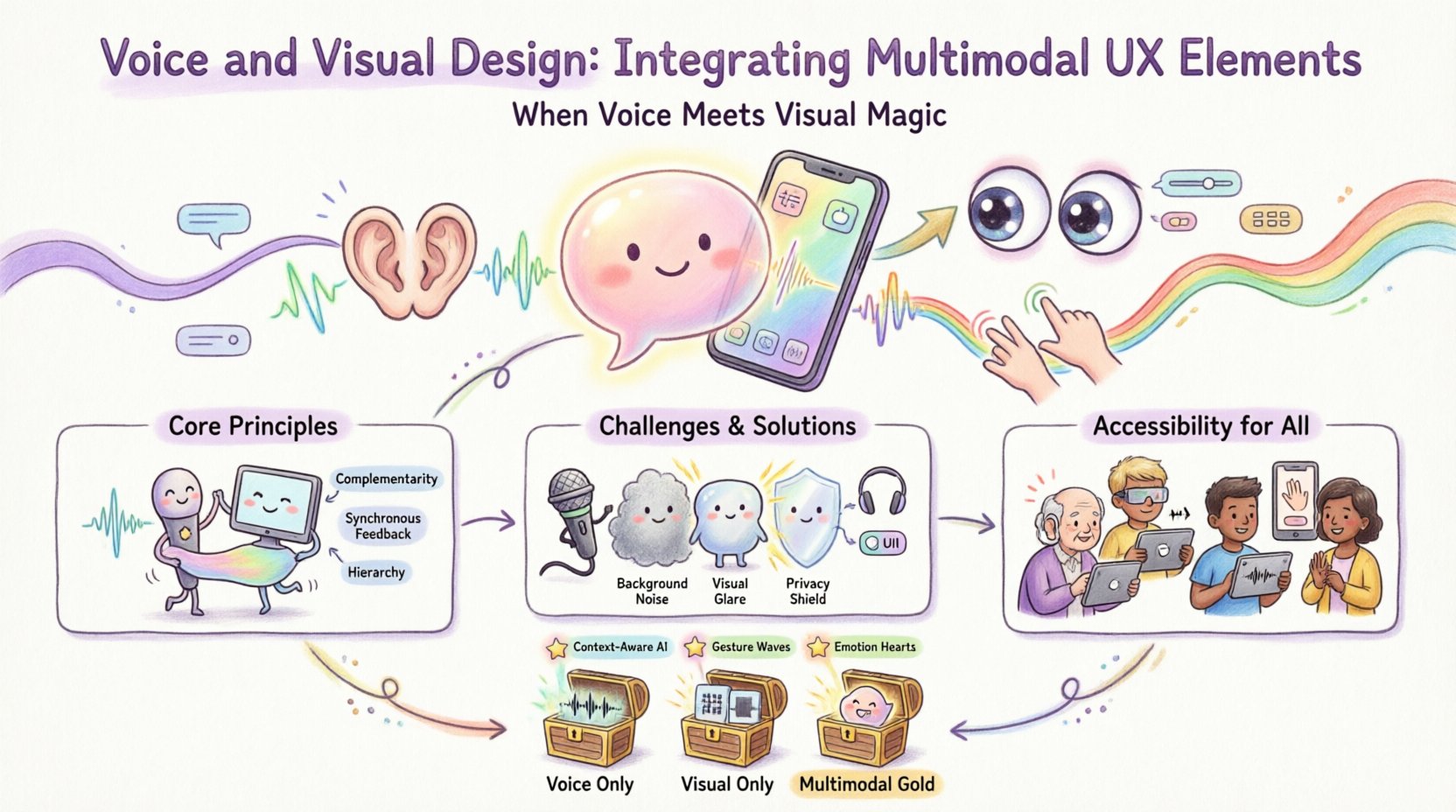
Understanding Multimodal Interaction 🔄
Multimodal interaction refers to systems that accept multiple types of input and provide multiple types of output. In the context of voice and visual design, this means a user might speak a command while simultaneously looking at a screen. The system must process the audio input and present visual context to confirm actions or provide feedback.
When modalities are integrated well, they reinforce each other. When they conflict, users experience friction. Here are the core components of this integration:
- Input Modality: The method used to provide data, such as speech recognition or touch.
- Output Modality: The method used to present results, such as text, graphics, or synthesized speech.
- Context Awareness: The system’s ability to understand the environment and user state to decide which modality to prioritize.
- Consistency: Ensuring the voice response matches the visual state exactly.
Consider a scenario where a user asks for weather updates. A purely voice interface might say, “It will rain tomorrow.” A purely visual interface might show a cloud icon. A multimodal interface should say the same words while highlighting a rain icon on the screen. This redundancy aids memory and comprehension.
Core Principles of Integration 🛠️
Building a cohesive experience requires adherence to specific design principles. These rules help maintain clarity and prevent confusion between what is said and what is seen.
1. Complementarity Over Repetition
While redundancy can be helpful for accessibility, repeating the exact same information in both voice and visual formats can feel robotic. Instead, aim for complementarity. Use one modality for the core data and the other for context or navigation.
- Visual: Display complex charts, maps, or lists.
- Voice: Summarize the key insight or provide the next step.
This division of labor respects the user’s attention span. If the screen is busy with data, the voice should be concise. If the voice is reading a list, the screen should display the items to track progress.
2. Synchronous Feedback
Latency is the enemy of multimodal trust. When a user speaks, the visual feedback must appear within the expected timeframe. If the system is listening, show a visual indicator. If the system is processing, show a loading state. If the system is ready for the next command, provide a clear cue.
Delays between the spoken command and the visual response create cognitive dissonance. Users may wonder if the system heard them or if the interface is broken. Synchronicity builds confidence.
3. Hierarchy and Focus
Not all information is equal. In a multimodal interface, you must decide which modality carries the primary focus. Voice is excellent for guiding attention. Visual is excellent for detailed reference.
For example, in a navigation task:
- Voice: “Turn left in 500 meters.”
- Visual: An arrow pointing left on the map.
The voice guides the immediate action, while the visual provides the spatial context. This hierarchy prevents the user from having to process two streams of conflicting directions.
Challenges in Multimodal Design ⚠️
Designing for two channels simultaneously introduces specific hurdles. These challenges range from technical limitations to human psychology.
Cognitive Load
Humans have a limited capacity for processing information. Adding a visual layer to a voice interaction can overwhelm the user. If the user must read a screen while listening to audio, they may miss verbal cues. This is particularly true in high-stress environments like driving or operating machinery.
Solutions include:
- Minimizing text on the screen during voice-heavy tasks.
- Using icons instead of words where possible.
- Allowing users to toggle visual feedback on or off.
Environmental Factors
Not all environments are suitable for voice. A noisy office, a busy street, or a quiet library presents different constraints. Similarly, lighting conditions affect visual usability. A design must be robust enough to handle these variations.
Adaptive interfaces detect the environment and shift the balance of modalities. In a noisy room, the system might default to visual confirmation. In the dark, it might rely more on audio cues.
Privacy and Security
Voice commands often involve sensitive data. Displaying this data on a public screen can be a security risk. Conversely, hiding all feedback on a voice-only device can lead to unauthorized access.
Designers must implement:
- Privacy screens that blur visual data when a voice command is active.
- Secure voice authentication before revealing sensitive information.
- Clear visual indicators when the microphone is active.
Accessibility and Inclusivity ♿
Multimodal design is not just about convenience; it is a necessity for accessibility. Users with different abilities require different ways to interact with digital products. Integrating voice and visual elements creates multiple pathways to the same goal.
Supporting Vision Impairments
For users who cannot see the screen, voice is the primary channel. However, screen readers often struggle with dynamic content. A multimodal approach ensures that visual updates are also announced via audio. Conversely, for users who cannot hear, visual cues must carry the full weight of the interaction.
Supporting Hearing Impairments
Users who cannot hear need clear visual transcripts of voice commands. This includes:
- Real-time captions of spoken feedback.
- Visual confirmation of recognized commands.
- Clear visual alternatives for voice-only actions.
WCAG Compliance
Standard accessibility guidelines, such as the Web Content Accessibility Guidelines (WCAG), provide a framework for multimodal design. Key requirements include:
- Perceivable: Content must be presentable in ways users can perceive.
- Operable: Interface components must be operable through various methods.
- Understandable: Information and operation must be understandable.
- Robust: Content must be robust enough for assistive technologies.
Testing and Validation 🧪
Validating a multimodal interface requires a different approach than testing single-modality systems. You must test the interaction between the modalities, not just the modalities themselves.
User Testing Scenarios
Conduct tests in varied environments to simulate real-world usage. Observe how users switch between voice and touch. Note where they get confused or frustrated.
- Scenario A: Silent environment. Test voice-only usage.
- Scenario B: Noisy environment. Test visual fallback.
- Scenario C: High stress. Test speed of response.
Metrics for Success
Track specific metrics to evaluate performance:
- Task Completion Rate: Did the user finish the task using the multimodal flow?
- Error Rate: How often did the system misunderstand the input?
- Response Time: How long did it take to process the request?
- Subjective Satisfaction: Did the user find the experience natural?
Comparison of Interaction Modes 📊
To better understand where each modality fits, consider the following comparison of voice, visual, and combined interactions.
| Feature | Voice Only | Visual Only | Multimodal (Combined) |
|---|---|---|---|
| Information Density | Low | High | Balanced |
| Hands-Free Capability | Yes | No | Partial |
| Privacy | Low (Public) | High (Screen) | Medium |
| Accessibility | High for Hearing | High for Vision | Maximum |
| Complexity | Simple | Complex | Dynamic |
Future Trends in Multimodal UX 🚀
The field is evolving rapidly. As technology improves, the boundary between voice and visual will blur further. Here are trends to watch.
Context-Aware Systems
Future interfaces will anticipate needs based on location, time, and user history. A system might suggest a voice command before the user even asks, displaying the option on the screen.
Gesture Integration
Beyond voice and touch, hand gestures are becoming a third modality. Combining gestures with voice creates a highly expressive interface. For example, waving a hand to dismiss a notification while saying “Done.”
Emotion Recognition
Systems will begin to detect user emotion through voice tone and facial expression. If a user sounds frustrated, the system might switch to a more concise visual summary instead of a long verbal explanation.
Implementation Checklist ✅
Before launching a multimodal product, review this checklist to ensure quality and consistency.
- Define the Primary Goal: Is the interaction primarily for speed, detail, or accessibility?
- Map the Flow: Create diagrams showing how voice and visual states change together.
- Establish Error Handling: What happens when the voice fails? What happens when the screen is dark?
- Test Across Devices: Ensure consistency on mobile, desktop, and smart displays.
- Review Accessibility: Verify compliance with current standards.
- Monitor Performance: Track latency and error rates post-launch.
Designing for Natural Interaction 🗣️
The ultimate goal of multimodal design is to make the technology feel invisible. Users should not think about the mode; they should focus on their task. This requires a deep understanding of human behavior.
When designing the dialogue:
- Keep language simple and direct.
- Avoid technical jargon in voice prompts.
- Ensure visual text matches the spoken words exactly.
- Provide clear cues for when to speak.
When designing the visual layout:
- Use high contrast for readability.
- Place key information in the center of attention.
- Animate transitions to show state changes.
- Ensure touch targets are large enough for fat-finger errors.
Final Thoughts on Integration 🤝
Integrating voice and visual design is a complex endeavor that requires careful planning and continuous testing. It is not enough to simply add a microphone to a screen. The two must work as a unified system.
By focusing on complementarity, consistency, and accessibility, designers can create experiences that are robust and user-friendly. The future of interaction lies in this blend. As we move forward, the best interfaces will be those that adapt to the user, rather than forcing the user to adapt to the interface.
Remember to prioritize the user’s needs over technical novelty. If a visual interface is clearer, use it. If a voice command is faster, use that. The goal is efficiency and satisfaction. With the right approach, multimodal design can transform how people interact with technology every day.
Key Takeaways 📝
- Multimodal UX combines voice and visual elements for richer interaction.
- Complementarity ensures each modality adds unique value without redundancy.
- Accessibility is a core requirement, not an afterthought.
- Testing must cover varied environments and user states.
- Consistency between audio and visual feedback builds trust.
Related posts:
 Mastering the Art of User Experience Design: A Complete Guide for CS and HCI Students
 From Industrial Design to Digital: A UX Journey for Specialized Designers
 The Beginner’s Roadmap to UX Design: Quick Start Strategies for Tech Students
 UX Design: Deep Dive into Human-Computer Interaction: Principles and Practices for Undergraduates