


In the modern digital landscape, speed is often mistaken for quality, yet true agility balances both. Traditional design workflows often fall behind the pace of software updates, creating bottlenecks where visual polish waits on code completion. Agile UX Design resolves this friction by integrating user experience strategies directly into rapid development cycles. This approach ensures that every sprint delivers tangible value to the end user, rather than a backlog of unfinished concepts.
This guide explores the mechanics of adapting design processes for fast-paced environments. We will examine how to maintain rigorous user research standards while shipping features weekly. We will also look at the structural changes required in teams, the communication protocols needed between designers and developers, and the specific methodologies that support iterative growth. By the end, you will understand how to build a resilient design practice that thrives under pressure.
Defining Agile UX Design 🧭
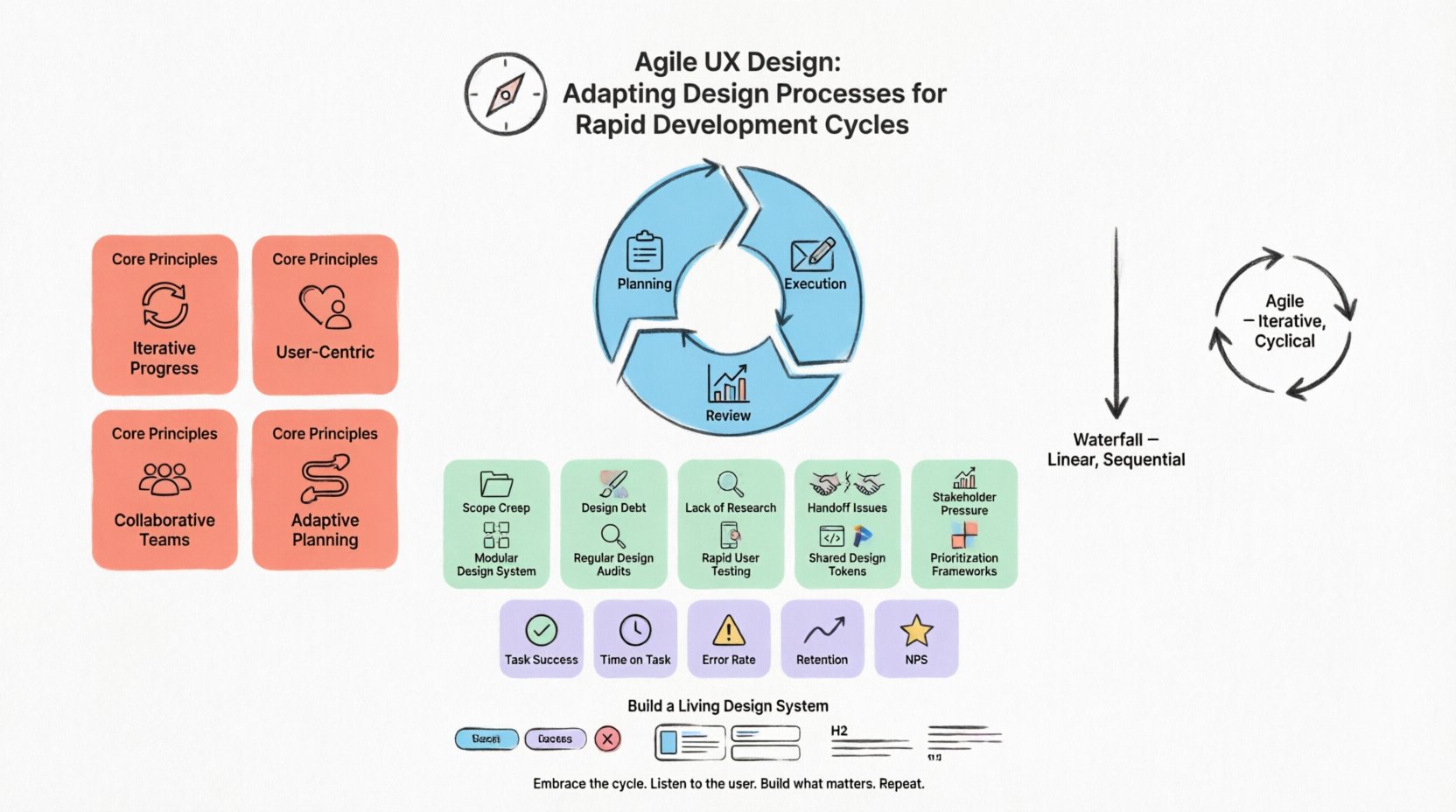
Agile UX is not simply about working faster. It is about working smarter within a framework of iterative delivery. In a standard Waterfall model, design is a distinct phase that happens before development begins. The designer hands off a static set of assets, and the developer builds them. If a bug is found or a user need changes during coding, the process often stalls.
Agile UX flips this dynamic. The design process becomes continuous. It moves alongside coding, allowing for adjustments based on real-world feedback rather than theoretical assumptions. This methodology relies on several core tenets:
- Iterative Progress: Work is broken down into small, manageable chunks called sprints, typically lasting two to four weeks.
- User-Centric Focus: Every decision is validated against user needs, not just technical feasibility.
- Collaborative Teams: Designers, developers, and product owners work as a single unit rather than siloed departments.
- Adaptive Planning: Plans are adjusted based on feedback from the previous iteration.
When you adopt this mindset, the design deliverables change. Instead of a comprehensive style guide created months in advance, you build a living design system. This system allows for consistency across the product without requiring a complete redesign every time a new feature is added.
The Shift from Waterfall to Iterative Design 🔄
Understanding the difference between traditional and Agile workflows is crucial for implementation. In a Waterfall approach, the timeline is linear. Requirements are gathered, then designed, then developed, then tested. If a user issue is discovered during the testing phase, the cycle often loops back to the beginning, causing delays.
Agile UX embraces uncertainty. It acknowledges that requirements will change. Therefore, the design process must be flexible enough to accommodate pivots without breaking the project. Here is how the workflow adapts:
- Early Involvement: Designers join the project during the planning phase, not after requirements are locked.
- Continuous Feedback: Usability testing happens throughout the sprint, not just at the end.
- MVP Mindset: The goal is to deliver a Minimum Viable Product that solves the core problem, rather than a perfect solution.
- Transparent Communication: Progress is visible to all stakeholders daily.
This shift requires a change in how designers think about their work. It is no longer about creating a perfect image. It is about solving problems that can be coded, tested, and measured within a short timeframe.
Integrating Design into Sprint Cycles 📅
The heart of Agile UX is the sprint. A sprint is a set period where a specific set of tasks must be completed. Designers must fit their creative process into this rigid structure. This often requires breaking down design tasks into smaller, atomic components.
1. Sprint Planning and Backlog Grooming
Before a sprint begins, the team reviews the backlog. This is the list of features or fixes that need to be built. Designers play a critical role here. They assess the complexity of the user stories. If a story is too vague, it cannot be designed. If it is too complex, it cannot be finished in one sprint.
During this phase, designers should:
- Clarify user goals for each story.
- Identify technical constraints early.
- Prioritize features based on user value.
- Estimate the design effort required.
2. Design Execution
Once the sprint starts, designers move into execution. Because time is limited, this phase must be efficient. Designers often create low-fidelity wireframes first to establish structure. This allows for quick feedback from developers before high-fidelity visuals are created.
Key activities include:
- Sketching user flows to map the journey.
- Creating clickable prototypes to test interactions.
- Documenting edge cases and error states.
- Collaborating with developers to ensure feasibility.
3. Sprint Review and Retrospective
At the end of the cycle, the work is reviewed. This is not just about showing off the design. It is about validating that the solution works for the user. The team discusses what went well and what needs improvement. This feedback loop is essential for long-term growth.
Challenges in Rapid Development and Solutions ⚖️
Working quickly introduces specific risks. Without careful management, quality can suffer. Below is a breakdown of common challenges and practical strategies to mitigate them.
| Challenge | Impact | Strategic Solution |
|---|---|---|
| Scope Creep | Features are added mid-sprint, delaying delivery. | Strict Backlog Management: Only add new work in the next sprint cycle. |
| Design Debt | Inconsistent patterns accumulate over time. | Living Design System: Maintain a centralized library of components. |
| Lack of Research | Decisions are made without user data. | Lean Research: Conduct quick, unmoderated tests weekly. |
| Developer Handoff | Designers and developers misunderstand specs. | Shared Documentation: Use annotations and live links instead of static files. |
| Stakeholder Pressure | Requests for changes that disrupt the workflow. | Data-Driven Pushback: Show impact on timeline and user metrics. |
By anticipating these issues, teams can build safeguards into their process. For example, establishing a rule that no new feature is added once the sprint begins helps protect the team’s focus.
Collaboration Between Design and Development 🤝
The relationship between designers and developers is the engine of Agile UX. When these two functions operate in silos, the product suffers. In an Agile environment, they must be partners.
1. The Handoff Process
Traditional handoffs involve sending a final file to a developer. In Agile, handoff is continuous. Designers and developers often pair up to review the work as it is being built. This ensures that the implementation matches the design intent without requiring a long rework cycle.
Effective collaboration tactics include:
- Pair Designing: A designer and developer work on the same screen simultaneously.
- Regular Syncs: Short daily meetings to discuss blockers and progress.
- Shared Context: Both parties understand the user problem, not just the technical implementation.
2. Managing Technical Constraints
Developers know what is feasible within the current architecture. Designers must respect these boundaries. Conversely, designers understand the user experience implications. Developers should understand the cost of poor UX on support tickets and retention.
When a design is technically difficult, the team should discuss alternatives immediately. This might mean simplifying an animation or restructuring a layout. The goal is to find a solution that meets user needs without breaking the system.
Conducting Research in Sprints 🔬
One of the biggest myths about Agile is that there is no time for research. This is incorrect. Research is simply conducted differently. Instead of a three-month study at the beginning of a project, research becomes a continuous activity.
1. Lean UX Research
Lean UX focuses on speed and validation. The goal is to learn quickly. This involves methods that can be executed in hours or days rather than weeks.
- Usability Testing: Observe users interacting with a prototype. Identify friction points.
- Surveys: Gather quantitative data on user satisfaction.
- Analytics Review: Look at behavior data from live features.
2. The Validation Loop
Every design decision should be treated as a hypothesis. “We believe that changing the button color will increase clicks.” The sprint is the test. After the feature is released, the team reviews the analytics. If the hypothesis is wrong, the team learns and adjusts. This cycle of build, measure, and learn is the core of scientific design.
It is important to note that not every sprint needs a formal test. Some sprints are for maintenance or technical debt. However, the habit of asking “how do we know this works?” should remain constant.
Measuring Success in Agile UX 📊
In traditional models, success is often defined by “on time” and “on budget.” In Agile UX, success is defined by user value. Did the feature solve the problem? Did it improve the experience?
Designers should track metrics that reflect user behavior. Common metrics include:
- Task Success Rate: Can users complete the core action without help?
- Time on Task: How long does it take to finish the action?
- Error Rate: How often do users make mistakes?
- Retention Rate: Do users come back to use the feature?
- Net Promoter Score (NPS): How likely are users to recommend the product?
By tying design work to these metrics, the design team demonstrates clear ROI. This builds trust with stakeholders and justifies the time spent on UX activities.
Building a Resilient Design System 🧱
As features are added rapidly, consistency becomes difficult to maintain. A design system acts as the single source of truth. It is a collection of reusable components and patterns that ensure the product looks and feels the same across all pages.
Key elements of a design system include:
- Component Library: Buttons, inputs, cards, and navigation bars.
- Style Guide: Colors, typography, and iconography.
- Interaction Patterns: How modals open, how menus slide, how errors appear.
- Documentation: Rules for when and how to use each component.
Investing in a design system pays dividends over time. It reduces the time spent designing common elements. It allows designers to focus on unique problems. It also speeds up development because developers can reuse code.
Navigating Remote and Hybrid Teams 🌍
Many Agile teams are distributed across different locations. This adds a layer of complexity to communication. In a physical room, you can point at a screen and discuss a detail. Remotely, you need explicit protocols.
Best practices for distributed Agile design include:
- Over-Communicate: Assume nothing is understood. Write down decisions.
- Use Visual Collaboration Tools: Digital whiteboards allow for real-time brainstorming.
- Record Sessions: Capture meetings for those in different time zones.
- Centralize Assets: Ensure everyone accesses the latest version of files.
Trust is the currency of remote work. Designers must deliver on promises. Developers must keep communication channels open. Regular video check-ins help maintain human connection.
Final Thoughts on Sustainable Agility 🌱
Adapting design processes for rapid development cycles is not a destination. It is a continuous improvement journey. There will be sprints that run smoothly and sprints that encounter significant friction. The key is to remain flexible and focused on the user.
Agile UX design requires a shift in culture. It demands that designers are comfortable with ambiguity. It requires developers to value aesthetics as much as function. It asks stakeholders to trust the process.
When implemented correctly, the result is a product that evolves with its users. It is a system that learns from its mistakes and grows stronger with every release. By prioritizing collaboration, continuous research, and iterative delivery, teams can navigate the complexities of modern software development without sacrificing quality.
The path forward is clear. Embrace the cycle. Listen to the user. Build what matters. Repeat.
Related posts:
 Mastering the Art of User Experience Design: A Complete Guide for CS and HCI Students
 From Industrial Design to Digital: A UX Journey for Specialized Designers
 The Beginner’s Roadmap to UX Design: Quick Start Strategies for Tech Students
 UX Design: Deep Dive into Human-Computer Interaction: Principles and Practices for Undergraduates