


Computer science students often approach software development with a mindset focused on logic, efficiency, and system architecture. While this foundation is crucial for building robust applications, it does not always account for the human element. User Experience (UX) design bridges the gap between functional code and human interaction. For those with a technical background, understanding UX is not just about aesthetics; it is about optimizing user paths, reducing cognitive load, and ensuring that the systems you build are intuitive and accessible.
This guide provides a structured approach to the UX design process, specifically tailored for individuals with a strong logical framework. We will move from the structural planning of wireframes to the interactive nature of prototypes, focusing on the principles that govern successful digital products without relying on specific software tools.
1. Understanding the Core Concepts 🧠
Before diving into the mechanics of wireframing or prototyping, it is essential to distinguish between related terms that are often used interchangeably but hold distinct meanings in the development lifecycle.
UI vs. UX
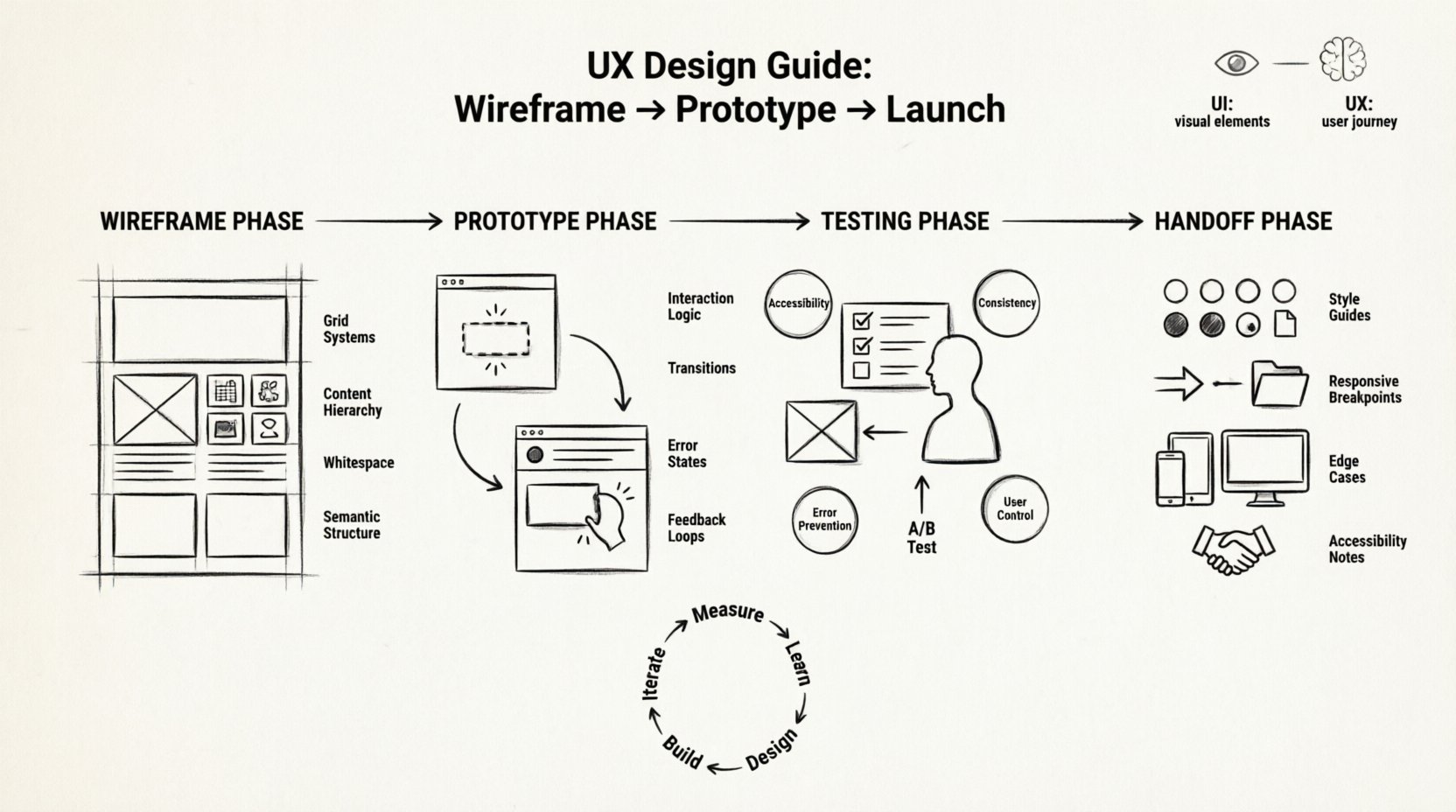
While User Interface (UI) deals with the visual elements—colors, typography, and layout—User Experience (UX) encompasses the entire journey a user takes. UI is what the user sees; UX is how the user feels while interacting with the product.
- UI Focus: Visual hierarchy, button states, color contrast.
- UX Focus: Flow, navigation logic, accessibility, error handling.
- Overlap: A well-designed UI cannot exist without a solid UX foundation.
The Engineering Mindset in Design
CS majors often think in terms of database schemas, API endpoints, and algorithms. UX design requires shifting that perspective to user goals and behaviors. Instead of asking “How does the backend handle this request?”, ask “Why is the user here?”.
This shift requires empathy. You are not designing for yourself or the development team; you are designing for the end-user who may have varying levels of technical literacy, accessibility needs, and patience.
2. Phase One: Wireframing 📐
Wireframing is the architectural blueprint of a digital product. It is where you define the structure and content placement before applying any visual styling. For a technical mind, think of wireframes as the HTML structure of a page, stripped of CSS but rich in semantic meaning.
Low-Fidelity vs. High-Fidelity
| Level | Characteristics | Best Used For |
|---|---|---|
| Low-Fidelity | Sketches, grey boxes, no text details. | Ideation, rapid iteration, layout planning. |
| Mid-Fidelity | Standardized shapes, placeholder text, grey scale. | Stakeholder review, functional flow validation. |
| High-Fidelity | Final colors, real content, interactive elements. | Usability testing, handoff to developers. |
Key Principles for Wireframing
When creating wireframes, avoid distractions. The goal is to validate layout and information architecture.
- Grid Systems: Establish a consistent grid to ensure alignment and rhythm. This mirrors the importance of consistent coding standards.
- Content Hierarchy: Use size and placement to indicate importance. The primary call-to-action should be the most prominent element.
- Whitespace: Do not fear empty space. It allows the user’s eye to rest and focuses attention on key elements.
- Navigation Patterns: Standard patterns (hamburger menus, breadcrumbs) reduce learning curves. Only deviate if you have a strong reason to do so.
Structural Considerations for Developers
As a CS major, you understand that DOM structure affects performance and accessibility. Your wireframes should reflect semantic groupings.
- Group related form fields together logically.
- Ensure that the navigation structure is flat enough to be crawlable.
- Define breakpoints for responsive design early. Do not design for desktop only and try to adapt later.
3. Phase Two: Prototyping 🔄
Once the structure is validated, you move to prototyping. This stage introduces interactivity and flow. A prototype is a simulation of the final product. It allows you to test the logic of the application before writing the production code.
Defining Interaction Logic
In software development, you define state changes through code. In prototyping, you define these states visually.
- Hover States: What happens when the cursor approaches a button?
- Active States: How does a button look when clicked?
- Disabled States: What does a non-clickable element look like?
- Error States: How does the system communicate failure to the user?
Transitions and Micro-Interactions
Transitions guide the user through the flow. They provide feedback that an action has occurred.
- Page Transitions: Slides, fades, or instant swaps. Instant swaps are often better for data-heavy dashboards.
- Feedback Loops: Loading spinners or progress bars must be visible when operations take time. Never leave the user waiting without confirmation.
- Animations: Use them sparingly. They should serve a functional purpose, such as showing the origin of a modal, not just for decoration.
Testing the Logic
Prototypes allow you to catch logic errors that wireframes miss. For example, you might realize that a user cannot navigate back from a specific screen without logging out. Identifying this in a prototype saves significant debugging time later.
4. Phase Three: Testing and Validation ✅
A design is not complete until it is tested. This phase is about validation. You need data to support your design decisions rather than relying on personal preference.
Usability Testing Methods
There are several ways to validate a prototype with real users.
- Moderated Testing: You observe the user as they complete tasks. You can ask clarifying questions if they get stuck.
- Unmoderated Testing: Users complete tasks on their own time. This provides quantitative data on completion rates.
- A/B Testing: Present two variations of a design to different user groups to see which performs better on specific metrics.
Heuristic Evaluation
As an expert, you can also conduct a heuristic evaluation yourself. This involves reviewing the interface against a set of recognized usability principles. Common principles include:
- Visibility of system status.
- Match between system and the real world.
- User control and freedom (e.g., undo functions).
- Consistency and standards.
- Error prevention.
- Recognition rather than recall.
5. Phase Four: Handoff and Collaboration 🤝
The final step in the design phase is handing off the work to the development team. Since you are likely a CS major, you may be the one developing the product. However, in larger teams, designers and developers work separately. Clear handoff ensures the vision remains intact.
Documentation Requirements
Documentation acts as the specification for the design. It must be precise.
- Asset Export: Provide icons and images in the correct resolution and format.
- Style Guides: Document color hex codes, font families, and line heights.
- Interaction Specs: Describe exactly how animations should behave (duration, easing functions).
- Edge Cases: Document what happens if data is missing, if the network fails, or if the input is invalid.
Handoff Checklist
| Item | Developer Needs | Why It Matters |
|---|---|---|
| Responsive Breakpoints | Widths for mobile, tablet, desktop. | Ensures layout adapts correctly. |
| Accessibility Notes | Contrast ratios, screen reader text. | Ensures compliance and inclusivity. |
| Content Length | Min/Max character limits. | Prevents layout breakage. |
| State Variations | Default, hover, active, error. | Ensures visual consistency. |
6. Common Pitfalls for Engineers 🚫
Transitioning from pure development to UX design introduces specific traps. Being aware of these can save you from creating products that are technically sound but difficult to use.
1. Over-Engineering the UI
Engineers love optimization. However, a button does not need to be optimized for 50 milliseconds of load time if it requires a complex rendering pipeline. Keep visual assets simple. Focus on the core interaction speed rather than the visual complexity.
2. Ignoring Accessibility
Accessibility is not a feature; it is a requirement. Ensure your designs support keyboard navigation, screen readers, and color blindness. Semantic HTML is your friend here. Use proper heading tags and ARIA labels in your mind while designing.
3. Assuming User Knowledge
Just because you understand the system does not mean the user does. Avoid internal jargon in your interface. If a user has to guess what a button does, the design has failed.
4. Neglecting Empty States
It is easy to design for the happy path. However, what does the dashboard look like when there is no data? What does the search result look like when nothing is found? Design for the absence of data to prevent confusion.
7. The Continuous Loop 🔄
UX design is not a linear process that ends at launch. It is a continuous loop of design, build, measure, and learn.
- Measure: Use analytics to see where users drop off.
- Learn: Form hypotheses based on the data.
- Design: Create new wireframes to address the issues.
- Build: Implement the changes in code.
For CS majors, this aligns well with DevOps and CI/CD pipelines. Just as you deploy code iteratively, you should release design improvements incrementally. Small changes allow you to isolate variables and understand their impact on user behavior.
8. Technical Constraints in Design 🛠️
While design should ideally be user-centric, it must also be feasible within technical constraints. As you design, keep these factors in mind:
- Browser Compatibility: Not all users use the latest browsers. Design for standards that are widely supported.
- Performance: Heavy animations or large image assets can slow down the application. Optimize assets for web delivery.
- Security: Never design a flow that exposes sensitive data in the URL or client-side storage.
- Scalability: Ensure the layout can accommodate growth in content without breaking.
9. Building a Design Mindset 🌱
Developing a design mindset requires practice. It is not about becoming an artist, but about becoming a problem solver who considers the human element.
- Study Interfaces: Look at the apps you use daily. Analyze why they work or why they frustrate you.
- Read Documentation: Look at design systems from major organizations. They often publish their guidelines publicly.
- Collaborate: Work with actual designers. Their feedback will sharpen your understanding of visual language.
10. Summary of the Process 📋
To recap the workflow from concept to implementation:
- Research: Understand the user and the problem.
- Wireframe: Define the structure and layout.
- Prototype: Add interactivity and flow.
- Test: Validate with users and stakeholders.
- Handoff: Provide specifications for development.
- Implement: Write the code.
- Iterate: Gather feedback and improve.
By integrating these design phases into your development workflow, you create software that is not only functional but also delightful to use. This approach reduces technical debt caused by poor user adoption and increases the overall value of the product. Remember, the best code is the code that solves a real problem for a real person.
Start applying these principles to your next project. Sketch a wireframe before you write a single line of code. Prototype the navigation before building the database schema. The investment in design upfront will save time and resources in the long run.
Design is a discipline that complements engineering. When the two work in harmony, the result is software that stands the test of time.
Related posts:
 Mastering the Art of User Experience Design: A Complete Guide for CS and HCI Students
 From Industrial Design to Digital: A UX Journey for Specialized Designers
 The Beginner’s Roadmap to UX Design: Quick Start Strategies for Tech Students
 UX Design: Deep Dive into Human-Computer Interaction: Principles and Practices for Undergraduates