


Transitioning from industrial design to user experience design involves a significant shift in focus. While industrial design centers on the physical form and materiality of objects, user experience design prioritizes the interaction, usability, and emotional connection between a user and a product. For designers accustomed to physical constraints, entering the digital or hybrid domain requires adapting established workflows. This guide outlines the structured approach to navigating the UX design process specifically tailored for those coming from an industrial design background. 🛠️
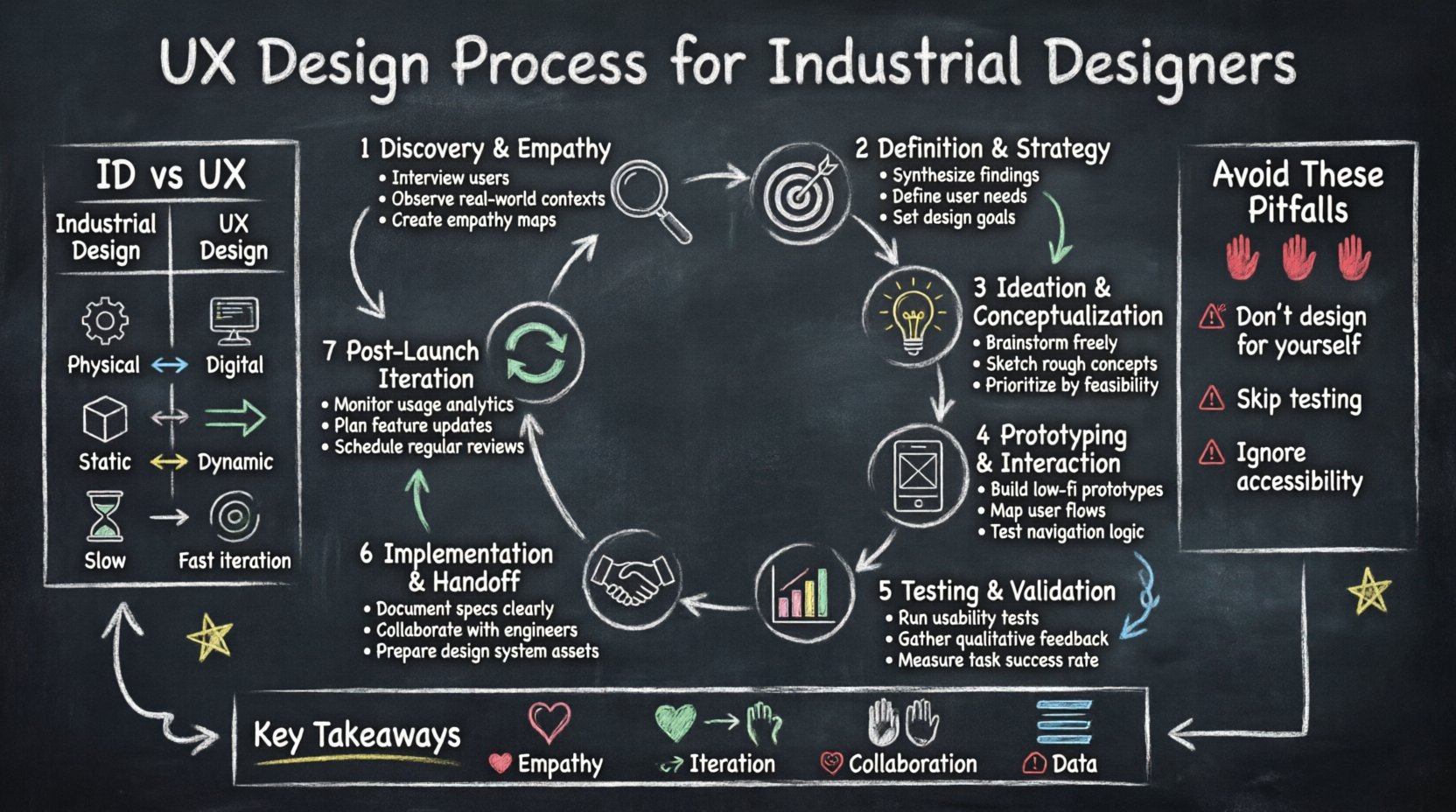
🔍 Understanding the Landscape: ID Meets UX
Industrial designers excel at ergonomics, aesthetics, and manufacturing feasibility. However, user experience (UX) design adds layers of behavioral psychology and information architecture to the mix. The core objective remains the same: solving problems for people. Yet, the tools and deliverables differ substantially. 📐
When bridging these disciplines, consider the following distinctions:
- Physical vs. Digital: ID deals with tangible constraints like material weight and assembly. UX deals with screen real estate, loading states, and navigation flows.
- Static vs. Dynamic: A physical product usually functions the same way every time. Digital interfaces adapt to input, context, and user history.
- One-to-One vs. One-to-Many: A physical prototype is often unique. A digital interface must scale to thousands of concurrent users.
This shift requires a mindset that values iteration and data over finality. The process below breaks down the standard UX workflow into actionable steps. 🔄
📝 Phase 1: Discovery & Empathy
The foundation of any successful product lies in understanding the user. This phase is about gathering qualitative and quantitative data to define who you are designing for and what they actually need. For industrial designers, this often means expanding beyond physical usability tests to include digital behaviors. 🔎
1. Stakeholder Interviews
Begin by aligning with business goals and technical constraints. These conversations help define the scope. Key questions include:
- What are the business objectives?
- Are there technical limitations we must respect?
- What is the timeline for release?
2. User Research Methods
Conduct research to uncover pain points. Common methods include:
- Interviews: One-on-one conversations to understand motivations.
- Surveys: Quantitative data collection from a larger audience.
- Contextual Inquiry: Observing users in their natural environment.
- Competitive Analysis: Reviewing existing solutions to identify gaps.
3. Synthesizing Findings
Data is useless without insight. Organize research findings into themes. Look for patterns in user behavior. Create a narrative that explains the problem space. This ensures the team shares a unified understanding before moving forward. 🧩
🎯 Phase 2: Definition & Strategy
Once the problem space is clear, define the specific problem to solve. This phase converts research insights into actionable goals. It acts as the blueprint for the rest of the project. 🏗️
User Personas
Create archetypes representing your target users. These are not real people, but composite characters based on research data. A persona should include:
- Demographic information
- Goals and motivations
- Frustrations and pain points
- Technical proficiency
User Stories
Translate needs into statements that describe functionality from the user’s perspective. The standard format is:
- As a [type of user], I want to [action], so that [benefit].
Example: As a factory worker, I want to access machine status via my tablet, so that I can respond to alerts immediately.
Journey Maps
Visualize the user’s path through the product. Map out every touchpoint, from initial awareness to post-use support. This highlights friction points where the experience might break down. 🗺️
💡 Phase 3: Ideation & Conceptualization
With a clear problem definition, it is time to generate solutions. This phase encourages divergent thinking. Quantity often leads to quality. Industrial designers are trained to sketch, which is a valuable skill here. 🎨
Brainstorming Techniques
Use structured methods to spark creativity:
- Mind Mapping: Connect ideas visually around a central concept.
- SCAMPER: Substitute, Combine, Adapt, Modify, Put to another use, Eliminate, Reverse.
- Crazy 8s: Sketch eight ideas in eight minutes to force rapid iteration.
Information Architecture
Organize content and functionality logically. This involves creating sitemaps and navigation structures. Consider how users will find what they need. Poor information architecture leads to user frustration, regardless of how beautiful the interface looks. 🏛️
Wireframing
Create low-fidelity sketches of the layout. Focus on structure and hierarchy rather than visual details. These blueprints allow the team to evaluate layout options quickly without investing time in high-fidelity graphics. 📏
🧪 Phase 4: Prototyping & Interaction
Prototyping brings concepts to life. It allows stakeholders to interact with the design before development begins. The fidelity of the prototype depends on the stage of the project. 🧪
Low-Fidelity Prototypes
These are often paper sketches or simple digital blocks. They are used to test basic flow and navigation. They are cheap to make and easy to discard. Use these for early validation. 📝
High-Fidelity Prototypes
These resemble the final product in terms of visual design and interactivity. They include colors, typography, and realistic content. They are used for detailed usability testing and stakeholder approval. 🎨
Interaction Design
Define how elements respond to user input. Consider:
- Hover states
- Click animations
- Error states
- Transitions between screens
Micro-interactions provide feedback and guide the user. They make the product feel responsive and alive. ✨
📊 Phase 5: Testing & Validation
Assumptions must be tested. Usability testing reveals whether users can complete tasks without assistance. This phase is critical for identifying issues that were invisible during the design process. 📉
Testing Methods
- Moderated Testing: A facilitator guides the user through tasks.
- Unmoderated Testing: Users complete tasks independently using remote tools.
- A/B Testing: Compare two versions of a design to see which performs better.
- Accessibility Audits: Ensure the product is usable by people with disabilities.
Key Metrics
Measure success using quantitative data:
- Success Rate: Percentage of tasks completed successfully.
- Time on Task: How long it takes to complete an action.
- Error Rate: Number of mistakes made by users.
- System Usability Scale (SUS): A standardized questionnaire for perceived usability.
🚀 Phase 6: Implementation & Handoff
The design phase ends when the product is built. Handoff involves communicating design specifications to developers. Clear documentation prevents misinterpretation during coding. 📋
Design Systems
Build a library of reusable components. This ensures consistency across the product. It also speeds up development by providing ready-made elements. A design system includes:
- Color palettes
- Typography scales
- Iconography
- Component libraries
Developer Collaboration
Maintain open communication with engineering teams. Participate in code reviews to ensure visual fidelity. Address technical constraints that may arise during implementation. Flexibility is key. 🤝
🔄 Phase 7: Post-Launch Iteration
Releasing the product is not the end. It is the beginning of a new cycle. Real-world usage provides data that cannot be simulated in a lab. 📈
Analyzing Performance
Use analytics tools to track user behavior. Identify drop-off points in the funnel. Look for features that are underutilized. Data drives future improvements. 📊
Gathering Feedback
Listen to user reviews and support tickets. These are direct lines to user satisfaction. Prioritize fixes based on impact and frequency. Continuous improvement keeps the product relevant. 🗣️
📅 Comparison: Industrial Design vs. UX Design
Understanding the overlap and differences helps in managing expectations. The table below summarizes the core distinctions. 📋
| Aspect | Industrial Design | User Experience Design |
|---|---|---|
| Primary Focus | Physical form, material, function | Interaction, usability, experience |
| Constraints | Manufacturing, cost, weight | Screen size, bandwidth, accessibility |
| Output | 3D models, physical prototypes | Wireframes, digital prototypes, specs |
| Iteration | High cost, slow cycle | Low cost, fast cycle |
| Tools | CAD software, clay, foam | Design tools, prototyping environments |
⚠️ Common Pitfalls to Avoid
Even experienced designers face challenges when shifting domains. Be aware of these common traps. 🚧
- Designing for Yourself: Do not assume your preferences match the user’s. Rely on research data.
- Skipping Validation: Do not skip testing to save time. It costs more to fix issues later.
- Over-Designing: Focus on solving the problem, not making it look perfect. Functionality precedes aesthetics.
- Ignoring Accessibility: Ensure the product works for everyone. Exclusion limits the user base.
- Disregarding Technical Feasibility: Consult engineers early to avoid impossible requirements.
🌟 Key Takeaways for Industrial Designers
The transition to UX design leverages your existing skills while demanding new ones. Your understanding of ergonomics translates to interface ergonomics. Your knowledge of materials informs the tactile feel of digital interactions. 🛠️
Success in this field relies on:
- Empathy: Deeply understanding the human behind the screen.
- Iteration: Embracing failure as a learning opportunity.
- Collaboration: Working closely with developers and stakeholders.
- Data: Letting metrics guide decisions rather than intuition alone.
By following this structured process, you can create products that are not only visually appealing but also functional and meaningful. The journey from physical form to digital experience is a continuous evolution. Stay curious and keep learning. 📚
🧭 Navigating Hybrid Products
Many modern products combine hardware and software. Smart home devices, wearables, and connected vehicles require both ID and UX skills. 🏠
In these scenarios, the design process must integrate both disciplines seamlessly:
- Hardware-Software Sync: Ensure physical buttons trigger the correct digital response.
- Form Factor: The physical size of the device dictates the UI layout.
- Feedback Loops: Haptic feedback must match visual cues.
This integration requires close communication between hardware and software teams. Shared language and shared goals are essential. The end user should not notice the boundary between the physical and digital parts. 🤖
🔒 Final Thoughts on Process
The UX design process is not linear. It is cyclical and iterative. You will often find yourself moving back to previous phases as new information emerges. This is normal. Adaptability is a core competency. 🔄
For industrial designers, the shift is about expanding the definition of the product. It is no longer just the object in your hand. It is the entire ecosystem of interaction surrounding that object. 🌐
Remember that the goal is value creation. Whether through efficiency, entertainment, or connection, the product must serve a purpose. Keep the user at the center of every decision. 🎯
Apply these principles consistently. Build a portfolio that showcases your ability to solve complex problems. Seek feedback from peers and mentors. The field is constantly evolving, and your growth should keep pace with it. 📈
Related posts:
 Mastering the Art of User Experience Design: A Complete Guide for CS and HCI Students
 From Industrial Design to Digital: A UX Journey for Specialized Designers
 The Beginner’s Roadmap to UX Design: Quick Start Strategies for Tech Students
 UX Design: Deep Dive into Human-Computer Interaction: Principles and Practices for Undergraduates