


Planning a complex project, like a complete kitchen renovation, often feels like trying to solve a puzzle where the pieces are constantly moving. You start with a simple vision of new cabinets and ends up buried under a mountain of permits, contractor schedules, and material choices. This is where an online AI-powered tree diagram maker becomes more than just a drawing tool; it becomes your digital project partner. By transforming abstract ideas into a structured, visual hierarchy, you can ensure that no detail—from the initial demolition to the final coat of paint—is overlooked in your quest for the perfect home.
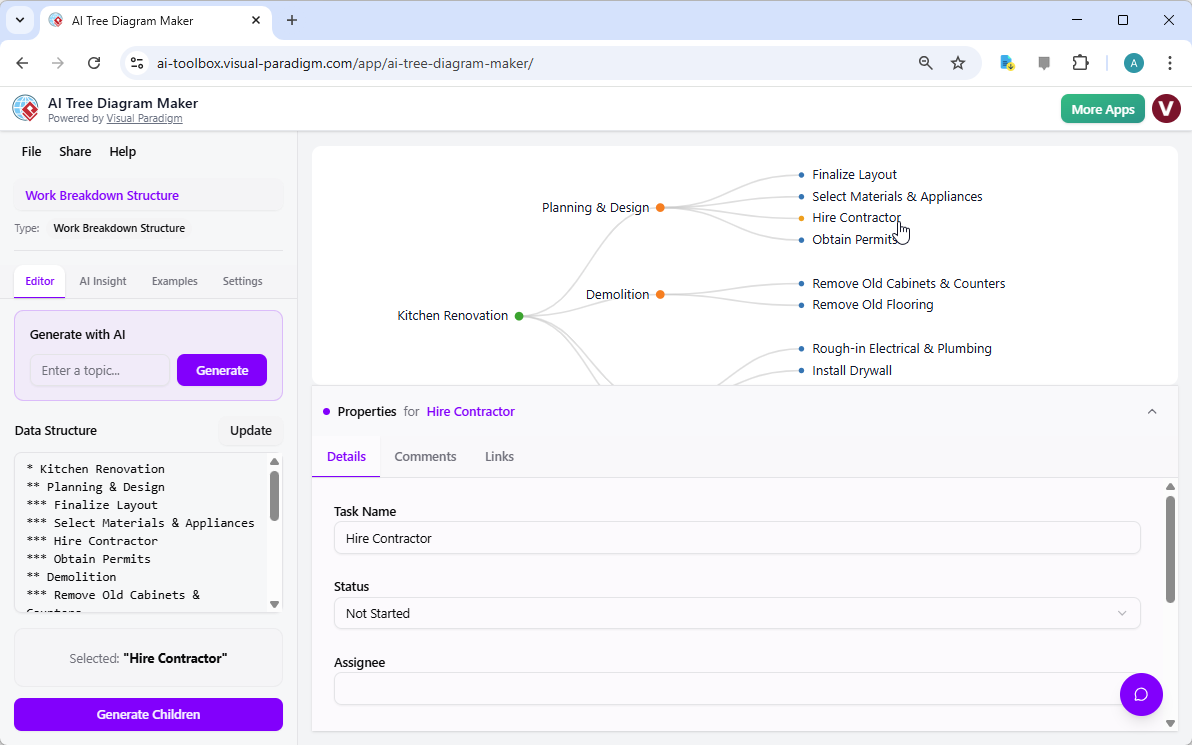
In the first visual example, we see the interface of Visual Paradigm Online’s innovative tool being used to map out a “Kitchen Renovation” project. The workspace is divided into an intuitive dual-view: a text-based editor on the left and a beautifully rendered tree diagram on the right. The user has effortlessly broken down the project into primary phases like “Planning & Design” and “Demolition.” What stands out is the “Hire Contractor” node; upon selection, a dedicated Property Editor opens at the bottom, allowing for the entry of specific details such as the task status, assignee, and additional comments. This seamless connection between high-level visualization and granular data management is what makes this easy-to-use AI tree diagram app so effective for homeowners and professionals alike.
The Power of Hierarchical Structure in Project Success
At the heart of every successful initiative is a solid Work Breakdown Structure (WBS). Using a professional hierarchy visualizer allows you to see the “big picture” while maintaining absolute control over the smallest sub-tasks. When you use an online AI-powered tree diagram maker, you aren’t just drawing lines; you are building a dynamic database of your project’s DNA. The tool utilizes a clever asterisk-based text system where a single asterisk represents a parent node and double or triple asterisks denote nested children. This means you can type out your thoughts as fast as they come to you, and the diagram will organize itself in real-time, saving you hours of manual formatting.
Quick Summary & Key Takeaways:
-
Dual-View Interface: Syncs a simple text editor with a visual diagram for maximum efficiency.
-
AI Generation: Build entire project trees from a single prompt in seconds.
-
Rich Metadata: Use the Property Editor to track statuses, assignees, and due dates within each node.
-
Intelligent Analysis: Leverage AI Insights to identify risks and bottlenecks in your plan.
-
Interactive Chat: Query your data using a natural language chatbot to find information instantly.
Detailed Task Management with the Property Editor
A common pitfall in project planning is having a beautiful chart that lacks actionable data. This best tree diagram software solves that by turning every node into a rich data container. As seen in the kitchen renovation example, clicking on a specific task like “Hire Contractor” doesn’t just highlight a bubble; it invites you to define the “Who,” “What,” and “When.” You can set the status to “Not Started,” “In Progress,” or “Completed,” providing a clear visual pulse of your project’s health at any given moment. This level of detail ensures that your interactive tree diagram editor serves as a reliable source of truth for all stakeholders involved.
Beyond simple status updates, the ability to add links and comments directly to a node means all your contractor quotes, material links, and design inspirations are stored exactly where they belong. Instead of hunting through endless email threads or messy spreadsheets, you simply click a branch on your tree and find everything you need. This supportive and organized approach reduces the cognitive load of project management, allowing you to focus on the creative aspects of your renovation rather than the administrative headaches.
Optimizing Your Workflow with a Context-Aware AI Assistant
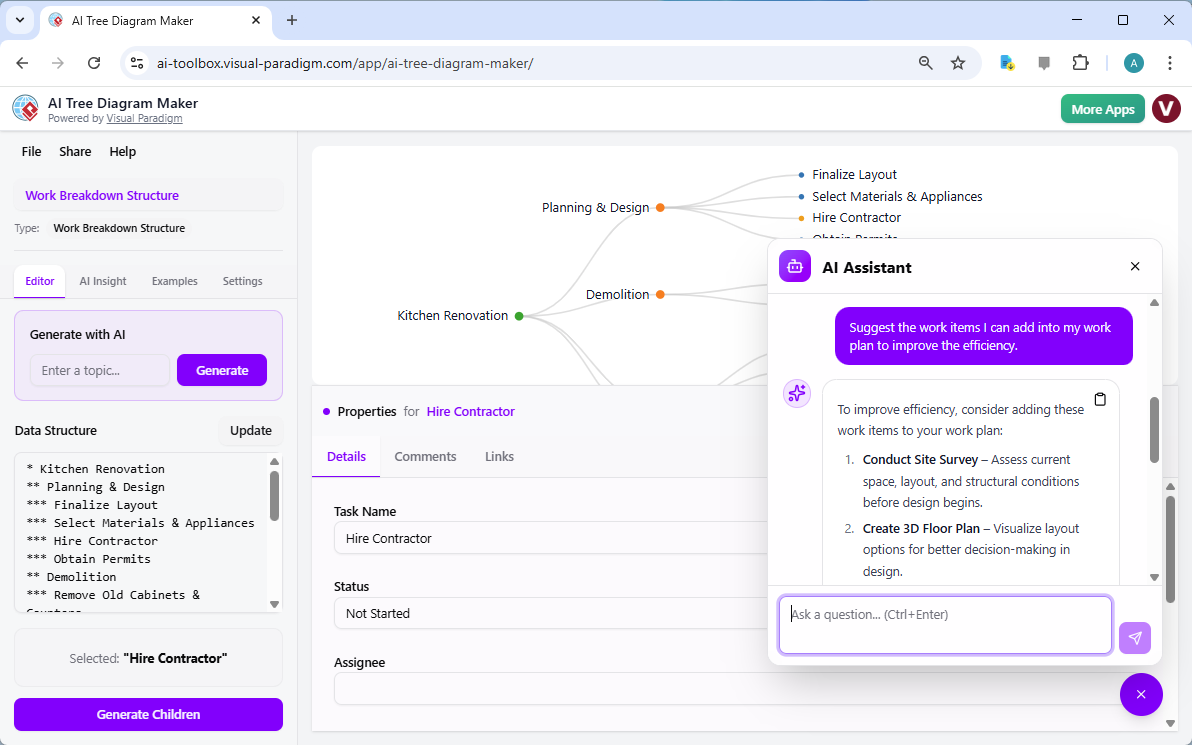
The true “magic” happens when you involve the AI Assistant. Planning is rarely a linear process, and it is easy to miss crucial steps when you are working solo. In our second visual reference, the user engages with the built-in chatbot to ask for improvement suggestions for their current work plan. The AI, which has full context of the “Kitchen Renovation” tree, suggests adding a “Conduct Site Survey” and “Creating a 3D Floor Plan” to improve efficiency. This is like having an experienced consultant sitting right next to you, offering gentle guidance to ensure your plan is as robust as possible.
This online AI-powered tree diagram maker doesn’t just wait for you to ask questions; it can also generate entire branches of logic for you. If you find yourself stuck on the “Arrange Logistics” phase of your project, you can simply select the node and click “Generate Children.” The AI will then suggest logical sub-tasks, such as “Rent Dumpster,” “Order Portable Toilet,” or “Schedule Debris Pickup.” It is an incredibly encouraging way to work, as the software helps fill in the blanks of your knowledge, making even the most daunting projects feel manageable and structured.
From Brainstorming to Professional Presentation
Whether you are a project manager, a software architect, or a student, the ability to present your ideas clearly is vital. Once you have used the professional hierarchy visualizer to refine your plan, the tool offers deep customization options. You can tailor colors, fonts, and spacing to match your personal style or corporate branding. Because the work is saved securely in the cloud, you can share a read-only version of your diagram with your family, team, or contractors, ensuring everyone is literally on the same page.
The “AI Insight” feature further elevates your work by providing a written analysis of your tree. It examines your structure and content to offer a high-level summary, highlighting potential risks you might have overlooked. For instance, it might notice that your “Demolition” phase has no assignee or that your “Permit” phase is scheduled too close to the “Construction” start date. This proactive feedback loop ensures that your easy-to-use AI tree diagram app is helping you build not just a diagram, but a successful outcome.
Ready to Transform Your Planning Process?
Experience the future of hierarchical organization today. Whether you are mapping out a complex business process, a family tree, or your next big home improvement project, Visual Paradigm Online provides the tools you need to succeed. The online AI-powered tree diagram maker is designed to grow with your ideas, providing the perfect balance of simplicity and expert-level depth. Don’t let your big ideas stay trapped in a messy list; give them the structure and clarity they deserve.
Start building your next project with the AI Tree Diagram Maker: Try the AI Tree Diagram Maker Now
To learn more about the full range of features and how to leverage AI for your visual projects, visit our detailed guide: Learn More about AI Tree Diagram Maker
Related Links
-
Visual Paradigm AI Tree Diagram Maker Features: Explore the advanced features and capabilities of Visual Paradigm’s AI-powered tree diagram creation tool.
-
Online AI Tree Diagram Generator: Access the interactive online tool to automatically generate professional tree diagrams using artificial intelligence.
-
AI Tree Diagram Maker Release Notes: Stay updated with the latest improvements, new features, and version history for the AI tree diagram maker.
-
Visual Paradigm Tree Diagram Software: A dedicated platform for creating logical tree structures and hierarchies with ease and precision.