


In today’s fast-paced digital workplace, teams struggle with fragmented information scattered across multiple tools. Visual Paradigm’s OpenDocs emerges as a revolutionary solution—a unified AI-powered knowledge platform that seamlessly blends rich text documentation with professional diagramming capabilities. This comprehensive review explores how OpenDocs transforms the way individuals and teams create, organize, and share institutional knowledge, making it an essential tool for modern collaborative workflows.
Core Features Overview
Rich Text Editor
OpenDocs features a full-featured rich text editor that brings professional document creation to your fingertips.
Key Capabilities:
- Beautifully structured documents with headings, lists, tables, and code blocks
- Live preview in split-pane view
- Support for task lists and advanced formatting
- Clean, distraction-free writing environment
Integrated Diagram Editor
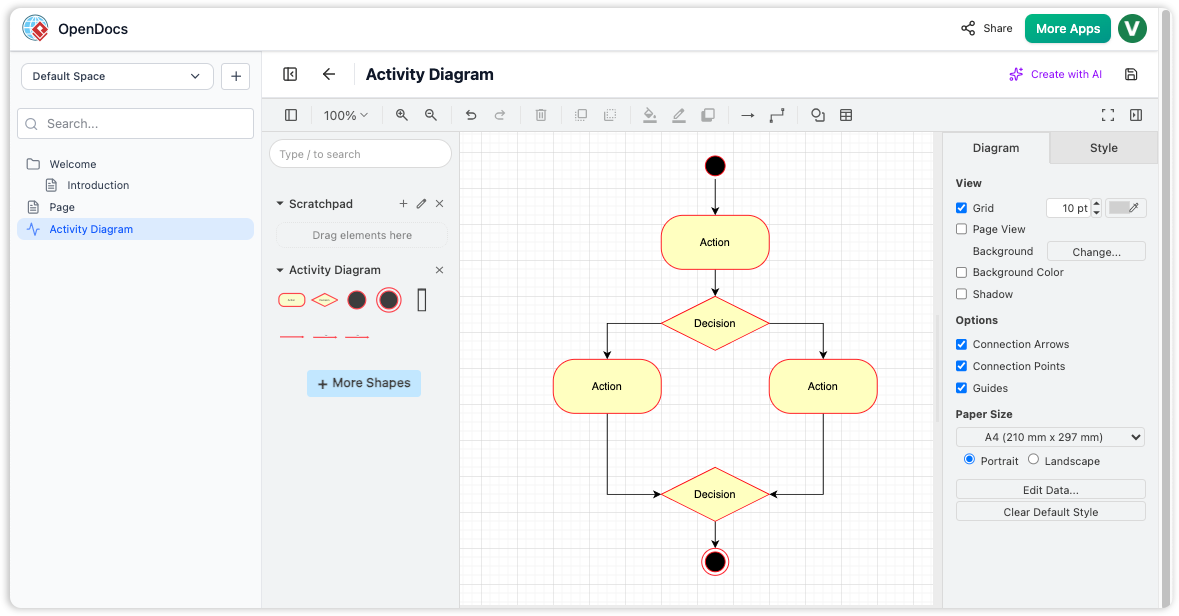
One of OpenDocs’ standout features is its built-in diagram editor that eliminates the need to switch between applications. Create professional visual documentation directly within your knowledge base.
What You Can Create:
- Flowcharts and process diagrams
- UML diagrams (Class, Sequence, Use Case, Activity, State Machine)
- Mind maps and brainstorming visuals
- Network diagrams and deployment architectures
- Entity Relationship Diagrams (ERD)
- PERT charts and timeline visualizations
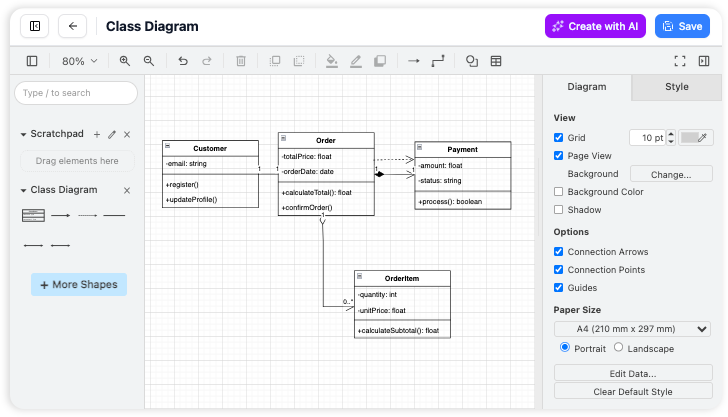
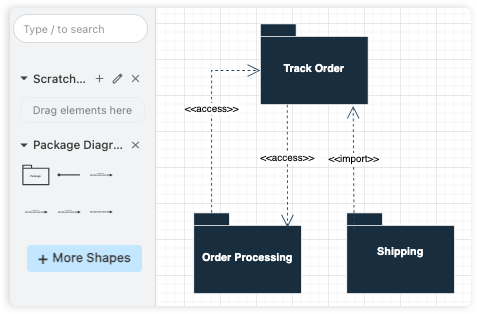
The vast library of shapes and stencils makes it effortless to create professional-looking diagrams that complement your text-based documentation.
AI-Powered Diagram Generation
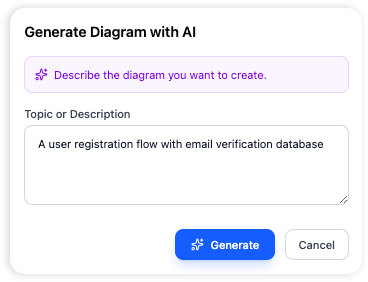
From sentence to diagram instantly. OpenDocs leverages artificial intelligence to revolutionize diagram creation. Simply describe what you need in plain English, and the AI generates the entire diagram for you.
AI Diagram Capabilities:
- Natural language to diagram conversion
- Automated UML diagram generation from text descriptions
- AI-powered ERD creation from data requirements
- Iterative refinement through conversational AI chatbot
- Contextual understanding of your documentation needs
This feature eliminates the manual drag-and-drop work, making it the fastest way to visualize complex processes and systems.
Hierarchical Organization System
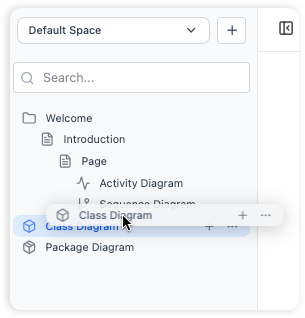
OpenDocs provides a familiar tree-like folder structure that scales with your knowledge base. Organize documents and diagrams logically with nested folders.
Organization Features:
- Intuitive drag-and-drop file and folder management
- Scalable hierarchical structure for large repositories
- Easy restructuring as projects evolve
- Clear visual navigation of your knowledge tree
AI Content Assistant
Beyond diagrams, OpenDocs embeds AI throughout the documentation workflow:
AI Writing Tools:
- Draft Generation: Create initial article drafts from simple outlines
- Summarization: Condense long documents into actionable insights
- Simplification: Transform technical jargon into accessible language
- Contextual Q&A: Get answers based on existing knowledge base content
- AI Image Generation: Create custom visuals to complement text
How to Use OpenDocs – Core Workflows
1. Structure Your Knowledge
Build a robust hierarchy using top-level folders and sub-folders. Easily drag and drop to restructure as your projects grow.
2. Simple Editing
Create rich documents with headers, code blocks, and lists. See your formatting instantly with real-time live preview.
3. Create Visual Diagrams
Complement your notes with visual models. Use professional shape libraries and connectors to illustrate complex relationships.
4. Leverage AI Generation
Describe your diagram needs in plain language and let AI handle the creation. Refine iteratively through conversation.
5. Share and Collaborate
Generate unique URLs to share your entire knowledge base instantly with secure, read-only access.
Key Benefits
✅ All-in-One Knowledge Hub: Combine text and diagrams in a single platform, eliminating tool-switching fatigue
✅ Structure Your Thoughts: Organize knowledge hierarchically with nested folders for easy navigation
✅ Effortless Collaboration: Share your entire knowledge base with one click via secure links
✅ Visually Rich Documentation: Go beyond plain text with professional diagrams illustrating complex processes
✅ AI-Powered Efficiency: Generate diagrams and content automatically from natural language
✅ Accessible Anywhere: Web-based access from any modern browser—no installation required
✅ Single Source of Truth: Centralize team knowledge and maintain institutional memory
Getting Started Guide
Step 1: Launch & Initialize
Open the OpenDocs application. You’ll be greeted by a welcome screen to manage recent projects.
Step 2: Create and Name Your First Page
Click the “New Page” button in the sidebar to create a document with a descriptive name.
Step 3: Write and Format Content
Use the rich text editor to start writing.
Step 4: Generate Visual Diagrams
Click “New Diagram” to open the visual editor, or use AI to generate diagrams from text descriptions.
Step 5: Organize with Folders
Create folders via the sidebar and drag-and-drop pages or diagrams to build your structured knowledge base.
OpenDocs in the Visual Paradigm Ecosystem
OpenDocs serves as the connective tissue in Visual Paradigm’s broader ecosystem, transforming raw technical models into accessible business knowledge.
The Central Knowledge Hub:
While Visual Paradigm Desktop/Online are “builder” tools for architects, OpenDocs acts as the “librarian” that organizes outputs for the entire organization, bridging the gap between complex models and stakeholder understanding.
Contextualizing Visual Assets:
OpenDocs provides narrative context to diagrams, embedding live visualizations directly into structured articles using “Knowledge Trees,” ensuring documentation stays synchronized with actual design models.
AI-Driven Transformation:
- From Text to Model: Write requirements in OpenDocs, and AI generates corresponding UML or ERD diagrams
- From Model to Docs: Analyze complex diagrams and summarize them into plain-English documentation
Collaborative Governance:
Serving as the Single Source of Truth (SSoT), OpenDocs provides a collaborative space for commenting, version control, and capturing the “why” behind designs.
Frequently Asked Questions
Can I import existing documents into OpenDocs?
OpenDocs is designed for creating content within the application. Currently, there is no direct import feature for existing files.
What types of diagrams can I create?
The integrated diagram editor supports flowcharts, UML diagrams (Class, Sequence, Use Case, Activity, State Machine, Component, Deployment), network diagrams, mind maps, ERDs, DFDs, PERT charts, and timelines.
Can I export my documents to other formats?
The application focuses on sharing within the platform. At this time, there is no direct export functionality to PDF or Word formats.
Is there a version history for my documents?
OpenDocs does not currently have built-in version history. We recommend maintaining regular backups of key documentation.
Can I share a single page?
The sharing feature is designed to share the entire knowledge base for full context. Individual page or folder sharing is not available.
Is OpenDocs available as a desktop app?
OpenDocs is a web-based application accessible from any modern web browser—no desktop installation required.
Who develops OpenDocs?
OpenDocs is developed by Visual Paradigm, a leading provider of professional modeling and diagramming software tools.
What licensing is required for AI features?
AI features generally require an active subscription, available through Visual Paradigm Online (Combo Edition) or Visual Paradigm Professional Edition.
Conclusion
OpenDocs represents a paradigm shift in how teams manage organizational knowledge. By seamlessly integrating rich text editing, professional diagramming, and AI-powered automation into a single platform, it eliminates the friction of traditional documentation workflows. Whether you’re building a personal knowledge repository, creating comprehensive project documentation, or fostering team collaboration, OpenDocs provides the tools to capture, structure, and share information effectively.
The platform’s AI capabilities particularly stand out, transforming what used to be hours of manual diagram creation into seconds of natural language description. Combined with its intuitive organization system and web-based accessibility, OpenDocs emerges as an indispensable tool for modern teams seeking to maintain a single source of truth while enhancing productivity and collaboration.
For organizations already invested in the Visual Paradigm ecosystem, OpenDocs serves as the perfect complement—bridging the gap between complex technical models and accessible business documentation. For new users, it offers a gentle learning curve with powerful features that scale with your needs.
Ready to transform your documentation workflow? Get Started with OpenDocs today and experience the future of knowledge management.
Related posts:
 Seamlessly Integrate Visual Paradigm OpenDocs into WordPress: The Ultimate Guide to Embedding AI-Powered Knowledge Bases
 A User’s Hands-On Review of Visual Paradigm’s OpenDocs Flipbook Integration
 A Practitioner’s Review of Visual Paradigm’s OpenDocs, Flipbooks & WordPress Workflow
 From Diagrams to Documentation: A Hands-On Review of Visual Paradigm’s Pipeline and OpenDocs Share History