


Designing state machines is an exercise in managing complexity. When a system grows, the number of states and transitions can expand rapidly, often leading to models that are difficult to debug, slow to execute, and hard for new team members to understand. Optimization is not merely about reducing line count; it is about enhancing the structural integrity of your logic flow. By refining your state diagrams, you improve execution speed, reduce memory overhead, and ensure that the model remains a reliable source of truth throughout the development lifecycle.
Performance in state machines is often overlooked until deployment issues arise. A bloated model consumes more memory and requires more CPU cycles to evaluate transitions. Furthermore, maintainability suffers when the diagram becomes a tangled web of dependencies. This guide provides a technical framework for optimizing state diagrams, focusing on structure, logic, and visual clarity without relying on specific software tools.
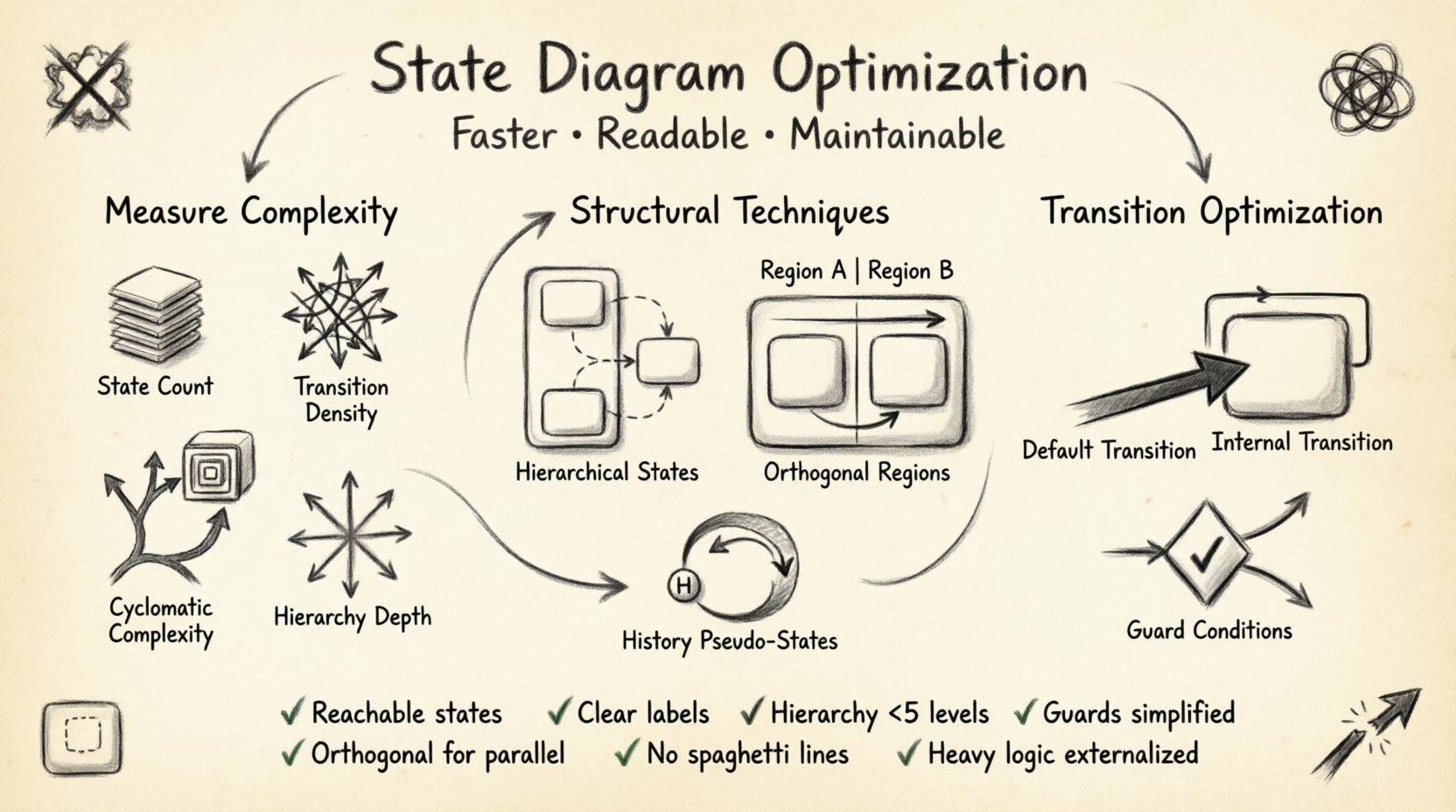
Understanding State Machine Complexity 📉
Before optimizing, you must measure the current state of your model. Complexity in state diagrams is often invisible until it causes issues during testing or production. Several metrics help quantify this complexity.
- State Count: The total number of distinct states. High counts often indicate a lack of hierarchy or poor abstraction.
- Transition Density: The ratio of transitions to states. A high ratio suggests tight coupling and potential fragility.
- Cyclomatic Complexity: While traditionally used for code, this applies to state logic paths. More paths mean more testing scenarios and higher risk of edge cases.
- Depth of Hierarchy: How many levels of nested states exist. Deep nesting can make tracing events difficult for developers unfamiliar with the system.
- Max Fan-Out: The maximum number of outgoing transitions from a single state. High fan-out indicates a “hub” state that handles too many decisions.
When these metrics exceed certain thresholds, the model becomes brittle. Optimization strategies focus on reducing these metrics without losing functional fidelity. The goal is to achieve the simplest model that accurately represents the system behavior.
Structural Optimization Techniques 🛠️
The most significant gains come from restructuring the diagram itself. Flat diagrams are the primary enemy of scalability. Modern state machine theory offers specific patterns to reduce structural bloat.
1. Leveraging Hierarchical States
Flat state machines require a separate state for every combination of conditions. Hierarchical states allow you to group related behaviors. This is often called state nesting.
- Parent States: Define common behavior for child states, such as entry actions or exit actions shared across a group.
- Child States: Implement specific variations of the parent behavior where necessary.
- Inheritance: Events handled by the parent are automatically available to children unless overridden locally.
Consider a login system. A flat diagram might have states for Idle, LoggingIn, Success, Failure, and Timeout. A hierarchical approach places Idle and LoggedIn as top-level states, with LoggingIn as a sub-state of Idle. This reduces the number of transitions required to define entry and exit logic. When the system moves to Idle, it automatically resets to the initial child state.
2. Utilizing Orthogonal Regions
Orthogonal regions allow a single state to represent concurrent activities. Instead of creating a cross-product of states for independent variables, you define regions within a composite state.
- Parallel Execution: Region A handles user input while Region B monitors system health independently.
- Synchronization: The composite state is active only when all regions are active. Transitions out of the composite state require all regions to be ready.
- Scalability: Adding a new concurrent feature requires a new region, not a new state.
This technique drastically reduces the state explosion problem. For example, if you have 4 independent status flags, a flat approach needs 16 states. Orthogonal regions need only 4 regions within 1 composite state. This improves both readability and execution efficiency.
3. History Pseudo-States
History pseudo-states allow a composite state to return to the last active sub-state upon re-entry. This is crucial for complex workflows where a user navigates away and returns.
- Shallow History: Returns to the most recent active child state.
- Deep History: Returns to the most recent active nested state, preserving the full context.
- Benefit: Reduces the need for explicit “Return to Previous” transitions.
Transition Logic and Optimization ⚡
Transitions define the flow of control. Optimizing them reduces the cognitive load on the reader and the computational cost for the engine.
1. Internal Transitions
Internal transitions handle events without changing the state. This is useful for logging, updating variables, or triggering side effects.
- Benefit: Avoids unnecessary state entry and exit processing, which saves CPU cycles.
- Use Case: Validating input while remaining in the Editing state.
2. Default Transitions
When entering a composite state, the system must choose an initial child state. A default transition simplifies this entry flow.
- Clarity: Makes the starting point of a sub-state machine explicit.
- Performance: Reduces the number of transition definitions needed for initialization.
3. Guard Conditions
Guard conditions refine transitions. However, too many complex guards can obscure logic and slow down evaluation.
- Simplicity: Keep guards boolean and simple.
- Separation: Move complex logic to variables or functions outside the diagram.
- Caching: If guards check frequently changing data, consider caching the result.
State Actions and Behavior 🧩
State machines define not just where to go, but what to do while there. Optimizing actions ensures the model remains performant.
- Entry Actions: Executed once upon entering a state. Use these for initialization logic.
- Exit Actions: Executed once upon leaving a state. Use these for cleanup or persistence.
- Do Activities: Executed continuously while the state is active. Avoid heavy computation here.
Heavy logic in Do Activities can block the state machine engine. If a task takes time, offload it to a background thread or an event queue. The state machine should focus on control flow, not heavy data processing.
Visual Readability and Naming 📝
A model that is fast but unreadable is useless. Optimization includes visual design principles that aid human comprehension.
- Consistent Naming: Use verb-noun pairs for transitions (e.g., SubmitRequest) and noun-adj pairs for states (e.g., ActiveSession).
- Directional Flow: Arrange states generally from left to right or top to bottom to guide the eye.
- Minimal Crossing: Avoid lines crossing over other states or transitions. This reduces visual noise and confusion.
- Color Coding: Use colors to denote state types (e.g., error states in red, success in green) if the rendering tool supports it.
- Annotations: Add comments to complex logic. Do not rely on the diagram alone for explanation.
Common Anti-Patterns ❌
Avoid these patterns to maintain a healthy model. These issues often appear in large-scale systems where requirements evolve over time.
| Anti-Pattern | Problem | Recommended Solution |
|---|---|---|
| State Explosion | Too many flat states for combinations. | Use Hierarchical or Orthogonal states. |
| Spaghetti Transitions | Many tangled lines connecting distant states. | Use local transitions or intermediate states. |
| Implicit Logic | Logic hidden in code rather than the diagram. | Move logic to state actions or guards. |
| Dead Ends | States with no exit transitions. | Ensure all states can reach a completion state. |
| Global State Reliance | Transitions depend on global variables. | Pass context explicitly via events. |
Testing and Verification 🧪
Optimized models are easier to test. A smaller state space means fewer paths to cover.
- Path Coverage: Aim for 100% path coverage. Ensure every transition is exercised.
- State Coverage: Verify every state is reachable.
- Edge Cases: Test invalid transitions. The model should handle unexpected events gracefully.
- Performance Testing: Measure the time taken for state transitions under load.
Automated testing frameworks can traverse the state machine. If the model is optimized, these tests run faster and are more stable. Flaky tests often indicate ambiguity in the state definition.
Performance Implications 🏎️
Optimized models execute faster. The state machine engine does not need to evaluate unnecessary conditions or traverse deep stacks.
- Memory Usage: Fewer states mean less memory allocated for the state registry.
- Execution Time: Internal transitions are faster than full state changes.
- Debugging Time: Clearer models allow faster root cause analysis when errors occur.
- Latency: Reduced logic depth leads to lower latency in event processing.
Optimization Checklist ✅
Use this checklist before finalizing your diagram.
- Are all states reachable from the initial state?
- Are there any states that cannot reach the final state?
- Is the hierarchy depth less than 5 levels?
- Are transition labels clear and concise?
- Do guard conditions rely on external variables that change often?
- Have orthogonal regions been used for independent processes?
- Is the diagram layout consistent with standard conventions?
- Have duplicate transition paths been consolidated?
- Are heavy computations moved out of the Do activity?
- Is the naming convention consistent across the entire model?
Iterative Refinement 🔄
Optimization is an iterative process. As requirements change, revisit your state diagrams. Keep them lean, keep them clear, and keep them aligned with the system’s actual behavior. This ensures your models remain valuable assets rather than technical debt. Regular reviews with the development team can identify areas where the model diverges from the implementation, ensuring synchronization between design and code.
By applying these techniques, you create state machines that are not only functionally correct but also efficient and maintainable. This approach supports long-term project health and reduces the cognitive burden on everyone involved in the system architecture.
Related posts:
 State Diagram Basics: A Beginner’s Quick Start Guide to Visualizing System Logic
 State Diagrams vs. Flowcharts: Key Differences for Systems Analysis Students
How to Build State Diagrams Step-by-Step: From Concept to Final Diagram
State Diagrams vs. Flowcharts: Key Differences for Systems Analysis Students
How to Build State Diagrams Step-by-Step: From Concept to Final Diagram
 Common State Diagram Mistakes That Confuse Beginners and How to Fix Them