


The landscape of Human-Computer Interaction (HCI) is shifting rapidly. What defined the field a decade ago is no longer sufficient for the digital environments of today. For students pursuing a degree in HCI or UX design, the curriculum must go beyond basic aesthetics. It requires a deep understanding of cognitive psychology, ethical responsibility, and technical feasibility. This guide outlines the foundational skills that are critical for success in the industry. These competencies are not about learning specific tools, but about developing a mindset capable of solving complex human problems through digital means.
As you navigate your undergraduate studies, focus on the core pillars that separate a novice from a professional. This involves a blend of research rigor, design logic, and communication prowess. The following sections detail the essential areas you need to master to build a robust portfolio and career foundation.
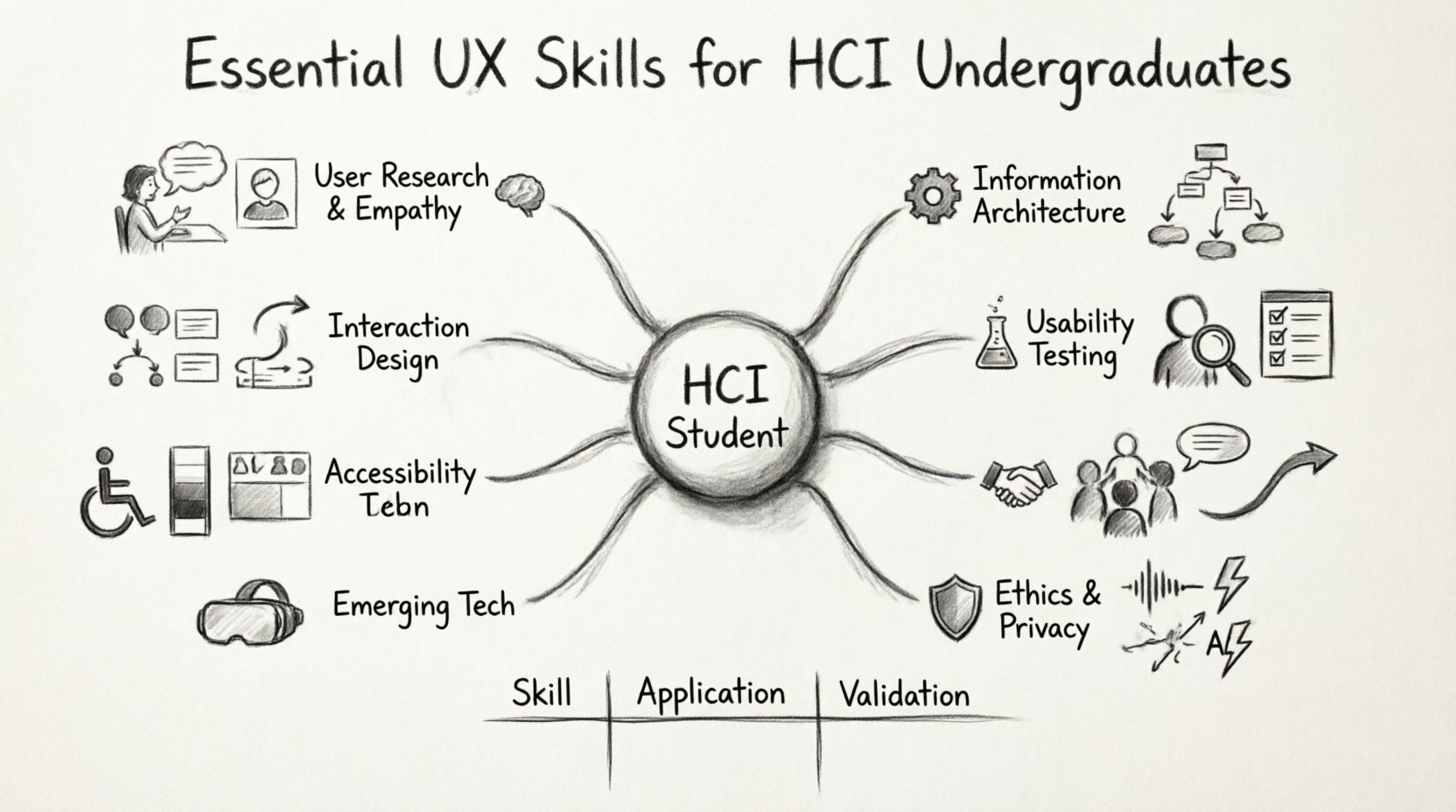
1. User Research & Empathy 🧠
Design without research is merely decoration. The ability to understand who you are designing for is the bedrock of effective interaction design. In an academic setting, you might be tempted to skip the fieldwork in favor of immediate creation. Resist this urge. Real-world constraints and user behaviors are rarely intuitive.
- Qualitative Methods: Learn to conduct in-depth interviews and contextual inquiries. Understand how to ask open-ended questions that reveal underlying motivations rather than surface-level preferences.
- Quantitative Analysis: Familiarize yourself with survey design and statistical significance. Numbers tell a different story than words; both are necessary for a complete picture.
- Personas & Scenarios: These artifacts are not just drawings. They represent aggregated data points about user behavior, goals, and pain points. Ensure your personas are grounded in actual evidence, not assumptions.
- Ethnographic Observation: Watch how people interact with technology in their natural environment. Note where they struggle, where they get distracted, and how they adapt their workflows.
Developing empathy means stepping outside your own cognitive biases. As a designer, you are not the user. Your experience of a screen or a workflow will differ vastly from someone with different abilities, cultural backgrounds, or technical literacy. Research skills are the mechanism by which you bridge this gap.
2. Information Architecture (IA) 🗂️
Before a single pixel is placed, the structure of the content must be sound. Information Architecture is the science of organizing and structuring information so that users can find what they need without confusion. For an HCI student, this is often the most overlooked skill, yet it is the skeleton upon which the body of the application hangs.
- Card Sorting: Use this method to understand how users mentally categorize information. It helps validate your navigation structures before development begins.
- Site Mapping: Create hierarchical diagrams that represent the relationship between pages and content. This ensures logical flow and depth.
- Taxonomy & Tagging: Establish consistent naming conventions. Ambiguity in labels leads to cognitive load and user frustration.
- Navigation Design: Decide on the placement of primary and secondary navigation. Consider how users move from one task to another within a session.
Good IA reduces the friction in the user journey. If a user cannot find a feature within three clicks, the design has likely failed its primary function. Focus on clarity and predictability. The goal is to make the system feel invisible, allowing the user to focus on their task rather than the interface.
3. Interaction Design & Prototyping Logic ⚙️
Prototyping is often confused with high-fidelity visual design. However, at its core, it is about testing logic and flow. You do not need to use a specific software suite to demonstrate this skill. The value lies in how you communicate interactivity.
- Wireframing: Create low-fidelity layouts to test structure without the distraction of color or imagery. Focus on hierarchy and placement.
- Interaction Flows: Map out the states of an element. How does a button look when pressed? What happens if a field is left empty? What is the error state?
- Lo-fi to Hi-fi Transition: Understand when to invest time in detail. Early stages require speed and iteration. Late stages require precision and polish.
- Feedback Loops: Every user action requires a system response. Design these responses to be immediate and clear. Users need to know that their input was received.
When prototyping, think about the device. A gesture that works on a large desktop monitor may fail on a mobile touchscreen. Consider the context of use. Are they walking? Standing in a noisy room? One-handed? These physical constraints dictate the interaction logic.
4. Usability Testing & Evaluation 🧪
Assumptions die in the lab. Usability testing provides the empirical evidence needed to validate design decisions. This skill is not just about watching someone click buttons; it is about interpreting their behavior and emotional state.
- Moderated Sessions: Observe users directly and ask probing questions when they hesitate. This reveals the “why” behind the “what”.
- Unmoderated Testing: Gather data at scale. Use remote tools to track where users click, how long they spend on a page, and where they drop off.
- Heuristic Evaluation: Apply established principles (such as Nielsen’s heuristics) to audit an interface. This helps identify violations of standard conventions.
- A/B Testing: Compare two versions of a design to see which performs better against a specific metric. This is data-driven design in action.
During testing, silence is golden. Do not guide the user. If they struggle, let them struggle. The frustration they feel is data. Record their struggles and use them to refine the design. The goal is not to prove your design is perfect, but to find the flaws before launch.
5. Accessibility & Inclusive Design ♿
Digital products must be usable by everyone, regardless of ability. Accessibility is no longer a nice-to-have feature; it is a legal and ethical requirement. HCI undergraduates must build this into their workflow from the start.
- WCAG Guidelines: Study the Web Content Accessibility Guidelines. Understand the three levels of compliance (A, AA, AAA) and what they entail.
- Screen Readers: Learn how text-to-speech software navigates a page. Semantic HTML is crucial here. Proper heading structures allow navigation without a mouse.
- Color Contrast: Ensure text is readable against its background. Do not rely on color alone to convey information.
- Keyboard Navigation: Can the entire interface be used without a mouse? Tab order must be logical and predictable.
Inclusive design benefits everyone. A ramp helps wheelchair users, but it also helps parents with strollers. Similarly, captions help deaf users, but they also help people watching videos in a noisy gym. Designing for accessibility expands your potential user base and improves the overall quality of the product.
6. Collaboration & Communication 🤝
Design does not happen in a vacuum. You will work with developers, product managers, stakeholders, and other designers. The technical skills mean little if you cannot articulate your decisions or negotiate trade-offs.
- Design Critique: Learn to give and receive feedback constructively. Focus on the work, not the person. Use evidence to support your suggestions.
- Storytelling: Present your work as a narrative. Explain the problem, the research, the solution, and the impact. This helps stakeholders understand the value of the work.
- Technical Literacy: Understand the basics of development. You do not need to code, but you must know what is feasible within a budget and timeline. This builds trust with engineering teams.
- Documentation: Create clear specifications. Handoff documents should be detailed enough that a developer can build the interface without constant clarification.
Soft skills are often the differentiator in hiring. The ability to collaborate, manage expectations, and advocate for the user is as important as the ability to wireframe. Treat your colleagues as partners in solving the problem, not obstacles to your vision.
7. Ethics & Data Privacy ⚖️
With great power comes great responsibility. As designers, you influence behavior. You must be vigilant about how your designs impact user privacy and well-being.
- Dark Patterns: Avoid design tricks that manipulate users into doing things they did not intend, such as hiding cancellation buttons or making subscriptions hard to cancel.
- Data Minimization: Collect only the data you need. Explain to users why you are asking for information and how it will be used.
- Algorithmic Bias: Be aware that AI and recommendation systems can perpetuate societal biases. Audit your data sources and logic.
- Digital Wellbeing: Consider the impact of your design on mental health. Infinite scroll and notification loops can be addictive. Design for balance, not engagement at all costs.
Ethical design builds trust. Users are increasingly aware of how their data is used. Prioritizing their privacy and autonomy will result in long-term loyalty and a positive brand reputation.
Core Competency Summary 📋
The following table summarizes the key skills discussed, their application, and the method to validate them.
| Skill Area | Primary Application | Validation Method |
|---|---|---|
| User Research | Understanding needs and behaviors | Interview transcripts, Survey data |
| Information Architecture | Organizing content structure | Card sorting results, Tree testing |
| Interaction Design | Defining system logic and flow | Click-through prototypes, Task completion rates |
| Usability Testing | Identifying friction points | Heuristic audits, Task success metrics |
| Accessibility | Ensuring inclusivity | Screen reader tests, Contrast checkers |
| Communication | Aligning teams and stakeholders | Stakeholder feedback, Project delivery success |
8. Adapting to Emerging Technologies 🤖
The tools change, but the principles remain. However, new technologies introduce new interaction paradigms that require specific attention.
- Voice User Interfaces (VUI): Designing for voice requires understanding natural language processing and conversational flow. There are no visual cues, so audio feedback is critical.
- Augmented Reality (AR) & Virtual Reality (VR): Spatial design requires a 3D understanding. Consider depth, occlusion, and user movement within a virtual space.
- Wearables: Small screens mean limited information density. Prioritize glanceable information and quick interactions.
- AI Integration: Understand how generative AI can assist in the workflow. Use it to generate ideas or analyze data, but verify the output for bias and accuracy.
Stay curious. Read industry blogs, attend conferences, and experiment with new platforms. The skills you learn today will form the basis of your adaptability tomorrow.
Building Your Professional Foundation 🏗️
Academic projects often focus on the ideal scenario. The professional world focuses on constraints. Budget, time, and legacy systems limit what is possible. To succeed, you must learn to design within these boundaries without sacrificing quality.
- Iterate Early: Do not wait until a project is finished to test it. Test the concept. Test the wireframe. Test the prototype.
- Document Everything: Keep a portfolio of your process, not just the final images. Show the failed experiments and the lessons learned.
- Network: Connect with peers and mentors. The industry is small, and reputation matters.
- Specialize Gradually: Start with general skills, then identify areas you enjoy deeply. You might find you prefer research, interaction, or visual design.
Your education is a launchpad, not the destination. The skills listed here are the baseline. The market will demand more as technology evolves. The most successful designers are those who remain students throughout their careers, constantly updating their knowledge and challenging their own assumptions.
Focus on the human element. Technology is the vehicle, but human needs are the destination. If you keep the user at the center of every decision, your designs will resonate, function, and endure.
Related posts:
 Mastering the Art of User Experience Design: A Complete Guide for CS and HCI Students
 From Industrial Design to Digital: A UX Journey for Specialized Designers
 The Beginner’s Roadmap to UX Design: Quick Start Strategies for Tech Students
 UX Design: Deep Dive into Human-Computer Interaction: Principles and Practices for Undergraduates