


For students of Computer Science and Human-Computer Interaction, the boundary between logic and empathy is where technology truly comes alive. User Experience (UX) Design is often misunderstood as merely making things look attractive. In reality, it is the rigorous discipline of aligning technical capabilities with human needs. This guide provides a structured pathway through the core principles, research methodologies, and ethical considerations required to build intuitive digital products. Whether you are writing backend logic or defining interaction flows, understanding the human element is essential for creating software that is not just functional, but delightful.
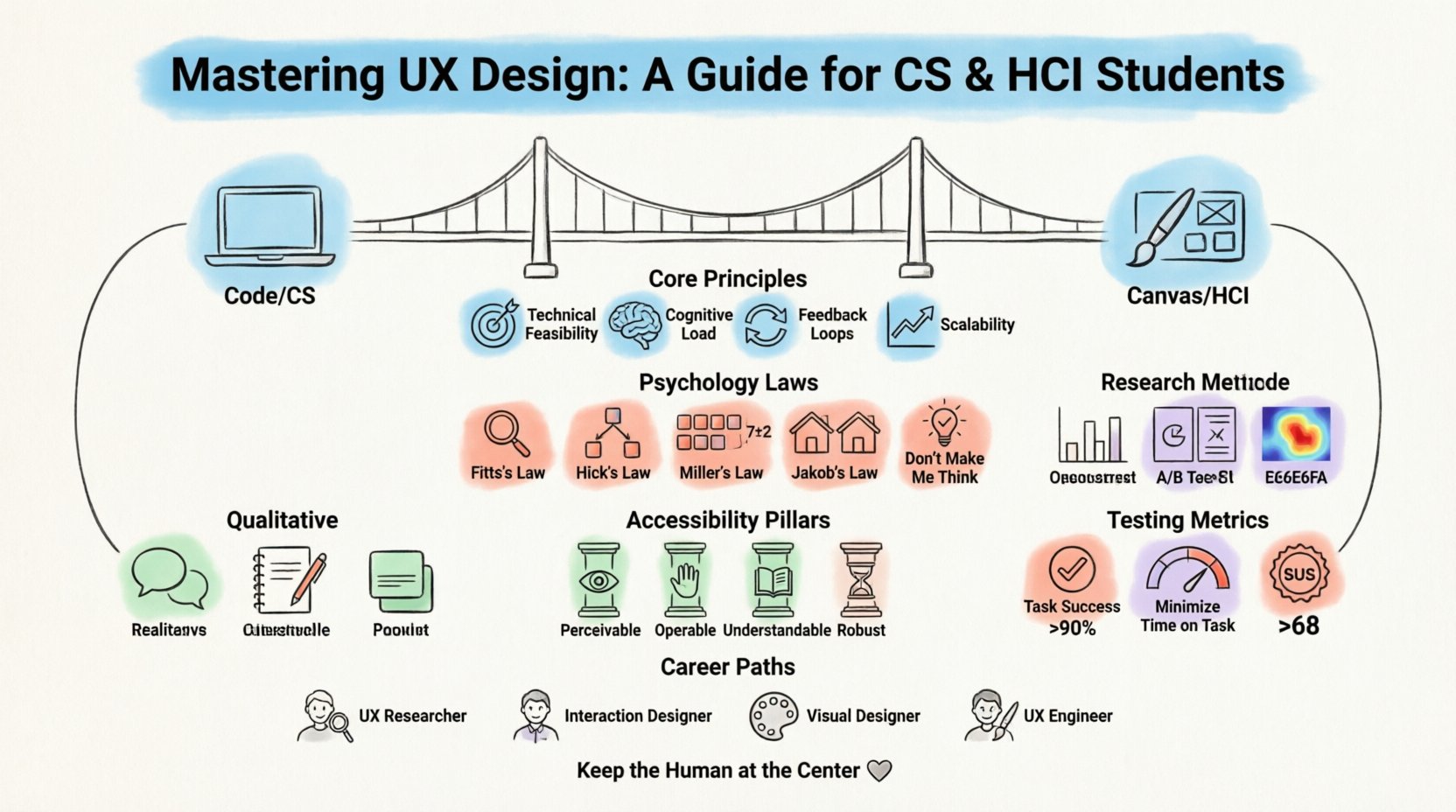
The Intersection of Code and Canvas 💻
Computer Science students often possess a strong foundation in algorithms, data structures, and system architecture. Human-Computer Interaction (HCI) students bring a focus on cognitive psychology, ergonomics, and qualitative research. When these disciplines merge, the result is a product that is both robust and usable. However, a common pitfall is prioritizing technical elegance over user clarity. A beautifully optimized algorithm that requires three clicks to complete a simple task is a failure of design.
- Technical Feasibility: Understanding what can be built efficiently without compromising the user journey.
- Cognitive Load: Ensuring the interface does not overwhelm the user’s working memory.
- Feedback Loops: Providing immediate, clear responses to user actions.
- Scalability: Designing systems that grow with the user base without losing consistency.
When you approach a project, consider the user not as a data point, but as an individual with goals, limitations, and context. This perspective shift is the cornerstone of effective design practice.
Foundational Psychology in Design 🧠
Design is not arbitrary. It is grounded in how humans perceive, process, and react to information. Several established laws govern interaction efficiency. Integrating these concepts into your workflow ensures predictability and ease of use.
Key Interaction Principles
- Fitts’s Law: The time to acquire a target is a function of the distance to and size of the target. Larger buttons placed closer to where the user’s action originates are easier to hit.
- Hick’s Law: The time it takes to make a decision increases with the number and complexity of choices. Limiting options reduces cognitive load.
- Miller’s Law: The average person can keep only 7 ± 2 items in their working memory. Grouping information into chunks aids retention.
- Jakob’s Law: Users spend most of their time on other sites. They prefer your site to work the same way as other sites they already know.
- Don’t Make Me Think: Every second a user spends wondering what to do is a second they are not achieving their goal.
These laws serve as heuristics. While they are not absolute rules, they provide a baseline for evaluating interface decisions. Applying them requires a deep understanding of the specific context of your application.
Table: Comparing Cognitive Laws
| Law | Focus | Design Implication |
|---|---|---|
| Fitts’s Law | Movement Time | Make important targets large and accessible. |
| Hick’s Law | Decision Time | Reduce the number of choices at any given step. |
| Miller’s Law | Memory Capacity | Chunk information into manageable groups. |
| Jakob’s Law | Consistency | Adopt standard patterns users already recognize. |
| Peak-End Rule | Memory | Focus on making the final moments of an experience memorable. |
Research Methodologies 📊
Assumptions are the enemy of good design. Before writing a single line of code or sketching a layout, you must validate your hypotheses through research. In the academic and professional spheres, research is categorized into qualitative and quantitative methods. Each serves a distinct purpose in the design lifecycle.
Qualitative Research
Qualitative research focuses on the why and how. It provides depth and context that numbers alone cannot capture. This type of inquiry is essential during the discovery phase.
- Contextual Inquiry: Observing users in their natural environment to understand their workflow.
- Interviews: One-on-one conversations to uncover motivations, pain points, and mental models.
- Diary Studies: Asking users to record their experiences over a period to identify recurring patterns.
- Card Sorting: Understanding how users categorize information to inform information architecture.
Quantitative Research
Quantitative research focuses on the what and how many. It validates findings from qualitative research and helps measure performance at scale.
- Surveys: Collecting data from a large sample size to identify trends.
- A/B Testing: Comparing two versions of a design to determine which performs better.
- Analytics Review: Analyzing behavioral data to see where users drop off or succeed.
- Heatmaps: Visualizing where users click, scroll, or hover most frequently.
Combining both approaches offers the most comprehensive view. Qualitative data explains the behavior, while quantitative data confirms its prevalence.
Table: Research Method Selection
| Goal | Recommended Method | Output Type |
|---|---|---|
| Understand motivations | User Interviews | Qualitative Insights |
| Validate a hypothesis | A/B Testing | Statistical Significance |
| Organize content structure | Card Sorting | Information Architecture Map |
| Measure task success | Usability Testing | Success Rate & Time on Task |
| Identify visual attention | Eye Tracking / Heatmaps | Visual Attention Maps |
Information Architecture & Wireframing 🏗️
Once the research is complete, the next step is organizing the content. Information Architecture (IA) is the structural design of shared information environments. It involves labeling, organizing, and structuring content in an intuitive way. For CS students, this is analogous to database schema design, but for the user’s mind rather than the server.
Core IA Components
- Navigation Systems: Global, local, and contextual navigation help users understand where they are and where they can go.
- Search Functionality: Essential for large sites, requiring robust tagging and filtering logic.
- Tagging Systems: Allowing users to categorize content themselves can enhance discoverability.
- Metadata: Structuring data to support filtering and sorting capabilities.
Wireframing is the process of creating low-fidelity blueprints. These sketches focus on layout, hierarchy, and functionality without the distraction of colors or imagery. They allow for rapid iteration and feedback before development begins.
- Low-Fidelity: Rough sketches, often on paper or whiteboards, used for initial brainstorming.
- Mid-Fidelity: Digital black-and-white layouts that define spacing and component placement.
- High-Fidelity: Detailed prototypes that look close to the final product, often used for stakeholder presentation.
Accessibility and Inclusion ♿
Designing for accessibility is not a feature; it is a requirement. A digital product that excludes people with disabilities is a failure of engineering and ethics. Accessibility standards, such as the Web Content Accessibility Guidelines (WCAG), provide technical criteria to ensure usability for all.
Key Accessibility Principles
- Perceivable: Information must be presentable to users in ways they can perceive (e.g., text alternatives for images).
- Operable: User interface components must be operable (e.g., keyboard navigability, sufficient time limits).
- Understandable: Information and operation must be understandable (e.g., readable text, predictable behavior).
- Robust: Content must be robust enough to be interpreted by a wide variety of user agents, including assistive technologies.
For developers, this means writing semantic HTML, managing focus states correctly, and ensuring color contrast ratios meet standards. For designers, it means choosing color palettes that are distinguishable by those with color vision deficiencies and ensuring text remains legible when resized.
Common Accessibility Pitfalls
- Using color alone to convey information (e.g., red text for errors).
- Missing alt text on images.
- Forms that do not have associated labels.
- Interactive elements that cannot be reached via keyboard.
- Auto-playing media without a pause option.
Usability Testing and Iteration 🔄
Testing is where theory meets reality. Usability testing involves observing real users as they attempt to complete tasks using your interface. This process reveals friction points that designers and developers often miss due to familiarity.
Conducting a Test Session
- Define Goals: What specific tasks do you want to observe?
- Recruit Participants: Find users who match your target audience profile.
- Prepare Tasks: Create realistic scenarios (e.g., “Find a pair of running shoes under $50”).
- Facilitate: Ask users to think aloud while they work. Do not help them.
- Analyze: Look for patterns in errors, hesitation, and success rates.
Iteration is the cycle of improvement. You build, test, learn, and build again. This is not a linear process but a spiral. Each iteration should address the critical issues found in the previous round.
Table: Testing Metrics
| Metric | Definition | Target |
|---|---|---|
| Task Success Rate | Percentage of tasks completed successfully | >90% |
| Time on Task | How long it takes to complete an action | Minimize |
| Error Rate | Number of errors made during the task | Minimize |
| System Usability Scale (SUS) | Standardized questionnaire for perceived usability | >68 (Industry Average) |
| Net Promoter Score (NPS) | Likelihood of user recommending the product | Higher is better |
Ethics and Privacy in UX 🛡️
As technology becomes more integrated into daily life, the ethical implications of design grow. Designers and engineers have a responsibility to protect user privacy and prevent manipulation. Dark patterns are interfaces designed to trick users into doing things they did not mean to, such as signing up for newsletters or making purchases.
- Transparency: Be clear about data collection and how it is used.
- Consent: Ensure opt-in mechanisms are explicit and not hidden.
- Accessibility: Ensure the product is usable for people with disabilities.
- Inclusivity: Avoid bias in imagery, language, and functionality.
- Well-being: Consider the psychological impact of features like infinite scroll or notifications.
Building trust is a long-term strategy. Users who trust a platform are more likely to return and recommend it. Trust is earned through consistent, honest, and respectful design choices.
Building a Career in UX 🚀
For students in CS and HCI, the path to a career in UX is diverse. You might become a UX Researcher, Interaction Designer, Product Designer, or a UX Engineer. Each role requires a specific blend of skills.
- UX Researcher: Focuses on understanding user needs through interviews and data analysis.
- Interaction Designer: Focuses on the flow and behavior of the interface.
- Visual Designer: Focuses on the aesthetic and branding elements.
- UX Engineer: Bridges the gap between design and development, implementing prototypes with code.
Building a portfolio is crucial. It should demonstrate your process, not just the final visuals. Include case studies that explain the problem, your research, the solution, and the results. Show how you collaborated with developers and stakeholders. Continuous learning is vital, as the field evolves rapidly with new technologies like voice interfaces and augmented reality.
Final Thoughts on Design Practice 🌟
The journey of becoming a skilled designer is never truly finished. It requires curiosity, humility, and a willingness to listen. You will make mistakes, and users will struggle with your designs. This is not a failure; it is data. It tells you where to improve.
By combining the analytical rigor of Computer Science with the empathetic focus of HCI, you can create systems that serve people effectively. Remember that technology is a tool, and the human is the user. Keep the human at the center of every decision you make. This approach will lead to products that are not only successful in the market but also meaningful in people’s lives.
Start small. Take a look at the tools you use every day. Identify what works and what frustrates you. Apply the principles discussed here to your own projects. Over time, these habits will become second nature, transforming the way you approach problem-solving in any technical field.
Related posts:
 From Industrial Design to Digital: A UX Journey for Specialized Designers
 The Beginner’s Roadmap to UX Design: Quick Start Strategies for Tech Students
 UX Design: Deep Dive into Human-Computer Interaction: Principles and Practices for Undergraduates
UX Design Component Breakdown: Anatomy of a Successful Interface
UX Design: Deep Dive into Human-Computer Interaction: Principles and Practices for Undergraduates
UX Design Component Breakdown: Anatomy of a Successful Interface