In the landscape of software development, the code itself tells only part of the story. While the implementation reflects the current state of logic, documentation captures the intent, structure, and relationships of the system. For Object-Oriented Analysis and Design (OOAD), documentation serves as the blueprint that guides architects and developers through complex hierarchies and interactions. Without a solid documentation strategy, even the most elegant object-oriented architecture can become a tangled web of dependencies that is difficult to maintain or extend.
Effective documentation bridges the gap between abstract design concepts and concrete implementation details. It ensures that the vision of the system remains clear as the team grows and the codebase evolves. This guide explores the essential methodologies, standards, and strategies for creating robust documentation that supports your object-oriented designs without becoming an obsolete burden.
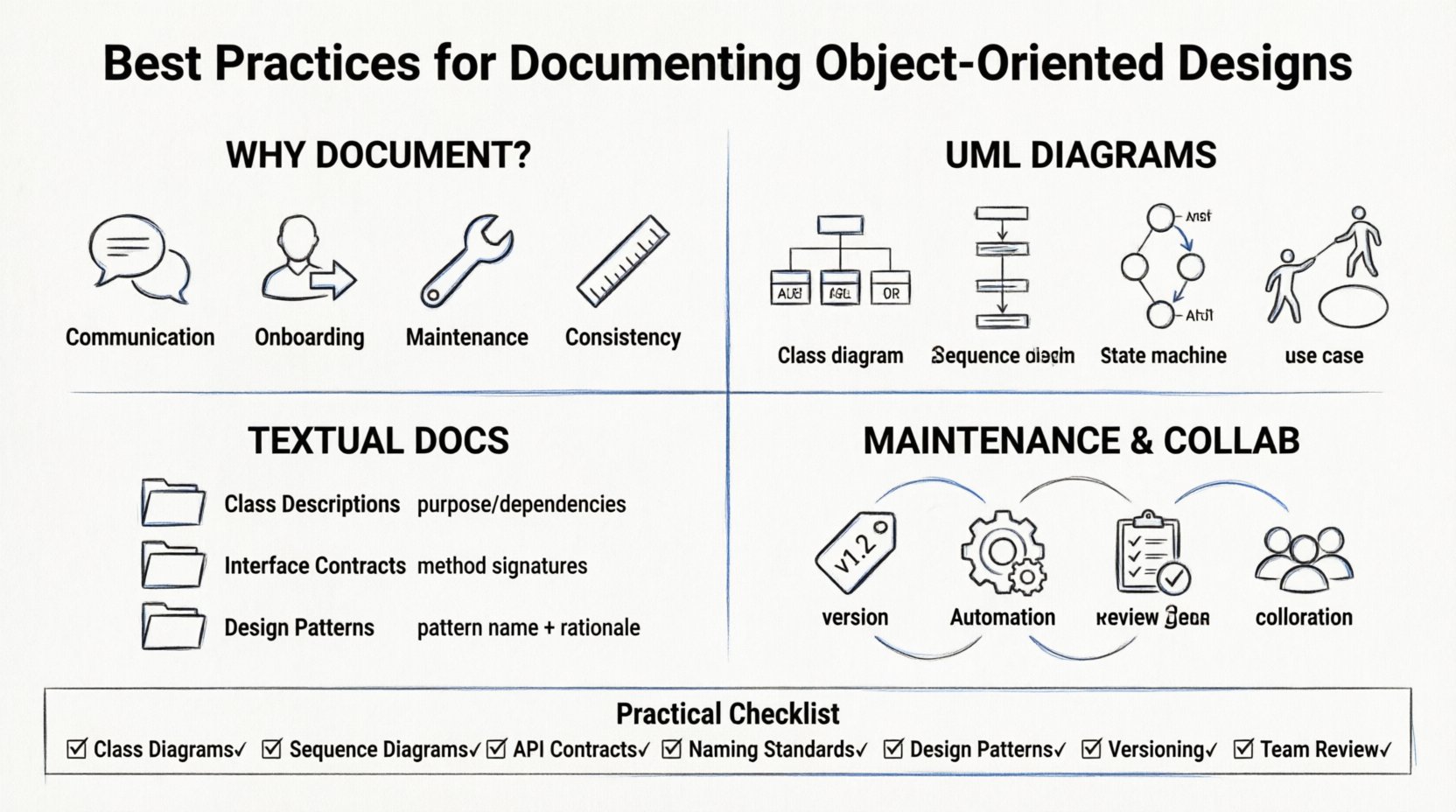
📚 The Foundation: Why Documentation Matters in OOAD
Object-oriented programming emphasizes encapsulation, inheritance, polymorphism, and abstraction. These principles create a structure that is powerful but complex. Documentation is not merely a formality; it is a critical component of the design lifecycle.
- Communication: It allows stakeholders, including non-technical project managers and clients, to understand the system’s capabilities and constraints.
- Onboarding: New team members can grasp the architecture quickly, reducing the time required to become productive.
- Maintenance: When bugs arise or features need modification, documentation provides the context needed to identify safe change points.
- Consistency: It enforces standards across the team, ensuring that naming conventions and architectural patterns remain uniform.
Without these documents, knowledge resides solely in the heads of individual developers. This creates a risk where the departure of a single person can leave the project in a vulnerable state. Proper documentation distributes this knowledge across the team.
🧩 Visualizing the Structure: UML Diagrams
Unified Modeling Language (UML) provides a standardized way to visualize the system. While text descriptions are necessary, diagrams offer a holistic view that is often faster to comprehend. For object-oriented design, specific diagram types serve distinct purposes.
1️⃣ Class Diagrams: The Backbone of Structure
Class diagrams are the most common artifact in OOAD. They depict the static structure of the system, showing classes, attributes, methods, and relationships.
- Classes: Define the blueprint for objects. Include visibility modifiers (public, private, protected) to clarify access control.
- Relationships: Clearly mark associations, aggregations, compositions, and inheritances. Use arrows to indicate directionality.
- Multiplicity: Specify cardinality (e.g., 1, 0..1, * ) to define how many instances relate to one another.
A well-documented class diagram should not just show connections but explain the *responsibility* of each class. Every class should have a clear Single Responsibility Principle (SRP) justification within the documentation.
2️⃣ Sequence Diagrams: Dynamic Behavior
While class diagrams show structure, sequence diagrams illustrate interaction over time. They are essential for understanding how objects collaborate to perform a specific task or handle an event.
- Lifelines: Represent objects or participants involved in the interaction.
- Messages: Show the flow of data and control between objects. Distinguish between synchronous and asynchronous calls.
- Focus of Control: Use activation bars to indicate when an object is actively performing an operation.
When documenting sequences, focus on the happy path first, then include alternative paths and error handling scenarios. This ensures the logic flow is complete.
3️⃣ State Machine Diagrams: Managing Complexity
Complex objects often have internal states that dictate their behavior. State machine diagrams are vital for entities like orders, tickets, or network connections.
- States: Define distinct conditions (e.g., Pending, Approved, Shipped).
- Transitions: Show the events that cause a change from one state to another.
- Actions: Specify activities triggered upon entry or exit of a state.
4️⃣ Use Case Diagrams: User Interaction
Use case diagrams provide a high-level view of system functionality from the user’s perspective. They define the boundary of the system and the actors interacting with it.
- Actors: Define roles (e.g., Administrator, Guest, Customer) rather than specific users.
- Use Cases: Describe functional requirements (e.g., “Place Order”, “Generate Report”).
- Relationships: Indicate inclusion, extension, or generalization between use cases.
| Diagram Type | Primary Focus | Best Used For | Complexity Level |
|---|---|---|---|
| Class Diagram | Static Structure | Core Architecture & Data Models | High |
| Sequence Diagram | Dynamic Interaction | Logic Flow & API Contracts | Medium |
| State Machine | Internal State | Complex Entity Lifecycle | Medium |
| Use Case | User Goals | Requirements Gathering | Low |
📝 Textual Documentation: Beyond Diagrams
Diagrams are powerful, but they cannot capture every nuance. Textual documentation fills the gaps with detailed descriptions, constraints, and business rules.
Class Descriptions
For every significant class, provide a textual description that includes:
- Purpose: A one-sentence summary of what the class does.
- Dependencies: List external classes or services it relies on.
- Preconditions: Requirements that must be met before the class can function correctly.
- Postconditions: The state of the system after the class completes its primary method.
Interface Contracts
Interfaces define the contract between components. Documenting them ensures that implementations adhere to expected behaviors.
- Method Signatures: Document parameters, return types, and exceptions.
- Behavioral Guarantees: Describe the expected outcome of calling specific methods.
- Thread Safety: Specify if the interface is safe to use in multi-threaded environments.
Design Patterns
When using standard design patterns (e.g., Singleton, Factory, Observer), document the rationale. Explain why a specific pattern was chosen over another.
- Problem Solved: What architectural issue does this pattern address?
- Implementation: How is it applied in this specific context?
- Trade-offs: Acknowledge any performance or complexity costs incurred.
🛠️ Naming Conventions and Standards
Consistency is the hallmark of maintainable code and documentation. Inconsistent naming makes searching and understanding difficult.
- Class Names: Use nouns. Capitalize each word (e.g.,
UserAccount). Avoid generic names likeDataorManager. - Method Names: Use verbs. Indicate action (e.g.,
CalculateTotal,ValidateInput). - Variable Names: Use descriptive nouns. Avoid single-letter variables except for loop counters.
- Comments: Write comments that explain why, not what. The code shows the what; the comment explains the why.
Adopt a shared style guide. If the team agrees on a specific format for comments or documentation headers, everyone must adhere to it. This reduces friction during code reviews.
🔄 Maintenance and Version Control
One of the greatest risks in software documentation is obsolescence. When code changes but documentation does not, the documentation becomes misleading and harmful. To prevent this, integrate documentation into the development workflow.
Versioning
- Assign version numbers to your design documents just as you do to the software.
- Keep a changelog for documentation updates. Note what changed, who changed it, and why.
- Store documentation in the same repository as the code to ensure they are deployed together.
Automation
Whenever possible, generate documentation from the code. Many tools can extract comments and structure from the source code to create reference manuals. This ensures that the documentation reflects the actual codebase.
- Code Generation: Use tools that parse source files to produce HTML or PDF reports.
- Validation: Run checks to ensure that the documentation matches the current code structure.
Review Cycles
- Include documentation updates in the definition of done for every task.
- During code reviews, verify that the relevant diagrams and descriptions are updated.
- Schedule periodic audits of the documentation to remove outdated sections.
🤝 Collaboration and Team Standards
Documentation is a team effort. It requires collaboration between architects, developers, and testers.
Shared Responsibility
Do not assign documentation solely to a single technical writer. Developers should own the technical accuracy, while architects ensure alignment with the overall vision. This shared ownership prevents bottlenecks.
Accessibility
- Store documents in a central location accessible to all team members.
- Use a format that is easy to search and navigate (e.g., Markdown, HTML).
- Ensure that diagrams are rendered clearly and are not just low-resolution images.
Feedback Loops
Create channels for feedback. If a developer finds a diagram confusing or inaccurate, they should have a clear process to report it. Treat documentation as a living artifact that evolves with the project.
🧪 Documentation for Testing
Design documentation should support the testing strategy. Testers need to understand the expected behavior to create effective test cases.
- Testable Design: Ensure that classes are designed to be testable. Document dependencies that need mocking.
- Input/Output Specifications: Clearly define valid and invalid inputs for key methods.
- Error Scenarios: Document how the system behaves under failure conditions.
This alignment reduces the gap between development and quality assurance, leading to higher confidence in the release.
📊 A Practical Documentation Checklist
To ensure nothing is missed, use the following checklist for every major component release.
| Item | Status | Notes |
|---|---|---|
| Class Diagrams Updated? | ☐ | Verify relationships and attributes |
| Sequence Diagrams Validated? | ☐ | Check message flow logic |
| API Contracts Documented? | ☐ | Include request/response formats |
| Naming Conventions Applied? | ☐ | Check against style guide |
| Design Patterns Identified? | ☐ | List patterns used and rationale |
| Version Number Incremented? | ☐ | Update changelog |
| Team Review Completed? | ☐ | Sign-off from lead architect |
🚀 Moving Forward
Creating high-quality documentation for object-oriented designs requires discipline and consistent effort. It is not a one-time task but a continuous practice woven into the development process. By focusing on clarity, consistency, and maintenance, teams can build a knowledge base that supports long-term success.
Remember that the goal is not to document everything, but to document the right things. Prioritize the information that reduces ambiguity and aids decision-making. As the system grows, so should the documentation, ensuring that the architecture remains understandable and adaptable.
Adopt these practices, refine them over time, and watch your project become more resilient. The effort invested in documentation pays dividends in reduced bugs, faster onboarding, and smoother evolution of the software.