


Introduction: The Future of Visual Knowledge Management
In today’s fast-paced development environment, documentation often becomes an afterthought—static, disconnected, and quickly outdated. But what if your documentation could evolve alongside your project? What if diagrams, specifications, and stakeholder communications lived in a single, intelligent ecosystem?
Enter Visual Paradigm OpenDocs: an AI-powered, web-based knowledge management platform that transforms how teams create, organize, and share technical documentation. More than just a documentation tool, OpenDocs serves as a “visual knowledge engine”—a centralized hub where professional diagramming meets rich text editing, powered by artificial intelligence and unified by the revolutionary Pipeline architecture.
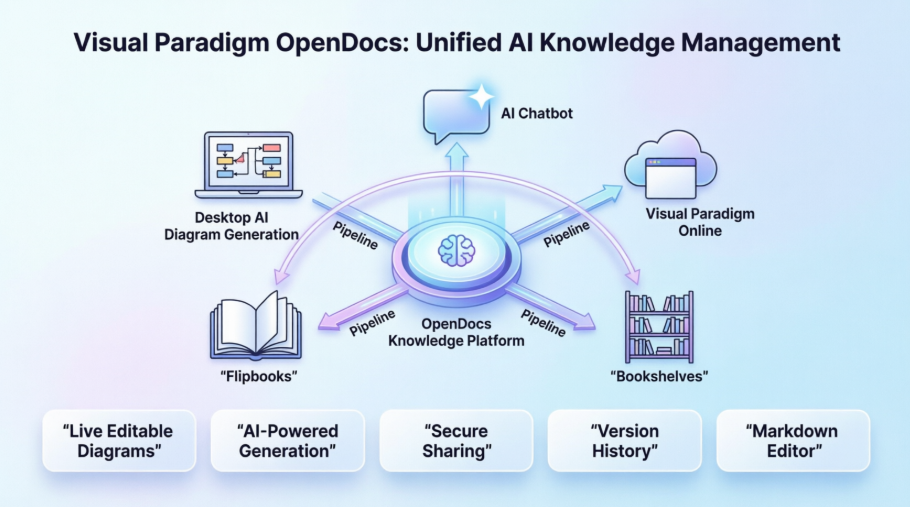
Whether you’re a solo developer documenting a side project or an enterprise team managing complex system architectures, this guide will reveal why OpenDocs has become a secret weapon for modern knowledge workers—and how you can harness its full potential.
Why OpenDocs Is Powerful: The Secret Weapons Inside
OpenDocs isn’t just another documentation platform. Its power comes from a unique combination of features that eliminate traditional friction points in technical communication. Here are the “secret weapons” that set it apart:
🔑 Secret Weapon #1: The OpenDocs Pipeline – Your Universal Connector
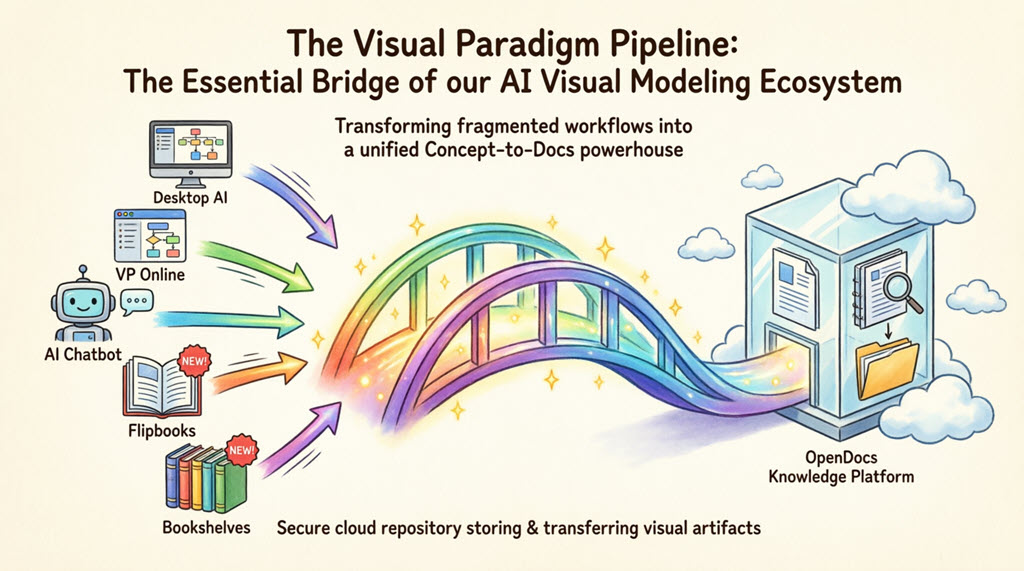
The Pipeline is the high-speed connective tissue of the Visual Paradigm ecosystem. It’s a secure, cloud-based centralized repository designed to store, manage, and transfer artifacts—the valuable visual assets you create across platforms.
A Single Source of Truth: The Pipeline eliminates the friction of manual downloads and uploads. It preserves the editability of your models and ensures that every stakeholder is looking at the most recent revision of a design.
🔑 Secret Weapon #2: AI-Powered Diagram Generation
Stop wrestling with diagram tools. OpenDocs includes an AI Diagram Generator that transforms natural language descriptions into complete, editable diagrams in seconds. Describe your system architecture, business process, or data flow in plain English—and watch as professional-grade visuals appear instantly.
🔑 Secret Weapon #3: Live, Editable Diagrams (No More Static Images)
Unlike traditional documentation where you paste static PNG/JPG screenshots, OpenDocs embeds live diagrams. Using the Pipeline, diagrams created in Visual Paradigm Desktop or Online can be synced so that when the model updates, the documentation reflects those changes automatically—eliminating stale documentation forever.
🔑 Secret Weapon #4: Integrated Rich Txt Editor with Diagram Awareness
Write technical specifications and create professional diagrams in the same workspace. The rich text editor supports syntax highlighting, tables, and live previews, while the built-in diagram editor lets you create UML, BPMN, ERD, Flowcharts, Mind Maps, and more—without ever leaving the page.
🔑 Secret Weapon #5: Hierarchical Knowledge Tree for Enterprise-Scale Organization
Structure complex information to mirror your codebase or project architecture using nested folders and a hierarchical “Knowledge Tree.” This isn’t just organization—it’s intentional knowledge architecture that scales with your team.
🔑 Secret Weapon #6: Secure, Read-Only Sharing for Stakeholders
Simplify sharing complex technical info with non-technical stakeholders through secure, read-only links. Anyone with a browser can view the entire knowledge base—no software installation required.
Browse Share History: Stay Organized with OpenDocs
In our recent updates, we’ve covered how to select specific pages, choose between static and live modes, and embed content. But once you have shared several different versions of your project, how do you keep track of them? Today, we are exploring Browse Share History in Visual Paradigm OpenDocs.
Think of the Share History as your command center. As a professional knowledge management platform, we believe that staying organized is just as important as the information itself.
Why is Share History Important?
When you use a knowledge management tool for large projects, you might generate multiple share links for different stakeholders. Share History allows you to:
- Audit Your Access: See exactly which pages were shared and when.
- Track Versions: Distinguish between different Static Snapshots you’ve sent out over the months.
- Clean Up: Identify old or outdated links that are no longer needed.
How to Browse Your History
Accessing your history is straightforward and integrated directly into your workflow:
- Open the Share Dialog: Click the Share button in the top right corner.
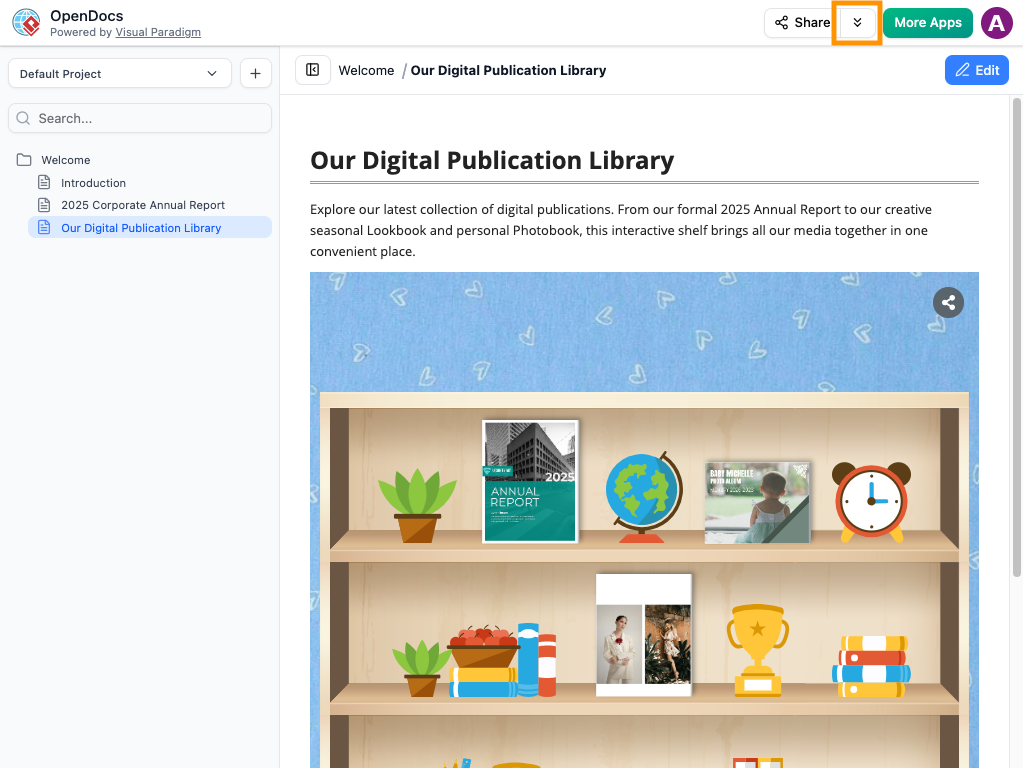
- View History: Look for the Browse Share History option (typically located within the sharing interface).
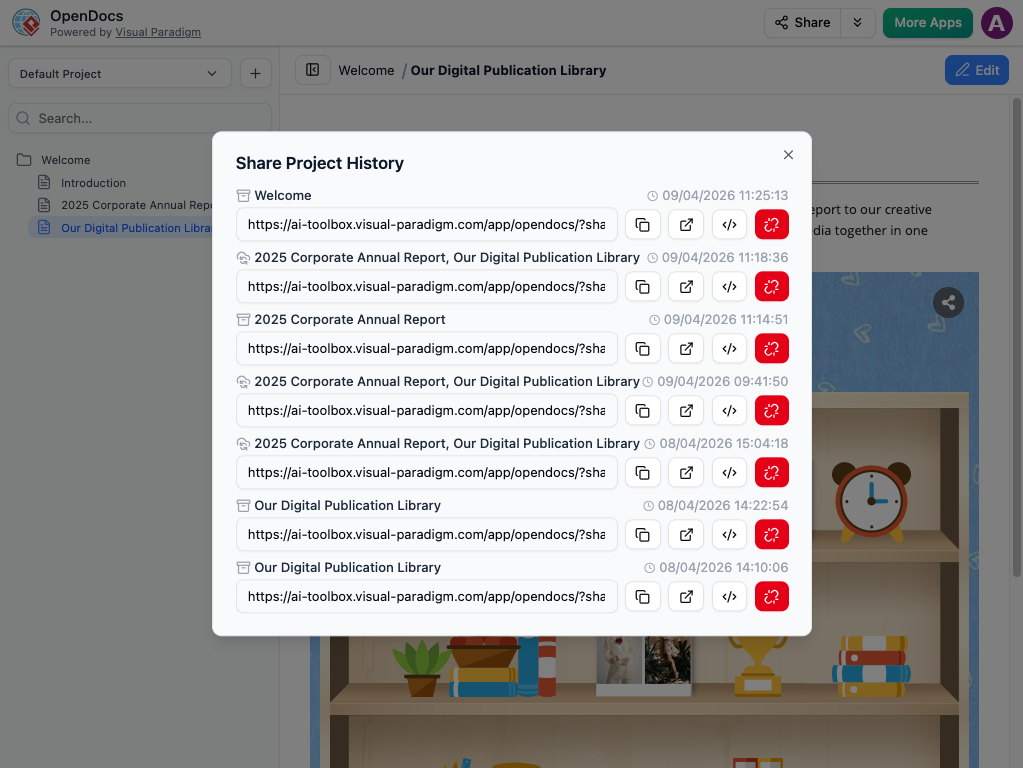
- Review Details: Here, you will see a list of all active and past shares, including their descriptions, the date they were created, and whether they are “Live” or “Static.”
- Manage Links: From this view, you can quickly copy a URL again if a stakeholder loses their link, or grab the embed code for an existing share.
Best Practices for Organized Sharing
To get the most out of your knowledge management platform, we recommend these habits:
- Use Clear Descriptions: When you share, use the description field (e.g., “Internal HR Policy – July Update”). This makes your Share History much easier to read later.
- Periodic Reviews: Check your history once a month to ensure you aren’t sharing pages that have become obsolete.
Want to see your sharing history? Visit the OpenDocs feature page.
The Visual Paradigm Pipeline: The Essential Bridge of our AI Visual Modeling Ecosystem
Transforming fragmented workflows into a unified, “Concept-to-Docs” powerhouse for modern teams.
What is the Pipeline?
The Pipeline is the high-speed connective tissue of the Visual Paradigm ecosystem. It is a secure, cloud-based centralized repository designed to store, manage, and transfer artifacts—the valuable visual assets you create across our various platforms.
In the context of Visual Paradigm’s AI Visual Modeling Ecosystem, the Pipeline acts as the vital bridge between our four core pillars: Visual Paradigm Desktop AI Diagram Generation, AI Chatbot, OpenDocs Knowledge Management Platform, and Step-by-Step AI-Powered Web Apps. It ensures that a diagram created in one “pillar” doesn’t stay trapped there; instead, it flows instantly to where it’s needed most: your documentation and publication hub.
The Gateway to OpenDocs: Your Publication Powerhouse
While the Pipeline is the vehicle, Visual Paradigm OpenDocs is the destination. OpenDocs is our premier knowledge management platform, specifically engineered to be “diagram-aware.” By utilizing the Pipeline, you can move work from any Visual Paradigm feature directly into a professional document, technical manual, or knowledge base.
This “Work-to-Publish” workflow allows you to:
- Model with Precision: Use high-end desktop or online tools to create complex system architectures.
- Generate with Speed: Use AI to brainstorm and visualize ideas instantly.
- Publish with Authority: Seamlessly embed those visuals into OpenDocs to create living documentation that evolves alongside your project.
The 5 Core Connections: What You Can Send to the Pipeline
We are constantly encircling our apps with deeper connectivity. Here are the five critical ways you can currently leverage the Pipeline to streamline your workflow:
1. Visual Paradigm Desktop to OpenDocs
For the power user. Create intricate UML, BPMN, or SysML models in our professional desktop modeling software and export to OpenDocs via the pipeline. This moves your local modeling expertise into a global, accessible knowledge base.
How to send a diagram from Visual Paradigm Desktop to OpenDocs
- In Visual Paradigm Desktop, open the diagram you wish to send.
- Right-click on the diagram and select Export > Send to OpenDocs Pipeline.
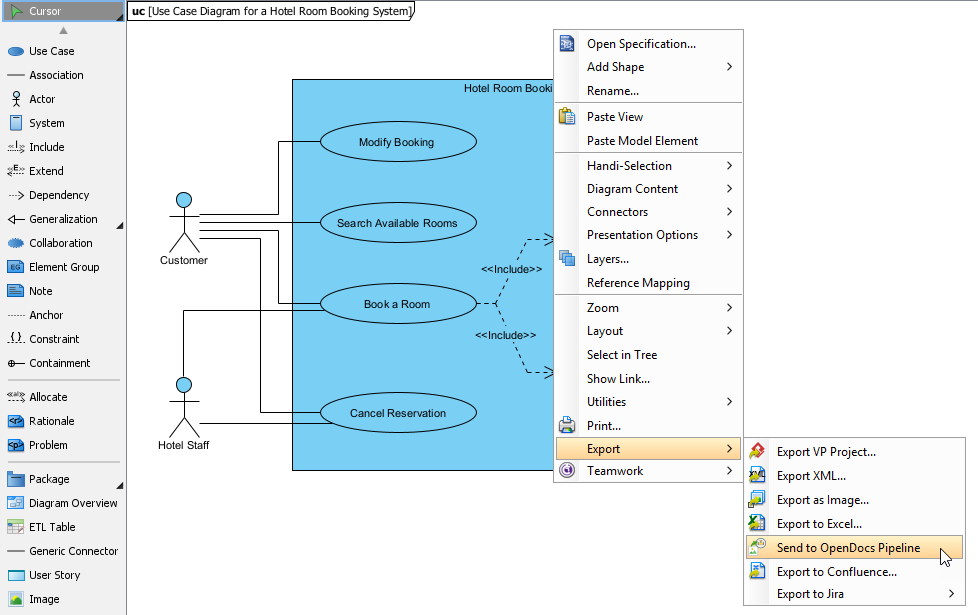
- When prompted, save your project by clicking OK.
- (Optional) Enter a comment. This will be visible in the Pipeline pane within OpenDocs to help you identify the version or purpose of the artifact.
- Confirm the export to output your diagram to the cloud.
- Once your diagram is in the Pipeline, you can place it anywhere in your knowledge base: Open any document page in OpenDocs and click Edit. Click on the page where you want to insert the diagram. On the toolbar, click Insert. In the Insert window, select Pipeline from the left-hand sidebar. Your sent diagrams will appear here.
Extended Reading: New Feature: Seamlessly Export Visual Paradigm Desktop Diagrams to OpenDocs
2. Visual Paradigm Online to OpenDocs
The 100% cloud workflow. Whether you are designing a technical flowchart or a high-impact marketing graphic in your browser, the Pipeline pass your work directly to your documentation in OpenDocs without a single local download.
How to send a diagram from Visual Paradigm Online to OpenDocs
- Open your diagram or graphic in Visual Paradigm Online.
- In the top menu, select Export > Send to OpenDocs Pipeline.
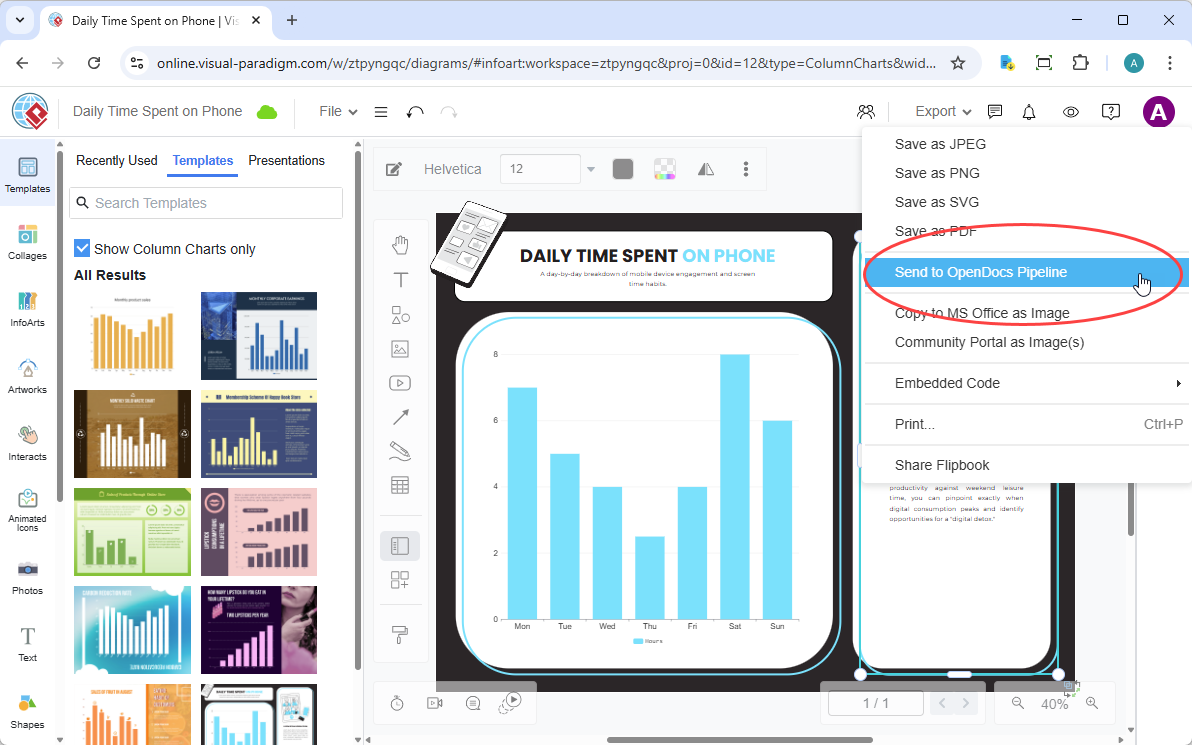
- (Optional) Add a comment to describe the artifact. This makes it easier to find later in the Pipeline pane.
- Confirm the export. Your visual is now securely stored in the Pipeline.
- Once your diagram is in the Pipeline, you can place it anywhere in your knowledge base: Open any document page in OpenDocs and click Edit. Click on the page where you want to insert the diagram. On the toolbar, click Insert. In the Insert window, select Pipeline from the left-hand sidebar. Your sent diagrams will appear here.
Extended Reading: New Feature: Send Your Visual Paradigm Online Creations Directly to OpenDocs
3. AI Chatbot to OpenDocs
Conversational documentation. Ask our AI Chatbot to generate a system architecture or a business process diagram. With one click, that AI-generated artifact is ready to be inserted into your OpenDocs pages.
How to send a diagram from Visual Paradigm AI Chatbot to OpenDocs
- Generate Your Diagram Create or refine your diagram (UML, flowchart, architecture, BPMN, etc.) in the AI Chatbot.
- Once the AI has produced the visual you need, click Export and select Send to OpenDocs Pipeline.
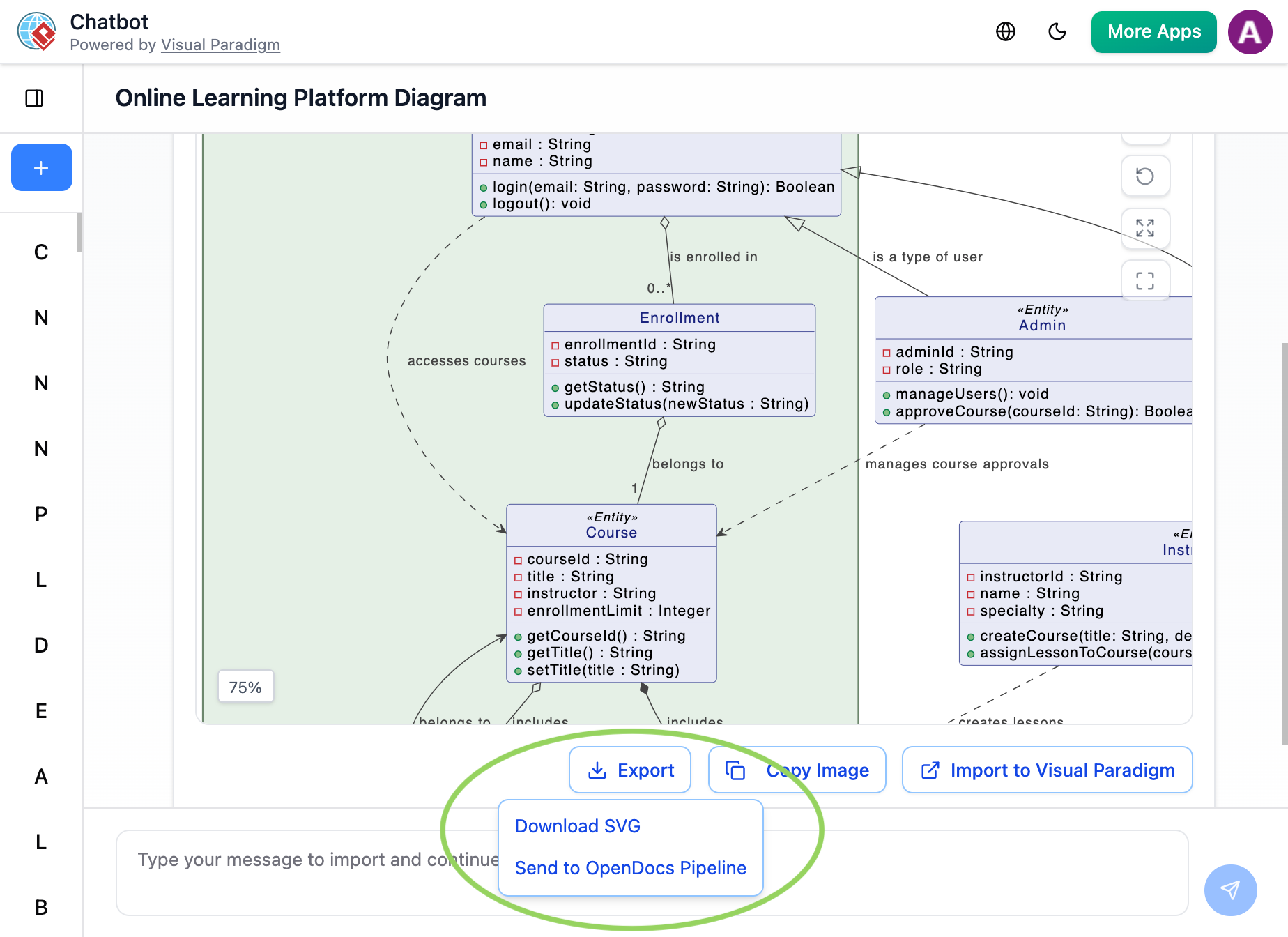
- Go to your desired document page in OpenDocs and enter the editor. Click Insert on the toolbar and select Pipeline. Your AI-generated diagram will be waiting for you in the asset list.
Extended Reading: New Feature Alert: Send Diagrams from Visual Paradigm AI Chatbot Directly to OpenDocs!
4. Flipbooks to OpenDocs (New!)
Bring interactive media into your knowledge management. You can now send your digital Flipbooks through the Pipeline, allowing you to embed rich, flippable catalogs or brochures directly within your OpenDocs pages.
5. Bookshelves to OpenDocs (New!)
Organize and publish at scale. Send entire Bookshelves to OpenDocs to create a centralized library of resources within your documentation workspace, making it easier than ever to manage large volumes of information.
Why the Pipeline is a Game-Changer
| Traditional Workflow | The Pipeline Workflow |
|---|---|
| Manual Export (PNG/JPG) | Instant “Send to Pipeline” |
| Manual Re-uploading on changes | “Update to Latest Revision” in one click |
| Disconnected, static images | Deep-linked, editable artifacts |
| Scattered files on local drives | Centralized cloud repository |
Core Technical Features at a Glance
- Rich Text Editor: Supports rich format tools for code blocks, tables, etc.
- Extensive Diagram Support: Includes specialized tools for UML (Class, Sequence, Deployment), Flowcharts, Data Flow Diagrams (DFD), Entity-Relationship Diagrams (ERD), Mind Maps, and PERT charts.
- Cloud-Based Accessibility: Being fully browser-based, it allows for immediate setup and remote team collaboration across any device.
Conclusion: Your Knowledge, Unified and Future-Ready
Visual Paradigm OpenDocs represents more than a tool—it’s a paradigm shift in how teams create, manage, and share technical knowledge. By combining AI-powered automation, seamless diagram integration, and the revolutionary Pipeline architecture, OpenDocs eliminates the fragmentation that has long plagued technical documentation.
The “secret weapons” we’ve explored—from live editable diagrams to hierarchical knowledge organization, from AI-generated visuals to secure stakeholder sharing—aren’t just features. They’re solutions to real-world problems that slow down development, create miscommunication, and produce outdated documentation.
Whether you’re documenting a microservice architecture, onboarding new team members, or presenting system designs to executives, OpenDocs provides the unified workspace you need to work smarter, not harder.
The future of knowledge management is visual, intelligent, and connected. With OpenDocs and the Pipeline ecosystem, that future is available today.
Ready to transform your documentation workflow? Start exploring OpenDocs at ai.visual-paradigm.com/tool/opendocs and experience the power of unified visual knowledge management.