


Introduction
Use case diagrams serve as a fundamental tool in software development and systems analysis, providing a visual representation of how users interact with a system to achieve specific goals. As a core component of the Unified Modeling Language (UML), use case diagrams enable stakeholders to understand system functionality, identify actors, and map out relationships between different system components.
In today’s rapidly evolving technological landscape, the approach to creating use case diagrams has transformed dramatically. While traditional manual methods provided precise control over diagram creation, the emergence of AI-powered tools has revolutionized the requirements engineering process. This comprehensive guide explores both the foundational techniques for manually crafting use case diagrams using Visual Paradigm’s robust toolset and the cutting-edge AI capabilities that can automate and enhance the entire modeling lifecycle. Whether you’re a seasoned systems analyst or a business stakeholder new to modeling, this guide will equip you with the knowledge to create professional, standards-compliant use case diagrams efficiently and effectively.
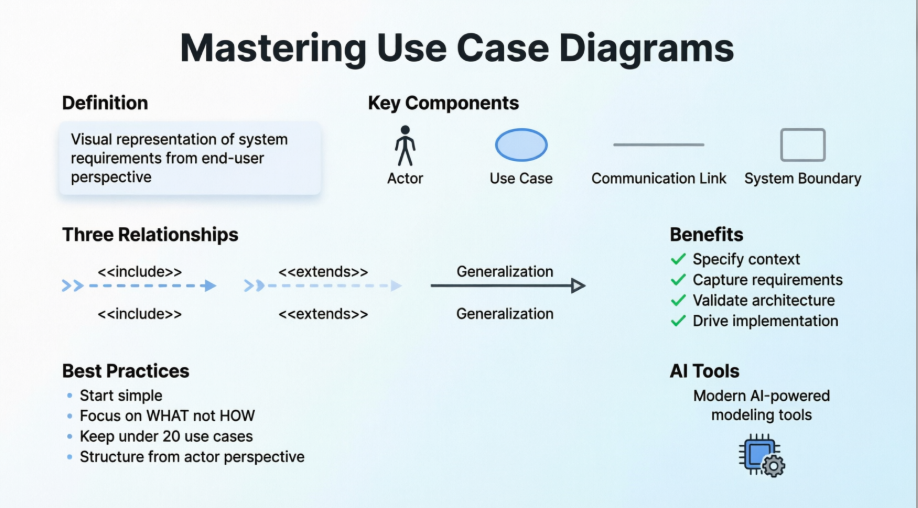
Understanding Use Case Diagrams
A use case diagram is a type of UML diagram that enables you to model system functions (i.e., goals) as well as the actors that interact with those functions. You can draw use case diagrams in Visual Paradigm as well as document the use case scenario of use cases using the flow-of-events editor.
Part 1: Traditional Use Case Diagram Creation
Creating a Use Case Diagram
Perform the steps below to create a UML use case diagram in Visual Paradigm:
- Select Diagram > New from the application toolbar.
- In the New Diagram window, select Use Case Diagram.
- Click Next.
- Enter the diagram name and description. The Location field enables you to select a model to store the diagram.
- Click OK.
Drawing a System
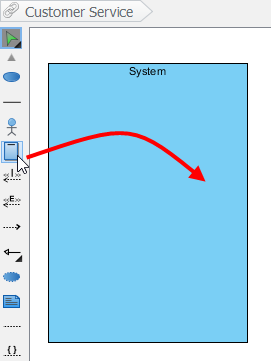
To create a system in use case diagram, select System on the diagram toolbar and then click it on the diagram pane. Finally, name the newly created system when it is created.
 |
|---|
| Create a system |
Drawing an Actor
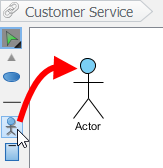
To draw an actor in use case diagram, select Actor on the diagram toolbar and then click it on the diagram pane. Finally, name the newly created actor when it is created.
 |
|---|
| Create an actor |
Drawing a Use Case
Besides creating a use case through diagram toolbar, you can also create it through Resource Catalog:
- Move the mouse over a source shape (e.g. an actor).
- Press on the Resource Catalog button and drag it out.
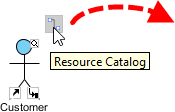
Resource Catalog - Release the mouse button until it reaches your preferred place.
- Select Association -> Use Case from Resource Catalog.
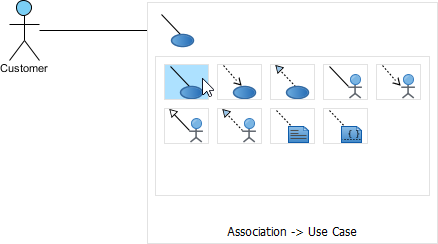
To create a use case - The source shape and the newly created use case are connected. Finally, name the newly created use case.
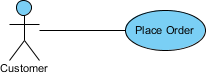
Use Case created
Line Wrapping Use Case Name
If a use case is too wide, you may resize it by dragging the filled selectors for a better outlook. As a result, the name of use case will be line-wrapped automatically.
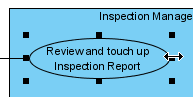 |
|---|
| Resize a use case |
| NOTE: | Alternatively, you can press Alt + Enter to force a new line. |
|---|
Drawing <> Relationship
To create an extend relationship, move the mouse over a use case, press and drag out its Resource Catalog button. Then, release the mouse button at the preferred place and select Extend -> Use Case from Resource Catalog. The use case with extension points and a newly created use case are connected. After you name the newly created use case, you can name the extension point.
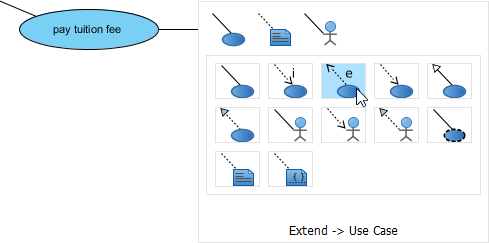 |
|---|
| Create an extend relationship |
Drawing <> Relationship
To create an include relationship, move the mouse over a use case, press and drag out its Resource Catalog button. Then, release the mouse button at the preferred place and select Include -> Use Case from Resource Catalog. A new use case together with an include relationship is created. Finally, name the newly created use case.
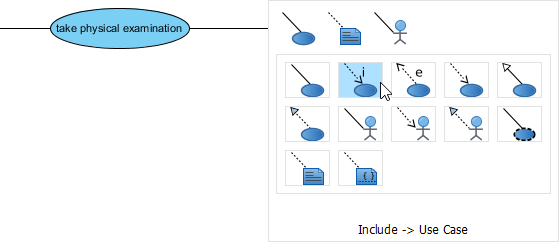 |
|---|
| Include relationship is created |
Structuring Use Cases with Package
You can organize use cases with package when there are many of them on the diagram.
Select Package on the diagram toolbar.
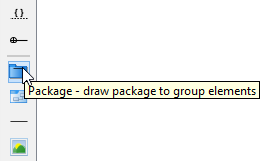 |
|---|
| Create a package |
Drag the mouse to create a package surrounding those use cases.
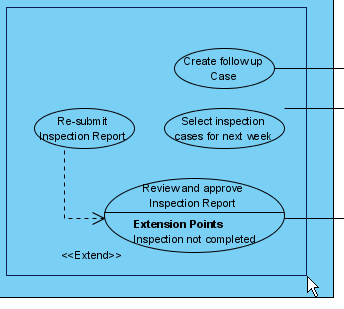 |
|---|
| Surround use cases with package |
Finally, name the package.
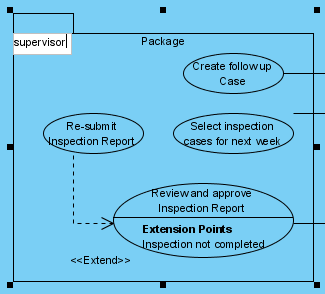 |
|---|
| Name the package |
Drawing Business Use Case
The uml diagram tool also supports the representation of business actor and use case. To show an ordinary use case as business use case:
- Right click on a use case and select Model Element Properties > Business Model from the pop-up menu.
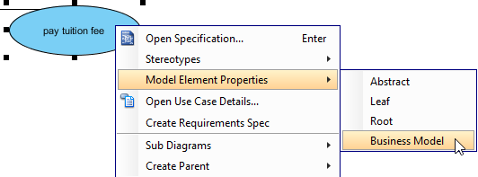
Click Business Model - After selected, an extra slash will be shown on the left edge of the use case.
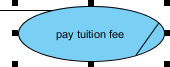
Business Model
Part 2: Visual Paradigm’s AI Ecosystem
Visual Paradigm’s AI Ecosystem is a suite of integrated tools designed to automate the transition from natural language descriptions to structured system models and documentation. It centers around the Use Case Modeling Studio, which serves as an automated assistant for requirements engineering.
AI Ecosystem Components
- Use Case Modeling Studio: A web-based application that transforms plain language system descriptions into complete models and documentation.
- AI Chatbot: A cloud-based assistant integrated into the Visual Paradigm Desktop environment that generates diagrams through conversation.
- UCDD Assistant: The Use Case Driven Development Assistant guides users through the entire lifecycle from problem statement to implementation.
- Specialised AI Apps: A library of tools for specific tasks, such as the Textual Analysis Tool for identifying domain classes and the ERD Tool for database design.
Key Feature List
Automated Modeling & Diagramming
- Text-to-Diagram: Instantly generates Use Case, Activity, Sequence, Class, and ER diagrams from a simple goal statement or prompt.
- Diagram Refinement: Analyzes existing diagrams to suggest and apply UML relationships like
<<include>>and<<extend>>. - Activity Diagram Generator: Specifically maps detailed use case narratives into visual flowcharts.
Advanced Requirements Analysis
- AI Use Case Description: Automatically generates structured descriptions including preconditions, postconditions, and standard/alternative/exception flows.
- Scenario Analyzer: Converts text-based use cases into structured decision tables and matrices.
- Textual Analysis: Pinpoints candidate domain classes, attributes, and operations from problem statements.
Documentation & Testing
- AI-Powered Test Case Creation: Produces detailed test scenarios, steps, and expected results directly from use case specifications.
- Automated SDD Reporting: Assembles scope, models, and test cases into professional Software Design Documents (PDF or Markdown) with one click.
- Gherkin Scenario Generation: Converts flows into Gherkin format for automated QA and acceptance testing.
Integration & Workflow
- Desktop & Web Sync: Features created in the VP Online workspace can be imported into Visual Paradigm Desktop for further modeling.
- Interactive Dashboard: Provides a real-time overview of project health, including description completeness and diagram coverage.
Part 3: Feature Comparison – Traditional vs. AI-Powered
Visual Paradigm’s use case features have evolved from manual drawing tools to an AI-powered ecosystem that automates the entire requirements lifecycle. While traditional features provide fine-grained manual control, the new AI features act as an intelligent assistant to accelerate modeling.
| Feature | Traditional Designer | AI-Powered Features |
|---|---|---|
| Creation Process | Manual brainstorming, documentation, and painstakingly drawing each element. | Text-to-Diagram: Generates fully rendered UML diagrams from plain English prompts in seconds. |
| Use Case Details | Manually writing narratives, pre/postconditions, and flows of events. | Automated Generation: Creates multi-section specifications (pre/postconditions, main/alt flows) from a goal statement. |
| Diagram Relationships | Manually identifying and adding <<include>> and <<extend>> associations. |
AI Refinement: Automatically detects missing associations and suggests standard-compliant relationships. |
| Traceability | Manual cross-referencing between diagrams and text descriptions. | Integrated Ecosystem: Automatically derives Activity, Sequence, and Class diagrams directly from use case text. |
| Testing & QA | Manually drafting test cases based on finalized requirements. | AI Test Case Creation: Instantly produces detailed test scenarios, steps, and expected results from specifications. |
Part 4: Key Benefits of AI Features
The Visual Paradigm AI Ecosystem transforms use case modeling from a “reactive” task into a “proactive” assisted workflow.
Extreme Time Efficiency
Reduces initial modeling effort by 70% to 90%. Users move from a simple idea to a finished draft in minutes rather than hours or days.
Improved Accuracy & Standards
Minimizes human errors such as omitted exception flows and misaligned postconditions. The AI is trained on formal modeling standards to ensure UML 2.0 compliance.
Ensures Completeness
The AI proactively suggests overlooked elements, such as edge cases, exception paths, or additional actors that might be missed during manual brainstorming.
Democratized Modeling
Enables stakeholders, business analysts, and non-experts to generate professional-grade diagrams using natural language, bridging the gap between requirements and technical design.
Automated Documentation
Assembles scope, models, and test cases into polished Software Design Documents (SDD) in PDF or Markdown format with a single click.
Related Resources
The following resources may help you to learn more about the topic discussed in this page:
- What is Use Case Diagram? – An introductory guide to Use Case Diagram
- The 10-tips to create a professional use case diagram
- User’s Guide – Drawing a use case diagram
- Visual Paradigm on YouTube
Conclusion
The landscape of use case diagram creation has undergone a remarkable transformation, evolving from labor-intensive manual processes to sophisticated AI-powered automation. This guide has demonstrated both the foundational techniques for traditional use case diagram creation and the revolutionary capabilities of Visual Paradigm’s AI ecosystem.
For practitioners who require precise control and deep understanding of UML standards, the traditional manual approach remains invaluable. The step-by-step methods for creating systems, actors, use cases, and relationships provide the granularity necessary for complex modeling scenarios. However, for teams seeking to accelerate their development lifecycle, reduce human error, and democratize the modeling process across diverse stakeholders, AI-powered features offer unprecedented advantages.
The integration of AI capabilities—ranging from text-to-diagram generation to automated test case creation—represents more than just a technological upgrade; it signifies a paradigm shift in how we approach requirements engineering. By reducing modeling time by up to 90% while simultaneously improving accuracy and completeness, these tools enable teams to focus on what truly matters: understanding user needs and delivering value.
Whether you choose the traditional path, embrace AI automation, or adopt a hybrid approach that leverages the strengths of both methodologies, Visual Paradigm provides the comprehensive toolset necessary to create professional, standards-compliant use case diagrams. As software systems continue to grow in complexity, mastering both traditional modeling techniques and AI-powered automation will become increasingly essential for successful system design and development.
Related posts:
 Transforming Use Case Diagrams into Detailed Reports with AI
 From Text to State Diagram: How AI Makes UML Modeling Effortless
Mastering UML Component Diagrams with AI: A Comprehensive Guide to Visual Paradigm’s AI-Powered Modeling Revolution
From Text to State Diagram: How AI Makes UML Modeling Effortless
Mastering UML Component Diagrams with AI: A Comprehensive Guide to Visual Paradigm’s AI-Powered Modeling Revolution
 🚀 The Ultimate Guide to AI-Powered Use Case Diagrams with Visual Paradigm