Building software is often mistaken for simply typing code until it works. However, seasoned developers know that the real magic happens before the first line is written. This process is known as Object-Oriented Analysis and Design, or OOA/D. It is the bridge between a vague idea and a functional application. 🏗️
For beginners, understanding this workflow is essential. It transforms chaotic thoughts into structured logic. Without this foundation, code becomes a tangled web of dependencies that is difficult to maintain. This guide walks you through the entire lifecycle, from gathering initial requirements to the final implementation.
1. Understanding the Foundation: What is OOA/D? 🔍
Object-Oriented Analysis and Design is a methodology used to model systems using objects and their interactions. It focuses on the “what” (Analysis) before the “how” (Design). This separation ensures that the solution fits the problem, rather than forcing the problem to fit the solution.
- Object-Oriented Analysis (OOA): Focuses on understanding the problem domain. What are the entities? What do they need to do? Who interacts with them?
- Object-Oriented Design (OOD): Focuses on the solution domain. How will the objects communicate? What interfaces are needed? How is data stored?
Thinking in objects allows developers to manage complexity. Instead of viewing a system as a massive list of functions, you view it as a collection of interacting agents. Each agent has responsibilities and state.
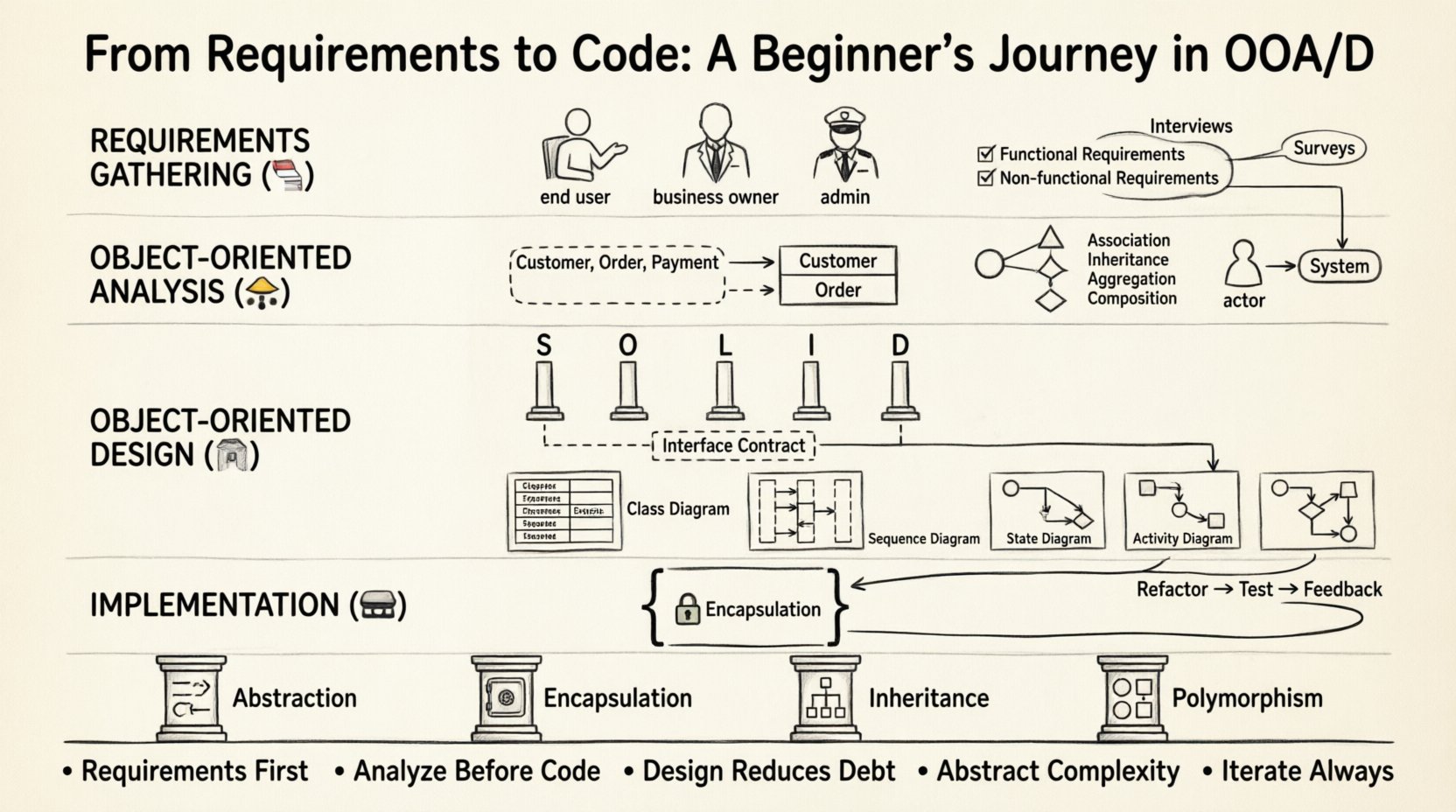
2. Phase One: Requirements Gathering 📝
The journey begins with understanding what needs to be built. This phase is critical. If the requirements are unclear, the design will suffer, regardless of how elegant the code is.
2.1 Identifying Stakeholders
Every software system serves a purpose. You need to know who benefits from it.
- End Users: The people who will interact with the system daily.
- Business Owners: The individuals defining the goals and success metrics.
- System Administrators: Those responsible for maintenance and deployment.
2.2 Functional vs. Non-Functional Requirements
Distinguishing between what the system does and how it performs is vital.
| Requirement Type | Focus Area | Example |
|---|---|---|
| Functional | Features and behaviors | The system must calculate tax automatically. |
| Non-Functional | Quality attributes | The system must load in under 2 seconds. |
| Constraints | Limitations | Must run on mobile devices only. |
2.3 Techniques for Gathering Needs
There is no single right way to collect information. Common methods include:
- Interviews: One-on-one discussions with stakeholders.
- Surveys: Collecting data from a larger group of potential users.
- Observation: Watching how users currently perform tasks manually.
- Prototyping: Creating a rough mockup to get feedback early.
3. Phase Two: Object-Oriented Analysis (OOA) 🧩
Once requirements are clear, the analysis phase begins. This is where you identify the core concepts of the domain. You are looking for nouns and verbs in the requirements.
3.1 Identifying Classes and Objects
Scan the requirements text for nouns. These often represent classes or objects. Verbs often represent methods or behaviors.
- Noun Example: “The customer places an order.” → Customer and Order are likely objects.
- Verb Example: “The system calculates the total.” → CalculateTotal is likely a behavior.
3.2 Defining Relationships
Objects do not exist in isolation. They relate to one another. Understanding these relationships prevents design flaws later.
- Association: A structural link between objects (e.g., a Driver owns a Car).
- Inheritance: A relationship where one class is a specialized version of another (e.g., a Sedan is a Car).
- Aggregation: A part-whole relationship where the part can exist independently (e.g., A Library has Books).
- Composition: A strict part-whole relationship where the part cannot exist without the whole (e.g., A House has Rooms).
3.3 Use Case Modeling
Use cases describe how users interact with the system to achieve a goal. This helps visualize the flow of data and actions.
- Actors: External entities (users or other systems).
- Scenarios: Specific paths an actor takes to achieve a goal.
- Preconditions: What must be true before the use case starts.
- Postconditions: The state of the system after the use case completes.
4. Phase Three: Object-Oriented Design (OOD) 🏗️
Design translates the analysis model into a blueprint for construction. This phase defines the architecture and structure of the code.
4.1 Design Principles
Adhering to established principles ensures the code remains flexible and robust.
- SOLID Principles: A set of guidelines for maintainable code.
- Separation of Concerns: Dividing the system into distinct features.
- High Cohesion: Keeping related responsibilities within a single class.
- Low Coupling: Minimizing dependencies between different classes.
4.2 Defining Interfaces
An interface defines how an object behaves without exposing how it works internally. This is crucial for abstraction.
- It allows different implementations to be swapped without breaking the system.
- It sets a contract that all implementing classes must follow.
4.3 Diagramming the System
Visualizing the design helps communicate ideas to the team. Standard notations are used for clarity.
| Diagram Type | Purpose | When to Use |
|---|---|---|
| Class Diagram | Shows structure and relationships | During detailed design phase |
| Sequence Diagram | Shows interaction over time | When defining complex flows |
| State Diagram | Shows lifecycle of an object | For objects with complex states (e.g., Orders) |
| Activity Diagram | Shows business processes | Mapping workflows |
5. Phase Four: Implementation 💻
After the design is approved, coding begins. This is where the abstract concepts become concrete reality.
5.1 Translating Design to Code
Each class in your design becomes a file or module in your codebase. Methods map to functions. Attributes map to variables.
- Encapsulation: Hide data inside the class. Only expose what is necessary via public methods.
- Constructors: Initialize objects with valid data before they are used.
- Access Modifiers: Control visibility (public, private, protected) to protect internal state.
5.2 Iterative Development
Rarely is the first implementation perfect. Development is often iterative.
- Refactoring: Improving the structure of existing code without changing its behavior.
- Testing: Writing tests to ensure each component works as expected.
- Feedback Loops: Reviewing code with peers to catch logical errors early.
6. Core Concepts to Master 🧠
To succeed in OOA/D, you must internalize the four pillars of object-oriented programming.
6.1 Abstraction
Abstraction simplifies complexity. It allows you to focus on essential features without worrying about background details.
- Example: You press a button to turn on a light. You do not need to know how the electricity flows through the wires.
6.2 Encapsulation
Encapsulation bundles data and methods together. It prevents external code from modifying internal data directly.
- Example: A bank account class allows you to deposit money but prevents you from setting the balance directly.
6.3 Inheritance
Inheritance allows new classes to adopt properties and behaviors from existing classes.
- It promotes code reuse.
- It establishes a hierarchy of relationships.
6.4 Polymorphism
Polymorphism allows objects to be treated as instances of their parent class rather than their actual class. This means different objects can respond to the same method call in different ways.
- Example: A Draw method works differently for a Circle object and a Square object.
7. Common Pitfalls to Avoid ⚠️
Even experienced developers make mistakes. Knowing what to watch out for saves time.
- God Objects: Classes that do too much. Break them down into smaller, focused classes.
- Over-Engineering: Creating complex designs for simple problems. Keep it simple.
- Ignoring Requirements: Building features that nobody asked for. Stay aligned with the initial goals.
- Hardcoding: Writing values directly into the code. Use configuration or constants instead.
- Tight Coupling: When classes rely too heavily on each other. Change one, and you break the other.
8. Tools for the Journey 🛠️
While the methodology is independent of software, specific tools can aid the process.
- Diagramming Software: Used for creating class and sequence diagrams.
- Code Editors: Where the actual logic is written.
- Version Control: Tracks changes to the code over time.
- Collaboration Platforms: Helps teams communicate requirements and design decisions.
9. Moving Forward 🏃
The transition from requirements to code is a skill that develops over time. It requires patience and discipline. Start small. Analyze a simple problem before tackling a complex system.
Focus on clarity. If you cannot explain your design to a colleague, the design is likely too complex. Refine your understanding of the core concepts. Practice drawing diagrams. Write code that reflects your analysis.
Remember, the goal is not just to make the computer run, but to create a system that is understandable, maintainable, and scalable. By following the OOA/D path, you build a strong foundation for your career. 🌟
Summary of Key Takeaways ✅
- Requirements are King: Never start coding without understanding the problem.
- Analysis First: Define the objects before defining the code.
- Design Matters: A good design reduces technical debt.
- Abstraction is Key: Hide complexity to manage it.
- Iterate: Software development is rarely linear.
This journey from analysis to implementation is the heartbeat of software engineering. Embrace the process, and your code will reflect the depth of your thinking.