


Are you tired of manually writing tedious documentation from your UML diagrams? The Use Case Diagram Report Generator from Visual Paradigm is an AI-powered tool that transforms your PlantUML use case diagrams into comprehensive, structured textual reports in seconds. This online tool streamlines the documentation process, ensuring consistency and clarity for all stakeholders. With a simple two-step workflow, you can generate detailed Markdown reports that bridge the gap between visual models and textual specifications. The tool’s intelligent AI analyzes your diagram code, extracts key information about actors, use cases, and their relationships, and presents it in a professional, readable format. This makes it an essential asset for business analysts, project managers, and software architects who need to document system functionality efficiently.
Quick Summary: What You Get
-
AI-Powered Generation: Input your PlantUML code and let the AI create a detailed textual report.
-
Structured 2-Step Workflow: A guided process from diagram input to a polished report.
-
Live Visualization: See your diagram rendered in real-time as you type the code.
-
Markdown Output: Receive a well-structured report that is easily exportable and integrable.
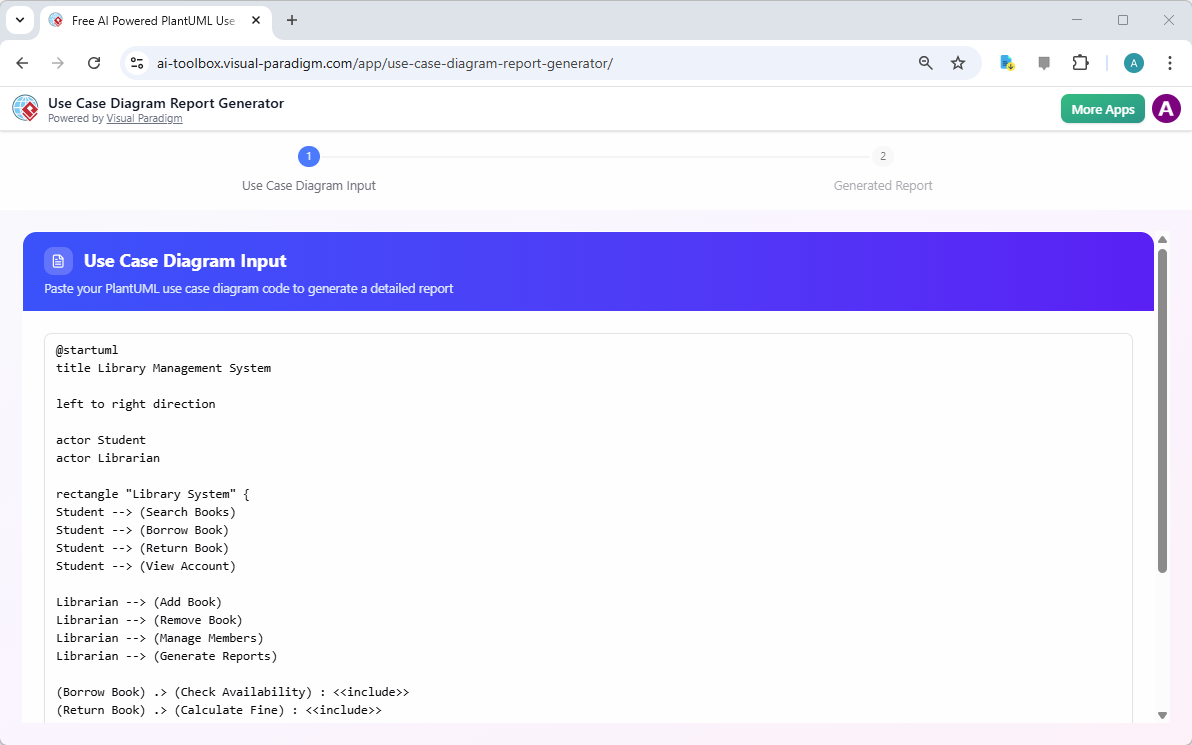
Imagine a world where your use case diagrams are not just visual artifacts but powerful communication tools that instantly generate detailed specifications. The Use Case Diagram Report Generator makes this a reality. The first step, as shown in Image 1, is all about input. You are presented with a clean interface where you can paste your PlantUML code. This code defines the system’s functionality, actors, and interactions. As you type, the tool provides a live preview of your diagram, allowing you to verify its accuracy before proceeding. The interface is intuitive, with clear instructions and a sample diagram to help you get started. This live preview is a critical feature, as it ensures that your diagram is correctly rendered and that no elements are missing or misinterpreted before the AI begins its analysis.
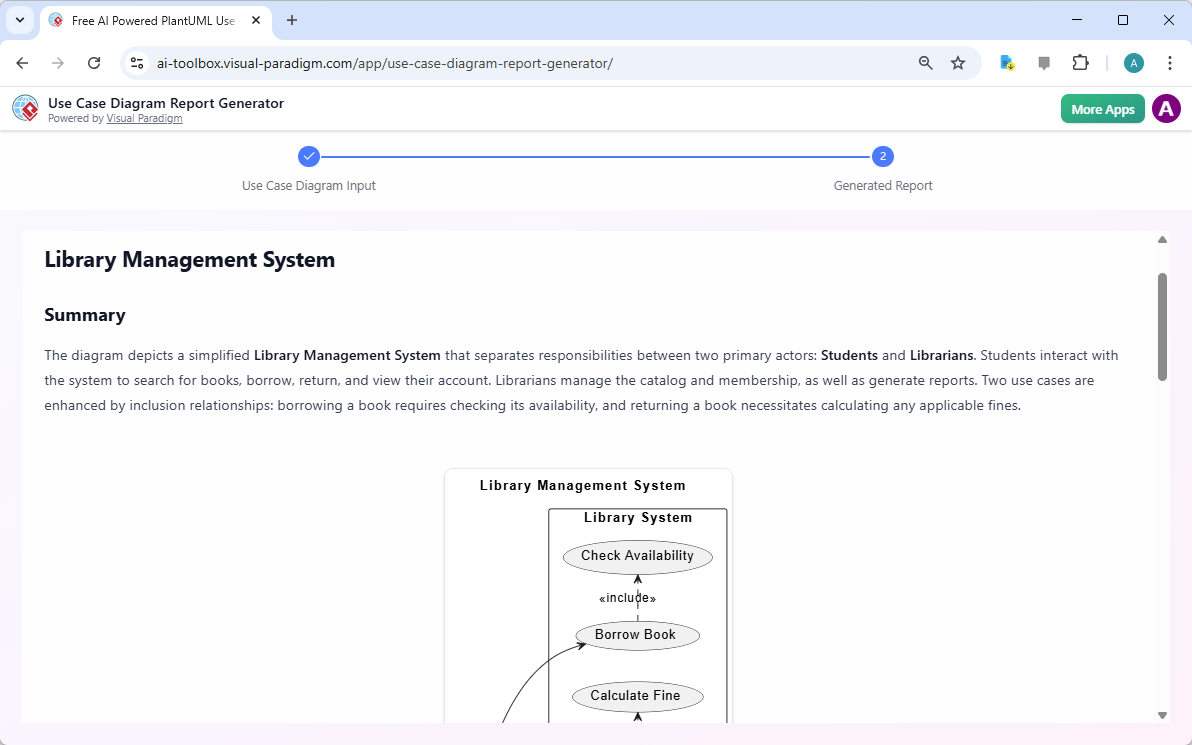
Once you are satisfied with your PlantUML code, the next step is to generate the report. The process is seamless. You simply click the “Generate with AI” button, and the tool takes over. The AI analyzes the syntax and structure of your code, identifying every actor, use case, and relationship. It then synthesizes this information into a coherent, well-organized text document. The result, as seen in Image 2, is a professional Markdown report that includes a summary, a list of actors, a detailed description of each use case, and an explanation of the relationships between them. This report is not just a list of items; it is a narrative that explains the system’s purpose and functionality. For instance, the report for the “Library Management System” clearly outlines the roles of students and librarians, the actions they perform, and how these actions are interconnected. This level of detail is invaluable for ensuring that everyone on the team, from developers to stakeholders, has a shared understanding of the system.
Who Benefits from This AI-Powered Tool?
The Use Case Diagram Report Generator is a versatile tool that benefits a wide range of professionals. Business analysts can use it to quickly generate detailed textual documentation for their requirements specifications, saving countless hours of manual writing. Project managers can leverage it to create clear, comprehensive reports for project documentation, stakeholder communication, and audit trails. Software architects and designers can use it to automatically translate their visual use case models into structured text, which is essential for system design and development. Students and educators also find it incredibly useful as a learning tool, as it helps them understand how to document use case diagrams and interpret their elements in a textual format. The tool’s ability to overcome writer’s block and provide a robust starting point for detailed descriptions is a significant advantage for anyone who needs to document system functionality.
Key Benefits and Features
The primary benefit of this tool is automation. It eliminates the need for manual report writing, which is often time-consuming and prone to inconsistencies. By automatically generating a detailed textual description, the tool ensures that all actors, use cases, and relationships are described consistently and comprehensively. This not only saves time but also reduces the risk of errors and omissions. Another key benefit is accelerated project workflow. By rapidly producing high-quality reports, the tool frees up valuable time for more critical analysis and design tasks. The generated reports also improve communication, as textual descriptions complement visual diagrams and cater to diverse stakeholder preferences. The tool’s ability to generate a structured Markdown report is another significant advantage. Markdown is a widely supported format that can be easily converted to PDF, HTML, or simply viewed in a text editor, making the report easily shareable and integrable into various documentation systems or wikis.
How to Get Started
Getting started with the Use Case Diagram Report Generator is straightforward. First, launch the tool and you will land on Step 1: Use Case Diagram Input. In the text area, paste or type your PlantUML code. As you type, a live preview of your diagram will appear on the right, allowing you to verify its correctness. If you don’t have code ready, you can click the “Load Sample” button to pre-fill the input area with an example. Once you are ready, click the “Generate with AI” button. The AI will analyze your diagram code and automatically advance you to Step 2. In Step 2, you will see the AI-generated Markdown report. Review the report to ensure it accurately reflects your diagram. Finally, click the “Export Markdown” button to download the report as a .md file to your computer. This file can then be used in your project documentation, version control systems, or shared with others.
Conclusion
The Use Case Diagram Report Generator is a powerful, AI-powered tool that revolutionizes the way we document system functionality. By transforming your PlantUML use case diagrams into detailed, structured Markdown reports, it saves time, ensures consistency, and enhances communication. The tool’s simple, guided workflow makes it accessible to users of all skill levels, from students to seasoned professionals. Whether you are documenting a new system, analyzing an existing diagram, or sharing documentation with stakeholders, this tool provides a reliable and efficient solution. Don’t let the tedious task of manual documentation slow you down. Try the Use Case Diagram Report Generator today and experience the power of AI in your workflow.
Ready to transform your diagrams into powerful documentation? Try the Use Case Diagram Report Generator now.
Related Links
-
Free AI Use Case Diagram Report Generator – Visual Paradigm AI: Transform PlantUML use case diagrams into detailed, structured reports instantly with our free AI-driven tool. Input your code, generate with AI, and receive a comprehensive analysis in one click. Try it now!
-
What is a Use Case Diagram Report Generator and Why You Need One: The Use Case Diagram Report Generator is just one of the many AI-powered tools available in Visual Paradigm . We’re committed to providing you with the most advanced and user-friendly modeling software on the market.
-
Mastering the Use Case Diagram Report Generator – Visual Paradigm Guides: Conclusion The Use Case Diagram Report Generator simplifies the creation of detailed reports from PlantUML diagrams , making it an essential tool for system analysis and documentation. With its intuitive interface, real-time previews, and AI-powered analysis, it empowers users to produce professional reports efficiently.
-
Free AI Use Case Diagram Report Generator – Visual Paradigm Product Updates: The Use Case Diagram Report Generator provides the automated assistance you need to create clear, complete, and consistent textual reports from your visual models, accelerating your analysis and improving communication. Learn More: Discover more about the Use Case Diagram Report Generator and how it can enhance your system documentation process.
-
Free AI Powered PlantUML Use Case Diagram Report Generator: Transform PlantUML use case diagrams into detailed, structured reports instantly with our free AI tool. Input your code, generate with AI, and receive a comprehensive analysis in one click. Try it free now!
-
Free AI Use Case Description Generator – Visual Paradigm AI: Generate detailed and professional use case descriptions and diagrams with the free AI-Powered Use Case Description Generator in Visual Paradigm Online.
-
Comprehensive Guide: Generating Reports from Use Case …: The Use Case Diagram Report Generator by Visual Paradigm is an AI-powered tool that automates this process, transforming PlantUML use case diagrams into structured, detailed reports .