


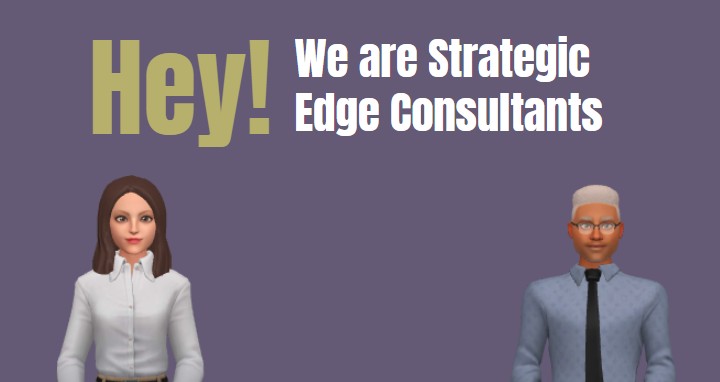
Imagine launching a presentation or video with a dynamic, engaging intro that instantly captures attention. Visual Paradigm’s Animation Maker, known as AniFuzion, makes it effortless to create such high-impact content. The image showcases a vibrant, professional animation featuring two 3D characters—a woman in a white blouse and a man in a blue shirt and tie—introducing themselves as “Strategic Edge Consultants.” This is a perfect example of how AniFuzion transforms simple concepts into compelling visual narratives. With its intuitive interface and powerful features, AniFuzion is an ideal online animation tool for professionals who need to communicate ideas effectively without requiring advanced design skills.
Why AniFuzion Stands Out as an Online Animation Tool
Creating professional animations used to be a complex, time-consuming process requiring specialized software and expertise. AniFuzion redefines this by offering a user-friendly, browser-based platform that democratizes animation. The screenshot illustrates a seamless workflow: users can drag and drop characters onto a canvas, apply pre-built actions like walking or gesturing, and add text animations with a few clicks. This drag-and-drop interface simplifies the creation process, allowing even beginners to produce polished results quickly. The ability to generate voiceovers using AI Text-to-Speech and automatically sync lip movements ensures that the final output is both visually and audibly cohesive.
Quick summary
-
Use AniFuzion to create professional animations without design skills.
-
Its drag-and-drop interface enables quick content creation.
-
AI-powered features like text-to-speech and automatic lipsync enhance realism.
-
Perfect for business presentations, marketing videos, and educational content.
The image highlights the tool’s versatility. The two characters, with distinct appearances and attire, demonstrate the extensive 3D character library available. Users can customize every aspect—from skin tone and clothing to accessories—ensuring the characters align with their brand or message. This level of personalization is crucial for creating authentic, relatable content. Additionally, the use of a clean background and bold text emphasizes the importance of visual clarity and focus, which are key to effective communication.
Core Features for Effortless Animation
At the heart of AniFuzion’s power are its core features designed to streamline the animation process. The pre-built actions library contains over 2,000 dynamic motions, allowing users to select from a wide range of gestures and movements. In the image, the characters appear to be in a poised, ready-to-speak stance, which could be achieved by applying a “standing” or “introducing” action. This eliminates the need for manual keyframing, saving significant time and effort. The shape effects and animation presets further enhance visual appeal, enabling users to apply effects like fades, bounces, or transitions to text and objects with minimal effort.
Another standout feature is the AI Text-to-Speech (TTS) capability. By entering a script, users can generate high-quality voiceovers with various accents and emotional tones. In the context of the image, this feature could be used to create a voiceover for the characters’ introduction, ensuring that their message is delivered clearly and professionally. The automatic lipsync feature ensures that the characters’ mouth movements are perfectly synchronized with the audio, adding a layer of realism that makes the animation more engaging.
For users looking to create more complex projects, AniFuzion offers advanced options like motion retargeting and rigging. These features allow for the customization of character movements, enabling the creation of unique animations that cater to specific needs. Whether it’s a corporate training video, a product demo, or an educational presentation, AniFuzion provides the tools to bring any idea to life.
Getting Started with AniFuzion
Starting with AniFuzion is straightforward. Users can sign up for a free account on the Visual Paradigm Online platform and begin creating animations immediately. The process begins by selecting a template or starting a new project. From there, users can drag and drop characters, props, and backgrounds onto the canvas. The timeline at the bottom of the interface allows for precise control over the sequence and duration of animations, ensuring that everything flows smoothly.
Once the characters are placed, users can apply actions from the library, such as walking, waving, or gesturing. The AI Text-to-Speech tool can be used to generate voiceovers, which are automatically synced with the characters’ mouth movements. Users can also enhance their animations with text and shape effects, making the content more visually appealing. After making all necessary adjustments, the final animation can be exported as an MP4 video or shared as an interactive flipbook.
For those new to animation, AniFuzion provides a gentle learning curve. The intuitive interface and comprehensive library of assets make it easy to experiment and learn. The tool’s versatility allows users to create a wide range of content, from simple explainer videos to complex interactive presentations.
Conclusion
Visual Paradigm’s Animation Maker, AniFuzion, is a powerful online animation tool that empowers users to create professional, engaging content with ease. The screenshot of the “Strategic Edge Consultants” animation demonstrates the tool’s ability to produce high-quality results quickly and efficiently. With its drag-and-drop interface, extensive character library, and AI-powered features, AniFuzion is an ideal solution for anyone looking to enhance their communication efforts. Whether you’re a business professional, educator, or content creator, AniFuzion provides the tools to bring your ideas to life.
Ready to create your own professional animation? Try AniFuzion today and discover how easy it is to make a lasting impression with dynamic visuals.
Visual Reference:
Related Links
-
Visual Paradigm Online Animation Maker (AniFuzion): Create professional-quality animated videos and motion graphics easily with Visual Paradigm’s versatile online animation tool.
-
Comprehensive Guide to Using Visual Paradigm Online’s Anifuzion: Explore this comprehensive resource to learn how to navigate AniFuzion’s interface and leverage its powerful animation tools for professional storytelling.
-
Introducing Visual Paradigm’s Anifuzion: The Ultimate Animated Video Maker: Learn how Anifuzion streamlines the creation of dynamic animations with features like AI-powered text-to-speech and a diverse library of 3D characters.
-
Creative Motion Graphics with Anifuzion (Pinterest Inspiration): Explore visual inspiration and creative examples of professional motion graphics and video projects developed using the Anifuzion animation engine.
-
Comprehensive Guide to Swapping Characters in AniFuzion: Master the character swap functionality within Visual Paradigm Online to maintain creative flow and save time by reusing animations across different character models.