
Modernizing Architecture Modeling with AI and VPasCode
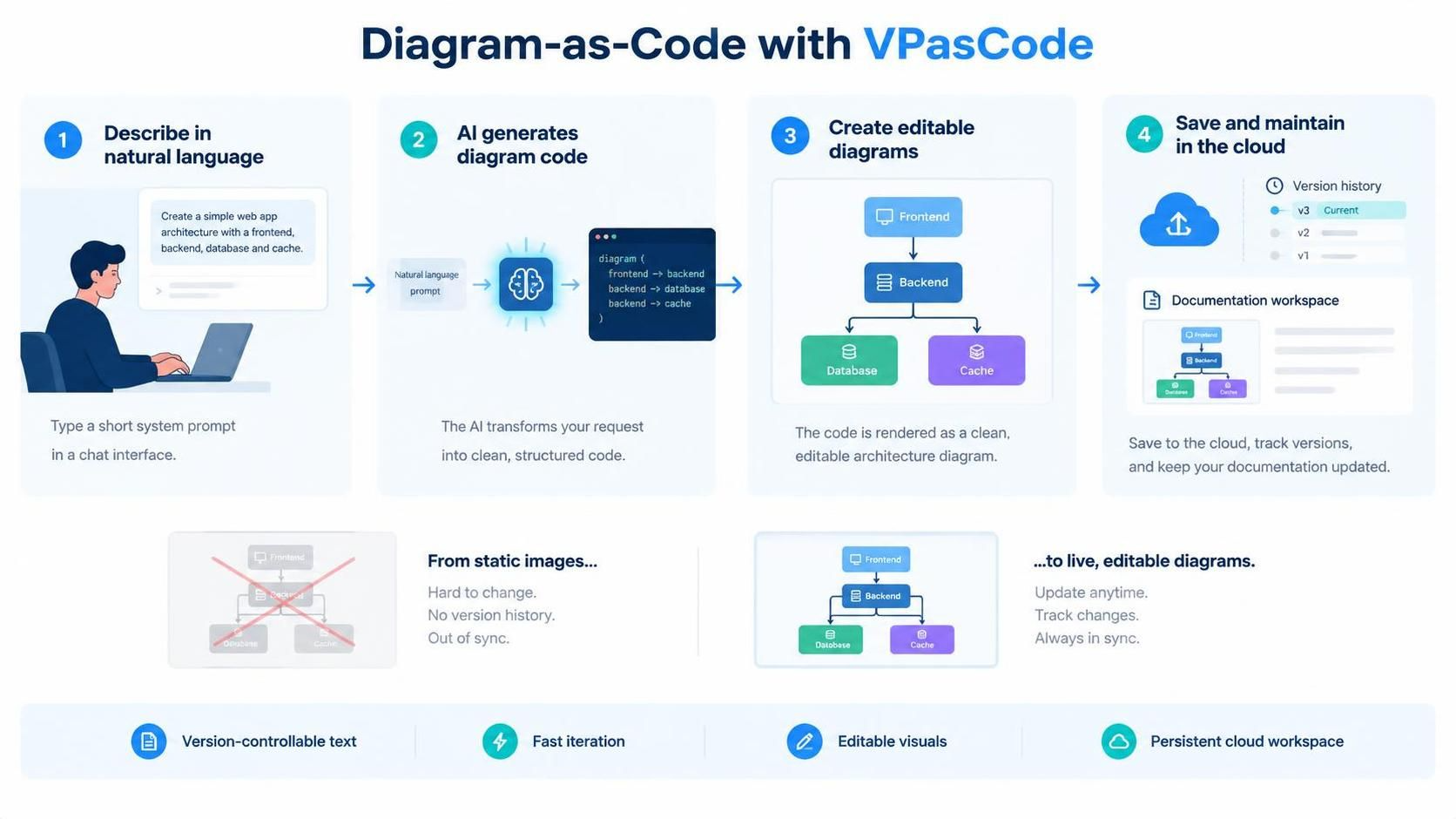
In the rapidly evolving landscape of software engineering, the gap between development velocity and documentation quality has never been wider. Traditional methods of capturing system architecture—static images or manual drag-and-drop tools—often become obsolete the moment a requirement changes. This “documentation debt” creates significant friction for product managers and engineers alike.
Visual Paradigm VPasCode introduces a transformative approach known as Diagram-as-Code (DaC). By treating visual models as version-controllable text files, this tool empowers teams to leverage Generative AI to bridge the gap between abstract requirements and concrete architectural blueprints.
The Evolution of System Modeling
The transition from traditional diagramming to Diagram-as-Code represents a fundamental shift in how we manage technical documentation. VPasCode does not merely render images; it manages the lifecycle of your architectural knowledge.
1. The Shift from Static to Dynamic
Historically, architects have relied on static images (PNGs or JPEGs) to communicate system design. While effective for a snapshot in time, this method has inherent flaws:
- Lack of Version History: It is nearly impossible to track who changed what and when without manual file naming conventions.
- Syncing Issues: When the code changes, the diagram often remains static, leading to “out of sync” documentation.
- Editing Friction: Modifying a static image requires opening a new tool, redrawing elements, and re-exporting.
VPasCode replaces this with live, editable diagrams. Because the diagram is driven by code, it is always up to date. You can update the code, and the visual representation refreshes instantly, ensuring that your documentation and your codebase remain synchronized.
2. The Diagram-as-Code (DaC) Philosophy
The core philosophy behind VPasCode is that diagrams should be treated as software artifacts. This means:
- Version-Controllable: Just like your Python or Java source code, your diagrams can be stored in Git, allowing for branching, merging, and rollback.
- Readable: The source code for a diagram is human-readable, making code reviews for architecture feasible.
- Automated: Diagrams can be generated and updated programmatically.
The AI-Driven Workflow
One of the most significant barriers to DaC is the learning curve associated with syntax. Writing raw code to define a complex architecture can be tedious. VPasCode solves this by integrating Generative AI directly into the workflow, allowing you to start with natural language.
Step 1: Describe in Natural Language
The process begins with a simple prompt. Instead of manually selecting shapes and drawing connectors, you describe the system you want to visualize. For example, you might request: “Create a simple web app architecture with a frontend, backend, database, and cache.”
Step 2: AI Generates Diagram Code
VPasCode’s AI engine interprets your natural language request and transforms it into structured, clean code. It identifies the components (Frontend, Backend, Database) and the relationships (connections) between them. This step acts as a bridge, converting abstract thoughts into a structured format that the rendering engine understands.
Step 3: Create Editable Diagrams
Once the code is generated, the tool renders it into a clean, editable architecture diagram. This is not just a static image; it is an interactive representation. You can view the visual hierarchy immediately. If the AI missed a relationship or added an unnecessary component, you can simply edit the code directly to refine the logic.
Step 4: Save and Maintain in the Cloud
The workflow culminates in a persistent cloud workspace. VPasCode allows you to save your work to the cloud, enabling you to track version history (v1, v2, v3). This ensures that your documentation is never lost and that you have a clear audit trail of how the architecture evolved over time.
Technical Implementation
While the user interface is intuitive, it is helpful to understand the underlying structure. In VPasCode, the diagram is defined by a syntax that describes the hierarchy and relationships of components. Below is an example of what the structured code looks like after being generated from a prompt, illustrating how text translates to visual logic.
diagram {
  frontend -> backend
  backend -> database
  backend -> cache
}
As seen in the example above, the logic is explicit and linear. The diagram block encapsulates the system, while the arrows (->) define the data flow or dependency. This simplicity is what makes DaC powerful; it removes the complexity of canvas positioning and focuses entirely on system logic.
Conclusion
Visual Paradigm VPasCode represents the next generation of system modeling. By combining the precision of code with the ease of natural language and the power of Generative AI, it eliminates the friction of documentation. Whether you are a Product Manager defining requirements or a Software Engineer detailing architecture, VPasCode ensures your diagrams are not just pictures, but living, version-controllable assets that evolve with your project.