
Mastering Visual Paradigm VPasCode: A Guide to the AI-Assisted Modeling Workflow
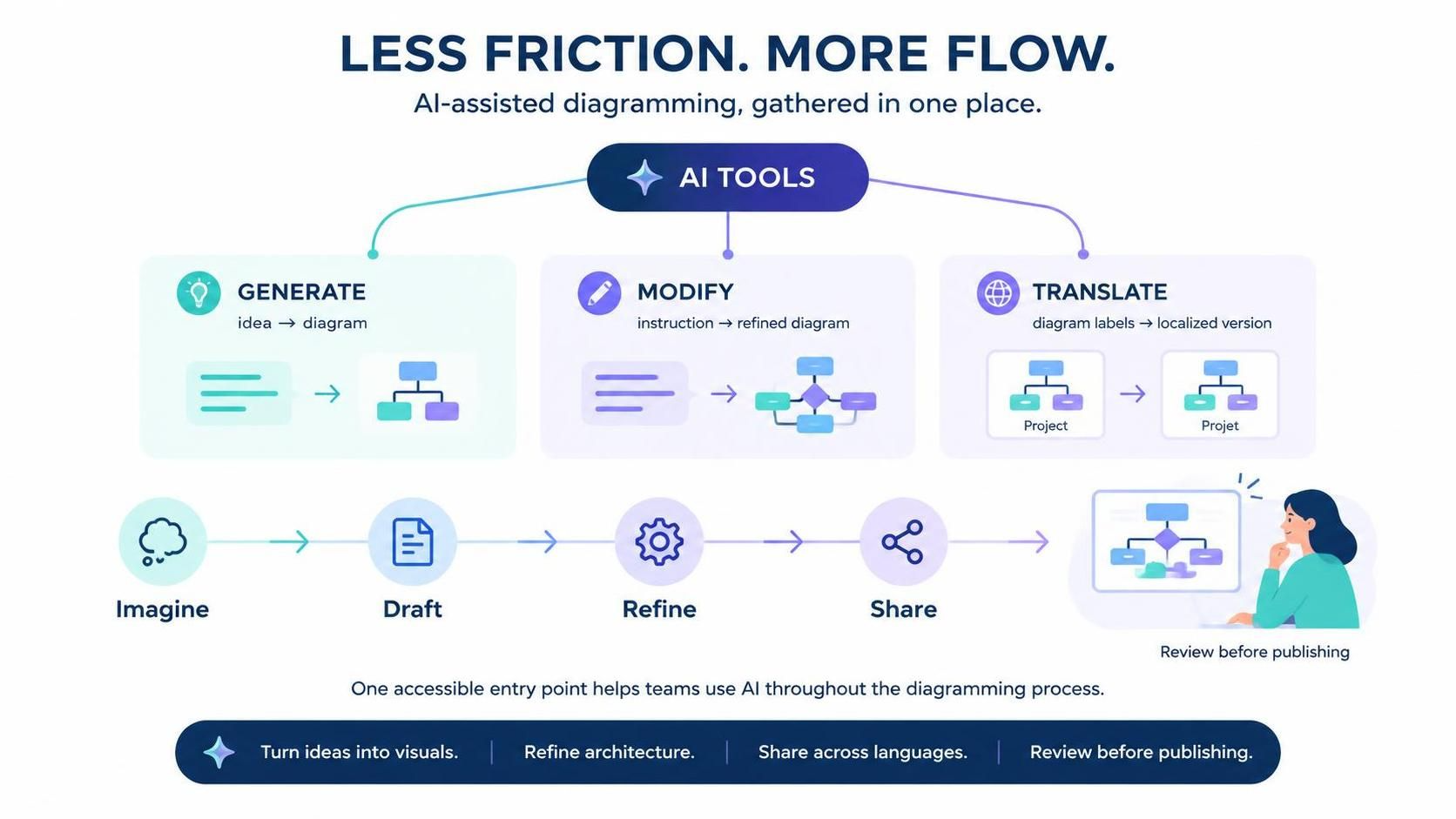
In the realm of software engineering and system architecture, the gap between a high-level concept and a finalized technical diagram often represents the biggest bottleneck in the development lifecycle. Historically, this gap was bridged by manual effort—typing out syntax, aligning shapes, and translating documentation. However, the introduction of the AI Tools menu in Visual Paradigm VPasCode represents a significant paradigm shift. It consolidates the capabilities of diagram generation, modification, and translation into a single, accessible hub, effectively removing friction from the modeling process.
This tutorial explores the architectural concepts behind this AI-assisted workflow, guiding you through the three core pillars: Generate, Modify, and Translate. By understanding how these tools function within the VPasCode ecosystem, you can transition from a static “Imagine-Draft-Refine-Share” cycle to a dynamic, intelligent engineering workflow.
The Conceptual Architecture: The AI Tools Hub
Visual Paradigm has restructured its interface to place Artificial Intelligence at the center of the user experience. The “AI Tools” menu is not merely a feature list; it is an architectural pivot point designed to support the entire diagramming lifecycle. By unifying these capabilities, the system allows users to interact with their diagrams using natural language and semantic instructions rather than rigid coding syntax.
The architecture supports three distinct but interconnected modes of operation:
- Generative Modeling: Transforming abstract ideas into structured visual representations.
- Iterative Refinement: Using instructions to alter existing structures dynamically.
- Linguistic Localization: Automatically translating diagram semantics across global languages.
1. The Generate Phase: From Idea to Diagram
The most fundamental change in this workflow is the “Generate” capability. Traditionally, creating a diagram requires knowledge of specific modeling standards (e.g., UML, SysML, BPMN) and the tools to draw them. The AI “Generate” tool bridges the gap between a vague concept and a concrete artifact.
When a user inputs a prompt—essentially describing a system idea—the AI engine parses the intent and constructs the appropriate diagram structure. For example, describing a “microservices architecture” or a “user login flow” triggers the generation of a corresponding visual graph. This process mimics the “Imagine” phase of the workflow, instantly converting mental models into visual models.
2. The Modify Phase: Instruction-Driven Refinement
Once a diagram is established, the “Modify” function allows for dynamic evolution. Instead of manually dragging and dropping shapes to add complexity, users can provide natural language instructions. This is akin to “Refining” a complex architecture without the friction of manual drawing.
This capability is particularly powerful for:
- Adding Components: Requesting the addition of specific nodes or services to an existing architecture.
- Re-routing Connections: Changing relationships between entities based on new requirements.
- Constraint Checking: Asking the system to verify if the current diagram adheres to logical flow rules.
3. The Translate Phase: Global Accessibility
One of the most significant features of the VPasCode AI integration is the “Translate” tool. In a globalized development environment, diagrams often become barriers to communication due to language differences. This feature automates the localization of diagram labels, ensuring that a diagram created in one language (e.g., English) can be instantly adapted for a global audience (e.g., Spanish, French, Japanese).
This ensures that the “Share” phase of the workflow is inclusive. It transforms a static document into a living, accessible asset that can be understood by stakeholders regardless of their native tongue.
The Workflow: A Step-by-Step Journey
Integrating these AI tools creates a seamless pipeline for engineering teams. The workflow can be visualized as a continuous loop of intelligence and action:
- Imagine: The process begins with a spark of an idea. This could be a requirement, a business process, or a system constraint.
- Generate (Draft): Using the AI Tools menu, the user inputs this idea. The system interprets the intent and generates a preliminary diagram. This is the “Draft” phase.
- Modify (Refine): The user reviews the draft. If it needs adjustment, they use the Modify tool to provide instructions like “add a database layer” or “simplify the user interface.” The AI refines the architecture instantly.
- Translate (Globalize): Before sharing, the user may utilize the Translate tool to localize labels, ensuring the diagram is ready for international teams.
- Share: The final, refined, and localized diagram is published. The “Review before publishing” step ensures quality assurance before the artifact is disseminated.
Technical Best Practices for AI-Assisted Modeling
While AI tools accelerate the process, they are most effective when guided by clear modeling principles. To get the best results from VPasCode’s AI engine, consider the following strategies:
- Be Specific with Context: When using the Generate tool, provide context. Instead of saying “draw a system,” specify “draw a distributed system architecture for an e-commerce platform.”
- Iterative Refinement: Don’t expect perfection in the first pass. Use the Modify tool iteratively. Refine the structure first, then focus on aesthetic details.
- Validate Before Translation: Ensure the source diagram is semantically correct before using the Translate tool. Translating a flawed diagram simply propagates the error in multiple languages.
Conclusion
The evolution of Visual Paradigm VPasCode with its AI Tools menu marks a new era in diagramming. By consolidating generation, modification, and translation into a single entry point, it empowers users to focus on the “Why” and “What” of system design rather than the “How” of drawing. Whether you are turning a vague idea into a concrete diagram or refining complex architectures for a global team, the AI Tools ensure that help is always just a click away.