
Mastering Diagram as Code: VPasCode, Mermaid, and AI for Agile Modeling
In the modern landscape of software development and business analysis, the ability to visualize complex logic is as critical as writing the code itself. However, traditional drag-and-drop diagramming tools often suffer from manual overhead, while raw code-based tools can be unforgiving to syntax errors. Visual Paradigm’s VPasCode tool, combined with the generative power of AI, introduces a transformative workflow that bridges this gap. This tutorial explores how to leverage this triad—Mermaid syntax, the VPasCode editor, and AI assistance—to accelerate the creation of maintainable, high-fidelity diagrams.
The Evolution: From Static Drawing to Generative Modeling
Historically, creating a flowchart or sequence diagram involved either manually placing shapes on a canvas (prone to alignment issues and layout headaches) or writing verbose code from scratch (prone to syntax errors and requiring memorization of specific commands). The integration of Generative AI into the VPasCode environment changes the paradigm from “drawing” to “directing.” Instead of fighting the tool to align boxes, the developer defines the intent, and the system handles the rendering.
This approach is rooted in the concept of “Text-to-Diagram” engineering. By utilizing Mermaid.js syntax, a powerful and open-source library, users can define diagrams using a simple, readable language. When this code is fed into the VPasCode editor, it is instantly compiled into a visual representation. This allows for version control, rapid iteration, and—most importantly—AI-driven debugging and enhancement.
Step-by-Step: The Integrated Workflow
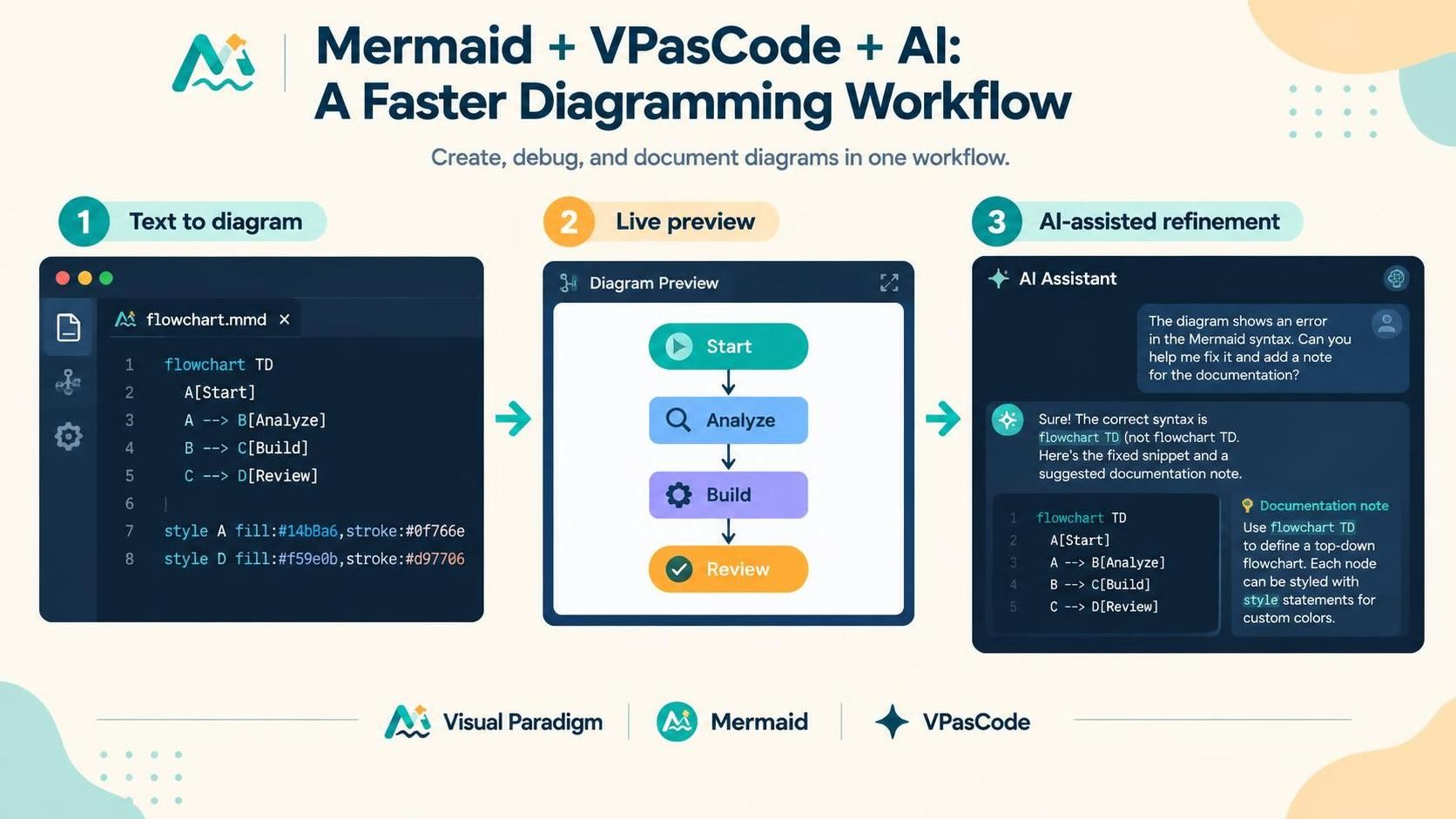
The workflow described in the image illustrates a three-step cycle that significantly reduces the time-to-value for documentation and system design.
1. Text to Diagram: Defining the Logic
The process begins in the code editor within VPasCode. Here, the user writes Mermaid code. Unlike standard text editors, VPasCode provides syntax highlighting and structural awareness specifically for diagramming languages.
- Intent Definition: The user starts by declaring the type of diagram, such as
flowchart TD(Top-Down) orsequenceDiagram. - Node Creation: Entities are defined using simple identifiers. For example,
A[Start]creates a node labeled “Start”. - Relationship Mapping: Arrows are defined using operators like
-->to show flow direction. This creates a logical map of the process without worrying about pixel-perfect placement.
2. Live Preview: Instant Visualization
One of the most powerful features of VPasCode is the “Live Preview” pane. As you type or modify the text on the left, the visual diagram on the right updates in real-time. This immediate feedback loop is crucial for debugging.
- Visual Verification: If the logic flow is broken, the visual output will immediately reflect disconnected nodes or incorrect directions.
- Styling Feedback: When you apply style definitions (such as colors or shapes), you can instantly see how they affect the diagram’s readability and aesthetic appeal.
3. AI-Assisted Refinement: The Intelligent Layer
This is where the workflow transitions from “coding” to “engineering.” The AI Assistant acts as an expert pair programmer. It does not just generate text; it understands the semantic structure of the diagram.
- Automated Debugging: If the Mermaid code contains a syntax error (e.g., a missing bracket or an invalid command), the AI detects it. It explains the error in natural language and provides a corrected snippet, saving the user from combing through documentation.
- Documentation Generation: Beyond fixing code, the AI can generate documentation notes. It can take the visual data and explain the logic, creating a “why” alongside the “how.”
- Refinement: Users can ask the AI to improve the diagram. For instance, “Make the ‘Build’ phase look more critical” or “Convert this flowchart into a sequence diagram.” The AI translates this request into the necessary code changes.
Technical Deep Dive: Understanding the Syntax and Architecture
To fully leverage this tool, one must understand the underlying Mermaid syntax that the AI is manipulating. The image highlights specific elements that define the diagram’s structure.
The Flowchart Declaration
Every Mermaid diagram starts with a declaration. In the example, flowchart TD is used. This stands for “Flowchart Top-Down.” Understanding directionality is key; changing this to LR (Left-Right) would completely reorient the entire system architecture.
Styling and Theming
The code snippet in the image demonstrates the use of style commands. This is where the visual customization happens. Instead of clicking a color picker, the developer uses hex codes to define the look and feel programmatically.
style A fill:#14b8a6,stroke:#0f766e
style D fill:#f59e0b,stroke:#d97706
This syntax allows for granular control. For example, fill sets the background color of the node, while stroke sets the border color. This is essential for creating “Theme” consistency across large documentation sets.
Node Linking
The core logic is defined by the arrows. The syntax A --> B implies a directed graph. In the context of the image, this represents the flow from Analyze to Build. The AI can interpret these connections to ensure that the logic is sound—checking, for example, that no process is left dangling without a next step.
Best Practices for AI-Assisted Diagramming
As you adopt this workflow, keep the following best practices in mind to ensure high-quality outputs:
- Iterative Prompting: Don’t try to generate the entire system architecture in one prompt. Start with a high-level overview, then ask the AI to expand on specific sub-processes.
- Review Generated Code: While AI is powerful, always review the generated Mermaid code. Ensure that the logical flow matches your intent, especially when the AI refines complex logic.
- Consistent Naming: Use clear, descriptive identifiers for your nodes (e.g.,
UserInputinstead ofA). This makes the code easier for both humans and AI to understand and debug. - Use
preBlocks for Complex Logic: For highly complex diagrams, keep the Mermaid code in a dedicated file or block. This allows you to version control the diagram logic alongside your software code.
Conclusion
The combination of Visual Paradigm’s VPasCode, Mermaid syntax, and AI generation represents the future of system modeling. It moves the focus away from the mechanics of drawing and towards the logic of the system. By mastering this workflow, developers and analysts can create clearer, more maintainable, and instantly debuggable diagrams, ensuring that documentation is never an afterthought but an integral part of the development lifecycle.