
Mastering Dev-First Modeling with VP AI Ecosystem and Git-Driven Diagrams
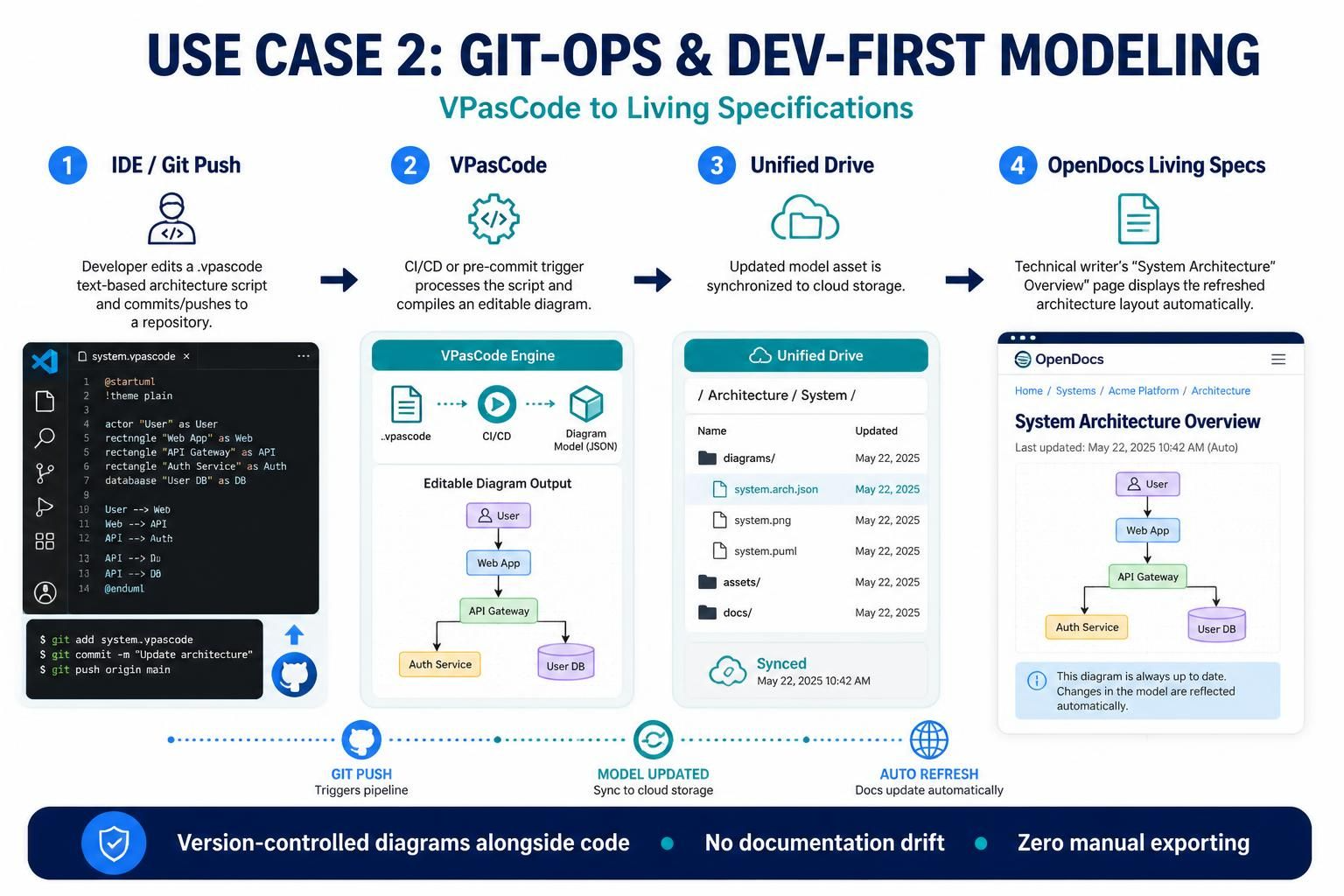
In modern software engineering, the gap between code and documentation is often where errors creep in. This phenomenon, known as “documentation drift,” occurs when diagrams are updated manually in a separate tool, falling out of sync with the actual system architecture. The solution lies in a paradigm shift: treating architecture diagrams not as static images, but as executable, version-controlled code.
This tutorial explores Use Case 2: Git-Ops & Dev-First Modeling. We will walk through a workflow where a developer maintains system architecture diagrams directly within their IDE (VS Code), using text-based scripting (VPasCode) that automatically syncs to a cloud repository and updates technical documentation in real-time.
1. The Concept: Code-as-Diagram
Traditionally, software architects use drag-and-drop tools to create architecture diagrams. These files are often binary or image-based, making them difficult to manage in a version control system like Git. Changes are hard to review via Pull Requests, and the history of design decisions is lost.
VPasCode (Visual Paradigm as Code) changes this dynamic. By allowing developers to write diagrams using text syntax (similar to PlantUML), the architecture becomes:
- Version Controllable: You can see exactly who changed a line and when.
- Reviewable: Architecture changes can be reviewed via GitHub Pull Requests just like source code.
- Automated: The diagram is generated programmatically, ensuring consistency.
2. The Workflow: From IDE to Living Specs
The following process demonstrates how a developer can update a system architecture layout without ever opening a graphical modeling tool.
Step 1: Write and Commit in the IDE
First, the developer opens their VS Code editor and navigates to a file named system.vpascode. Inside this file, they write the logic for their architecture using a text-based syntax. The image shows a classic component diagram describing a “Web App” connecting to an “API Gateway” and “Auth Service.”
@startuml
!theme plain

actor "User" as User
rectangle "Web App" as Web
rectangle "API Gateway" as API
rectangle "Auth Service" as Auth
database "User DB" as DB

User --> Web
Web --> API
API --> Auth
API --> DB

@enduml
Once the script is saved, the developer commits and pushes these changes to the company’s GitHub repository. This action serves as the trigger for the entire ecosystem.
Step 2: The CI/CD Trigger (VPasCode Engine)
Upon detecting the push, a CI/CD pipeline or a pre-commit hook activates the VPasCode Engine. This utility takes the raw text script and compiles it into a usable diagram model.
The engine processes the logic defined in the script—interpreting the relationships between the User, Web App, and Database—and generates the visual representation. This output is then serialized (often as JSON or a binary model file) ready for storage.
Step 3: Synchronization with Unified Drive
The compiled diagram asset is automatically uploaded to a central cloud storage location, referred to here as the Unified Drive. This acts as the “single source of truth” for the project’s assets.
The Unified Drive manages the lifecycle of the file, storing both the source script (e.g., system.puml) and the generated output (e.g., system.arch.json or system.png). This ensures that the latest version of the architecture is always available at a specific URL.
Step 4: Real-Time Documentation (OpenDocs)
Finally, we reach the Technical Writer’s environment. The writer has an OpenDocs Living Spec page open, titled “System Architecture Overview.”
Crucially, this webpage does not contain a static image. Instead, it contains a reference to the asset hosted in the Unified Drive. As soon as the developer’s push was processed and the file updated in the cloud, the Technical Writer’s browser automatically refreshes to display the new architecture layout. There is no need to export an image, upload it to a document, or re-save the file.
3. Why This Matters: Eliminating Drift
This workflow solves the critical issue of architectural drift. In traditional workflows, a developer might change a database schema but forget to update the diagram. In the VPasCode workflow, the diagram is the code. If the code isn’t updated, the diagram doesn’t change.
- Version Control: The diagram history is preserved alongside the application code.
- Collaboration: Developers and Technical Writers work in parallel without stepping on each other’s toes.
- Automation: Zero manual exporting is required.
Conclusion
By adopting Git-Ops for architecture modeling, teams can ensure that their documentation is always accurate, always up-to-date, and always accessible. The transition from static drawings to living specifications is a key step in mature software engineering practices.