
Mastering C4 with Visual Paradigm: AI-Powered VPasCode for Living Architecture
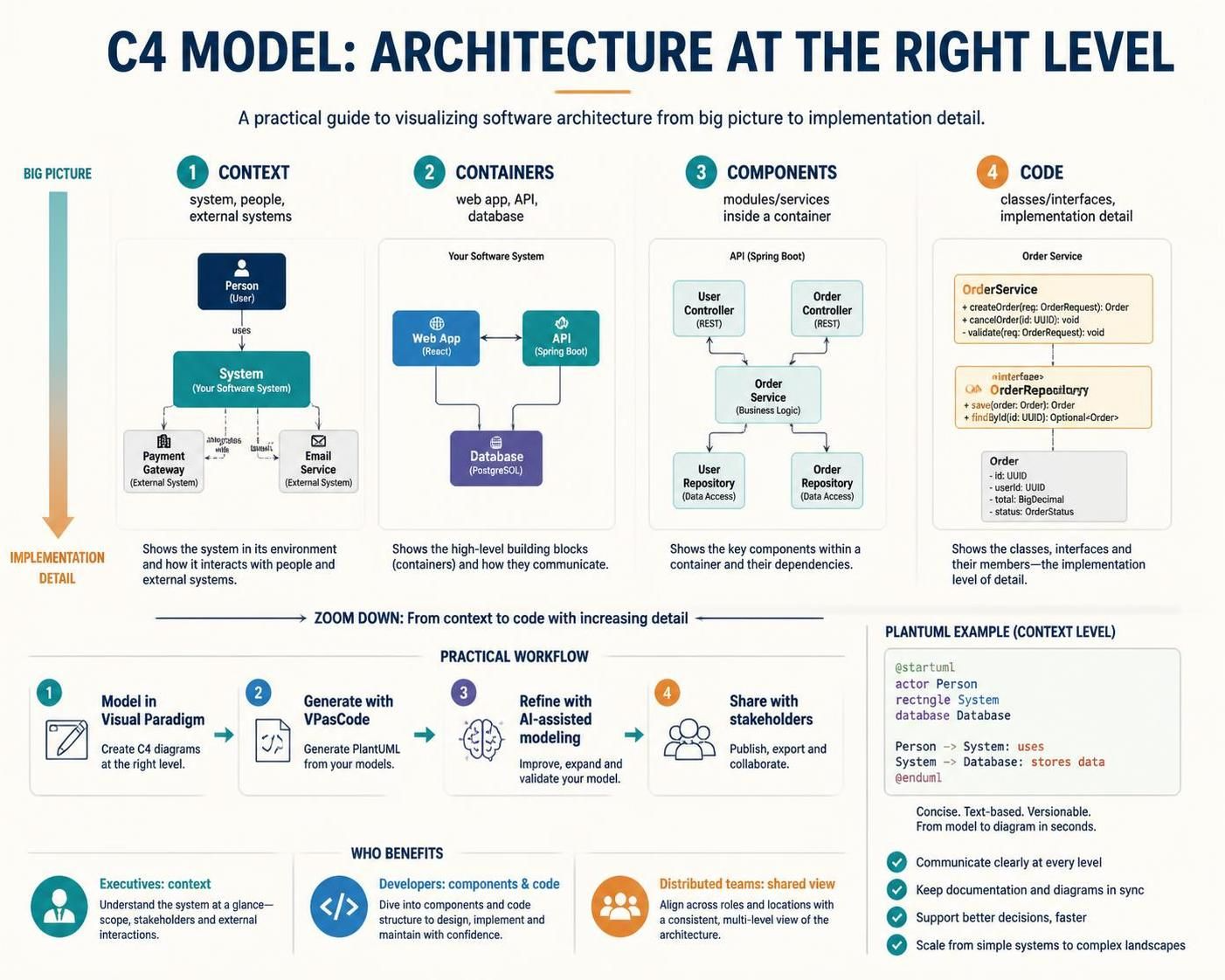
In the fast-paced world of software engineering, architecture diagrams are often the bridge between abstract design and concrete reality. However, too many diagrams are either too vague to be useful or so detailed that they become obsolete the moment the code changes. The C4 Model solves this by introducing a hierarchical approach to software architecture, allowing teams to visualize systems at the “right level” of detail.
This tutorial explores the four layers of the C4 model—Context, Container, Component, and Code—and demonstrates how to implement this workflow using Visual Paradigm, VPasCode, and AI-assisted modeling to create dynamic, living documentation.
Understanding the Four Levels of Abstraction
The C4 model is not about creating four separate diagrams for the same system; it is about zooming in and out to reveal different details. Think of it as a map application: you start with a world view, zoom in to find your city, then your street, and finally your house.
1. Context (The Big Picture)
The System Context Diagram is your “elevator pitch.” It shows the software system as a single box and the people (Actors) and external systems (Partners) that interact with it. It answers the question: “What is this system, and who uses it?”
2. Containers (The Building Blocks)
Zooming in, the Container Diagram breaks the system down into high-level building blocks. A container is a deployable unit—like a web application, a mobile app, an API, or a database. This level answers: “How is the system built, and what technologies are we using?”
3. Components (The Logic Inside)
Inside a container, you find Components. These are logical groupings of functionality, such as a “User Service” or an “Order Processor.” This level answers: “What are the key responsibilities within this application?”
4. Code (The Implementation)
At the deepest level, the Code Diagram shows classes, interfaces, and methods. While often handled by IDEs, the C4 model suggests including this level to show implementation details when necessary for onboarding or debugging.
The Modern Workflow: From Model to Code
Traditionally, creating these diagrams required tedious manual drawing. Today, Visual Paradigm offers a modern workflow that integrates model-driven engineering with text-based tools.
- Model in Visual Paradigm: Start by dragging and dropping elements in the Visual Paradigm IDE to create your C4 diagrams visually. This ensures a structured data model.
- Generate with VPasCode: Visual Paradigm’s VPasCode tool allows you to extract the model data and generate PlantUML code automatically. This bridges the gap between visual modeling and code repositories.
- Refine with AI-Assisted Modeling: Use AI tools to expand your model, validate relationships, or generate missing components. AI can help turn a rough sketch into a comprehensive architecture.
- Share with Stakeholders: Publish the diagrams or export the PlantUML source code to keep your documentation version-controlled and in sync with your codebase.
Practical Example: Generating Context Diagrams
One of the most powerful features of this workflow is the ability to generate diagrams from text. Using VPasCode, you can define your architecture using simple PlantUML syntax. Below is an example of how to define a Context Diagram that includes a User, the Main System, an External Database, and an External Email Service.
@startuml
skinparam packageStyle rectangle

actor Person as User
rectangle "Your Software System" as System
database Database
package "External Systems" {
    database PaymentGateway
    [Email Service]
}

User --> System : uses
System --> Database : stores data
System --> PaymentGateway : charges
System --> EmailService : sends email

@enduml
This concise, text-based approach ensures that your diagrams are versionable and can be generated directly from your build pipeline, preventing documentation drift.
Why This Approach Works
By adopting the C4 model within a modern toolchain, teams can benefit from a shared understanding of the architecture.
- Executives can look at the Context diagram to understand scope and external dependencies without getting bogged down in technical details.
- Developers can dive into the Components and Code levels to understand the internal logic and dependencies.
- Distributed Teams can maintain a consistent, multi-level view of the architecture, ensuring that everyone is aligned on how the system fits together.
Whether you are onboarding new developers, aligning distributed teams, or presenting to stakeholders, the ability to visualize architecture at the right level of detail is invaluable. By combining the structured approach of the C4 model with the automation of Visual Paradigm and VPasCode, you can turn your architecture documentation from a chore into a competitive advantage.