
E-Commerce Fulfillment: AI-Powered Diagram as Code with VPasCode & Mermaid
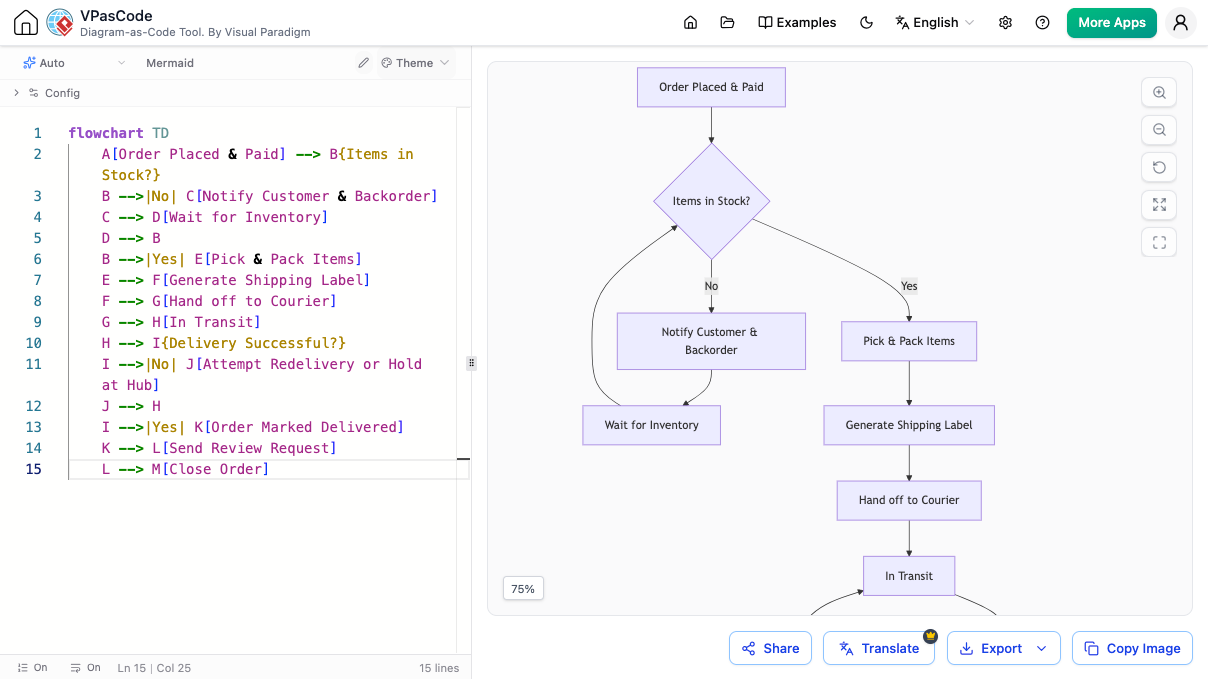
In the realm of system architecture and business process modeling, clarity is paramount. When designing complex workflows like an e-commerce order fulfillment system, visualizing the decision points and execution paths is essential for stakeholders to understand the “what” and “how” of the operation. This tutorial explores how to leverage the synergy between Visual Paradigm’s VPasCode and Mermaid.js to create robust, editable flowcharts that document business logic with precision.
Understanding the Fulfillment Workflow
The core of any e-commerce operation lies in the fulfillment process. Unlike simple linear scripts, fulfillment involves branching logic based on inventory availability, payment status, and delivery confirmation. A standard flowchart allows us to map these sequences, but doing so via code offers distinct advantages for version control and rapid iteration.
The workflow depicted in our example begins with the initiation of an order. The system must immediately evaluate a critical condition: Is the item in stock? This decision diamond is the pivot point of the entire diagram. If the answer is affirmative, the process flows smoothly through picking, packing, and shipping. If the answer is negative, the system must trigger a “backorder” protocol, notifying the customer and waiting for inventory replenishment before resuming the cycle.
The Power of Diagram-as-Code
Traditionally, creating diagrams required drag-and-drop interfaces within GUI tools. While intuitive, this approach often leads to “spaghetti diagrams” that are difficult to edit without losing formatting. VPasCode bridges this gap by allowing developers to write Mermaid syntax directly in a text editor.
The tool parses the textual definition and renders it instantly as a visual graph. This means you can:
- Use standard text editors or IDEs with syntax highlighting.
- Track changes to the diagram logic using Git or similar version control systems.
- Reuse snippets of logic across different project documentation.
Diving into the Mermaid Syntax
To recreate the e-commerce fulfillment logic, we utilize the graph TD (Top-Down) directive. This establishes the direction of the flow. The syntax relies on defining nodes (shapes) and connecting them with directed edges (arrows).
graph TD
    A[Order Placed & Paid] --> B{Items in Stock?}
    B --No--> C[Notify Customer & Backorder]
    C --> D[Wait for Inventory]
    D --> B
    B --Yes--> E[Pick & Pack Items]
    E --> F[Generate Shipping Label]
    F --> G[Hand off to Courier]
    G --> H[In Transit]
    H --> I{Delivery Successful?}
    I --No--> J[Attempt Redelivery or Hold at Hub]
    J --> H
    I --Yes--> K[Order Marked Delivered]
    K --> L[Send Review Request]
    L --> M[Close Order]
Let’s break down the specific components used in this logic:
1. Nodes and Shapes
In Mermaid, nodes are defined by an ID (e.g., A, B) followed by a colon and the content in square brackets. The content determines the shape:
- Rectangles: Used for processes like
A[Order Placed & Paid]orE[Pick & Pack Items]. - Diamonds: Used for decisions. In Mermaid, this is achieved by wrapping the content in curly braces, such as
B{Items in Stock?}.
2. Directed Edges and Labels
Connections are made using the -- operator. The arrow direction is implied by the order of the nodes. Crucially, for decision nodes (diamonds), we must label the outgoing paths to indicate the outcome of the condition.
For example, the line B --No--> C explicitly states that if the condition at node B is false, the flow moves to node C. Similarly, B --Yes--> E handles the positive outcome.
3. Handling Complex Logic Loops
A key feature of the fulfillment diagram is the feedback loop. When an item is not in stock, the system waits for inventory (Node D) and then loops back to check availability again (Node B). In the code, this is represented simply by the connection D --> B. This creates a logical cycle that ensures the order is not abandoned until the stock condition is met.
Similarly, the delivery phase includes a loop for failed deliveries. If the delivery is not successful (Node I –No–> J), the system attempts redelivery (Node J), which loops back to the “In Transit” state (Node H) to retry the attempt.
4. Escaping Special Characters
In the node definitions, such as A[Order Placed & Paid], you may notice the use of &. This is an HTML entity used to represent the ampersand symbol. Mermaid renders text using HTML entities, so special characters like &, <, and > must be escaped (e.g., &, <, >) to ensure the diagram renders correctly without syntax errors.
Advanced Features in VPasCode
VPasCode enhances the raw Mermaid experience with several developer-centric features:
- Real-time Rendering: As you type in the left pane, the visual graph on the right updates instantly. This immediate feedback loop is invaluable for debugging logic errors.
- Configurable Themes: The tool allows you to switch between different visual themes (like "Forest" or "Base") without altering the underlying code, enabling you to match the diagram to your corporate branding.
- Export Capabilities: Once the diagram is finalized, VPasCode allows for easy exportation into high-resolution images (PNG, SVG) or even PDF, making it easy to include in technical documentation or presentations.
Conclusion
By transitioning from manual drawing to code-based diagramming, teams can achieve higher consistency and maintainability in their system architecture documentation. The e-commerce fulfillment example demonstrates how complex business rules—such as inventory checks and delivery retries—can be modeled clearly and concisely. With VPasCode, the barrier between technical logic and visual representation is lowered, empowering both developers and business analysts to collaborate effectively.