
Now Reading: How to Generate UML Diagrams with Visual Paradigm AI: A 2026 Comprehensive Guide
-
01
How to Generate UML Diagrams with Visual Paradigm AI: A 2026 Comprehensive Guide


How to Generate UML Diagrams with Visual Paradigm AI: A 2026 Comprehensive Guide
As of January 2026, the landscape of software modeling has shifted dramatically with the integration of artificial intelligence. Visual Paradigm leads this charge with its suite of AI-powered tools designed to revolutionize how developers and architects create visual models. Unlike general Large Language Models (LLMs) that often struggle with complex visual syntax, Visual Paradigm’s ecosystem turns natural language descriptions into professional, editable diagrams—specifically UML class diagrams—with remarkable accuracy and stability.

This comprehensive guide details the primary methods to leverage Visual Paradigm’s AI for diagram generation, focusing on workflows that bridge the gap between conversational AI and professional engineering tools.
1. Using the AI Chatbot for Instant Generation & Refinement
The AI Chatbotserves as a specialized, fine-tuned co-pilot for visual modeling. It is arguably the most flexible entry point for users who want to iterate quickly using conversational English.

Step-by-Step Workflow
To get started, navigate to the official chat interface or the specific UML Class Diagram tool. The process focuses on an interactive dialogue rather than a single static command.
- Initiate the Chat: Start a new session and provide a descriptive prompt. For example: “Create a UML class diagram for an online shopping system with classes: Customer, Product, Order, OrderItem, Payment, ShoppingCart. Include attributes, methods, associations, composition, and multiplicities.”
- Instant Visualization: The AI generates a clean diagram immediately, adhering to proper UML notation including layout, relationships, and visibility indicators.
- Conversational Refinement: This is the chatbot’s distinct advantage over static LLMs. You can refine the model contextually. You might say, “Make OrderItem a composition part of Order and set multiplicity to 1..*.” or “Change Customer to inherit from User.” The diagram updates live without needing full regeneration.
- Analysis & Output: You can ask the AI to generate code stubs (Java, C#, etc.) based on the diagram or identify potential scalability issues within the design.
Once satisfied, users can export the result to a Visual Paradigm project file (.vpp) for full engineering capabilities or share a link for collaboration.
2. The AI-Assisted UML Class Diagram Generator
For users seeking a more structured approach with built-in validation, the AI-Assisted UML Class Diagram Generatoroffers a guided wizard experience. This tool is ideal for ensuring high-quality output through a step-by-step process.
The 10-Step Wizard Process
This tool breaks down the modeling process into manageable stages, preventing the AI from hallucinating complex structures all at once.
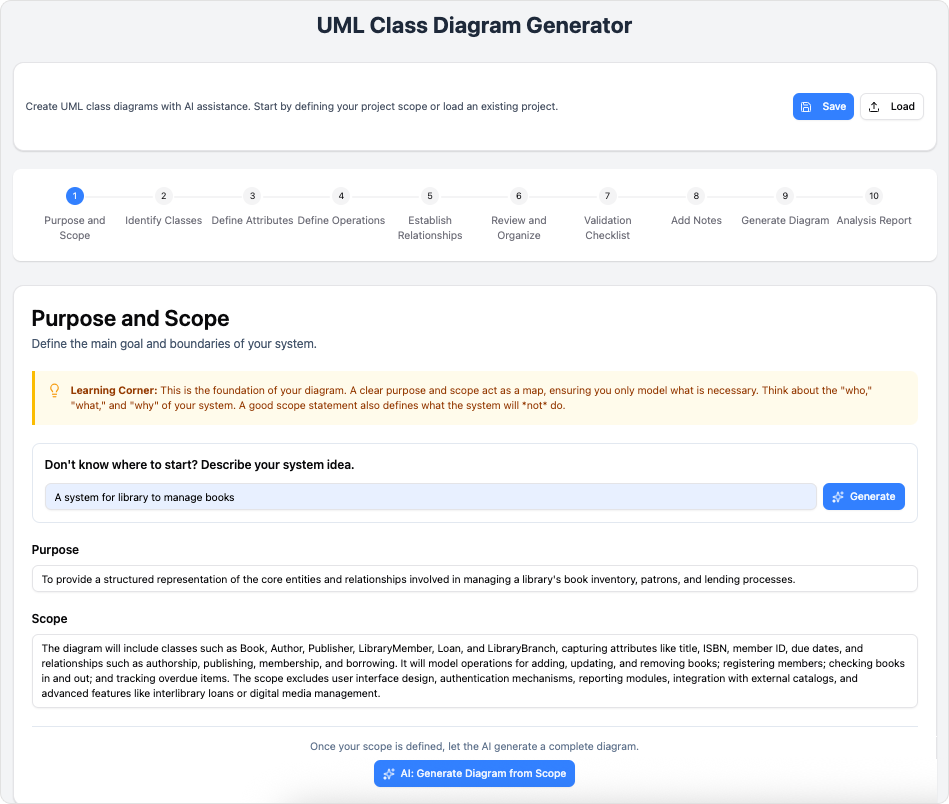
- Purpose & Scope: Define the high-level goal (e.g., “Library Management System”).
- Entity Identification: The AI proposes a list of classes based on the scope, which you can approve, edit, or remove.
- Detailing Attributes & Operations: In steps 3 through 7, the wizard guides you through adding attributes, operations, visibility rules, and relationships (association, inheritance, composition).
- Generation & Analysis: Step 8 produces the visual diagram. Step 9 provides an AI-generated analysis report covering design quality and potential logic issues.
- Finalization: The final step allows for exporting to standard formats like SVG, PlantUML, or a full Visual Paradigm project.
3. Integrated AI in Desktop and Online Editions
Visual Paradigm has embedded AI generation directly into its core Desktop and Online platforms (Professional Edition and higher). This allows for seamless creation within an existing workspace.
To access this, navigate to Tools >AI Diagram. Select your desired diagram type—this extends beyond Class Diagrams to include Use Case, Sequence, ERD, and ArchiMate. After entering a text description, the AI generates the diagram directly on your canvas. This method is best for users who are already working inside a larger project and need to quickly prototype a specific module without switching to a web browser.
4. The Professional Workflow: From Chat to Engineering
For enterprise-grade software development, the most powerful workflow involves combining the speed of the Chatbot with the depth of the Desktop client.
Recommended Workflow:
- Draft: Use the AI Chatbot for rapid prototyping and initial iteration. It is faster to type changes than to drag-and-drop boxes manually.
- Export: Save the refined model as a Visual Paradigm project (.vpp).
- Engineer: Open the project in Visual Paradigm Desktop. Here, you can perform advanced tasks such as round-trip code engineering, simulation, team collaboration, and version control.
- Extend: Use the desktop features to derive other views, such as generating a Sequence Diagram automatically from your AI-created Class Diagram.
5. Best Practices and Advanced Tips
To maximize the effectiveness of these tools, users should adopt specific prompting strategies and understand the ecosystem’s capabilities.
Prompting Strategies
Start broad and refine gradually. Begin with a prompt like “Online banking system classes.” Once the core entities exist, issue specific commands for refinement, such as “Add a PaymentGateway class associated with Payment” or “Set multiplicity for Order to OrderItem as 1 to many.” providing domain hints (e.g., “fintech system with compliance considerations”) can also help the AI infer necessary attributes.
Why Visual Paradigm Beats General LLMs
General LLMs often output ASCII art or code snippets (like Mermaid.js) that may render incorrectly or lack standard UML compliance. Visual Paradigm‘s tools are trained specifically on modeling standards, ensuring correct notation for composition, aggregation, and inheritance. Furthermore, the ability to update the visual layout live without re-rendering code offers a significantly superior user experience.
-
AI-Powered Use Case Diagram Refinement Tool – Smart Diagram Enhancement: AI-powered refinement enhances use case diagrams for improved clarity, consistency, and completeness.
-
Convert Use Case to Activity Diagram – AI-Powered Transformation: Automatically convert use case diagrams into detailed activity diagrams to visualize system workflows.
-
AI-Assisted UML Class Diagram Generator – Visual Paradigm: Generate UML class diagrams with AI-powered suggestions, validation, PlantUML export, and design analysis.
-
Mastering UML Activity Diagrams with AI | Visual Paradigm Blog: Explores how AI features in Visual Paradigm enhance the creation and optimization of UML activity diagrams for developers and analysts.
-
Revolutionize Your Slides: Meet Visual Paradigm’s AI Markdown Presentation Maker!: Turn raw ideas into polished, animated presentations using AI-powered Markdown input.
-
Lumina AI: Generate AI-Powered Video Slideshows Instantly: Generate dynamic video presentations from text using AI, ideal for storytelling and rapid content creation.
-
Lumina AI Slideshow Maker: Create Stunning Presentations with AI: Create professional-quality slides from simple text using artificial intelligence to save time and spark creativity.
-
Illumy AI Slideshow Maker: Instant AI-Powered Presentation Creation: Create professional, visually rich slides in seconds using AI, tailored for marketers, educators, and business professionals.
-
AI Animated Presentation Studio: Create Dynamic, Animated Slides with Ease: Design engaging, animated presentations with AI-powered storytelling, motion, and visual effects.
-
How to Structure Your Jira Backlog Instantly with Agilien AI: Automate Jira backlog structuring by analyzing user stories and generating organized sprints and epics using Agilien AI.
-
Agilien AI-Powered Jira Backlog Planner – Visual Paradigm: Automate and improve Jira backlog planning with Agilien AI, which intelligently structures user stories and epics for efficient sprints.
-
How to Create Stunning Animated Presentations with Visual Paradigm’s AI Markdown Presentation Maker: Create dynamic, visually engaging presentations using AI-powered Markdown tools in Visual Paradigm.