
Visual Paradigm OpenDocs: Architecting Living Docs with VP AI Ecosystem
In the rapidly evolving landscape of technical writing and system architecture, the gap between “static documentation” and “living processes” is often bridged by a lack of integration. Traditional flowcharting tools often require a disconnect where you design a diagram in one application, export an image, and paste it into a document. Once pasted, that diagram is “dead”—it cannot be edited without returning to the original tool, and it has no semantic link to the text surrounding it.
Visual Paradigm OpenDocs represents a paradigm shift. By combining the rigorous modeling capabilities of the Visual Paradigm ecosystem with the accessibility of an integrated AI ecosystem, it transforms flowchart creation into a dynamic, code-driven, and AI-enhanced experience.
1. The Architecture: From Tedious to Integrated
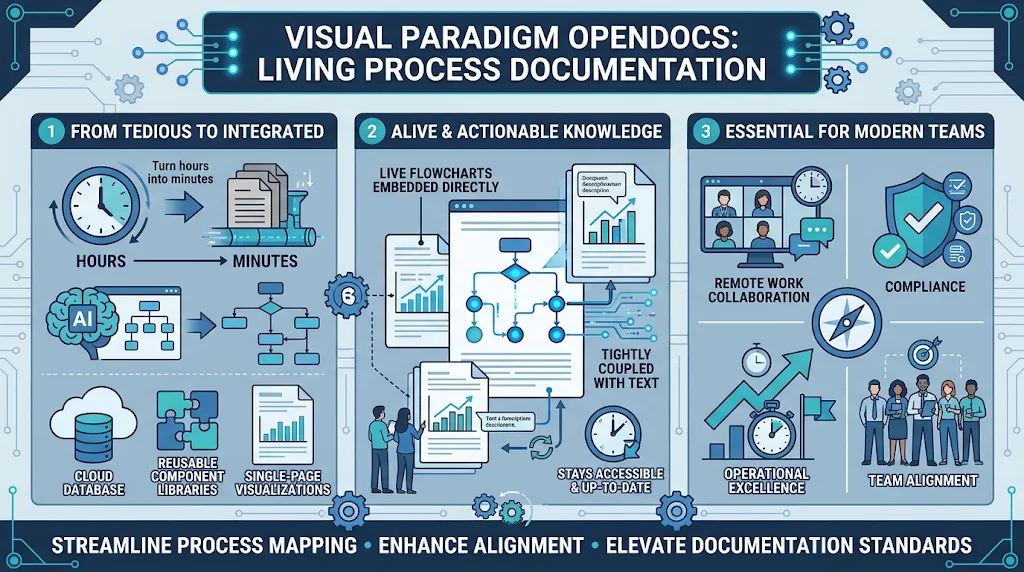
The core philosophy of OpenDocs is to reduce the friction between thinking and documenting. The system architecture is designed to turn hours of manual drawing into minutes of structured definition. This is achieved through three primary architectural pillars:
- Cloud-Native Database: Unlike local file-based systems, OpenDocs leverages a cloud database. This ensures that diagrams are not isolated assets but are part of a central repository of truth.
- Reusable Component Libraries: To maintain enterprise-wide standardization, the system utilizes a library of reusable components. You define a process block once, and it can be instantiated anywhere. If the definition changes, the change propagates automatically.
- Single-Page Visualizations: For quick, specific contexts, the platform supports lightweight, single-page visualizations that strip away the complexity of full system modeling while retaining the visual power.
2. Modeling Concepts: The “Living” Document
The most significant shift in OpenDocs is the concept of the Living Document. In traditional modeling, a diagram is often a snapshot in time. In OpenDocs, the diagram is tightly coupled with the text.
Embedding and Context
When you embed a flowchart within a document, you are not embedding a static image (like a JPEG or PNG). You are embedding a live object. This means:
- Accessibility: The process knowledge is accessible directly where the text is read.
- Up-to-Date Status: If the underlying logic changes, the document reflects that change immediately upon refresh.
- Text-Diagram Coupling: The diagrams act as the visual representation of the textual logic, ensuring that the “what” (text) and the “how” (flowchart) never drift apart.
3. The AI Ecosystem: VPasCode and Automation
Visual Paradigm OpenDocs integrates AI not just as a gimmick, but as a fundamental layer of the modeling engine. The system leverages VPasCode—a specialized coding language designed for system modeling.
This allows users to define flowcharts and system architectures using text-based logic rather than mouse clicks. This “code-first” approach enables:
- Version Control: Since the diagram is defined in text/code, it can be managed like software code (checking in, checking out, diffing).
- AI Generation: Users can prompt the AI to generate initial flowchart structures based on natural language descriptions, which the system then translates into valid VPasCode.
- Rapid Prototyping: Teams can produce professional flowcharts in minutes rather than hours.
4. Practical Implementation: A Conceptual Example
To understand how this works technically, consider a standard “Order Processing” scenario. In a traditional tool, you would drag and drop boxes. In OpenDocs with VPasCode, you define the logic. Here is how the system interprets the underlying code for a simple flow:
// Define the Start Node
Start -> "Receive Order"

// Define the Decision Logic
"Receive Order" -> "Check Inventory"

"Check Inventory" {
    if (stock > 0) {
        return "Process Payment"
    } else {
        return "Notify Customer"
    }
}

// Define the End Nodes
"Process Payment" -> "Ship Order" -> End
"Notify Customer" -> "Wait for Restock" -> "Notify Customer"
This code structure allows the AI engine to instantly render the visual flowchart while maintaining the strict logic required for compliance and operational excellence.
5. Essential for Modern Teams
As organizations pivot towards remote work and distributed teams, the ability to communicate process clearly is no longer a “nice-to-have”—it is an essential capability. OpenDocs addresses the critical needs of:
- Remote Work Collaboration: By centralizing documentation in the cloud, teams across different locations can view and interact with the same living process.
- Compliance: The tight coupling of diagrams and text ensures that audit trails are clear and process definitions are unambiguous.
- Operational Excellence: By streamlining process mapping, teams can identify bottlenecks faster and update workflows in real-time.
Mastering flowchart creation in Visual Paradigm OpenDocs is about more than just drawing diagrams; it is about elevating your documentation standards and ensuring that your process knowledge remains alive, actionable, and accessible.