


Revolutionizing Enterprise Architecture with Generative AI
In the rapidly evolving landscape of Enterprise Architecture (EA), the bridge between business strategy and IT implementation has always been crucial. However, constructing the models that visualize this alignment is often a labor-intensive process. On December 3, 2025, Visual Paradigm introduced a groundbreaking update to its Desktop Enterprise edition: the AI Diagram Generator now fully supports the ArchiMate modeling language and all its official Viewpoints. This comprehensive guide explores how this technology addresses traditional modeling challenges and provides a walkthrough of utilizing these new features.
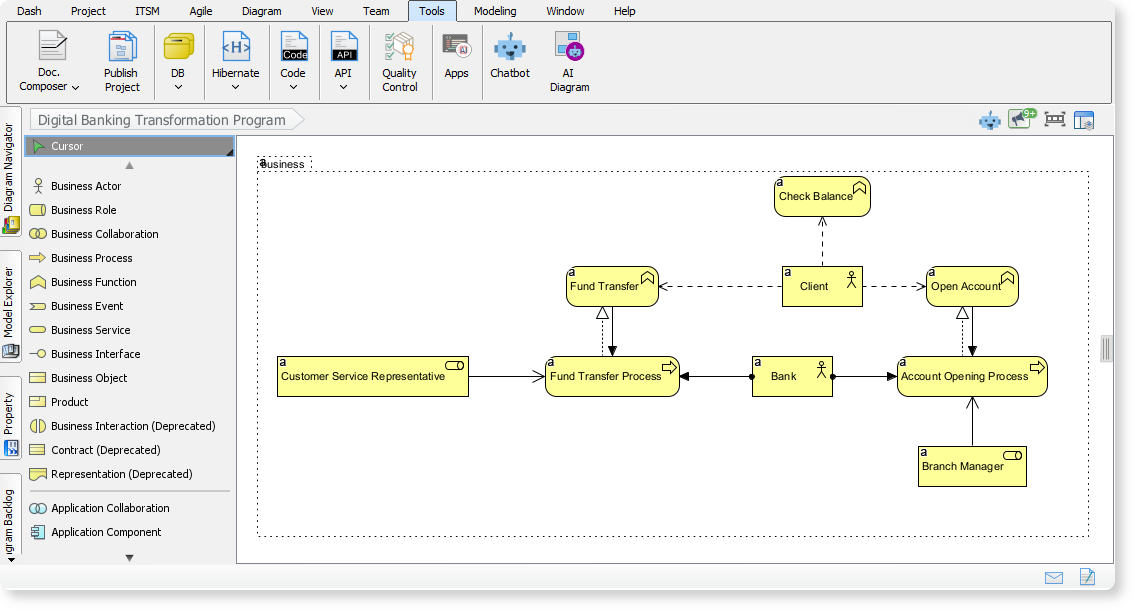
The Challenge of Manual ArchiMate Modeling
For years, architects and analysts have faced the “blank canvas” dilemma. Creating a robust Enterprise Architecture model requires not only a deep understanding of business requirements but also an intricate knowledge of the ArchiMate specification. Translating high-level strategies into detailed, compliant diagrams involves laborious manual drawing and careful element selection.
The complexity increases when communicating with diverse stakeholders. A generic diagram rarely suffices; project managers, engineers, and executives all require specific views tailored to their concerns. Manually generating dozens of these specialized “Viewpoints” acts as a bottleneck, slowing down project kickoffs and strategic validation.
Introducing Instant AI Alignment
The new AI ArchiMate Generator is designed to shift the architect’s focus from manual drafting to strategic analysis. By leveraging generative AI, Visual Paradigm allows users to input a high-level requirement or topic and instantly receive a fully drafted, specification-compliant ArchiMate model. This automation facilitates rapid prototyping and ensures that the structural foundation of the architecture is sound before human refinement begins.
Key Capabilities
- Complete Diagram Generation: Draft comprehensive models simply by typing a topic.
- Audience Customization: Define the tone (e.g., formal, technical) and target audience (e.g., product managers, engineers) to tailor the output.
- Quality Control: The output serves as an editable draft, allowing architects to refine, fact-check, and align the model with specific organizational standards.
Mastering Official Viewpoints
One of the most significant aspects of this release is the support for all official ArchiMate Viewpoints. A Viewpoint dictates which elements are visible and how they are structured to address specific stakeholder concerns. The AI tool can instantly structure data into the following standard viewpoints:
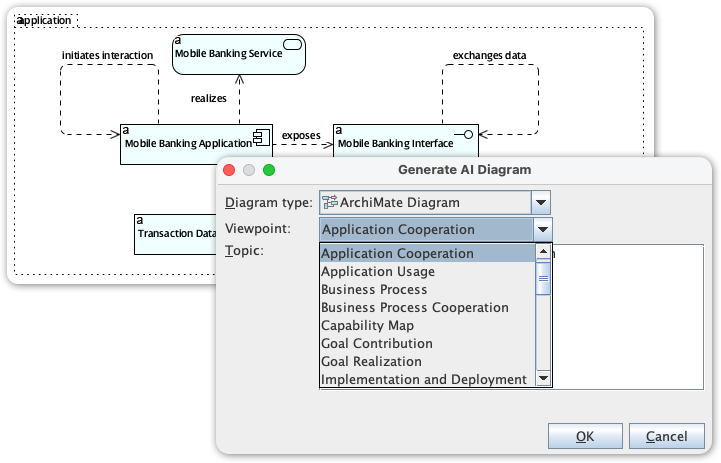
| Category | Supported Viewpoints |
|---|---|
| Strategy & Motivation | Goal Contribution, Goal Realization, Motivation, Principles, Requirements Realization, Stakeholder, Outcome Realization, Capability Map, Resource Map, Value Stream |
| Business Layer | Business Process, Business Process Cooperation, Organization, Product |
| Application Layer | Application Cooperation, Application Usage, Information Structure, Service Realization |
| Technology & Physical | Technology, Technology Usage, Physical, Implementation and Deployment, Infrastructure |
| Implementation & Migration | Implementation Migration, Migration, Project |
Step-by-Step Guide: Generating Your First Model
Utilizing the AI Diagram Generator is a streamlined process integrated directly into the Visual Paradigm Desktop interface. Follow these steps to generate a model:
- Access the Tool: Navigate to the Tools menu in the ribbon.
- Select AI Diagram: Click on the AI Diagram option to open the generator interface.
- Choose the Viewpoint: From the dropdown menu, select the specific ArchiMate Viewpoint you wish to generate (e.g., “Product Viewpoint” or “Technology Usage”).
- Define the Scope: Enter your topic or high-level requirement into the prompt field. Be as specific as necessary regarding the domain.
- Generate: Hit OK. The AI will process the request and render a completely structured diagram on your canvas.
Real-World Use Cases
To understand the practical application of this tool, consider the following scenarios where AI generation accelerates the architecture process:
1. Telecom: 5G Network Rollout
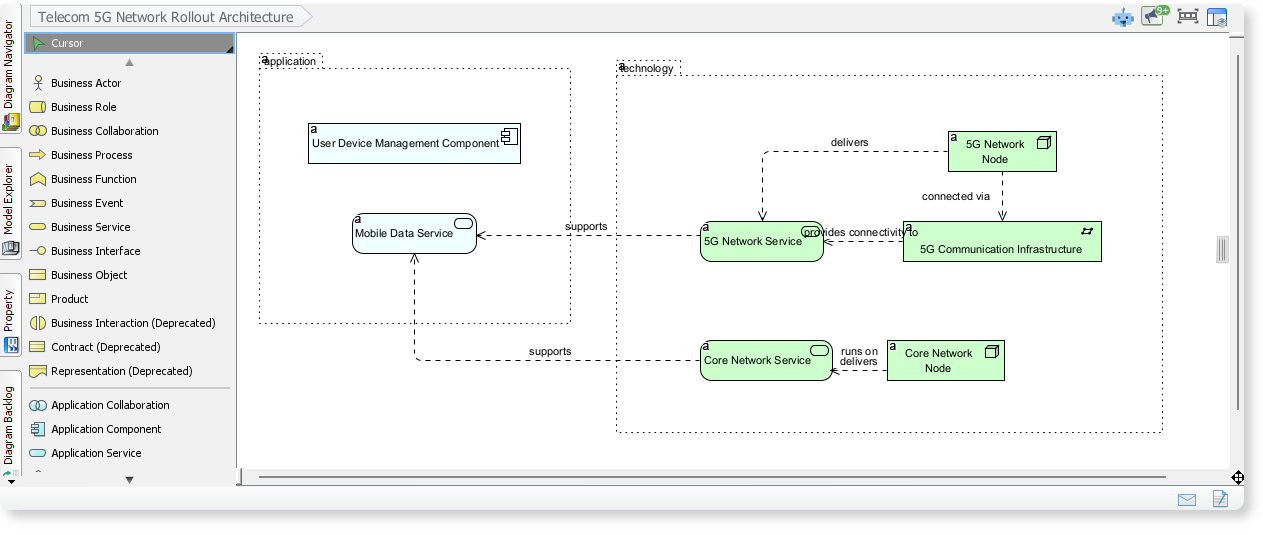
When tasked with visualizing a complex infrastructure rollout, an architect can request a diagram for a “Telecom 5G Network Rollout.” The AI generates a model outlining core components, showing relationships between application services, network services, and physical infrastructure. This provides an immediate visual aid for how data flows from the core network to the end-user device.
2. Finance: Digital Banking Transformation
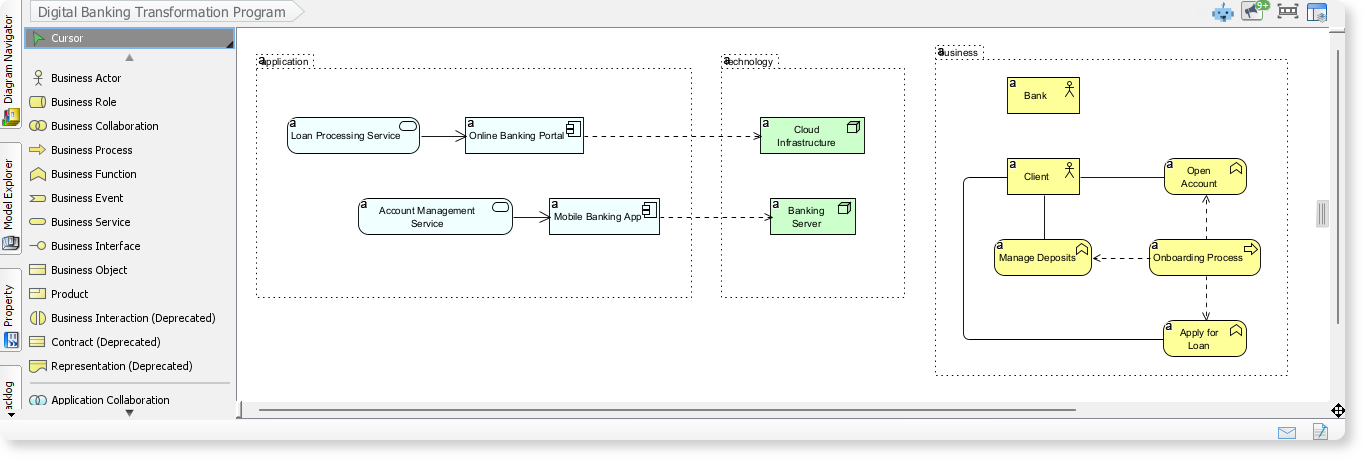
For business transformation leaders, visualizing the shift to digital banking is critical. By inputting “Digital Banking Transformation Program,” the tool generates a diagram illustrating the interaction between business processes, application services, and modern technology components. This helps stakeholders understand the dependencies between legacy systems and new digital interfaces.
3. Healthcare: Information Exchange Platform
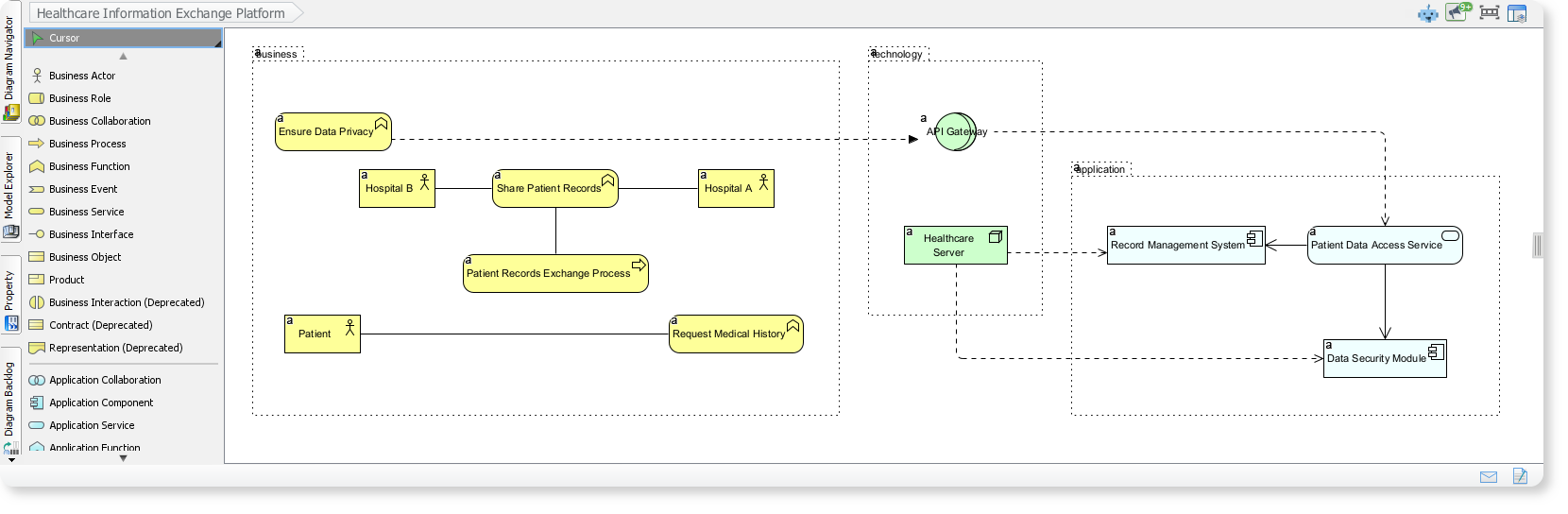
In the healthcare sector, interoperability is key. An architect can generate a model for a “Healthcare Information Exchange Platform.” The resulting diagram depicts how hospitals, patients, and supporting applications collaborate to exchange medical records securely. This creates a clear view of security layers and data workflow across the healthcare network.
Conclusion
The integration of generative AI into ArchiMate modeling represents a significant leap forward for Enterprise Architecture. By automating the creation of complex diagrams and official viewpoints, Visual Paradigm empowers architects to achieve business-IT alignment faster than ever before. This tool removes the technical barriers of drawing and specification compliance, allowing teams to focus on the high-value tasks of strategy, validation, and innovation.
Related posts:
 Mastering UML Package Diagrams with Visual Paradigm AI
How to Generate UML Diagrams with Visual Paradigm AI: A 2026 Comprehensive Guide
Visual Paradigm 18.0: A Comprehensive Guide to the AI-Powered Evolution of Modeling
Case Study: Automating IT Project Management with UML Activity Diagrams Using Visual Paradigm’s AI Chatbot
Mastering UML Package Diagrams with Visual Paradigm AI
How to Generate UML Diagrams with Visual Paradigm AI: A 2026 Comprehensive Guide
Visual Paradigm 18.0: A Comprehensive Guide to the AI-Powered Evolution of Modeling
Case Study: Automating IT Project Management with UML Activity Diagrams Using Visual Paradigm’s AI Chatbot