


Mastering Global Visual Modeling: A Guide to Visual Paradigm’s AI Chatbot Multi-Language Support
In the rapidly evolving landscape of system design and business analysis, accessibility is paramount. Visual Paradigm has announced significant improvements to its AI-Powered visual modeling software, specifically targeting the global user base. The latest update to the Visual Paradigm AI Chatbot introduces robust multi-language support, transforming it into a truly international tool for AI diagram generation.

This comprehensive guide explores these new features, defines the core technologies involved, and provides actionable steps to help you leverage the tool in your native language, whether you are creating UML diagrams, strategic analyses, or engineering models.
Key Concepts
Before diving into the workflow, it is essential to understand the foundational components of this enhanced tool:
- AI-Powered Visual Modeling Software: A category of tools that utilizes Artificial Intelligence (specifically Large Language Models) to interpret natural language text and convert it into structured visual models and diagrams.
- AI Diagram Generator for UML: A specific function within the software that automates the creation of Unified Modeling Language (UML) diagrams (such as Class, Sequence, and Use Case diagrams) based on user descriptions.
- Localization (L10n): The process of adapting a product’s interface and content to meet the language, cultural, and other requirements of a specific target market (e.g., switching the UI from English to Spanish or Japanese).
- Prompt Engineering in Native Language: The practice of crafting input commands for the AI in one’s primary language, expecting the AI to detect the linguistic nuance and respond in kind.
Guidelines: Leveraging Multi-Language Features
The recent updates focus on two main areas: the User Interface (UI) and the Chat Content. Follow these guidelines to maximize your productivity.
1. Switching the Interface Language
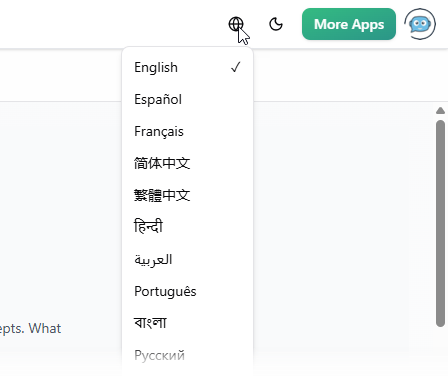
By default, the Visual Paradigm AI Chatbot launches in English. However, to reduce cognitive load and improve accessibility, you can switch the entire UI to your preferred language.
- Locate the Settings: Look for the ‘Earth’ icon located on the top navigation bar of the application.
- Select Your Language: Click the icon to reveal a drop-down menu.
- Choose from Supported Languages: Select your native language. Supported options include Español, Français, Simplified Chinese, Traditional Chinese, Português, Japanese, Deutsch, Polski, and many others.
- Verify: Ensure all menu items, buttons, and tooltips have updated to the selected language.

2. Prompting for AI Diagram Generation
The AI assistant has been refined to detect the language of your input. You no longer need to translate your thoughts into English before prompting the tool.
- Input Strategy: Type your request naturally in your chosen language. For example, if you need a SWOT analysis, ask for it in German or Portuguese directly.
- Context Maintenance: The AI will maintain the language context for follow-up questions. If you start in French, the AI will explain the diagram in French.
- Diagram Labeling: The generated diagram (e.g., UML classes, actors, and use cases) will automatically use labels in the language of the prompt.
Examples: Real-World Application
To demonstrate the power of the improved AI diagram generator, let’s look at a specific scenario involving a non-English workflow.
Scenario: Creating a Library Management System in Spanish
Goal: A user wants to create a UML Use Case Diagram for a library system, but prefers working in Spanish.
User Input (Spanish): “Dibuja un diagrama de casos de uso UML para un sistema de gestión de biblioteca.”AI Response:
The AI generates a visual Use Case Diagram where the actors are labeled “Bibliotecario” (Librarian) and use cases are labeled “Prestar libro” (Lend book) or “Registrar usuario” (Register user). The accompanying text description is also fully in Spanish.
User Input (Spanish): “Explica este diagrama.”AI Response:
The chatbot provides a detailed paragraph explaining the relationships and actors within the diagram in Spanish, ensuring no language hurdles impede understanding.
Supported Diagram Types
This multi-language capability applies across the full spectrum of supported diagrams, including:
- UML: Class, Sequence, Activity, Use Case.
- Systems Engineering: SysML diagrams.
- Enterprise Architecture: ArchiMate viewpoints.
- Strategic Analysis: SWOT, PEST, Five Forces.
- General: Mind maps, Flowcharts, and C4 models.
Checklist: Optimizing Your Multilingual Workflow
Use this checklist to ensure you are getting the most out of Visual Paradigm’s AI chatbot for UML and visual modeling updates.
- [ ] UI Configuration: Have you clicked the ‘Earth’ icon and set the interface to your native language?
- [ ] Prompt Verification: Are you typing prompts directly in your target language without manual translation?
- [ ] Output Review: detailed check—are the diagram labels correctly localized? (e.g., “Actor” vs. “Acteur”).
- [ ] Iteration: Test the “Edit” features by asking for changes in your native language (e.g., “Add a login module” in Chinese).
- [ ] Export & Share: Have you utilized the sharing features to send the localized diagram to your team?
- [ ] Platform Integration: Remember that you can import these results into the main Visual Paradigm software for further editing.
Conclusion
The enhancements to the Visual Paradigm AI Chatbot mark a significant step forward in democratizing AI-Powered visual modeling software. By removing language barriers, Visual Paradigm empowers professionals, educators, and teams globally to collaborate more effectively. Whether you are generating complex SysML requirements in Japanese or a quick mind map in German, the tool now adapts to you, rather than forcing you to adapt to it.
Ready to experience these features? Visit the Visual Paradigm AI Chatbot landing page or launch the app to start generating diagrams in your language today.
Resources
- Visual Modeling Archives – Visual Paradigm Guides
- FREE Learning Resources: UML, Agile, TOGAF, PMBOK, BPMN – Visual Paradigm
- Comprehensive Guide to TOGAF ADM – Visual Paradigm TOGAF
- Revolutionize Your Visual Modeling with Visual Paradigm
- Visual Modeling Tool
- Visual Model Management Toolset
- UML Modeling, Software Process and Tool – Visual Paradigm
- Visual Paradigm Free Online Training }
- Visual Modeling – UML Tool
- Visual Paradigm Database Designer Guides
- Visual Paradigm Archives – Visual Paradigm Guides
- UML Archives – Visual Paradigm Guides