


1. Introduction
In today’s fast-paced IT environment, effective project management is critical to delivering high-quality software on time and within budget. Traditional project management workflows—often documented in text or spreadsheets—can be complex, inconsistent, and difficult to visualize. To address this, UML Activity Diagrams have emerged as a powerful tool for modeling business processes, particularly in IT project management.
This case study explores how Visual Paradigm’s AI-powered Visual Modeling Chatbot streamlines the creation of PlantUML-based UML Activity Diagrams for IT project management, transforming manual documentation into an intelligent, automated workflow.
2. Key Concept: UML Activity Diagrams in Project Management
An UML Activity Diagram is a type of behavioral diagram that models the flow of activities, decisions, and actions within a system or process. In the context of IT project management, it provides a visual representation of the entire project lifecycle—from initiation to closure—highlighting key stages, decision points, responsibilities, and control flow.
Why Use Activity Diagrams for IT Project Management?
-
Clarity & Communication: Offers a clear, visual roadmap for teams and stakeholders.
-
Process Optimization: Identifies bottlenecks, redundancies, and inefficiencies.
-
Role Accountability: Swimlanes clearly define responsibilities (e.g., Project Manager, QA, Dev Team).
-
Decision Tracking: Highlights critical decision points such as “Is the charter approved?” or “Are deliverables of acceptable quality?”
-
Integration with Methodologies: Compatible with both Waterfall and Agile/Scrum workflows.
✅ Example: In Agile, the activity diagram can represent sprint cycles, backlog refinement, and sprint reviews—making it a versatile tool across methodologies.
3. Use Case: IT Project Management Workflow
Scenario
A mid-sized software development company is managing a new enterprise application project. The project involves cross-functional teams, multiple stakeholders, and strict deadlines. The team needs a standardized, visual workflow to align all members and ensure compliance with project management best practices (PMBOK/Agile).
Challenge
Manually drawing and maintaining complex activity diagrams is time-consuming, error-prone, and often inconsistent across teams.
Solution: Visual Paradigm’s AI Chatbot
By leveraging the Visual Paradigm AI chatbot, the team inputs a clear natural language problem description (as seen in the prompt), and the AI instantly generates a fully formatted, valid PlantUML activity diagram code.
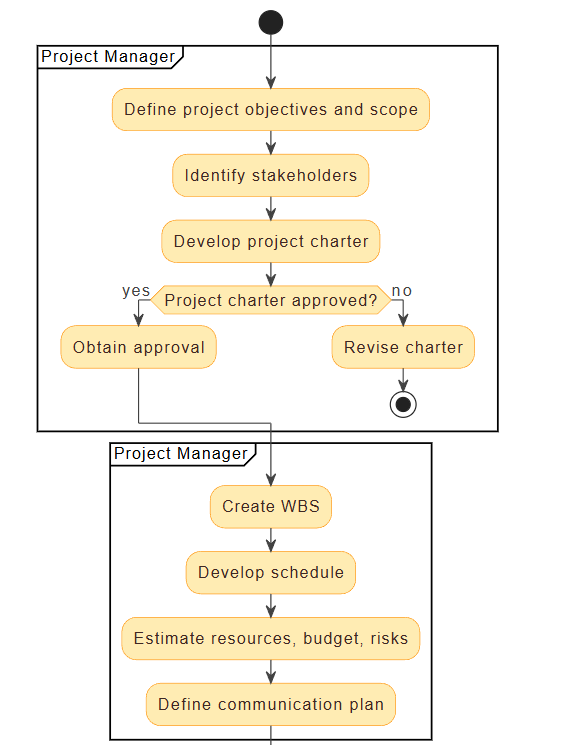
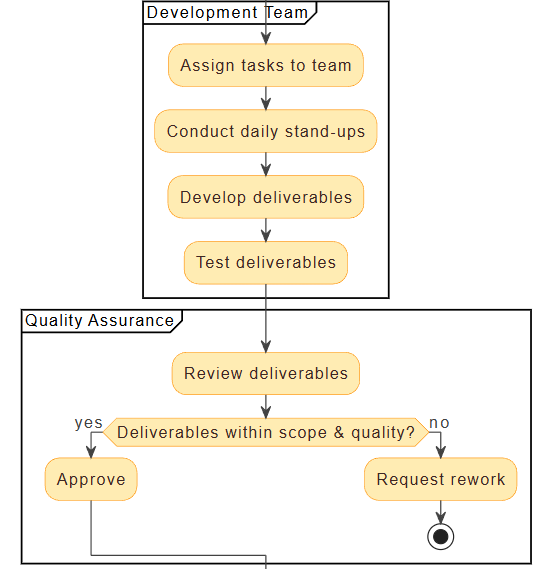
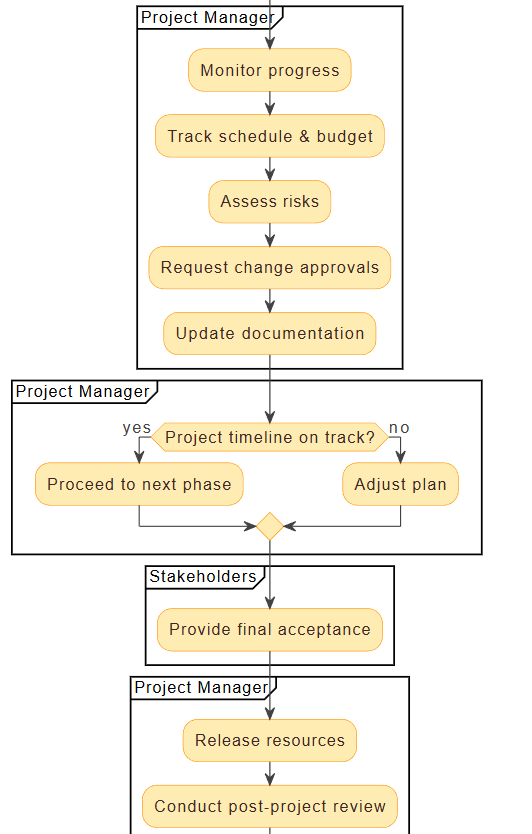

✅ Output:
@startuml
skinparam {
  ArrowColor #424242
  ArrowFontColor #424242
  DefaultFontSize 14
  Swimlane {
    BorderColor #9FA8DA
    BackgroundColor #E8EAF6
    FontColor #303F9F
  }
  Activity {
    BorderColor #FF8F00
    BackgroundColor #FFECB3
    FontColor #3E2723
  }
}
start
partition "Project Manager" {
  :Define project objectives and scope;
  :Identify stakeholders;
  :Develop project charter;
  if (Project charter approved?) then (yes)
    :Obtain approval;
  else (no)
    :Revise charter;
    stop
  endif
}
partition "Project Manager" {
  :Create WBS;
  :Develop schedule;
  :Estimate resources, budget, risks;
  :Define communication plan;
}
partition "Development Team" {
  :Assign tasks to team;
  :Conduct daily stand-ups;
  :Develop deliverables;
  :Test deliverables;
}
partition "Quality Assurance" {
  :Review deliverables;
  if (Deliverables within scope & quality?) then (yes)
    :Approve;
  else (no)
    :Request rework;
    stop
  endif
}
partition "Project Manager" {
  :Monitor progress;
  :Track schedule & budget;
  :Assess risks;
  :Request change approvals;
  :Update documentation;
}
partition "Project Manager" {
  if (Project timeline on track?) then (yes)
    :Proceed to next phase;
  else (no)
    :Adjust plan;
  endif
}
partition "Stakeholders" {
  :Provide final acceptance;
}
partition "Project Manager" {
  :Release resources;
  :Conduct post-project review;
  :Archive documentation;
}
stop
@enduml
📌 Note: The generated diagram is ready to render in any PlantUML-compatible tool (e.g., Visual Paradigm, VS Code with PlantUML plugin, or online editors).
4. How Visual Paradigm’s AI Chatbot Automates the Process
✅ 1. Natural Language to UML Code
Instead of learning complex syntax, users describe their workflow in plain English. The AI interprets the intent and generates correct, valid PlantUML code—eliminating syntax errors and inconsistencies.
🔤 Input: “Create an activity diagram for IT project management with initiation, planning, execution, monitoring, and closure phases.”
🧠 AI Output: A complete, structured PlantUML diagram.
✅ 2. Smart Swimlane Assignment
The AI automatically assigns actions to swimlanes based on role context (e.g., “Project Manager”, “QA”, “Stakeholders”), ensuring role accountability and clear ownership.
✅ 3. Decision Logic & Control Flow
The AI recognizes conditional logic (e.g., “if approved then… else…”) and renders it correctly using diamond decision nodes, ensuring the diagram is both accurate and professional.
✅ 4. Real-Time Feedback & Iteration
Users can refine the diagram by simply asking:
-
“Add a sprint review step in the execution phase.”
-
“Make the QA review a loop until approved.”
The AI updates the diagram instantly—no need to re-draw from scratch.
5. Benefits: Making Project Management Easier & Smarter
| Benefit | Impact |
|---|---|
| Speeds up documentation | From hours to seconds |
| Reduces human error | No more misplaced arrows or missing nodes |
| Improves team alignment | Visual workflow ensures everyone understands the process |
| Enables reuse | Save templates for future projects (e.g., “Agile Sprint Workflow”) |
| Supports Agile & Waterfall | Adaptable to different project methodologies |
💡 Real-World Impact: A project manager can now generate a complete project workflow in under 2 minutes—enabling faster kickoffs, clearer stakeholder communication, and smoother audits.
6. Conclusion: The Future of Visual Modeling is AI-Powered
Visual Paradigm’s AI chatbot transforms the way teams approach UML modeling. By automating the creation of activity diagrams for IT project management, it empowers project managers, developers, and stakeholders to focus on value delivery, not diagramming.
With AI as a co-pilot, complex workflows become intuitive, documentation becomes consistent, and project success becomes more predictable.
7. Call to Action
🚀 Ready to automate your project workflows?
Try Visual Paradigm’s AI chatbot today and turn your project management ideas into professional UML diagrams in seconds.
👉 Visit: https://www.visual-paradigm.com
🎯 Use Case: “Generate a PlantUML activity diagram for an Agile sprint cycle.”
- Free Online Activity Diagram Tool | Visual Paradigm: This is a web-based solution for visualizing workflows and business processes without requiring software installation.
- What Is an Activity Diagram? | UML Guide by Visual Paradigm: An in-depth guide explaining the purpose, components, and use cases of activity diagrams in modeling system workflows.
- Activity Diagram Tutorial | Step-by-Step Guide | Visual Paradigm: A comprehensive tutorial designed for beginners to learn how to model complex workflows using step-by-step instructions.
- Activity Diagrams in Software Design | Visual Paradigm Handbook: A detailed handbook section on using activity diagrams to map out system behavior and decision points effectively.
- Mastering UML Activity Diagrams with AI | Visual Paradigm Blog: This post explores how AI-powered features enhance the creation and optimization of activity diagrams for developers and analysts.
- Generate Activity Diagrams from Use Cases Instantly with Visual Paradigm’s AI: This resource highlights how the AI engine enables rapid and accurate conversion of use cases into professional diagrams.
- Mastering Swimlane Activity Diagrams: A Practical Guide with Examples: A guide focused on creating swimlane diagrams to visualize workflows across different roles or departments.
- Convert Use Case to Activity Diagram – AI-Powered Transformation: Details an AI transformation tool that automatically converts use case diagrams into detailed activity diagrams.
- Advanced Activity Diagram Software Features | Visual Paradigm: An overview of powerful tool capabilities, including real-time collaboration and extensive export options.
- Activity Diagram Guide | Visual Paradigm User Manual: A technical reference in the user manual covering all aspects from basic diagram creation to advanced modeling.