


OpenDocs is a next-generation, AI-powered knowledge management platform and documentation hub developed by Visual Paradigm. It is designed to function as a centralized, interactive, and intelligent “single source of truth,” allowing individuals and teams to structure information effectively by combining text and professional visuals in one web-based environment.
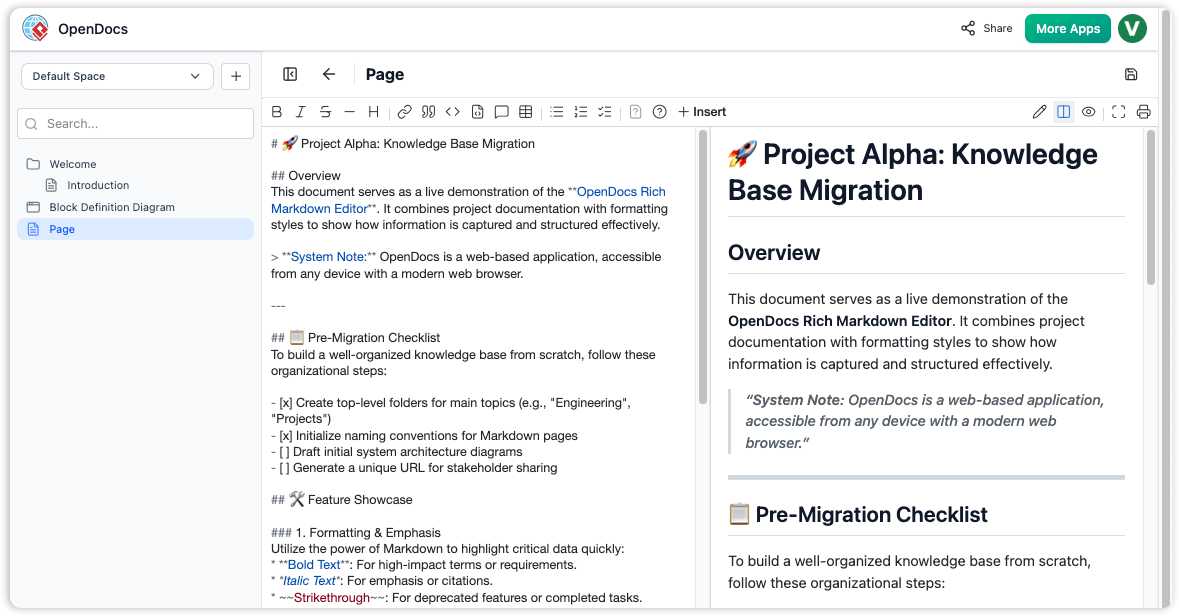
The Unified Framework: Unifying Text and Visual Logic
Unlike standard documentation tools that require switching between separate applications, OpenDocs provides a single home for all project work. It integrates professional drawing tools directly into the document editing environment.
- Rich Text Editing: The platform features a full-featured text editor, allowing users to input content in rich format.
- Integrated Diagram Editor: Users can create a wide variety of visuals—including flowcharts, UML diagrams, network diagrams, and mind maps—directly within their pages.
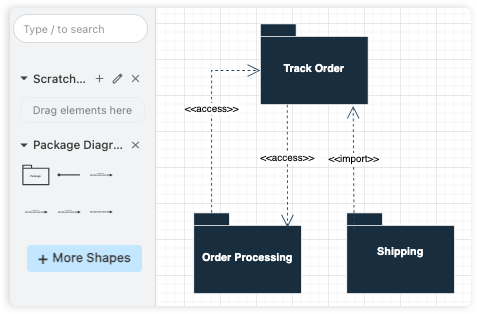
- Unified Content: This synergy allows users to mix text and charts in one spot, ensuring that visual models complement and illustrate the complex relationships described in text-based notes.
The AI Advantage
OpenDocs leverages generative AI to transform static documents into a dynamic, interactive knowledge base.
- AI Diagram Generator: Users can generate entire diagrams instantly by typing a natural language prompt, such as “Create a flowchart for our refund process”.
- AI Content Assistant: This tool can generate article drafts, summarize long documents, simplify complex topics, or answer questions based on the content stored within the knowledge base.
Structural Organization and Sharing
OpenDocs acts as a primary information organizer, utilizing a familiar hierarchical tree-like structure with nested folders.
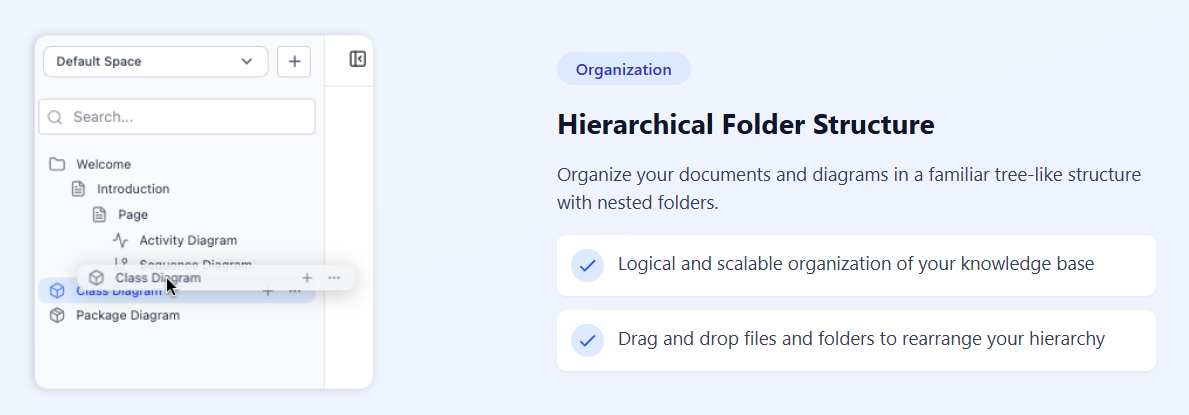
- Management: Users can easily drag and drop files and folders to rearrange the hierarchy as projects grow.
- Collaboration: The platform allows for one-click sharing of the entire knowledge base via a secure, read-only URL. This ensures that all stakeholders have access to the full context of a project.
Core Workflow: Getting Started
- Launch & Initialize: Access OpenDocs via a modern web browser; no desktop installation is required.
- Create a Page: Click the “New Page” button in the sidebar and provide a descriptive name.
- Build Content: Use the page editor for text and the “New Diagram” button to open the visual editor for models.
- Organize: Create folders and drag-and-drop pages into a logical hierarchy.
Availability and Use Cases
OpenDocs is the perfect collaborative platform for Development Teams (API guides and architecture), Project Managers (requirements and reports), HR Departments (handbooks), and Educators (research and study guides).
It is available through Visual Paradigm 18.0 and later, included with:
- Visual Paradigm Desktop Professional Edition (with active maintenance).
- Visual Paradigm Online.
Resource Library: Further Reading
For more information on the platform and its features, please refer to the following resources:
- OpenDocs AI-Powered Knowledge Platform Release: https://updates.visual-paradigm.com/releases/opendocs-ai-powered-knowledge-platform/
- OpenDocs Official Feature Page: https://www.visual-paradigm.com/features/opendocs/
- Visual Paradigm 18.0 Release Features: https://updates.visual-paradigm.com/releases/visual-paradigm-18-0-release-ai-powered-features/
- OpenDocs Tool Overview: https://ai.visual-paradigm.com/tool/opendocs
- Markdown Editor Details: https://ai.visual-paradigm.com/tool/markdown-editor/
- Intelligent Specialized AI in Professional Work: https://www.cybermedian.com/why-visual-paradigm-18-0-is-more-than-just-a-free-llm-the-case-for-intelligent-specialized-ai-in-professional-work/
Related posts:
 The World’s First Purpose-Built AI Co-Pilot for Visual Modeling
 Talk to Your Diagrams: Experience Conversational Design Refinement
 🚀 Unlock the Future of Visual Modeling with Visual Paradigm AI – Where AI Meets Enterprise-Grade Design
 SysML Block Definition Diagrams: A Modern Guide to System Architecture Modeling