


The Complete Guide to AI-Powered Markmap Studio: Revolutionizing Mind Maps with Markdown and AI
In an era where information overload is common, the ability to visualize complex ideas instantly is invaluable. Visual Paradigm has officially launched AI-Powered Markmap Studio, a groundbreaking tool released on December 22, 2025. This sophisticated web application bridges the gap between simple text editing and complex data visualization by combining the simplicity of Markdown with the generative power of Artificial Intelligence.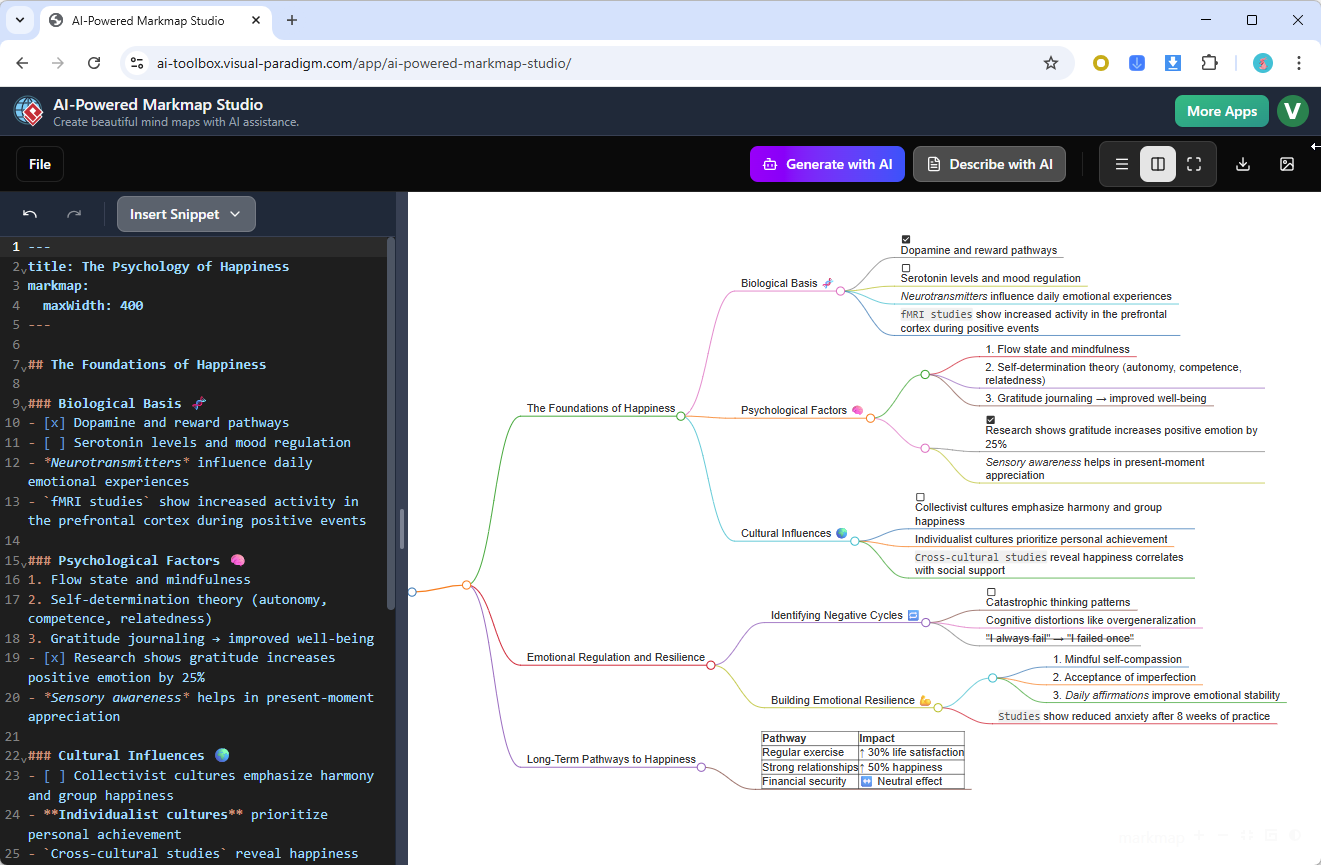
Whether you are a developer, business strategist, educator, or content creator, this guide will explore how this premier markmap editor transforms brainstorming sessions into structured, interactive mind maps in seconds.
Key Concepts
Before diving into the workflows, it is essential to understand the core terminologies that make AI-Powered Markmap Studio a standout solution in the realm of visual productivity tools.
- Markmap (Markdown + Mind Map): A visualization technique that parses Markdown text content and renders it as a hierarchical mind map. It allows users to focus on content structure (text) rather than layout mechanics (drawing boxes and lines).
- AI-Powered Generation: The integration of artificial intelligence algorithms that analyze a simple topic or prompt to automatically generate a comprehensive, multi-tiered mind map structure. This feature handles the heavy lifting of brainstorming, offering depth and complexity settings.
- Real-Time Synchronization: The capability of the editor to update the visual canvas instantly as you type code or text. AI-Powered Markmap Studio is built with React and TypeScript to ensure this sync is smooth and responsive.
- KaTeX: A library supported within the tool that allows for the rendering of complex mathematical expressions directly within the mind map nodes.
Guidelines: How to Master AI-Powered Markmap Studio
Using AI-Powered Markmap Studio is designed to be effortless, but mastering its full potential requires understanding both its AI capabilities and its manual editing features. Follow these step-by-step guidelines to get started.
Step 1: Access and Initialization
Navigate to the AI-Powered Markmap Studio landing page. Upon launching the app, you are presented with two primary paths:
- Manual Markdown Editing: Ideal for users who already have a structure in mind and want to type it out using standard syntax.
- AI Generation: Best for overcoming writer’s block or generating comprehensive overviews of new topics.
Step 2: Generating Content via AI
To leverage the intelligent AI mind map generator:

- Select the AI generation option.
- Enter your central topic (e.g., “Digital Marketing Strategy 2026”).
- Adjust the parameters for Depth (how many levels of hierarchy) and Complexity (detail per node).
- Click generate and watch as the tool produces a structured markmap instantly.
Step 3: Mastering Markdown Syntax
Once your map is generated (or if you are starting from scratch), you can edit the structure using the editor on the left panel. The tool uses standard Markdown syntax to create hierarchy. Use the table below as your reference guide:
| Syntax Element | Description | Example Usage |
|---|---|---|
| # Header | Main topic (Root Node) | # Project Alpha |
| ## Subheader | First-level branch | ## Phase 1 |
| ### Sub-subheader | Second-level branch | ### Research |
| – List Item | Bullet points under headers | - Task A |
| 1. Numbered List | Ordered items | 1. Step One |
| **Bold** | Emphasized text | **Urgent** |
| [Link](URL) | Hyperlinks | [Google](https://google.com) |
| `Code` | Inline code highlighting | `var x = 1` |
| “`Code Block“` | Fenced code blocks | ```python\nprint('Hello')\n``` |
| $Math$ | KaTeX Math expressions | $E=mc^2$ |
Step 4: Management and Export
After finalizing your map, use the project management features to:
- Save/Load: Keep your projects organized within the suite.
- Share: Generate shareable links for collaboration.
- Export: Download your creation as an interactive HTML file, an SVG image for presentations, or a raw Markdown file.

Tips and Tricks
To maximize your productivity with AI-Powered Markmap Studio, consider these advanced strategies:
- Utilize YAML for Styling: You can customize the styling of your mind map (colors, fonts, and layout behaviors) by adding a YAML frontmatter block at the very top of your markdown editor. This gives you granular control over the visual presentation.
- Leverage Code Blocks for Technical Maps: If you are a developer documenting an API or system architecture, use the fenced code blocks (` “` `). The editor supports syntax highlighting, making technical diagrams much easier to read.
- Keyboard Shortcuts: The editor supports standard coding shortcuts (Undo/Redo). Use
Ctrl+Z(Undo) andCtrl+Y(Redo) to experiment with structure without fear of losing work. - Rich Content Integration: Don’t limit yourself to text. You can insert Emojis to categorize nodes visually and use standard Markdown tables to present structured data inside a specific node.
Checklist: Auditing Your Markmap Workflow
Before publishing or sharing your mind map, run through this quick checklist to ensure you are utilizing the full capabilities of AI-Powered Markmap Studio:
- Core Structure Check: Have you used headers (#, ##) correctly to define the hierarchy? (Only one # should ideally be used for the root).
- AI Enhancement: Did you try generating the initial structure with AI to see if you missed any sub-topics?
- Visual Clarity: Have you used bold or italics to highlight key takeaways within nodes?
- Interactive Elements: Are all hyperlinks working? If you used mathematical formulas, did they render correctly via KaTeX?
- Export Format: Have you selected the right export format (SVG for static images, HTML for interactive sharing)?
AI-Powered Markmap Studio creates a seamless bridge between thought and visualization. By combining the speed of AI with the precision of Markdown, Visual Paradigm has created the ultimate tool for modern professionals. Ready to revolutionize your brainstorming? Visit the landing page and start mapping today.
Resources
- Visual Paradigm Desktop Product Updates – Visual Paradigm Product Updates
- The Ultimate Guide to C4-PlantUML Studio: Revolutionizing Software Architecture Design – Visual Paradigm Blog
- Visual Paradigm AI: Advanced Software & Intelligent Apps
- Boost Creativity & Productivity with AI-Powered Mind Maps – Visual Paradigm Blog
- Visual Paradigm Online Shop
- Visual Paradigm – Online Productivity Suite
- Unleash Your Creativity with Visual Paradigm Online: The Ultimate Free Web-Based UML Software – Visual Paradigm Blog
- AI Chatbot | Diagramming & Modeling with Visual Paradigm
- Unleashing Creativity with AI-Assisted Brainstorming – Visual Paradigm Guides
- From Simple to Sophisticated: What is the AI-Powered Sequence Diagram Refinement Tool? – Visual Paradigm Guides
- How AI Chatbot Can Help You Learn UML Faster – Visual Paradigm Blog
- AI-Powered Business Model Canvas Tool – Visual Paradigm Guides
- Generate ArchiMate Diagrams and Viewpoints Instantly with AI – Visual Paradigm Product Updates
- AI-Powered MVC System Architecture Generator – Visual Paradigm 17.3
- AI-Assisted Brainstorming | Unlock Creativity with Visual Paradigm