


In the fast-paced world of Agile development, bridging the gap between high-level strategic vision and actionable backlog items is a constant challenge. The Product Canvas, a strategic tool designed by Roman Pichler, addresses this by creating a unified interface for product managers, UX designers, and development teams. It serves as a dynamic map that aligns user experience with feature implementation and business goals.
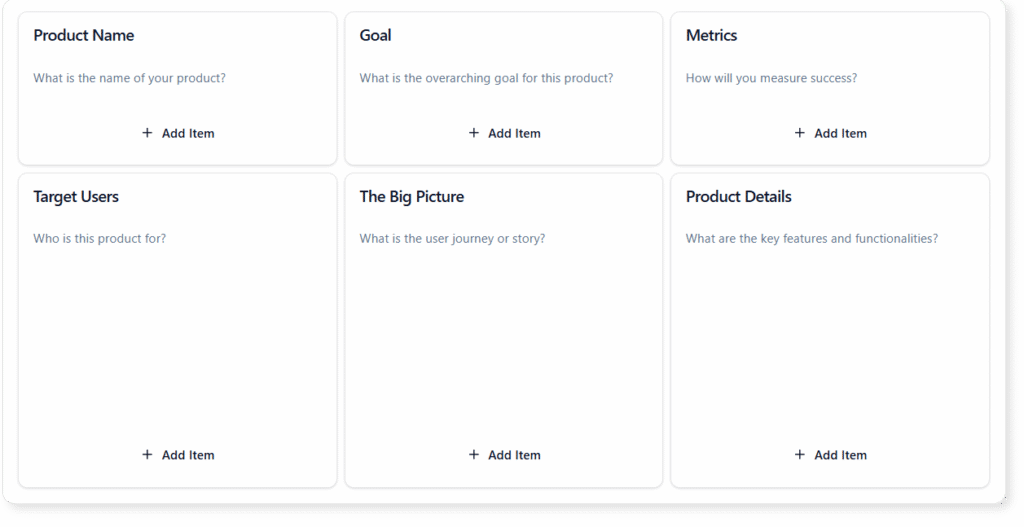
This comprehensive guide explores the structure of the Product Canvas, practical guidelines for implementation, and how modern AI tools—specifically Visual Paradigm AI—can revolutionize how teams approach this framework.
Key Concepts of the Product Canvas
Before diving into execution, it is essential to understand the foundational elements that make up a robust Product Canvas. Unlike a traditional Business Model Canvas which looks at the entire organization, the Product Canvas focuses specifically on the product’s value proposition and user experience.
- Vision: The guiding star of the product. This describes the ultimate future state and the overarching reason for creating the product.
- Target Group: Detailed profiles of the users and customers. This section often utilizes personas to humanize the audience.
- Needs: The specific problems, desires, or jobs-to-be-done that the target group has. This defines the “why” behind the features.
- Product (The Solution): A high-level description of the product, including its unique value proposition and how it addresses user needs.
- Business Goals: The tangible benefits the organization hopes to achieve, such as revenue targets, market share growth, or brand equity.
- Big Picture & Details: This area connects the strategy to execution. It includes high-level features (Epics) and specific user interaction steps or constraints.
Visual Paradigm AI: Enhancing Product Strategy
The traditional method of filling out a canvas involves sticky notes, whiteboards, and hours of manual brainstorming. Visual Paradigm Online transforms this process by integrating advanced AI capabilities directly into the canvas workflow. Here is how Visual Paradigm AI automates and enhances the Product Canvas experience:

1. Automated Canvas Generation
Starting from a blank slate is often the hardest part of strategy. With Visual Paradigm, you can accelerate the workflow significantly. By simply inputting a short description of your product idea, the AI generates a detailed, structured canvas. It populates sections like Target Group, Needs, and Business Goals with logical, industry-relevant data, providing a solid foundation to refine rather than build from scratch.
2. AI-Enhanced Ideation
Creative blocks can stall product planning. The AI assistant acts as a collaborative partner, providing context-driven input for specific sections. If you are struggling to define the “Unique Value Proposition,” the AI can offer suggestions based on the target group and market context you have already defined. This strengthens strategic thinking and uncovers opportunities you might have missed.
3. Advanced Strategic Evaluation
Moving from planning to validation is crucial. Visual Paradigm AI allows you to execute automated analyses—such as SWOT, Risk assessments, and Market Feasibility studies—directly against the content of your Product Canvas. This ensures that the strategy is not only creative but also viable and aligned with measurable goals.
Guidelines: Step-by-Step Implementation
Creating an effective Product Canvas requires a logical flow. Follow these guidelines to build a canvas that serves as a single source of truth for your team.
Phase 1: Strategic Foundation
Begin with the Vision. Ensure it is concise and inspiring. Next, define your Target Group rigorously. Do not just list demographics; understand their behaviors. Map these users directly to their Needs. If a need does not map to a user, it does not belong on the canvas.
Phase 2: Product Definition
Outline the Product features that solve the identified needs. Keep this high-level; focus on capabilities rather than technical specifications. simultaneously, define the Business Goals. How will you measure success? Metrics should be specific (e.g., “Acquire 10,000 active users by Q3”).
Phase 3: The Big Picture and Details
This is where UX meets Agile. Sketch out the user journey or list the major Epics (The Big Picture). Then, break these down into immediate steps or “Details” for the next sprint. This connects the long-term vision with immediate development tasks.
Real-World Application Examples
To better understand the versatility of the Product Canvas, consider these scenarios where the framework is applied to different industries:
| Industry | Scenario | Application |
|---|---|---|
| Fintech | Mobile Banking App – Budgeting Feature | Used to map user financial anxieties (Needs) to specific automated savings features (Solution), ensuring the UX simplifies complex financial data. |
| SaaS | AI Assistant for Project Management | Focuses on integrating a new AI agent into an existing tool. The canvas helps prioritize features that offer high impact with low user friction. |
| Mobile App | Language Learning App | An initial canvas for a new concept focused on conversational practice, identifying the “fear of speaking” as a primary user pain point to solve. |
Tips and Tricks for Success
To maximize the utility of your Product Canvas within Visual Paradigm Online, utilize the following best practices:
- Use Focus Mode: Complex canvases can be overwhelming. Visual Paradigm’s “Focus Mode” allows you to view and edit one section at a time, eliminating distractions and allowing for deep-dive work on specific areas like user needs or business goals.
- Treat it as a Living Document: A Product Canvas is not a one-time activity. It should be revisited after every release or sprint review. Update the “Big Picture” and “Details” as the product evolves.
- Leverage Professional Exports: Communication with stakeholders is key. Export your canvas and the AI-generated analysis reports into Word, Markdown, or PDF formats. This allows you to share strategic insights with executives who may not be in the day-to-day tool.
- Validate with Empathy Maps: If your “Target Group” section feels weak, switch to an Empathy Map Canvas (also available in the toolkit) to deepen your understanding of the user, then feed those insights back into the Product Canvas.
By combining the structured framework of the Product Canvas with the intelligent automation of Visual Paradigm AI, product managers can move faster, validate ideas more thoroughly, and ensure their teams are building the right features for the right users.
Resource
-
What Is the Business Model Canvas? Why Use Visual Paradigms & AI Tools: This comprehensive guide explains the Business Model Canvas, its core components, and how visual paradigms and AI-powered tools enhance strategic planning and business innovation.
-
AI-Powered Business Model Canvas Builder – Instant Strategy Design: An AI-driven tool that automates the creation of business model canvases, offering intelligent suggestions and real-time insights to accelerate business planning.
-
AI Canvas Tool – Intelligent Design for Business Frameworks: An AI-powered canvas application that helps users generate and refine business models, value propositions, and strategy frameworks with smart suggestions and automation.
-
AI Business Model Canvas Tool – Smart Strategy Development: A comprehensive AI-enhanced solution for building and refining business models with intelligent insights, real-time feedback, and collaborative features.
-
AI Canvas Editor Release Update: Introduces an AI-powered canvas editor that enhances diagram creation through intelligent suggestions and automated layout optimization.
-
AI-Powered Business Model Canvas Tool Guide: A step-by-step guide on using an AI-enhanced tool to generate and refine business model canvases with intelligent input and real-time recommendations.
-
Mission Model Canvas | AI-Powered Strategy Tool by VP: October 28, 2025 – Coordinate live sessions with your team using the built-in timer and export your final canvas or reports into professional formats such as Word, Markdown, or CSV. … The Mission Model Canvas is specifically designed for non-profits, government agencies, social enterprises, and any organization where the primary goal is mission achievement rather than profit.
-
Comprehensive Tutorial: AI-Powered Business Canvas Toolkit with Visual Paradigm: This page provides a detailed guide on using an AI-enhanced Business Model Canvas toolkit integrated with Visual Paradigm for automated business strategy development.
-
AI Canvas Tool – Visual Paradigm: An AI-driven tool within Visual Paradigm that enables users to generate and refine business canvases through intelligent automation and natural language input.
-
Mastering the Business Model Canvas with AI: Step-by-Step Guide Using Visual Paradigm: This blog post offers a structured walkthrough of leveraging AI capabilities in Visual Paradigm to create, customize, and optimize Business Model Canvases efficiently.
-
How the AI Business Model Canvas Builder Works – Visual Paradigm: This page explains the functionality of the AI-powered Business Model Canvas Builder, highlighting how machine intelligence automates canvas creation and strategic insight generation.
-
Product Canvas | AI-Powered Strategy Tool by VP: Build products people love. Combine strategy, design, and feedback into one visual space with our AI-powered Product Canvas to bring ideas to market faster.
-
Lean UX Canvas | AI-Powered Strategy Tool by VP: October 28, 2025 – Create a complete strategy framework in moments. Simply describe your vision, and the AI canvas generator transforms it into a structured, insight-rich canvas that helps you visualize, plan, and refine your next big idea.
-
Lean Canvas – Visual Paradigm: October 28, 2025 – Our application is designed to be your strategic partner, providing intelligent tools to enhance every step of your planning process for the Business Model Canvas. … Have a startup idea? Just enter ‘a mobile app for local home-cooked meal delivery’ and let our AI generate a complete Lean Canvas, outlining the problem, solution, and key metrics.