
In the modern product ecosystem, the boundary between the physical and digital worlds continues to blur. While traditional User Experience (UX) design focuses on screens and interfaces, the tactile reality of industrial design (ID) offers a robust framework for building cohesive experiences. By integrating the core tenets of industrial design into UX strategy, teams can create products that feel as intuitive to touch as they do to navigate.
This guide explores how principles such as ergonomics, materiality, and affordance translate from physical objects to digital interfaces. We will examine the strategic alignment required to merge these disciplines and provide actionable methods for implementing these concepts without relying on specific tools.
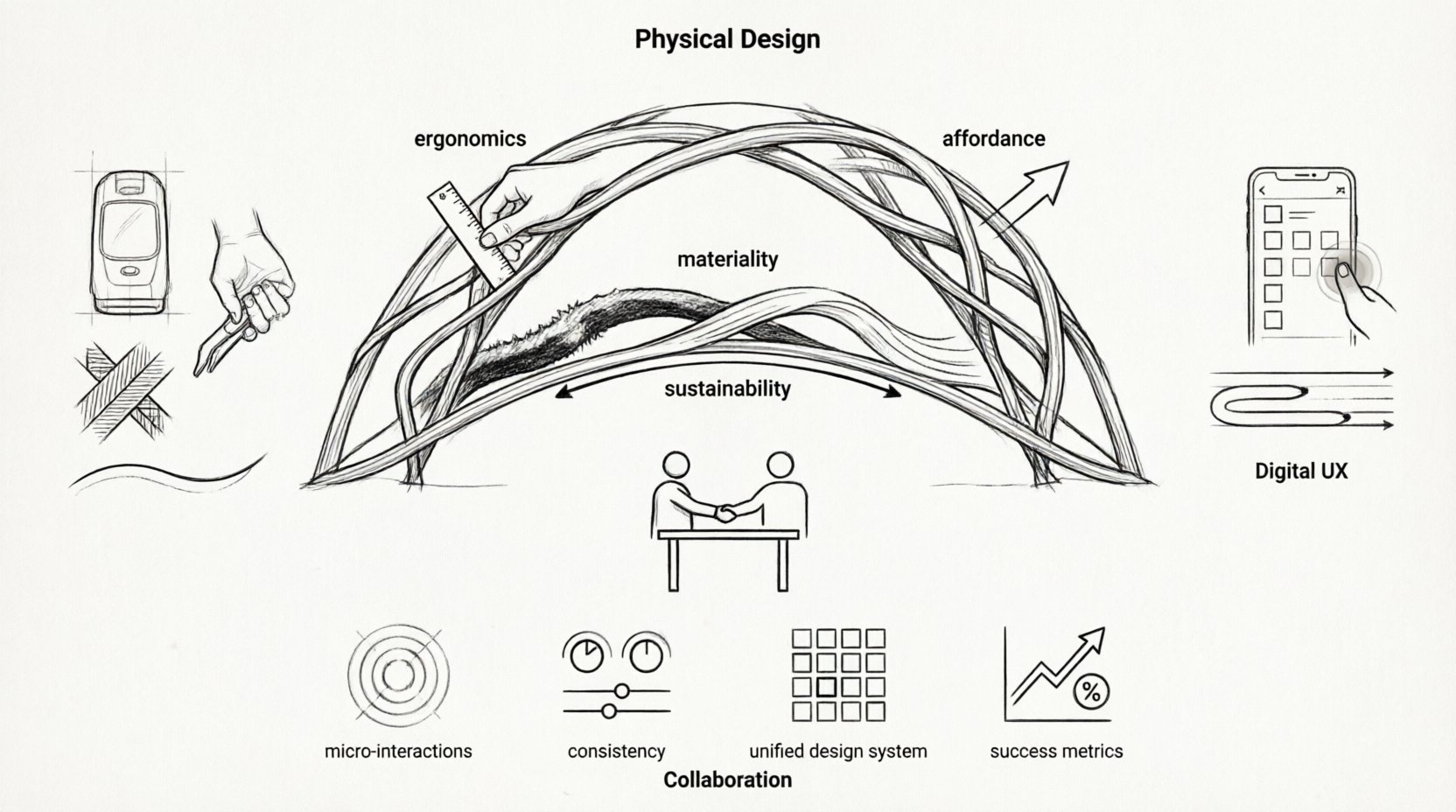
Understanding the Intersection of ID and UX 🤝
Industrial design is the professional practice of designing products to be manufactured by mass production. It concerns the shape, function, durability, and aesthetics of an object. UX design, conversely, focuses on the user’s journey through a system. Historically, these fields operated in silos. Hardware engineers built the chassis while software teams built the interface. Today, that separation creates friction.
Consider a smart home device. The button placement on the hardware must match the logic on the screen. If the physical interaction feels heavy or unresponsive, the digital feedback must compensate. Bridging this gap requires a shared vocabulary.
Key areas where these disciplines converge include:
- Form Follows Function: The shape of an interface element should indicate its purpose.
- Ergonomics: Both the physical reach of a hand and the visual reach of a thumb.
- Materiality: How texture and weight are represented digitally.
- Sustainability: The lifecycle of the device and the longevity of the software.
Core Industrial Design Principles for Digital Strategy 🔧
To effectively apply industrial design logic to user experience, one must first understand the foundational principles that govern physical product creation.
1. Ergonomics and Anthropometrics 📏
In industrial design, ergonomics ensures a product fits the human body. In UX, this translates to reachability and cognitive load. A button placed in the corner of a screen is harder to reach than one in the center. This is not just about layout; it is about the physical act of interacting with the device.
Strategies for ergonomic alignment:
- Analyze device dimensions to determine optimal touch target sizes.
- Map the “thumb zone” on mobile interfaces.
- Ensure physical buttons correspond logically to on-screen actions.
- Consider the weight and balance of the device when designing handling flows.
2. Affordance and Signifiers 🔘
Don Norman popularized the concept of affordance: the relationship between an object and a user. A chair affords sitting. A flat surface affords placing objects. In UX, we replicate this through signifiers.
When a digital button looks pressable, it is leveraging the same principle as a physical button with a concave surface. This reduces learning curves and anxiety.
- Use visual depth to indicate interactivity.
- Ensure icons match established mental models.
- Provide immediate feedback upon interaction to confirm action.
- Avoid visual styles that suggest immobility for interactive elements.
3. Materiality and Sensory Feedback 🖐️
Physical objects have texture, temperature, and weight. Screens are flat and uniform. However, users expect digital interactions to have a “feel.” This is often achieved through motion design and haptics.
Applying materiality to UX involves:
- Simulating weight through animation timing (ease-in vs ease-out).
- Using vibration patterns to confirm significant actions.
- Designing soundscapes that match the physical context.
- Creating visual hierarchies that mimic physical layering.
Strategic Alignment: Hardware and Software Teams 📊
One of the biggest challenges in product development is the disconnect between the hardware roadmap and the software roadmap. Industrial designers often finalize the physical form before software teams begin coding. This leads to compromises that degrade the user experience.
To mitigate this, teams must adopt a collaborative workflow.
| Phase | Industrial Design Focus | UX Strategy Focus | Collaboration Goal |
|---|---|---|---|
| Discovery | User needs, physical constraints | User journey, pain points | Unified Problem Definition |
| Concept | Form factors, materials | Interaction models, wireframes | Feasibility Check |
| Prototyping | CAD models, 3D prints | Interactive mockups, flows | Integration Testing |
| Refinement | Tooling, manufacturing | Optimization, performance | Final Polish |
By aligning these phases, the final product avoids the common pitfall of “hardware-first” thinking where software is forced to fit awkward physical constraints.
Tactile-Digital Integration Methods 🔄
Moving beyond theory, there are specific methods to integrate tactile principles into digital strategies. These methods ensure the digital interface respects the physical reality of the device.
Micro-interactions as Feedback Loops
In physical design, a switch clicks. In digital design, we must simulate that click. Micro-interactions serve this purpose. They provide confirmation that an input was received.
- Visual Feedback: Color changes, shadows, or scaling on press.
- Motion Feedback: Bounce effects or smooth transitions.
- Haptic Feedback: Vibration patterns that mimic physical resistance.
- Spatial Feedback: Using the device’s gyroscope to shift UI elements.
Consistency in Interaction Models
Users transfer habits from physical objects to digital ones. A volume knob on a device should feel like a volume slider on the screen. Consistency reduces cognitive friction.
Key considerations for consistency:
- Maintain the same directionality (e.g., up is more, down is less).
- Match the speed of response to the physical mechanism.
- Ensure error states are communicated clearly in both domains.
- Align the physical button functions with the digital menu structures.
Common Pitfalls in Bridging the Gap ⚠️
While the integration of industrial design and UX offers significant benefits, it introduces complexity. Teams often stumble when trying to apply physical logic to digital spaces.
1. Over-Reliance on Skeuomorphism
Early digital interfaces tried to look exactly like physical objects (e.g., a leather journal app). This is often unnecessary and can clutter the interface. Modern design focuses on the behavior of the object, not its appearance.
- Focus on function rather than literal texture.
- Use flat design principles for clarity.
- Reserve texture for specific branding or context.
2. Ignoring Physical Constraints
Designing an app for a wearable device without considering the screen size or battery life is a strategic failure. The interface must adapt to the hardware limits.
- Optimize for low-power modes.
- Design for limited input methods (voice, touch, gesture).
- Ensure visibility in outdoor or high-glare environments.
3. Disconnected Brand Identity
The physical product and the digital experience must feel like part of the same ecosystem. If the device is premium and the app is cheap, the brand value drops.
- Align color palettes across hardware and software.
- Maintain consistent typography standards.
- Ensure the tone of voice matches the physical feel of the product.
The Role of Empathy in Physical-Digital Design ❤️
At its heart, both industrial design and UX are rooted in empathy. They require understanding the user’s environment, their limitations, and their goals.
When designing for the physical-digital bridge, empathy questions include:
- How does the user hold the device?
- What are the environmental distractions?
- What is the user’s dexterity level?
- How does the user transition between devices?
Answering these questions leads to a more holistic strategy. It moves the focus from “making it work” to “making it feel right.”
Future Trends in Integrated Design 🚀
The landscape of product design is evolving rapidly. New technologies are further dissolving the line between the physical and digital worlds.
1. Augmented Reality (AR) Integration
AR overlays digital information onto physical objects. This requires deep knowledge of spatial design and physical dimensions. UX strategies must now account for real-world lighting, occlusion, and movement.
2. Smart Materials
Materials that change color or shape based on digital input are becoming available. Designers must plan for dynamic surfaces that react to software commands.
3. Voice and Gesture Interfaces
As touchscreens become less dominant in certain contexts, voice and gesture become primary inputs. This shifts the focus to auditory and spatial design principles.
Implementing a Unified Design System 🛠️
To sustain this integration, a unified design system is essential. This system should govern both the physical components and the digital assets.
Guidelines for the System
- Tokenization: Define colors, spacing, and motion values that apply to both hardware and software.
- Documentation: Create a single source of truth for how elements should behave.
- Accessibility: Ensure both physical buttons and digital controls meet accessibility standards.
- Iterative Testing: Test the physical and digital prototype together, not in isolation.
A shared system prevents the fragmentation that occurs when hardware and software teams work in different silos. It ensures that a change in the hardware material is reflected in the digital texture.
Measuring Success in Integrated Experiences 📈
How do you know if the integration is working? Standard metrics like conversion rate are not enough. You need metrics that reflect the quality of the interaction.
- Task Completion Time: Does the physical-digital flow speed up the process?
- Error Rate: Are users confused by the interface due to hardware mismatch?
- Satisfaction Scores: Do users feel the product is cohesive?
- Return Rate: Is the product being returned due to usability issues?
Tracking these metrics helps refine the strategy over time. It validates whether the industrial design principles are actually enhancing the user experience.
Building a Culture of Integration 🏢
Finally, the technical integration requires cultural integration. Teams must value the contribution of industrial designers as much as software engineers.
Steps to foster this culture:
- Cross-functional workshops where hardware and software teams sketch together.
- Shared KPIs that reward both physical and digital performance.
- Joint prototyping sessions where physical models and digital screens are used simultaneously.
- Regular reviews of the entire user journey, not just the screen.
When the culture supports integration, the product naturally becomes more polished and intuitive.
Final Thoughts on Cohesive Product Design 🌟
The gap between industrial design and UX strategy is not a wall; it is a bridge. By applying the rigorous principles of physical design to digital interfaces, teams can create products that are robust, intuitive, and deeply satisfying. This approach requires discipline, collaboration, and a deep understanding of human behavior.
As technology advances, the distinction between the object and the interface will continue to fade. The products that succeed will be those that treat the physical and digital as a single, unified entity. The goal is not just to build a device, but to craft an experience that flows seamlessly from the hand to the mind.
Start by auditing your current processes. Identify where the disconnect lies. Begin the conversation between the hardware and software teams. The result will be a product strategy that is stronger, more resilient, and ultimately, more human.