
Now Reading: From Text to State Diagram: How AI Makes UML Modeling Effortless
-
01
From Text to State Diagram: How AI Makes UML Modeling Effortless


From Text to State Diagram: How AI Makes UML Modeling Effortless
Ever stared at a complex system description, trying to visualize its behavior as a series of states and transitions? You’re not alone. UML state diagrams are powerful tools for modeling object lifecycles and system behavior, but creating them from scratch can be a daunting task. What if you could turn your plain-language description of a process into a professional UML state machine diagram in seconds? Enter the AI-powered UML state diagram generator in Visual Paradigm. This article explores how this intelligent tool transforms the way we create state diagrams, making them accessible and efficient for everyone from developers to business analysts.
Visual Paradigm’s AI tools are designed to streamline the complex world of software and business analysis. The AI-powered UML state diagram generator is a prime example, allowing users to describe a system’s lifecycle in natural language and instantly receive a fully formed, standards-compliant diagram. This isn’t just a time-saver; it’s a paradigm shift in how we approach behavioral modeling. Whether you’re designing a customer order system, a support ticket workflow, or a game mechanic, this tool turns your ideas into a clear, visual representation. The result is a more efficient, accurate, and collaborative design process.
What is a UML State Diagram?
Before diving into the AI magic, let’s quickly unpack the basics of a UML State Machine Diagram. It’s a type of UML behavioral diagram that models the lifecycle of an object or system. Think of it as a map of an entity’s journey through different states. For instance, an “Order” object might transition from “Pending Payment” to “Paid” when a payment is received, or to “Cancelled” if the customer decides to abort the purchase. The diagram captures these states, the events that trigger transitions between them (like “paymentReceived” or “cancelOrder”), and the conditions (guards) that must be met for a transition to occur.
Key elements of a UML state diagram include:
-
State: A rounded rectangle representing a condition or situation (e.g., “Order Pending”).
-
Transition: An arrow from one state to another, labeled with the event, guard, and action (e.g., “paymentReceived [paymentSuccessful] / sendConfirmation”).
-
Initial State: A solid black circle indicating the starting point of the lifecycle.
-
Final State: A black circle with a surrounding ring, marking the end of the lifecycle.
-
Composite State: A state that contains nested substates, allowing for more complex modeling.
Manually drawing these diagrams can be time-consuming and error-prone. You need to ensure the notation is correct, the layout is clear, and all the logic is accurately represented. This is where the AI-powered UML state diagram generator shines.
How the AI-Powered UML State Diagram Generator Works
The process is delightfully simple. Instead of wrestling with drawing tools, you simply describe the system’s behavior in plain English. The AI takes your text, analyzes it, and infers the correct states, transitions, events, and guards to create a fully formed diagram. It’s like having a modeling expert in your pocket.
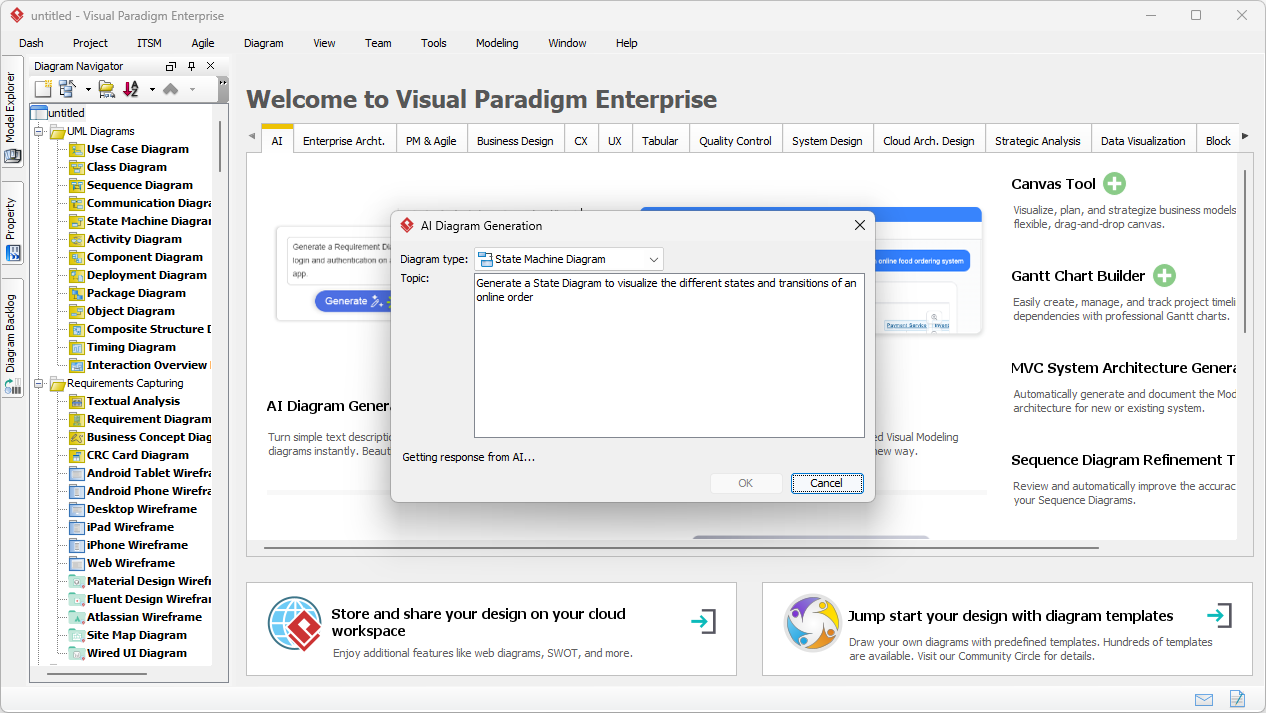
Let’s see this in action. Image 1 shows the user in Visual Paradigm Desktop, initiating the AI Diagram Generation process. They’ve selected “State Machine Diagram” and entered a prompt: “Generate a State Diagram to visualize the different states and transitions of an online order.” The AI is then processing this request, with a “Getting response from AI…” message indicating it’s working its magic.
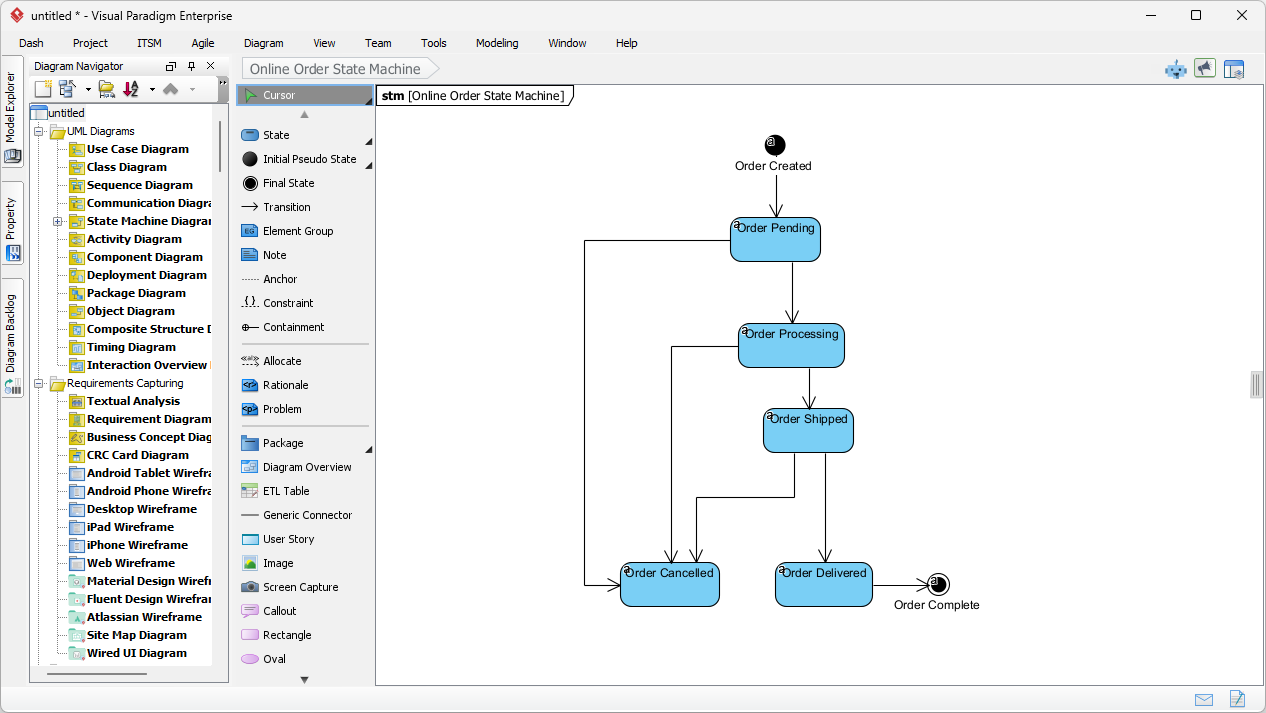
Once the AI has processed the text, it generates the diagram. Image 2 displays the resulting UML State Machine Diagram for an online order. You can see the clean, professional layout with states like “Order Pending,” “Order Processing,” and “Order Shipped,” connected by arrows representing the transitions. The diagram is immediately ready for review and refinement. The AI has correctly identified the initial state (“Order Created”) and the final state (“Order Complete”), and it has laid out the transitions logically.
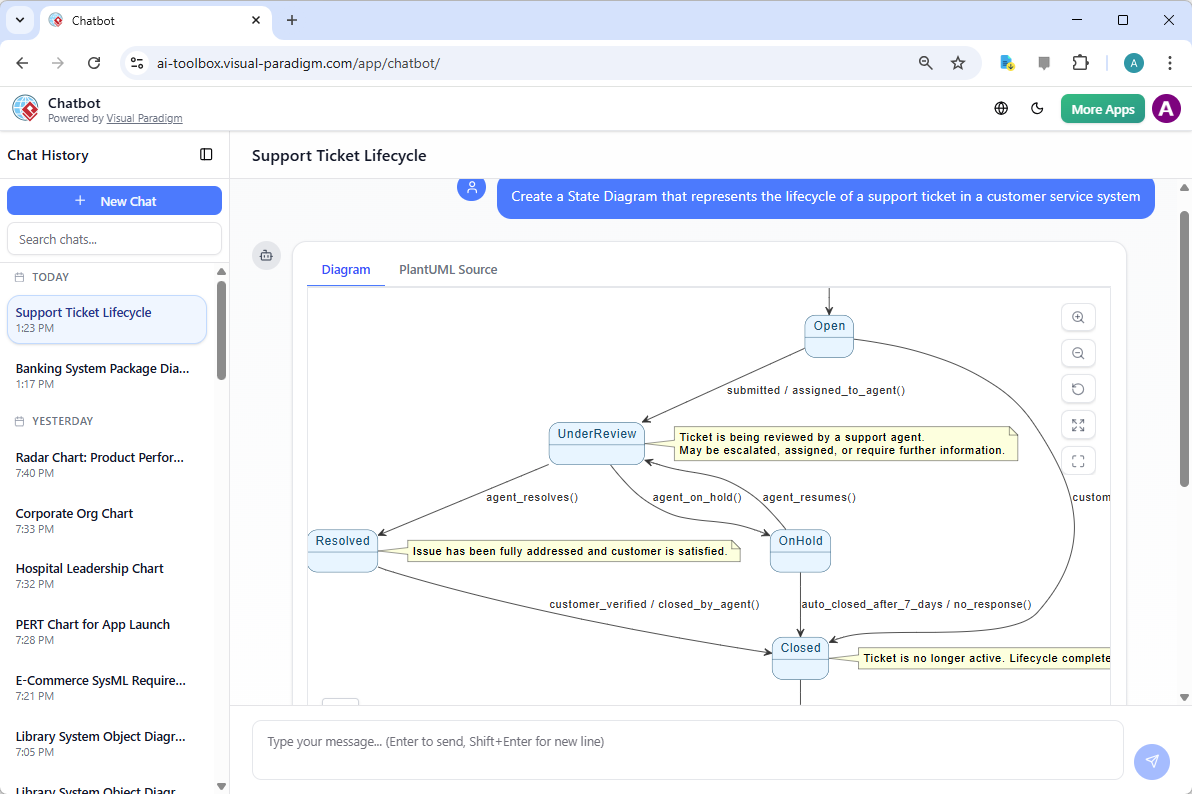
The power of this tool isn’t limited to the desktop application. The Visual Paradigm AI Chatbot extends this capability into a conversational interface. As shown in Image 3, users can simply type a request like “Create a State Diagram that represents the lifecycle of a support ticket in a customer service system.” The AI processes the natural language input and generates a complete diagram, complete with states like “Open,” “UnderReview,” and “Closed,” and transitions triggered by events like “agent_resolves()” or “auto_closed_after_7_days.” This makes it incredibly easy to explore different scenarios and brainstorm ideas.
Key Benefits and Use Cases
The AI-powered UML state diagram generator offers several significant benefits:
-
Massive Time Savings: No more manually drawing rounded rectangles and arrows. The AI constructs the entire diagram structure in seconds.
-
Reduced Errors: By automating the process, the tool minimizes the risk of misplacing states or incorrectly labeling transitions.
-
Improved Clarity: The generated diagrams are professionally laid out, making complex behavior easy to understand and communicate to stakeholders.
-
Enhanced Collaboration: The generated diagrams can be easily shared and reviewed, fostering better understanding and alignment across teams.
-
Democratized Modeling: It makes advanced UML modeling accessible to non-experts, allowing business analysts and product owners to create accurate models.
These benefits make the tool ideal for a wide range of use cases. Software developers can quickly model the behavior of a new feature or a complex state machine. Business analysts can visualize approval workflows or order status changes. Students can use it to learn and practice UML concepts in a hands-on way. The possibilities are vast.
Getting Started with Your AI-Powered UML State Diagram
Ready to harness the power of AI for your modeling needs? The process is straightforward. In Visual Paradigm Desktop, simply go to the Tools menu and select AI Diagram Generation. Choose the “State Machine Diagram” type and provide a clear, natural language description of the system you want to model. Click “OK,” and the AI will do the rest. The generated diagram will open in the editor, ready for you to review, refine, and use in your project.
For a more conversational experience, the Visual Paradigm AI Chatbot offers a seamless way to generate diagrams through simple text prompts. It’s a perfect tool for rapid ideation and exploration.
Whether you’re a seasoned developer or a business analyst looking to visualize a new process, the AI-powered UML state diagram generator in Visual Paradigm is a game-changer. It takes the tedious and complex task of creating state diagrams and turns it into a simple, intuitive process. It’s not just a tool; it’s a new way of thinking about and creating software and business models.
Want to see it in action? Try it yourself with the Visual Paradigm AI Chatbot today.
Related Links
The integration of artificial intelligence into state machine modeling allows developers to bridge the gap between high-level behavioral requirements and executable system logic. The following resources provide insights into AI-powered chatbot assistants that generate diagrams from natural language, tools for automating code generation from state models, and comprehensive guides for distinguishing state machines from other behavioral diagrams like activity diagrams.
-
AI-Powered UML Chatbot State Diagrams: This article explores how artificial intelligence improves the creation and interpretation of UML state diagrams specifically for chatbot systems.
-
Definitive Guide to UML State Machine Diagrams with AI: This resource provides a detailed guide on using AI-enhanced tools to model object behavior with UML state machine diagrams.
-
Mastering State Diagrams with Visual Paradigm AI: A Guide for Automated Toll Systems: This guide demonstrates using AI-enhanced state diagrams to model and automate complex behaviors within toll system software.
-
Interactive State Machine Diagram Tool: This web-based tool allows for the creation and editing of state machine diagrams through real-time collaboration and generative AI support.
-
Visual Paradigm – UML State Machine Diagram Tool: This describes a comprehensive online interface for creating, editing, and exporting detailed UML state machine diagrams via a conversational assistant.
-
What is a State Machine Diagram? A Comprehensive Guide to UML State Diagrams: This resource provides an in-depth overview of state machine diagrams, detailing their components and real-world applications in system design.
-
Generating Source Code from State Machines in Visual Paradigm: This tutorial teaches users how to generate source code directly from state machine diagrams to implement complex state-driven logic efficiently.
-
State Machine Diagram Software Features – Visual Paradigm: This overview highlights the specific capabilities of the software for modeling complex state transitions and dynamic system behavior.
-
State Machine vs Activity Diagram: Key Differences: This guide clarifies the distinct roles and applications of state machines compared to activity diagrams in modeling system behavior.
-
Free State Machine Diagram Templates for Visual Paradigm: This collection offers professional state machine templates that can be used to efficiently model various system behaviors and state transitions.