
The landscape of digital product design is shifting beneath our feet. Artificial intelligence is no longer a futuristic concept confined to science fiction; it is a tangible force reshaping how users interact with technology. For UX designers, this evolution presents both a significant opportunity and a complex set of challenges. Understanding the intersection of AI and UX is critical for anyone aiming to create meaningful, effective, and human-centered digital experiences. This guide explores the mechanics, implications, and practical applications of this convergence.
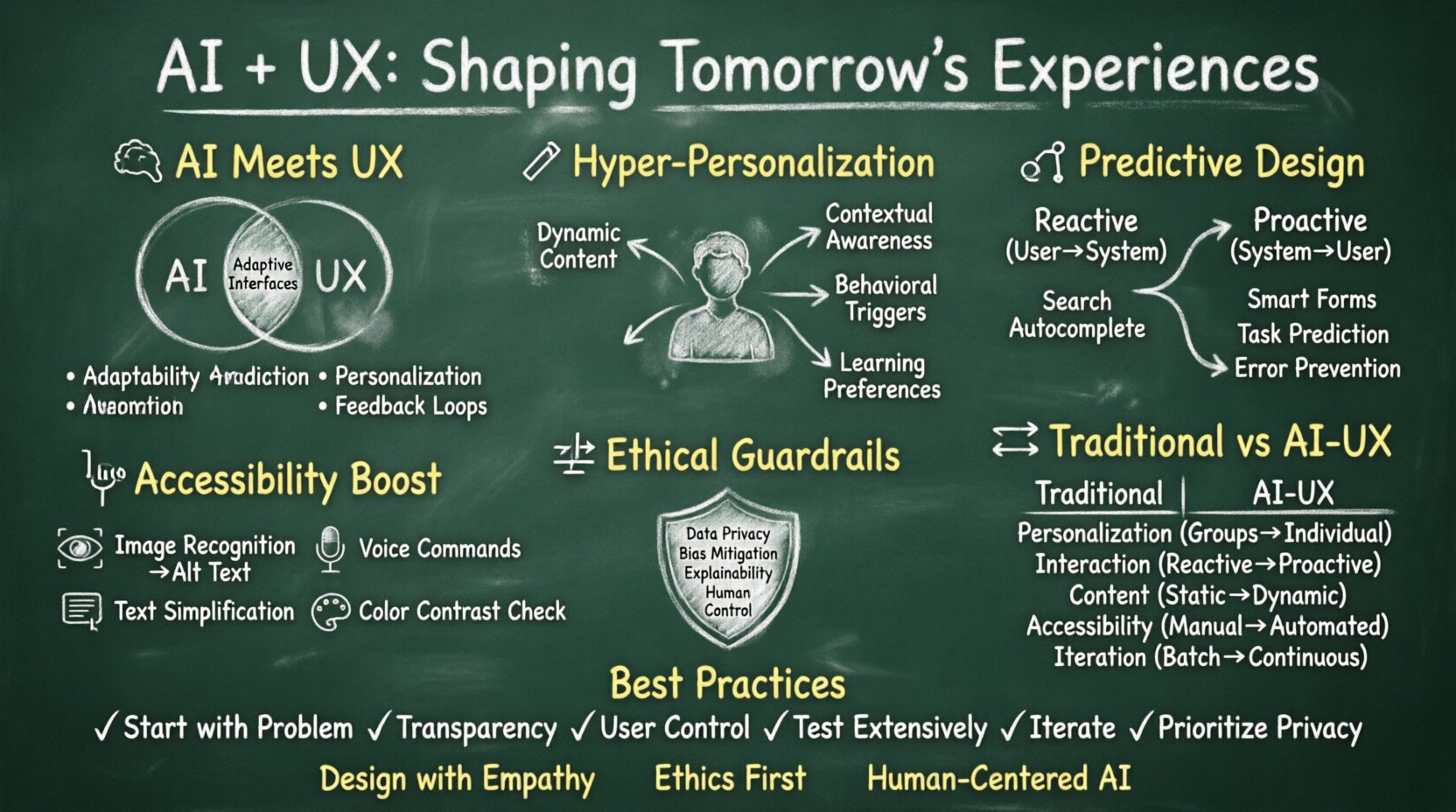
🧠 Defining the Convergence: AI Meets User Experience
At its core, User Experience (UX) design focuses on the journey a person takes when interacting with a product. It encompasses usability, accessibility, and the emotional response elicited by the interface. Artificial Intelligence (AI), in this context, refers to systems capable of performing tasks that typically require human intelligence, such as learning, reasoning, and problem-solving.
When these two fields intersect, the result is a dynamic ecosystem where interfaces adapt, predict, and respond in real-time. This is not merely about automating tasks; it is about creating systems that understand context. Traditional static designs are giving way to adaptive interfaces that change based on user behavior, preferences, and environmental factors.
Key Characteristics of AI-Enhanced UX
- Adaptability: Interfaces that modify layouts or content based on user history.
- Prediction: Systems that anticipate user needs before they are explicitly stated.
- Automation: Routine interactions are handled by algorithms to reduce friction.
- Personalization: Content tailored specifically to individual user profiles.
- Feedback Loops: Continuous learning from user interactions to improve future performance.
🎯 Hyper-Personalization Beyond Basic Recommendations
Personalization has long been a staple of digital strategy. However, AI enables a level of granularity that was previously impossible. Instead of broad segments like “users in New York,” AI can analyze individual behavior patterns to tailor the experience at a micro-level.
How Personalization Evolves
- Dynamic Content: Text, images, and layout structures change based on who is viewing the screen.
- Contextual Awareness: The system considers time of day, location, and device type to serve relevant information.
- Behavioral Triggers: Actions taken by the user trigger specific workflows or suggestions.
- Learning Preferences: The interface remembers which features a user avoids and adjusts accordingly.
Consider a scenario where a user frequently accesses a specific section of an application early in the morning. An AI-driven system might move that section to the top of the navigation bar during those hours. This reduces the cognitive load required to find necessary tools, making the workflow smoother.
🔮 Predictive Interfaces and Proactive Design
The most advanced application of AI in UX is the move from reactive to proactive design. In a reactive model, the user must initiate an action, and the system responds. In a predictive model, the system suggests the action before the user even thinks about it.
This requires deep data analysis and ethical consideration. The goal is to reduce friction, not to manipulate behavior. When done correctly, predictive features feel helpful. When done poorly, they feel intrusive.
Examples of Predictive Functionality
- Search Autocomplete: Suggesting queries based on typing patterns and search history.
- Smart Forms: Pre-filling fields based on known data or previous entries.
- Task Prediction: Offering shortcuts for actions the user is likely to perform next.
- Error Prevention: Anticipating user mistakes and guiding them away from problematic inputs.
To implement this effectively, designers must provide clear options for users to opt-out or override suggestions. Transparency is key to maintaining trust.
♿ Accessibility and Inclusivity Through AI
One of the most profound benefits of AI in UX is the potential to democratize access. Accessibility standards often require significant manual effort to maintain. AI can automate many of these processes, making digital products more inclusive for people with disabilities.
AI Tools for Accessibility
- Image Recognition: Automatically generating alt text for images to aid screen readers.
- Voice Interaction: Enabling navigation through voice commands for users with limited mobility.
- Text Simplification: Adjusting reading levels or summarizing complex content for cognitive accessibility.
- Color Contrast Analysis: Real-time suggestions to ensure text is readable for users with visual impairments.
These tools do not replace the need for human oversight. Designers must still verify that AI-generated accessibility features meet legal and ethical standards. However, AI acts as a powerful assistive layer that can handle repetitive accessibility checks.
⚖️ Ethical Considerations and User Trust
As AI capabilities grow, so do the ethical responsibilities of the design team. Users are increasingly aware of how their data is used. Trust is fragile; once lost, it is difficult to regain. Designers must navigate the fine line between helpful intelligence and surveillance.
Core Ethical Principles
- Data Privacy: Ensuring user data is collected and processed securely with explicit consent.
- Bias Mitigation: Auditing algorithms to prevent discrimination based on race, gender, or socioeconomic status.
- Explainability: Users should understand why a system is making a specific recommendation or decision.
- Human Control: Ensuring humans remain in the loop for critical decisions.
Without these guardrails, AI can perpetuate existing biases found in training data. For instance, if a hiring tool is trained on historical data that favored certain demographics, it may unfairly filter out qualified candidates. UX designers play a crucial role in advocating for these ethical standards during the product development lifecycle.
🛠️ The Evolving Role of the Designer
The introduction of AI does not replace the UX designer; it transforms the role. Manual tasks like wireframing or generating copy variations can be automated. This frees designers to focus on higher-order thinking, strategy, and empathy.
New Skills for the Modern Designer
- Data Literacy: Understanding how to interpret data outputs from AI models.
- Algorithmic Thinking: Knowing how to structure problems for machine learning solutions.
- Ethical Judgment: Making decisions that prioritize user well-being over engagement metrics.
- Collaboration: Working closely with data scientists and engineers to bridge the gap between design and code.
Designers must become advocates for the user within technical discussions. They ensure that the capabilities of the technology align with human needs rather than forcing humans to adapt to the technology.
🔄 Workflow Integration: From Concept to Delivery
Integrating AI into the design workflow changes how teams operate. Prototyping can become faster, and testing can become more comprehensive. However, this requires a shift in how teams manage their processes.
AI in the Design Process
- Research: AI can analyze vast amounts of user feedback to identify patterns faster than manual review.
- Wireframing: Generative tools can create initial layout options based on content requirements.
- Testing: Automated testing tools can simulate user behavior across different scenarios.
- Handoff: Design systems can dynamically update based on user feedback loops.
Teams should view AI as a collaborator rather than a replacement. The creative vision still comes from the human designer. AI provides the raw material and the efficiency, but the human provides the soul and the intent.
⚡ Comparison: Traditional vs. AI-Enhanced UX
| Feature | Traditional UX | AI-Enhanced UX |
|---|---|---|
| Personalization | Segment-based (Groups) | Individual-based (Micro-targeting) |
| Interaction | Reactive (User initiates) | Proactive (System anticipates) |
| Content | Static | Dynamic (Real-time adaptation) |
| Accessibility | Manual implementation | Automated assistance |
| Design Iteration | Slow, batch updates | Continuous, data-driven updates |
🚧 Challenges to Address
Despite the benefits, there are significant hurdles to overcome. Designers must be aware of these challenges to build robust systems.
- Over-automation: Users may feel disconnected if the system makes too many decisions for them.
- Black Box Problem: Complex AI models are often opaque, making it hard to debug or explain behavior.
- Cost: Implementing AI infrastructure can be expensive and resource-intensive.
- Technical Debt: Rapid integration of AI tools can lead to maintenance issues later.
- User Fatigue: Constant personalization can feel overwhelming or intrusive if not managed well.
✅ Best Practices for Integration
To navigate these challenges successfully, teams should adopt a set of best practices. These guidelines ensure that AI enhances the experience without compromising the human element.
- Start with the Problem: Do not use AI for the sake of using AI. Identify a specific pain point the technology can solve.
- Maintain Transparency: Clearly communicate when a user is interacting with an AI system.
- Provide Control: Always give users the ability to turn off AI features or adjust settings.
- Test Extensively: Validate AI outputs with real users to ensure they meet expectations.
- Iterate Continuously: AI models require ongoing training and refinement based on new data.
- Prioritize Privacy: Implement data minimization principles to protect user information.
🌍 The Future Landscape
Looking forward, the integration of AI and UX will deepen. We are moving toward interfaces that are conversational, multimodal, and deeply integrated into daily life. Voice interfaces, gesture controls, and augmented reality will all rely on AI to function smoothly.
The focus will shift from designing screens to designing interactions. The physical and digital worlds will blend further, requiring designers to consider context in ways that were previously impossible. This evolution demands a mindset that is flexible, ethical, and deeply human-centric.
📝 Final Thoughts
The intersection of AI and UX is not a destination but a continuous journey. It requires constant learning and adaptation. As technology advances, the core principles of empathy, usability, and clarity remain unchanged. AI is a powerful tool that can amplify human potential, but it must be wielded with care and intention.
By prioritizing the user and maintaining ethical standards, designers can shape a future where technology serves humanity effectively. The goal is not to create machines that think like humans, but to create interfaces that help humans think better. This balance will define the success of digital products in the coming years.