
Now Reading: 🚀 The Ultimate Guide to AI-Powered Use Case Diagrams with Visual Paradigm
-
01
🚀 The Ultimate Guide to AI-Powered Use Case Diagrams with Visual Paradigm


🚀 The Ultimate Guide to AI-Powered Use Case Diagrams with Visual Paradigm
“In the high-stakes world of software development, clarity is currency.”
— Visual Paradigm
Use case diagrams are the cornerstone of requirement analysis and stakeholder alignment. Yet, creating them manually is time-consuming, error-prone, and often stalls progress. Enter Visual Paradigm — a revolutionary AI-powered ecosystem that transforms your ideas into professional, implementation-ready UML models in seconds.
Since 2002, Visual Paradigm has evolved from a simple modeling tool into a full-fledged AI-driven software design platform, seamlessly integrating artificial intelligence across four powerful platforms. Whether you’re a solo developer, a team lead, or a CTO, this guide will walk you through how to harness AI to supercharge your use case modeling workflow.
🔍 Why Use Case Diagrams Matter
Use case diagrams visually represent:
-
Actors (users or external systems)
-
Use Cases (functionalities or services)
-
Relationships (
<<include>>,<<extend>>, association)
They help:
✅ Clarify system scope
✅ Align developers, product owners, and clients
✅ Serve as a foundation for detailed design and testing
✅ Enable traceability from requirements to code
But traditional methods? Slow. Manual edits? Prone to inconsistencies.
Enter AI-powered automation — where ideas become diagrams instantly.
🛠️ Meet the Visual Paradigm AI Ecosystem
Visual Paradigm unifies AI intelligence across four core platforms, each tailored for a specific stage of your software design lifecycle.
🖥️ 1. VP Desktop – The Professional Powerhouse
For architects and developers who demand precision, traceability, and enterprise-grade features.
🔹 Why Choose VP Desktop?
-
✅ Precision Modeling: Handle complex UML relationships like
<<include>>and<<extend>>with accuracy. -
✅ Traceability: Link use cases directly to requirements, sequence diagrams, and source code.
-
✅ Team Collaboration: Built-in Git integration for version control and collaborative modeling.
-
✅ Code Engineering: Generate code skeletons from models or reverse-engineer UML from existing code.
📌 How to Generate a Use Case Diagram (Step-by-Step)
-
Open VP Desktop.
-
Go to Tools > AI Diagram Generation.
-
Select Use Case Diagram from the dropdown.
-
Enter a clear description of your system:
“An ATM system where customers withdraw cash, check balances, and deposit funds. Admins can maintain the machine and reset PINs.”
-
Click OK.
👉 Result: A fully editable, native UML diagram — not a static image. You can refine actors, use cases, and relationships with real-time validation.
💡 Pro Tip: Use AI Refinement to auto-fix missing preconditions or suggest better actor naming.
📚 2. OpenDocs – The Collaborative Knowledge Base
Where documentation meets living diagrams — like Notion, but for software design.
🔹 Why Use OpenDocs?
-
✅ Living Diagrams: Embed interactive UML diagrams directly into wikis, project briefs, or sprint docs.
-
✅ Inline Editing: Update the model without switching tools — changes reflect instantly.
-
✅ Stakeholder Alignment: Keep text and visuals perfectly synchronized during reviews.
-
✅ Real-time Collaboration: Share links with teammates and co-edit in real time.
📌 Use Case Example:
You’re writing a product spec in OpenDocs. Add a use case diagram using the AI Diagram Generator block. Describe:
“A school management system where teachers assign grades, students view reports, and administrators manage classes.”
The AI generates the diagram — embeddable, editable, and instantly shareable.
✨ Perfect for agile teams, product managers, and onboarding documentation.
💬 3. AI Visual Modeling Chatbot – Conversational Design
Turn brainstorming into design — one conversation at a time.
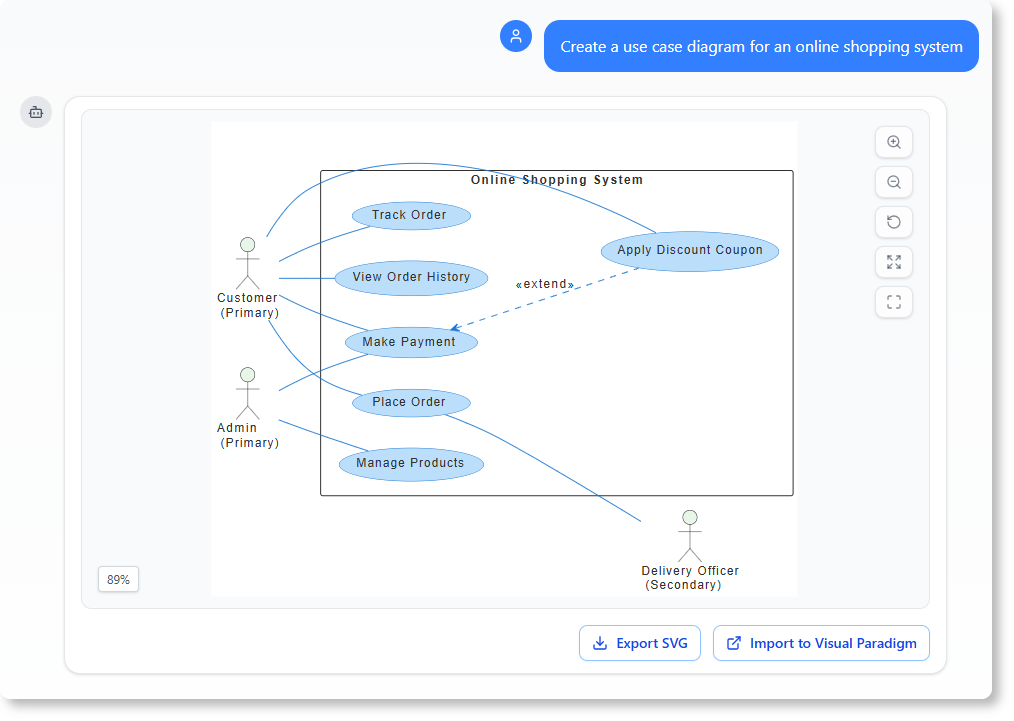
🔹 Why Use the Chatbot?
-
✅ Natural Language Input: Just type:
“Create a use case diagram for an online grocery delivery app.”
-
✅ Iterative Refinement: Ask follow-ups:
“Add a delivery driver actor.”
“Explain the ‘Place Order’ use case.” -
✅ Instant Prototyping: Explore multiple variations without touching a mouse.
📌 Workflow:
-
Open the AI Chatbot in Visual Paradigm.
-
Start the conversation:
“Design a use case diagram for a ride-hailing app like Uber.”
-
Refine:
“Include ‘Rider’, ‘Driver’, and ‘Admin’. Add ‘Request Ride’, ‘Accept Ride’, ‘Rate Driver’, and ‘Cancel Ride’.”
-
Accept the output → it becomes a real, editable model.
🧠 Ideal for overcoming “blank canvas syndrome” and rapid ideation.
🌐 4. Specialized Web Apps – Guided AI Excellence
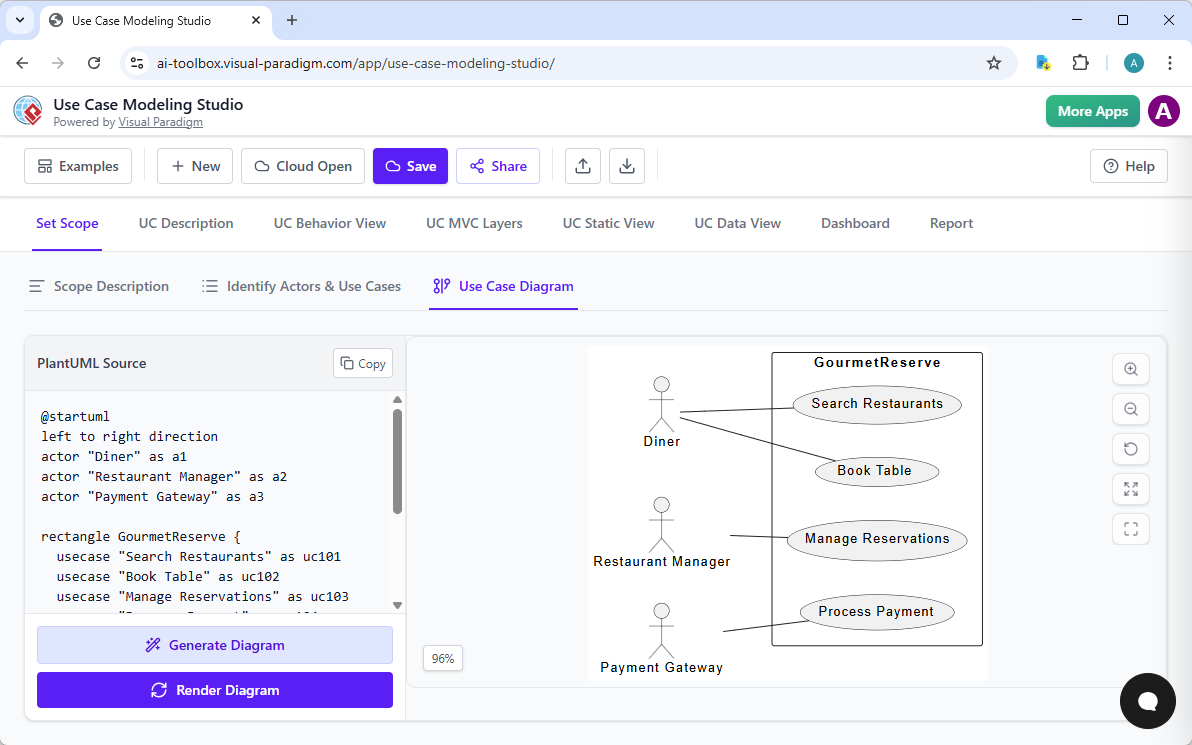
These web-based tools provide structured, best-practice-driven workflows — perfect for deep analysis, automation, and documentation.
| Tool | Purpose |
|---|---|
| Use Case Modeling Studio | End-to-end design: from scope definition to full Software Design Document (SDD). |
| Description Generator | Turns use cases into detailed specs: flows, pre/post-conditions, exceptions. |
| Refinement Tool | Auto-applies UML best practices: checks for missing actors, ambiguous names, or unbalanced relationships. |
| Activity Diagram Generator | Converts text-based use cases into behavioral flowcharts. |
| Analyzer Tool | Parses existing code to extract and validate use cases, detect design flaws. |
📌 Real-World Example: Building an Online Store
-
Use Use Case Modeling Studio to define scope:
“E-commerce platform with user registration, product browsing, cart management, checkout, and admin dashboard.”
-
Use Description Generator to expand each use case:
“Generate full description for ‘Checkout’ including preconditions, post-conditions, and alternative flows.”
-
Use Refinement Tool to validate:
“Check for missing <> relationships (e.g., ‘Process Payment’ in ‘Checkout’).”
-
Use Activity Diagram Generator to visualize the flow of checkout.
📦 Output: A complete, documented, and validated use case model ready for development.
🏆 Why Visual Paradigm Stands Above the Rest
| Feature | Most Tools | Visual Paradigm |
|---|---|---|
| AI Diagram Generation | One-off, static output | ✅ Native, editable model objects |
| Lifecycle Integration | Siloed tools | ✅ Connected ecosystem across platforms |
| Collaboration | Limited or external | ✅ Built-in team sync & versioning |
| Traceability | Rarely available | ✅ Link to code, docs, and requirements |
| Hybrid Work Mode | Not supported | ✅ Work offline (secure) or online (collaborative) |
| AI Quality | Generic, generic | ✅ Guided, context-aware, best-practice-aware |
✅ Key Advantage: You’re not just generating a diagram — you’re building a living, traceable, and actionable design artifact.
🔄 The Connected AI Workflow: From Idea to Implementation
graph LR
    A[Chatbot: "Create a use case diagram for a hospital appointment system"] --> B[OpenDocs: Embed in project wiki]
    B --> C[VP Desktop: Refine with traceability & code generation]
    C --> D[Use Case Modeling Studio: Define scope & SDD]
    D --> E[Description Generator: Add detailed specs]
    E --> F[Refinement Tool: Validate UML best practices]
    F --> G[Activity Diagram Generator: Visualize flow]
    G --> H[Analyzer Tool: Check code alignment]
    H --> I[Ready for Development!]
🔄 This is not a one-way path. You can loop back, iterate, and refine at any stage.
🎯 Final Thoughts: Your Design Journey Starts Here
Visual Paradigm isn’t just a tool — it’s a design accelerator that transforms:
-
Raw ideas → Structured models
-
Manual effort → AI-driven speed
-
Static diagrams → Living, interactive blueprints
Whether you’re:
-
A startup founder validating a product idea
-
A senior architect designing enterprise systems
-
A student learning UML for the first time
👉 Visual Paradigm’s AI ecosystem empowers you to focus on what matters: innovation, clarity, and impact.
🛠️ Ready to Get Started?
Let’s build your first AI-powered use case diagram together.
Just reply with:
“Create a use case diagram for a [your system idea], including [actors] and [key functions].”
For example:
“Create a use case diagram for a fitness tracking app with users, coaches, and a dashboard that logs workouts and tracks progress.”
I’ll generate a polished, AI-optimized description you can plug directly into VP Desktop, OpenDocs, or the Chatbot — and even suggest improvements based on UML best practices.
💬 Your idea. Instantly visualized. Professionally validated.
✨ Powered by Visual Paradigm.
👉 Start your journey today — and design with confidence.
- AI Chatbot Feature – Intelligent Assistance for Visual Paradigm Users: This article introduces the core chatbot functionality designed to provide instant guidance and automate tasks within the modeling software.
- Visual Paradigm Chat – AI-Powered Interactive Design Assistant: An interactive interface that helps users generate diagrams, write code, and solve design challenges in real time through a conversational assistant.
- AI-Powered Use Case Diagram Refinement Tool – Smart Diagram Enhancement: This resource explains how to use AI to automatically optimize and refine existing use case diagrams for better clarity and completeness.
- Mastering AI-Driven Use Case Diagrams with Visual Paradigm: A comprehensive tutorial on leveraging specialized AI features to create intelligent and dynamic use case diagrams for modern systems.
- Visual Paradigm AI Chatbot: The World’s First Purpose-Built AI Assistant for Visual Modeling: This article highlights the launch of a groundbreaking AI assistant tailored specifically for visual modeling with intelligent guidance.
- AI-Powered Use Case Diagram Example for Smart Home System: A community-shared example of a professional use case diagram generated by AI, illustrating complex user-system interactions in an IoT environment.
- Master AI-Driven Use Case Diagrams: A Short Tutorial: A concise guide from Visual Paradigm on leveraging AI to create, refine, and automate use case diagram development for faster project delivery.
- Revolutionizing Use Case Elaboration with Visual Paradigm AI: This guide details how the AI engine automates documentation and enhances the modeling clarity of software requirements.
- How to Turn Requirements into Diagrams with an AI Chatbot: This article explores how project requirements can be evolved from simple text into full system designs through a conversational interface.
- AI-Powered Chatbot Development Using Visual Paradigm: A video tutorial demonstrating how to build an AI-driven chatbot using automated modeling techniques and assisted diagramming tools.