
Human-Computer Interaction (HCI) forms the backbone of modern digital experiences. For undergraduate students entering the field of User Experience (UX) Design, understanding the theoretical underpinnings is just as critical as learning practical application. This guide explores the core principles, psychological foundations, and ethical considerations that define effective interaction design.
The intersection of technology and human behavior creates a complex landscape. Designers must navigate cognitive limitations, emotional responses, and physical constraints to build systems that serve users effectively. This article provides a structured overview of what it means to design for humans, not just screens.
🧠 The Psychology Behind Interaction
UX Design is rooted in cognitive psychology. When a user interacts with a digital interface, they are processing information, making decisions, and forming memories. Understanding these mental processes allows designers to align the system with the user’s natural behavior rather than forcing the user to adapt to the system.
Cognitive Load and Mental Models
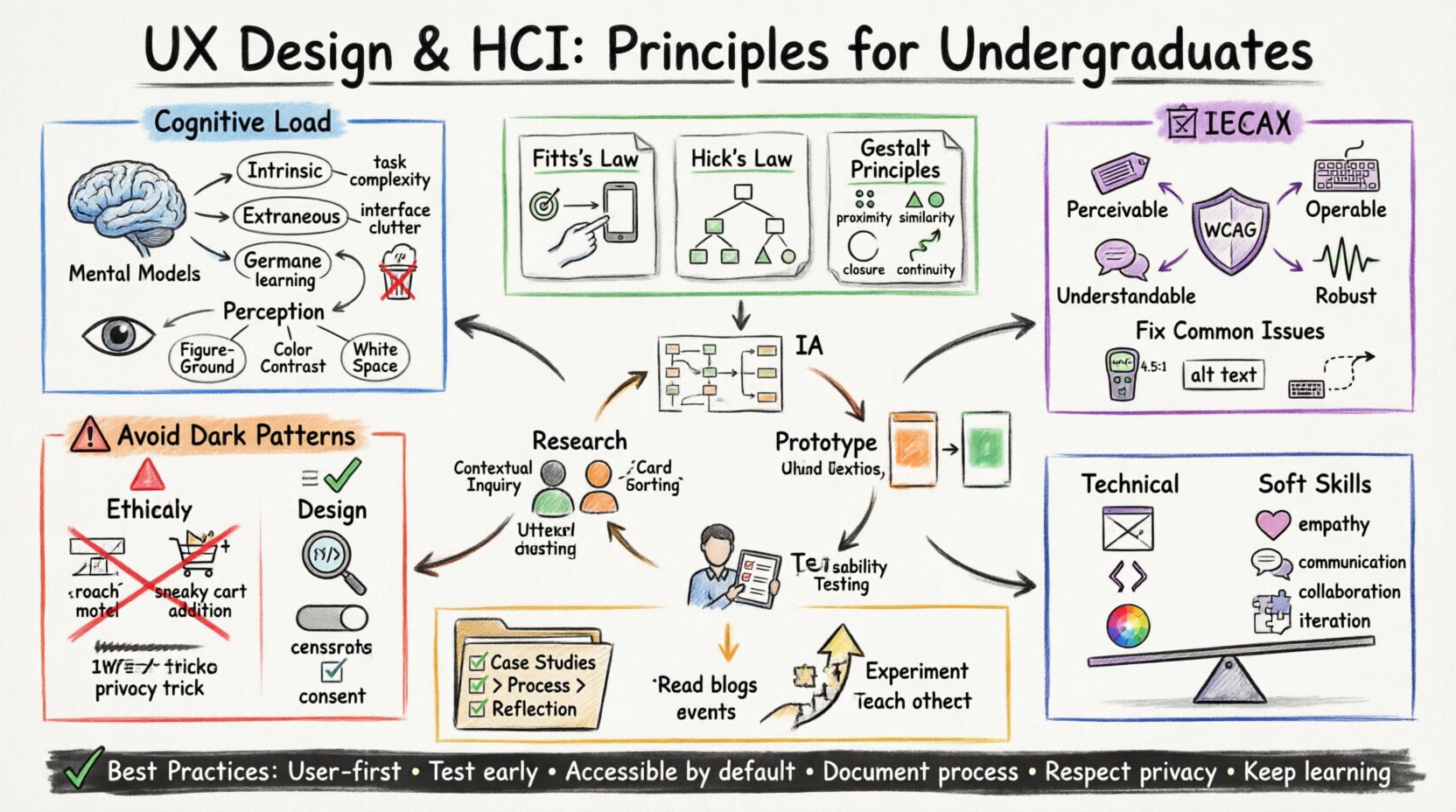
Cognitive load refers to the amount of working memory resources used during learning or task completion. In digital design, high cognitive load leads to frustration and errors. Designers aim to minimize extraneous load—the effort required to understand the interface itself.
- Intrinsic Load: The complexity inherent to the task (e.g., calculating a mortgage).
- Extraneous Load: The complexity introduced by the interface design (e.g., confusing navigation menus).
- Germane Load: The effort devoted to schema construction and learning.
A strong mental model helps users predict how a system works. When a digital object mimics a physical counterpart, users transfer their real-world knowledge to the digital space. For example, a trash can icon implies deletion. This alignment reduces the learning curve.
Perception and Attention
Human perception is selective. We cannot process every visual element simultaneously. Designers must guide attention through visual hierarchy, spacing, and contrast.
- Figure-Ground Relationship: Distinguishing an object from its background.
- Color Contrast: Ensuring text is legible against the background.
- White Space: Using negative space to group related items and reduce clutter.
Ignoring these factors leads to interfaces where users struggle to find critical information. Strategic placement of elements ensures that the most important actions are noticed first.
⚖️ Core Principles of Interaction Design
Several established laws and principles guide decision-making in HCI. These are not rigid rules but heuristics that help predict user behavior and inform layout choices.
Fitts’s Law
Fitts’s Law predicts the time required to rapidly move to a target area. It states that the time to acquire a target is a function of the distance to the target and the size of the target.
- Target Size: Larger targets are easier to hit quickly.
- Distance: Closer targets are reached faster.
In practice, this means placing critical buttons, like “Submit” or “Next,” in easily reachable areas. Mobile interfaces often utilize large touch targets at the bottom of the screen to accommodate thumb reachability.
Hick’s Law
Hick’s Law describes the time it takes to make a decision based on the number of choices available. The more choices a user has, the longer it takes to decide.
- Decision Fatigue: Too many options can paralyze users.
- Progressive Disclosure: Revealing options only when needed reduces complexity.
When designing navigation or forms, simplifying the number of visible choices improves speed and satisfaction.
Gestalt Principles
Gestalt psychology explains how humans perceive visual elements as unified wholes. These principles include proximity, similarity, closure, and continuity.
| Principle | Description | Application |
|---|---|---|
| Proximity | Objects near each other are perceived as a group. | Group related form fields together. |
| Similarity | Objects that look alike are perceived as related. | Use consistent colors for all links. |
| Closure | Users fill in missing parts of a shape to perceive a whole. | Use icons that are recognizable even if incomplete. |
| Continuity | Elements arranged on a line or curve are perceived as more related. | Guide users through a flow using alignment. |
🛠️ The Design Process
Effective UX design is iterative. It involves a cycle of understanding, defining, creating, and validating. This process ensures that the final product solves the right problem for the right people.
Research and Discovery
Before drawing a single screen, designers must understand the context. Research methods include interviews, surveys, and observation.
- Qualitative Research: Provides depth and context through interviews.
- Quantitative Research: Provides breadth and statistical significance through surveys.
- Contextual Inquiry: Observing users in their natural environment.
User personas and journey maps are common artifacts created during this phase. They help teams maintain empathy and focus on user needs rather than technical constraints.
Information Architecture
Information Architecture (IA) organizes content so users can find what they need. It involves structuring navigation, labeling systems, and search functionality.
- Card Sorting: A method to test how users categorize information.
- Sitemaps: Visual representations of the site structure.
- Navigation Design: Determining how users move between pages.
A logical IA reduces cognitive load and helps users build a mental map of the system.
Prototyping and Testing
Prototypes range from low-fidelity sketches to high-fidelity interactive models. They allow designers to test concepts before significant development resources are committed.
- Low-Fidelity: Paper sketches or wireframes focusing on layout.
- High-Fidelity: Detailed visuals that mimic the final product.
- Usability Testing: Observing users as they complete tasks to identify friction points.
Testing early and often prevents costly changes later. It validates assumptions and reveals unexpected behaviors.
♿ Accessibility and Inclusivity
Designing for accessibility ensures that products are usable by people with disabilities. This is both an ethical obligation and a legal requirement in many jurisdictions. Accessibility benefits everyone, not just those with specific impairments.
Key Standards
The Web Content Accessibility Guidelines (WCAG) provide a framework for making web content more accessible. Key concepts include perceivability, operability, understandability, and robustness.
- Perceivability: Text alternatives for non-text content.
- Operability: Keyboard navigability and sufficient time limits.
- Understandability: Readable text and predictable operation.
- Robustness: Compatibility with assistive technologies.
Common Pitfalls
Certain design choices create barriers. These include relying solely on color to convey meaning, using small touch targets, or creating content that cannot be read by screen readers.
| Issue | Impact | Solution |
|---|---|---|
| Low Contrast | Users with low vision cannot read text. | Maintain a contrast ratio of at least 4.5:1. |
| Missing Alt Text | Screen readers cannot describe images. | Provide descriptive alternative text. |
| Keyboard Traps | Users cannot navigate away using the keyboard. | Ensure all interactive elements are focusable. |
⚖️ Ethics in Design
Designers hold power over user behavior. Ethical design respects user autonomy and privacy. It avoids manipulating users into actions they do not want to take.
Dark Patterns
Dark patterns are user interface tricks designed to deceive users. Examples include hidden costs, forced continuity, or confusing subscription cancellations.
- Roach Motel: Easy to sign up, hard to cancel.
- Sneaking into Basket: Adding items to the cart without user consent.
- Privacy Zuckering: tricking users into sharing more data than intended.
Ethical design prioritizes transparency and user control. It builds trust rather than exploiting cognitive biases.
Data Privacy
Collecting user data requires responsibility. Designers must ensure that data collection is necessary, consensual, and secure. Users should have clear options to manage their privacy settings.
📚 Skills for Undergraduates
Entering the UX field requires a blend of hard and soft skills. Technical proficiency is important, but the ability to communicate and collaborate is equally vital.
Essential Technical Skills
- Wireframing: Creating structural blueprints of interfaces.
- Prototyping: Building interactive models to test flows.
- Visual Design: Understanding typography, color theory, and layout.
- Basic Coding: Understanding HTML and CSS helps communicate with developers.
Essential Soft Skills
- Empathy: The ability to understand and share the feelings of another.
- Communication: Articulating design decisions to stakeholders.
- Problem Solving: Approaching challenges with a structured mindset.
- Adaptability: Being open to feedback and willing to iterate.
🚀 Building a Portfolio
A portfolio demonstrates capability to potential employers. It should showcase the process, not just the final visuals. Recruiters want to see how you think and solve problems.
- Case Studies: Detail the problem, your role, the process, and the outcome.
- Before and After: Show how your design improved the experience.
- Reflection: Discuss what you learned from challenges.
Quality matters more than quantity. A few well-documented projects are better than many incomplete ones.
🔍 Staying Current
The field of UX evolves rapidly. New technologies, platforms, and user behaviors emerge constantly. Continuous learning is necessary to remain relevant.
- Read Industry Blogs: Follow thought leaders and publications.
- Attend Conferences: Network and learn about trends.
- Experiment: Try new tools and techniques in personal projects.
- Teach Others: Writing or mentoring reinforces your own understanding.
Staying informed ensures that you can anticipate changes and adapt your practice accordingly.
📝 Summary of Best Practices
To summarize the key takeaways for undergraduate students entering the field:
- Always prioritize user needs over business desires.
- Test designs with real users early and often.
- Make accessibility a standard, not an afterthought.
- Document your design process thoroughly.
- Respect user privacy and avoid manipulative patterns.
- Keep learning about psychology and technology.
By grounding your work in established principles and maintaining a user-centric mindset, you can create digital experiences that are functional, inclusive, and meaningful. The journey of a UX designer is one of continuous inquiry and improvement.