
Introduction
In today’s fast-paced software development landscape, the ability to rapidly transform conceptual requirements into structured, actionable models is no longer a luxury—it’s a necessity. Visual Paradigm’s AI Ecosystem represents a groundbreaking evolution in requirements engineering, offering an integrated suite of intelligent tools designed to automate the transition from natural language descriptions to professional-grade system models and comprehensive documentation.
At the heart of this ecosystem lies the Use Case Modeling Studio, an automated assistant that empowers business analysts, product managers, and development teams to accelerate the requirements gathering process while maintaining precision and UML compliance. This article explores the complete architecture of Visual Paradigm’s AI-powered modeling environment, detailing its components, capabilities, and practical applications for modern software teams seeking to enhance productivity, reduce ambiguity, and deliver higher-quality systems.
Understanding the AI Ecosystem Architecture
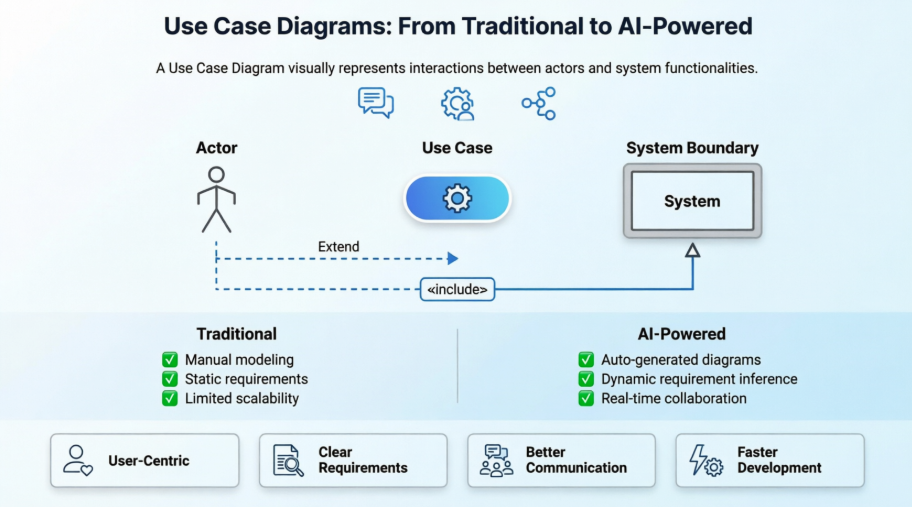
Visual Paradigm’s AI Ecosystem is not a single tool but a cohesive network of intelligent assistants working in concert to support the entire requirements engineering lifecycle. By leveraging advanced natural language processing, machine learning, and UML modeling expertise, the ecosystem bridges the gap between informal stakeholder conversations and formal system specifications.
Core Components
Use Case Modeling Studio
The cornerstone of the AI Ecosystem, the Use Case Modeling Studio is a web-based application that transforms plain language system descriptions into complete, structured models and documentation. Users can input a simple goal statement—such as “Users should be able to reset their passwords securely”—and the studio automatically generates:
-
A fully-formed use case diagram with relevant actors and relationships
-
Structured use case descriptions with preconditions, postconditions, and flow details
-
Associated activity diagrams mapping the logical sequence of actions
This component serves as an automated requirements engineering assistant, reducing manual modeling time by up to 70% while ensuring consistency with UML standards.
AI Chatbot
Integrated directly into the Visual Paradigm Desktop environment, the AI Chatbot functions as a conversational interface for diagram generation. Rather than navigating complex menus, users can simply describe their modeling needs in natural language:
“Create a use case diagram for an e-commerce checkout process with guest and registered user actors.”
The chatbot interprets the request, generates the appropriate diagram elements, and even suggests refinements based on modeling best practices. This conversational approach lowers the barrier to entry for non-technical stakeholders while accelerating workflow for experienced modelers.
UCDD Assistant (Use Case Driven Development Assistant)
The UCDD Assistant extends AI support beyond initial modeling to guide users through the complete development lifecycle. Starting from a problem statement, it helps teams:
-
Refine requirements into structured use cases
-
Derive analysis classes and domain models
-
Generate sequence diagrams for key scenarios
-
Outline implementation considerations
This end-to-end guidance ensures traceability from requirements to design, supporting agile and iterative development methodologies.
Specialized AI Applications
The ecosystem includes a library of purpose-built AI tools for targeted modeling tasks:
-
Textual Analysis Tool: Scans problem statements and requirement documents to automatically identify candidate domain classes, attributes, and operations—providing a head start on object-oriented analysis.
-
ERD Tool: Translates conceptual data requirements into Entity Relationship Diagrams, suggesting primary keys, relationships, and cardinality based on contextual analysis.
-
AI Use Case Description Generator: Expands brief use case titles into comprehensive specifications including standard flows, alternative paths, exception handling, and business rules.
Key Capabilities: From Text to Professional Models
Automated Modeling & Diagramming
Text-to-Diagram Generation
Perhaps the most transformative feature, Text-to-Diagram allows users to generate multiple UML diagram types from a single prompt:
-
Use Case Diagrams: Identify actors, use cases, and relationships
-
Activity Diagrams: Map process flows and decision points
-
Sequence Diagrams: Illustrate object interactions over time
-
Class Diagrams: Suggest structural elements and associations
-
ER Diagrams: Model data entities and relationships
Example workflow:
Input: "Library members can search for books, reserve available titles, and renew loans online."

Output:
✓ Use Case Diagram with Member actor and three use cases
✓ Activity Diagram for the reservation workflow
✓ Class Diagram suggesting Book, Member, and Loan entities
✓ Initial ERD with cardinality relationships
Diagram Refinement
The AI doesn’t just create diagrams—it improves them. The Diagram Refinement tool analyzes existing models to:
-
Suggest missing
<<include>>relationships for shared functionality -
Identify opportunities for
<<extend>>relationships to handle optional behavior -
Recommend actor generalizations to reduce redundancy
-
Flag potential modeling inconsistencies with UML semantics
Activity Diagram Generator
For teams documenting detailed process flows, the Activity Diagram Generator converts narrative use case descriptions into visual flowcharts. It automatically:
-
Parses step-by-step scenarios into action nodes
-
Identifies decision points and creates branch structures
-
Maps alternative and exception flows to appropriate paths
-
Maintains traceability back to the source use case
Advanced Requirements Analysis
AI Use Case Description Generator
Moving beyond diagram creation, this feature produces publication-ready use case specifications. Given a use case name and brief description, it generates:
-
Preconditions: System state requirements before execution
-
Postconditions: Expected outcomes upon successful completion
-
Main Success Scenario: Step-by-step primary flow
-
Alternative Flows: Variations for different user choices or conditions
-
Exception Flows: Error handling and recovery procedures
-
Business Rules: Constraints and policies governing the use case
Scenario Analyzer
Complex decision logic within use cases can be challenging to document clearly. The Scenario Analyzer converts textual descriptions into structured decision tables and matrices, making it easier to:
-
Validate completeness of business rule coverage
-
Identify redundant or conflicting conditions
-
Communicate logic to developers and testers
-
Support test case derivation
Textual Analysis for Domain Modeling
During early requirements gathering, the Textual Analysis tool scans stakeholder documents to extract modeling candidates:
-
Nouns become potential classes or entities
-
Verbs suggest operations or use cases
-
Adjectives may indicate attributes or constraints
-
Relationships between terms inform associations
This automated extraction provides a valuable starting point for domain-driven design discussions.
Documentation & Testing Integration
AI-Powered Test Case Creation
Quality assurance begins with clear requirements. The AI Test Case Generator derives detailed test scenarios directly from use case specifications:
-
Identifies testable conditions from pre/postconditions
-
Creates test steps aligned with main and alternative flows
-
Specifies expected results for validation
-
Generates both manual test scripts and automated test skeletons
Automated SDD Reporting
Compiling Software Design Documents traditionally requires significant manual effort. The Automated SDD Reporting feature assembles:
-
Project scope and objectives
-
Generated diagrams and models
-
Use case specifications and decision tables
-
Derived test cases and acceptance criteria
Into professionally formatted PDF or Markdown documents with a single click—ensuring consistency and saving hours of documentation time.
Gherkin Scenario Generation
For teams practicing Behavior-Driven Development (BDD), the ecosystem converts use case flows into Gherkin syntax:
Scenario: Member reserves an available book
  Given the member is logged in
  And the book "Clean Code" is available
  When the member requests to reserve the book
  Then the system confirms the reservation
  And the book status changes to "reserved"
This output integrates seamlessly with Cucumber, SpecFlow, and other BDD frameworks, bridging requirements and automated testing.
Seamless Integration & Workflow Management
Desktop & Web Synchronization
Recognizing that modeling work happens across environments, Visual Paradigm ensures smooth synchronization between:
-
VP Online Workspace: Cloud-based collaboration for distributed teams
-
Visual Paradigm Desktop: Full-featured modeling for power users
Models created or refined in either environment can be imported, exported, or synchronized, maintaining version consistency and team alignment.
Interactive Project Dashboard
The AI Ecosystem includes a real-time dashboard providing visibility into project health:
-
Description Completeness: Percentage of use cases with fully documented flows
-
Diagram Coverage: Ratio of requirements represented in visual models
-
Traceability Metrics: Links between requirements, designs, and tests
-
AI Suggestions Pending: Unreviewed refinement recommendations
This overview helps project managers identify gaps, prioritize refinement efforts, and demonstrate progress to stakeholders.
Practical Implementation Strategies
Getting Started with AI-Assisted Modeling
-
Begin with Natural Language: Draft initial requirements as simple user stories or goal statements
-
Leverage Text-to-Diagram: Use the AI to generate baseline models from your descriptions
-
Review and Refine: Apply domain expertise to validate and adjust AI-generated elements
-
Expand with Specialized Tools: Use Textual Analysis and Scenario Analyzer for deeper specification
-
Generate Deliverables: Produce documentation and test cases directly from refined models
Best Practices for Optimal Results
-
Provide Context-Rich Prompts: The more detail in your initial description, the more accurate the AI output
-
Iterate Collaboratively: Treat AI suggestions as starting points for team discussion, not final answers
-
Maintain UML Discipline: Use AI to accelerate modeling, but apply UML semantics consciously
-
Document Assumptions: When the AI makes modeling choices, record the rationale for future reference
-
Validate with Stakeholders: Use generated diagrams as communication tools to confirm requirements understanding
Common Use Cases
-
Agile Sprint Planning: Rapidly model user stories into use cases for estimation and task breakdown
-
Legacy System Modernization: Extract use case models from existing documentation to guide refactoring
-
Regulatory Compliance: Generate traceable requirements models for audit-ready documentation
-
Cross-Functional Alignment: Create visual models that bridge business, analysis, and development perspectives
-
Onboarding New Team Members: Use AI-generated documentation as training materials for system understanding
Conclusion
Visual Paradigm’s AI Ecosystem represents a significant leap forward in requirements engineering methodology. By automating the translation of natural language into structured UML models, it empowers teams to focus their expertise on validation, refinement, and strategic decision-making rather than manual diagram construction.
The true power of this ecosystem lies not in replacing human judgment but in augmenting it—freeing analysts and architects from repetitive modeling tasks while providing intelligent suggestions that elevate model quality. Whether you’re documenting a simple feature or architecting an enterprise system, the AI-powered tools offer scalable support that grows with your project’s complexity.
As software development continues to demand faster delivery without compromising quality, embracing intelligent modeling assistance becomes a strategic advantage. Visual Paradigm’s AI Ecosystem provides the framework to achieve that balance: accelerating requirements capture, enhancing model precision, and ensuring traceability from concept to implementation.
For teams ready to transform their requirements engineering practice, the journey begins with a single prompt. The question is no longer whether to adopt AI-assisted modeling, but how quickly you can integrate these capabilities to deliver greater value to your stakeholders.
References
- Use Case Modeling Studio: Web-based AI application that transforms plain language system descriptions into complete use case models and documentation.
- Comprehensive Guide to Use Case Modeling with Visual Paradigm’s AI Ecosystem: In-depth guide covering AI-powered use case modeling techniques, workflows, and practical implementation strategies.
- Comprehensive Guide to Use Case Modeling with Visual Paradigm’s AI Ecosystem – Part 2: Advanced continuation covering sophisticated AI modeling features, integration patterns, and enterprise adoption considerations.
- AI Use Case Diagram Tutorial Video: Step-by-step video demonstration of AI-powered use case diagram creation and refinement in Visual Paradigm.
- AI Chatbot: Cloud-based conversational assistant integrated into Visual Paradigm Desktop for generating diagrams through natural language interaction.
- Use Case Driven Development Assistant: AI-powered lifecycle assistant guiding users from problem statement through analysis, design, and implementation planning.
- AI Textual Analysis: Intelligent tool for automatically identifying candidate domain classes, attributes, and operations from textual requirement statements.
- ERD Tool: AI-enhanced Entity Relationship Diagram tool for translating conceptual data requirements into structured database models.
- AI Use Case Description Generator: Automated feature that expands brief use case titles into comprehensive specifications with preconditions, flows, and business rules.
- Use Case Modeling Studio Workspace: Cloud-based collaborative environment for AI-assisted use case modeling and team requirements engineering.
- AI-Powered Use Case Modeling Studio Release: Official release notes detailing new features, improvements, and capabilities in the AI-enhanced modeling platform.
- AI Use Case Diagram Refinement Tool: Intelligent analyzer that suggests UML relationship improvements like <> and <> to enhance diagram quality.
- Use Case to Activity Diagram: Automated conversion tool that maps detailed use case narratives into visual activity flowcharts.
- AI Use Case Scenario Analyzer: Feature that transforms text-based use cases into structured decision tables and condition matrices for clearer logic documentation.
- AI Use Case Modeling Video Tutorial: Comprehensive video walkthrough demonstrating end-to-end AI-powered use case modeling workflows and best practices.