


In the modern business landscape, lengthy business plans are often replaced by agile, visual frameworks that allow for rapid iteration and clarity. From startup founders to social entrepreneurs, the ability to visualize ideas, uncover insights, and build robust models is crucial for success. The Business Canvas Toolkit by Visual Paradigm Online offers a comprehensive suite of frameworks designed to take projects from strategy to execution.
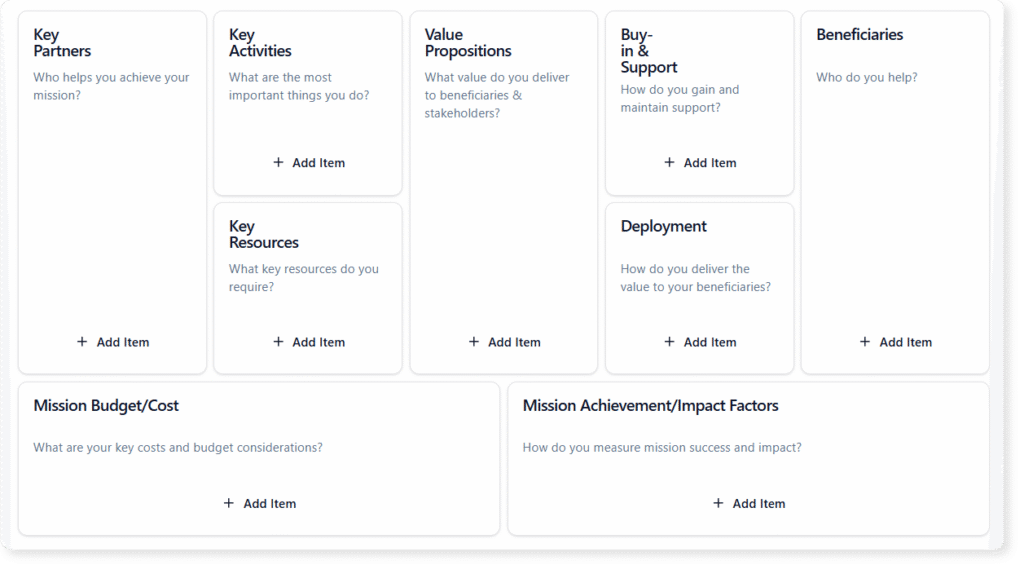
This guide explores the ecosystem of business canvases, with a special focus on the Mission Model Canvas for non-profits, and demonstrates how Artificial Intelligence can revolutionize the way organizations strategize.
Key Concepts in Visual Strategy
Before diving into specific methodologies, it is essential to understand the foundational concepts that make these tools effective.
- The Business Canvas Approach: A canvas is a one-page visual chart with elements describing a firm’s or product’s value proposition, infrastructure, customers, and finances. Unlike static documents, canvases are living blueprints designed to be updated as assumptions are validated.
- Mission-Driven Strategy: While traditional businesses focus on revenue, non-profits, government agencies, and social enterprises prioritize mission achievement. The Mission Model Canvas adapts the standard Business Model Canvas (BMC) by shifting the focus from profit generation to impact creation.
- Strategic Deconstruction: This involves breaking down complex business ideas into manageble components. For example, a Lean Canvas deconstructs an idea into key assumptions, while a SWOT Analysis separates internal strengths/weaknesses from external opportunities/threats.
VP AI: Enhancing Strategy with Artificial Intelligence
Visual Paradigm (VP) AI transforms the traditional canvas experience from a manual drafting process into an intelligent, automated workflow. By integrating AI into the canvas toolkit, users can overcome creative blocks and validate assumptions instantly.

AI Canvas Maker
The core of this technology is the AI Canvas Maker. Instead of starting with a blank whiteboard, users can simply type a business idea or mission statement. The AI instantly analyzes the concept and generates a well-defined, strategic blueprint. This feature allows teams to move from concept to clarity in seconds, providing a solid foundation to refine and expand upon.
Creative AI Idea Support
Strategizing often involves hitting a wall. VP AI acts as a personal brainstorming partner, offering meaningful prompts and examples to inspire new thoughts. Whether you are populating a Value Proposition or identifying Customer Segments, the AI helps keep the momentum flowing by suggesting relevant content.
Automated Strategic Analysis
Beyond content generation, VP AI performs deep analytical tasks. Users can run instant assessments, such as SWOT, Risk, or Market Viability evaluations directly within the platform. This identifies gaps and opportunities that might otherwise be overlooked, supporting stronger, data-driven decision-making.
Selecting the Right Framework
The toolkit offers a canvas for every specific business need. Choosing the correct layout is the first step toward effective planning.
For Business Modeling and Startups
- Business Model Canvas: The standard for documenting existing business models or developing new ones.
- Lean Canvas: Ideal for startups, focusing on deconstructing ideas into key assumptions and risks.
- Blue Ocean Strategy: A tool to identify new market spaces by analyzing what to eliminate, reduce, raise, and create.
For Strategic Analysis
- PEST & PESTLE Analysis: Frameworks for evaluating external factors—Political, Economic, Social, Technological, Legal, and Environmental.
- Porter’s Five Forces: specific for analyzing industry competition and profitability.
- VRIO Framework: Evaluates resources based on Value, Rarity, Imitability, and Organization.
For Mission-Driven Organizations
- Mission Model Canvas: Specifically designed for organizations where the primary goal is mission achievement rather than profit. It is essential for grant writers, program managers, and social enterprise leaders.
Guidelines for Building a Mission Model Canvas
The Mission Model Canvas requires a shift in thinking compared to commercial frameworks. Follow these guidelines to effectively map a mission-driven strategy.
1. Define the Mission Achievement
Instead of a revenue stream, focus on the Impact. Define exactly what success looks like. For example, a healthcare clinic might measure success by the number of uninsured patients treated rather than net income.
2. Identify Beneficiaries, Not Just Customers
In a commercial model, customers pay for the product. In a mission model, the user (beneficiary) often pays nothing. You must map out who benefits from the service versus who funds the service (donors/grants).
3. Map the Deployment
Determine how your product or service will reach the beneficiaries. This often requires different logistics than commercial distribution channels. Use the canvas to visualize the operational requirements needed to deliver value.
4. Iterate with Real-World Scenarios
Use real-world examples to guide your structure. For instance:
- Code for All: A non-profit providing coding bootcamps. Their canvas focuses on mentorship logistics and underserved youth metrics.
- River Cleanup Alliance: An environmental group. Their canvas emphasizes volunteer organization and ecosystem restoration metrics.
Tips and Tricks for Optimizing Your Canvas
To get the most out of the Visual Paradigm Online toolkit, utilize these advanced features and workflow optimizations.
- Leverage Multiple Views: Switch between the classic canvas view for a holistic picture and the Focus View. The Focus View allows you to deep-dive into a single section without distractions, which is crucial when refining complex details like “Key Resources” or “Cost Structure.”
- Structure with Color Codes: Don’t just dump text onto the canvas. Use color codes and tags to categorize ideas (e.g., High Priority, Unvalidated Assumption, Proven Fact). This adds a layer of visual hierarchy to your strategy.
- Collaborate in Real-Time: Strategy is rarely a solo endeavor. Coordinate live sessions with your team using the built-in timer to time-box brainstorming sessions. This keeps meetings efficient and focused.
- Professional Exports: When presenting to stakeholders or donors, raw digital canvases can be hard to read. Use the export feature to convert your canvas and AI analysis reports into professional formats like Word, PDF, or Markdown.
Resource
-
What Is the Business Model Canvas? Why Use Visual Paradigms & AI Tools: This comprehensive guide explains the Business Model Canvas, its core components, and how visual paradigms and AI-powered tools enhance strategic planning and business innovation.
-
AI-Powered Business Model Canvas Builder – Instant Strategy Design: An AI-driven tool that automates the creation of business model canvases, offering intelligent suggestions and real-time insights to accelerate business planning.
-
AI Canvas Tool – Intelligent Design for Business Frameworks: An AI-powered canvas application that helps users generate and refine business models, value propositions, and strategy frameworks with smart suggestions and automation.
-
AI Business Model Canvas Tool – Smart Strategy Development: A comprehensive AI-enhanced solution for building and refining business models with intelligent insights, real-time feedback, and collaborative features.
-
AI Canvas Editor Release Update: Introduces an AI-powered canvas editor that enhances diagram creation through intelligent suggestions and automated layout optimization.
-
AI-Powered Business Model Canvas Tool Guide: A step-by-step guide on using an AI-enhanced tool to generate and refine business model canvases with intelligent input and real-time recommendations.
-
Mission Model Canvas | AI-Powered Strategy Tool by VP: October 28, 2025 – Coordinate live sessions with your team using the built-in timer and export your final canvas or reports into professional formats such as Word, Markdown, or CSV. … The Mission Model Canvas is specifically designed for non-profits, government agencies, social enterprises, and any organization where the primary goal is mission achievement rather than profit.
-
Comprehensive Tutorial: AI-Powered Business Canvas Toolkit with Visual Paradigm: This page provides a detailed guide on using an AI-enhanced Business Model Canvas toolkit integrated with Visual Paradigm for automated business strategy development.
-
AI Canvas Tool – Visual Paradigm: An AI-driven tool within Visual Paradigm that enables users to generate and refine business canvases through intelligent automation and natural language input.
-
Mastering the Business Model Canvas with AI: Step-by-Step Guide Using Visual Paradigm: This blog post offers a structured walkthrough of leveraging AI capabilities in Visual Paradigm to create, customize, and optimize Business Model Canvases efficiently.
-
How the AI Business Model Canvas Builder Works – Visual Paradigm: This page explains the functionality of the AI-powered Business Model Canvas Builder, highlighting how machine intelligence automates canvas creation and strategic insight generation.
-
Deep Learning AI Canvas | Strategy Tools Analysis Canvas Template: Edit Localized Version: 深度學習 AI 畫布(TW) | 深度学习 AI 画布(CN) View this page in: EN TW CN · Visual Paradigm Online (VP Online) is an online diagram software that supports analysis canvases, various charts, UML, flowchart, rack diagram, org chart, family tree, ERD, floor plan, etc .
-
Product Canvas | AI-Powered Strategy Tool by VP: Build products people love. Combine strategy, design, and feedback into one visual space with our AI-powered Product Canvas to bring ideas to market faster.
-
Lean UX Canvas | AI-Powered Strategy Tool by VP: October 28, 2025 – Create a complete strategy framework in moments. Simply describe your vision, and the AI canvas generator transforms it into a structured, insight-rich canvas that helps you visualize, plan, and refine your next big idea.
-
Lean Canvas – Visual Paradigm: October 28, 2025 – Our application is designed to be your strategic partner, providing intelligent tools to enhance every step of your planning process for the Business Model Canvas. … Have a startup idea? Just enter ‘a mobile app for local home-cooked meal delivery’ and let our AI generate a complete Lean Canvas, outlining the problem, solution, and key metrics.