
Designing complex systems requires more than just technical proficiency; it demands a unified vision across different disciplines. At the heart of many robust applications lies the state machine diagram. These visual representations map out how a system behaves under various conditions, defining states, transitions, and events. However, creating a state machine diagram in isolation often leads to gaps in logic, missed edge cases, and misalignment between development and business goals. Effective collaboration is the key to building reliable, maintainable, and scalable systems. This guide explores how to foster collaboration around state modeling, ensuring that every team member understands the system’s flow and constraints.
Understanding the Value of State Diagrams in System Design 🧩
State diagrams are not merely documentation artifacts; they are blueprints for logic. They provide a clear visual language that describes the lifecycle of an entity, such as an order, a user account, or a payment transaction. When multiple teams contribute to a single product, ambiguity becomes a major risk. A developer might interpret a state transition differently than a tester or a product manager. State diagrams bridge this gap by offering a single source of truth.
Consider a scenario where a payment system processes transactions. The states might include Pending, Processing, Completed, and Failed. Without a clear diagram, developers might assume a direct transition from Pending to Completed, skipping necessary validation steps. Testers might not know which states require specific retry logic. Operations teams might lack the context to monitor specific state durations for performance issues. A shared diagram mitigates these risks by making the logic explicit and accessible to all stakeholders.
Defining Stakeholders and Their Needs 👥
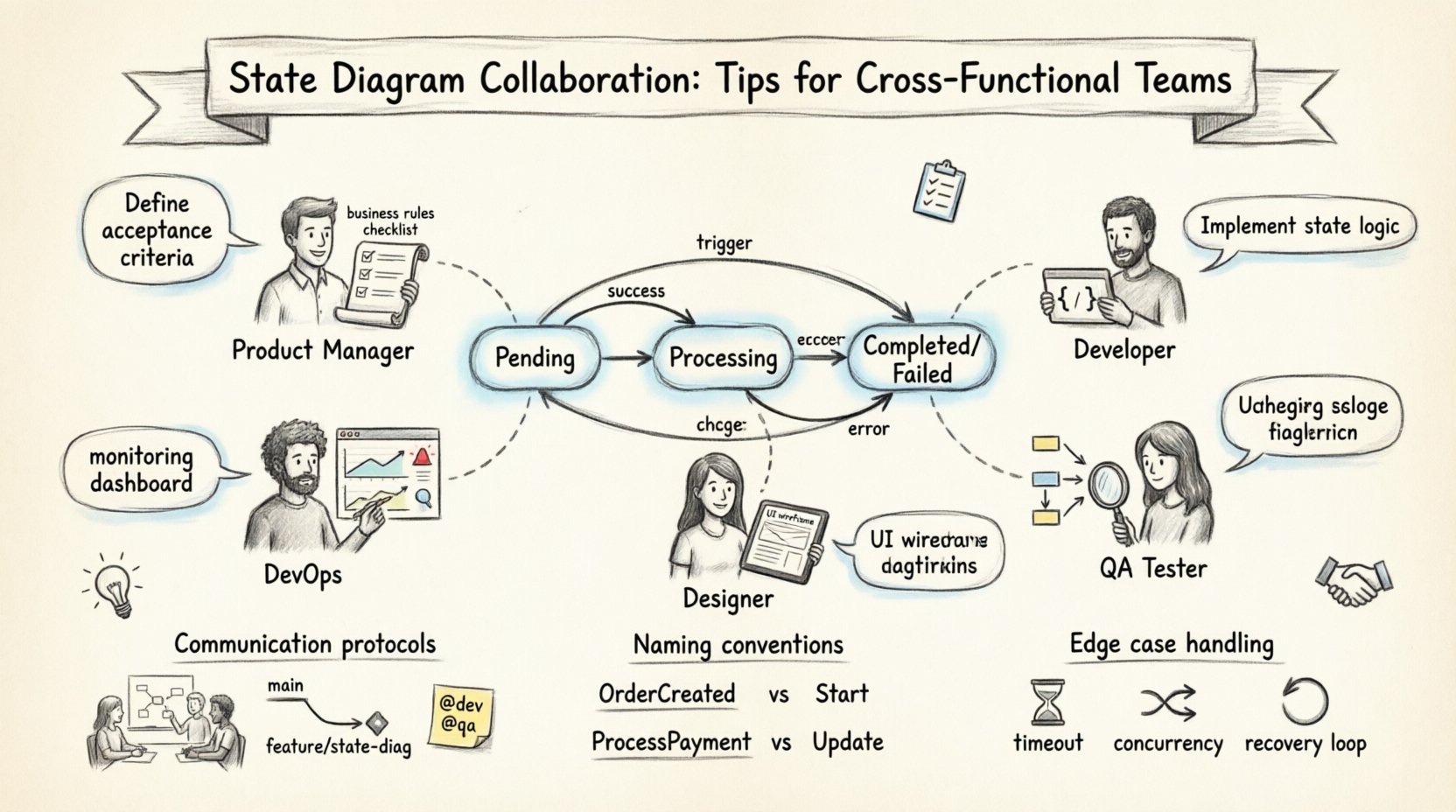
Collaboration begins with understanding who needs to interact with the state model and what they require from it. Different roles prioritize different aspects of the state machine. A product manager cares about the business rules that govern transitions. A developer cares about the implementation logic and error handling. A tester cares about the paths that must be covered to ensure quality. By identifying these needs early, the team can create diagrams that serve everyone.
- Product Managers: Focus on business logic, user flows, and feature requirements. They need to know which states are valid for a user to see and which actions trigger state changes.
- Developers: Focus on implementation details, API endpoints, and database constraints. They need to understand the exact conditions for transitioning between states.
- Quality Assurance: Focus on test coverage and edge cases. They need a clear map of all possible paths, including error states and recovery scenarios.
- DevOps and Operations: Focus on monitoring, logging, and reliability. They need to know which states indicate healthy systems and which indicate issues requiring alerts.
- Designers: Focus on user experience and interface feedback. They need to understand the states that dictate what UI elements are visible or disabled.
Mapping Roles to Diagram Needs
| Role | Primary Interest | Key Questions |
|---|---|---|
| Product Manager | Business Rules | Is this state required for the user journey? |
| Developer | Implementation Logic | What triggers the transition? |
| Tester | Path Coverage | Are all error paths covered? |
| DevOps | Monitoring & Alerts | How long can a state persist? |
| Designer | UI Feedback | What does the user see in this state? |
Establishing Communication Protocols for Modeling 🗣️
Once roles are defined, the team must agree on how to communicate about the diagram. Static images are often insufficient because they become outdated quickly. Collaborative modeling requires an iterative process where the diagram evolves alongside the code. Here are strategies to maintain alignment:
- Live Diagramming Sessions: Schedule regular workshops where developers, testers, and product managers review the state model together. This ensures that everyone has a chance to ask questions and point out logical gaps before implementation begins.
- Version Control for Diagrams: Treat state diagrams as code. Store them in a version control system to track changes over time. This allows the team to see who modified a transition and why, facilitating better accountability.
- Annotation Standards: Use consistent notation for comments and notes. If a state requires special handling, mark it clearly. Avoid vague descriptions like “handle error”; instead, specify “trigger retry on timeout”.
- Accessibility: Ensure that the diagrams are accessible to all team members, regardless of their location or time zone. Use cloud-based repositories where the latest version is always available.
Naming Conventions and Documentation Standards 🏷️
Clarity in state modeling depends heavily on naming. Ambiguous names lead to misinterpretation. A state named “Active” could mean a user is logged in, a subscription is valid, or a process is running. To avoid confusion, the team should adopt a strict naming convention.
State Names: Use nouns that describe the condition of the entity. For example, OrderCreated is clearer than Start. PaymentFailed is more specific than Error.
Transition Labels: Use verbs that describe the event triggering the change. For example, ProcessPayment or CancelOrder. Avoid generic labels like Update unless it is the only action possible.
Documentation: Every state and transition should have a brief description. This description should explain the business rule or technical constraint associated with it. For example, a transition from Pending to Failed might require the description: “Triggered if payment gateway returns a timeout error after three attempts.”
Handling Edge Cases and Error States ⚠️
One of the most common failures in state modeling is ignoring what happens when things go wrong. Teams often focus on the happy path, where everything proceeds smoothly. However, the robustness of a system is defined by how it handles exceptions. Collaborative review is essential to identify these edge cases.
- Timeouts: What happens if a process takes longer than expected? Is there a timeout state?
- Concurrency: What happens if two events occur at the same time? Can the system handle simultaneous state changes?
- Recovery: If a state fails, is there a path to recover? For example, if a database write fails during a state transition, can the system revert to a previous safe state?
- External Dependencies: What if an external service is unavailable? The state machine should account for network failures and service outages.
During collaboration, ask the question: “What if this step fails?” This simple query often reveals missing states or transitions. For instance, in a document approval workflow, what happens if the approver rejects the document? Is there a state for Rejected that allows for edits, or does it terminate the process entirely? These decisions require input from product managers and developers alike.
Integrating Testing with State Modeling 🧪
Testing strategies should be derived directly from the state diagram. Every state and every transition represents a potential test case. By mapping test cases to the diagram, the team ensures comprehensive coverage. This integration reduces the likelihood of bugs slipping into production.
Path Testing: Identify all possible paths from the initial state to the final state. Ensure that each path has at least one corresponding test.
State Testing: Verify that the system enters the correct state after a specific event. For example, after a user clicks “Submit,” the system should enter the Processing state.
Transition Testing: Verify that the system does not enter invalid states. For example, a payment should not move from Pending directly to Shipped without passing through Completed.
QA teams should be involved in the diagram review process. They can identify transitions that are difficult to test or states that are ambiguous. This early involvement saves time later when fixing issues found during integration testing.
Maintaining the State Model Over Time 🔄
State diagrams are not static documents; they are living artifacts that must evolve with the product. As features are added or business rules change, the diagram must be updated. Failure to update the diagram leads to technical debt and confusion.
Change Management: When a developer modifies code that affects state logic, they must also update the diagram. This should be part of the code review process. If the diagram is not updated, the code change should be flagged as incomplete.
Regular Audits: Schedule periodic reviews of the state model. Check for deprecated states, unused transitions, or logic that no longer matches the business requirements. This ensures the diagram remains accurate and useful.
Decomposition: For complex systems, a single diagram can become too large to manage. Consider breaking the model into smaller, focused diagrams. For example, one diagram for the user authentication flow and another for the billing cycle. Link these diagrams to show how they interact.
Resolving Conflicts in Logic ⚖️
During collaboration, conflicts will arise. A developer might argue that a state transition is too complex to implement efficiently. A product manager might insist that a state is necessary for compliance. Resolving these conflicts requires a structured approach.
- Data-Driven Decisions: Use metrics and user feedback to guide decisions. If a state causes a high drop-off rate, it might need to be redesigned.
- Technical Constraints: Be honest about what is technically feasible. If a transition is too risky, propose an alternative that achieves the same business goal with less complexity.
- Compromise: Find a middle ground. If a state cannot be implemented immediately, mark it as a future milestone rather than blocking the current release.
Conclusion on Collaborative Modeling 📈
Building reliable systems is a collective effort. State diagram collaboration ensures that the logic behind the system is understood, tested, and maintained by everyone involved. By defining roles, establishing standards, and prioritizing communication, teams can avoid common pitfalls and deliver higher quality software. The state machine diagram becomes a shared language that connects business requirements with technical execution. This alignment is essential for long-term success and system stability.
Remember that the goal is not perfection on the first draft. It is about continuous improvement through feedback and iteration. As the system grows, the diagram will grow with it. Keep it accessible, keep it accurate, and keep the conversation open. This is the foundation of effective cross-functional teamwork in software development.