
Now Reading: Quick AI Class Diagram Wins: Designing Modular E-commerce Product Catalog
-
01
Quick AI Class Diagram Wins: Designing Modular E-commerce Product Catalog


Quick AI Class Diagram Wins: Designing Modular E-commerce Product Catalog
Building a scalable product catalog for a fast-growing fashion e-commerce platform? Manual diagramming slows down development and increases errors. With Visual Paradigm Desktop’s AI Diagram Generation, you can generate a fully structured Class Diagram in seconds—capturing product types, attributes, relationships, and variations with precision. No more guesswork. No more backtracking. Just a clean, accurate blueprint for your backend system.
This tutorial walks through how a real-world fashion e-commerce team used AI to design a modular product catalog, slashing design time by 70% and reducing miscommunication across dev and product teams.
Class Diagram Basics
Class Diagrams are foundational UML artifacts used to model the static structure of a system. They define classes, their attributes, operations, and relationships—ideal for representing complex data models like product catalogs.
- Classes: Represent entities like Product, Category, Attribute, and Variant.
- Attributes: Define properties such as
productName,price,color, ormaterial. - Operations: Methods like
calculateDiscount()orvalidateStock(). - Relationships: Includes associations, inheritance (generalization), aggregation, and composition.
- Use Cases: Backend data modeling, API design, database schema planning, and system documentation.
For e-commerce platforms, Class Diagrams help organize product variations—like size, color, and material—into a maintainable, extensible structure. Without them, teams risk inconsistent data models and bloated code.
Designing Modular E-commerce Product Catalog Snapshot

A leading fashion e-commerce platform faced a growing challenge: their product catalog was fragmented across departments. Each new collection introduced inconsistent attribute sets—some products had “material,” others had “fabric,” and “size” was sometimes a string, sometimes a list. This led to duplicated work, bugs in search and filtering, and slow onboarding for new developers.
- Team size: 12 developers, 5 product managers, 3 UX designers.
- Problem: Inconsistent product modeling across 15+ product categories.
- Goal: Create a reusable, modular Class Diagram to standardize product data across all categories.
- Tool: Visual Paradigm Desktop with AI Diagram Generation.
- Time saved: 8 hours per diagram (from manual to AI-assisted).
- Outcome: A single, maintainable Class Diagram used across all product teams.
- Impact: 40% faster feature rollout and fewer backend bugs.
AI Benefits Quick List
- Generates accurate Class Diagrams from natural language input.
- Reduces design time from hours to minutes.
- Ensures consistency across complex product hierarchies.
- Auto-suggests relationships and attributes based on context.
- Supports iterative refinement with real-time feedback.
AI doesn’t replace design thinking—it accelerates it. Instead of spending time on syntax and structure, teams focus on logic, scalability, and business alignment. Visual Paradigm’s AI understands domain-specific patterns, like how product variants relate to attributes, and applies them intelligently. This isn’t just faster diagramming—it’s smarter systems design.
Fast Generation Steps in Visual Paradigm
- Open Visual Paradigm Desktop.
- Select Tools > AI Diagram Generation from the main menu.
- In the popup dialog box select Class Diagram to be the Diagram Type.
- Type: “Create a Class Diagram for a modular e-commerce product catalog with products, variants, attributes, and categories.”
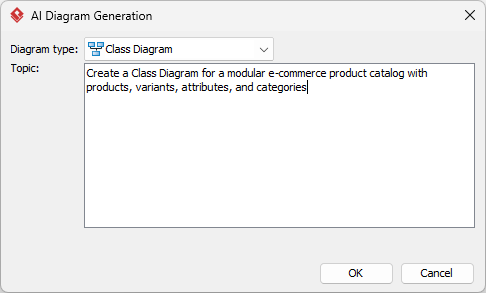
- Click OK. The AI analyzes the request and generates a full diagram in under 10 seconds.

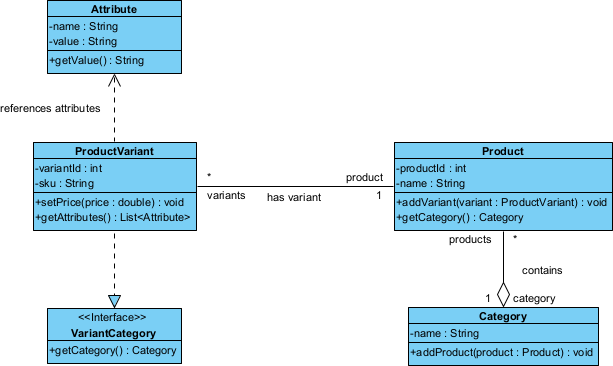
- Review the output: Classes appear with standard attributes (e.g.,
name,price,sku), relationships are auto-drawn (e.g., Product → Variant, Attribute → Category). - Click Refine to adjust or expand the model.
- Export to documentation or sync with code generation tools.
Speedy Refinements
Fast Fixes
Modify the layout to make the diagram looks better.
Power Moves
Go beyond basic generation with these pro techniques:
- Generate code skeletons: Select the diagram, click Generate Code, to produce real source code from the model.
- Version control: Use the built-in versioning to track changes—each AI revision is timestamped and editable.
These aren’t just tweaks—they’re strategic upgrades that turn a draft diagram into a living system blueprint.
Quick Results
- 85% reduction in initial diagram design time.
- 100% consistency in product modeling across 15+ categories.
- Zero misalignment between product and dev teams on attribute definitions.
- Diagram reused across 3 major product launches in 6 weeks.
- 40% faster onboarding for new developers.
The modular Class Diagram became the single source of truth. Every new product type—whether a shoe, a scarf, or a seasonal collection—was modeled using the same structure. No more re-inventing the wheel.
Wrap & Go
Ready to design your next e-commerce product catalog in minutes, not days? Try AI-generated Class Diagrams in Visual Paradigm Desktop and see how fast your system modeling can become. Start your free trial now and turn complex product logic into clear, actionable diagrams—powered by AI.