
In the world of software development, building robust and maintainable systems requires more than just writing code. It requires a structured approach to understanding problems and organizing solutions. This is where Object-Oriented Analysis and Design (OOAD) comes into play. This discipline serves as the blueprint for software architecture, ensuring that the final product is scalable, flexible, and easy to understand.
Many beginners jump straight into coding without a plan, leading to spaghetti code that is difficult to modify. By learning OOAD, you shift your focus from immediate implementation to strategic planning. This guide walks you through the essential concepts, processes, and principles needed to build high-quality software systems from the ground up.
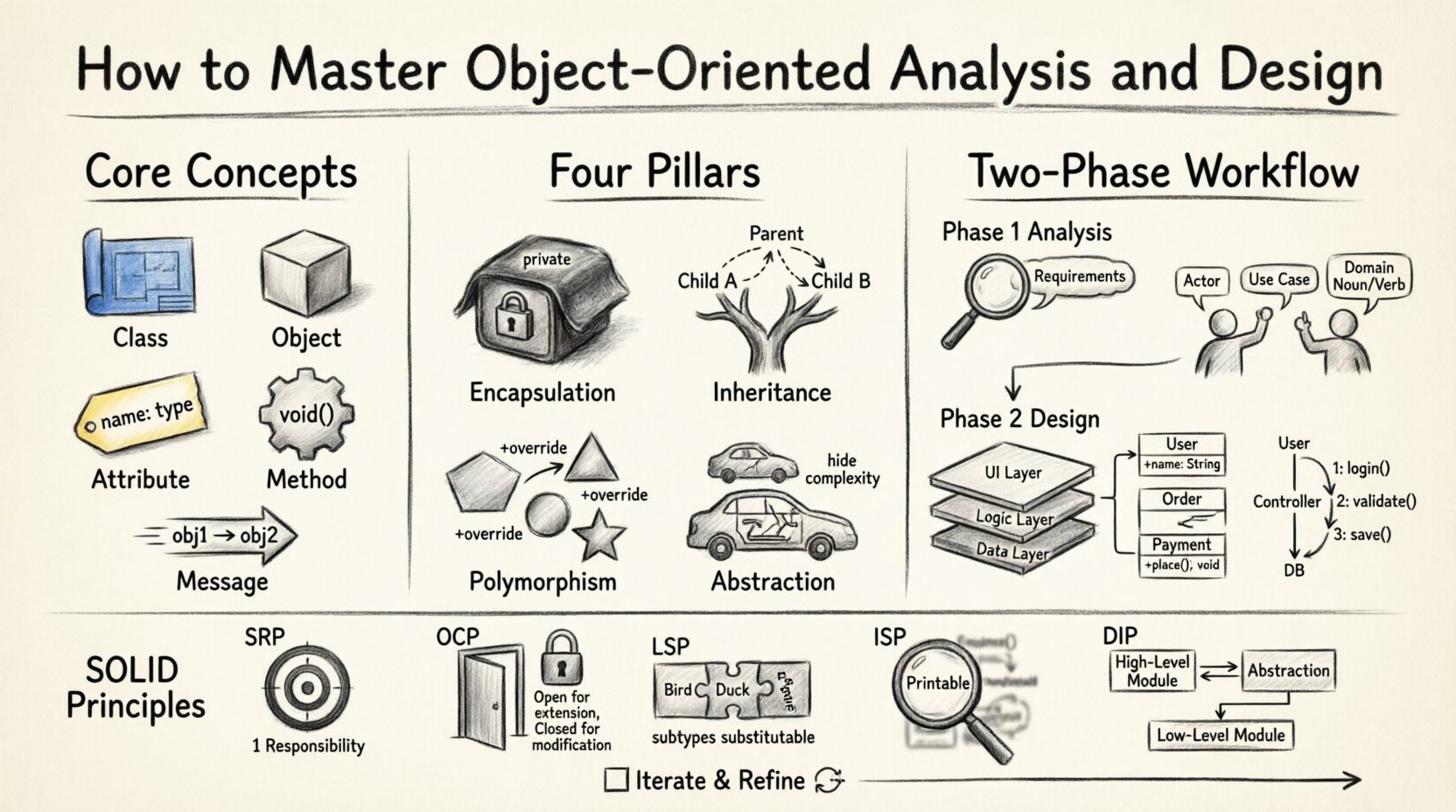
🧱 Understanding the Core Concepts of OOAD
Before diving into the process, it is vital to understand the building blocks. Object-Oriented Analysis and Design revolves around the concept of objects. In this context, an object is a distinct entity that holds data and behavior. Think of it as a digital container that combines state and logic.
🔑 Key Terminology
- Class: A blueprint or template from which objects are created. It defines the structure and behavior.
- Object: An instance of a class. It represents a specific entity with its own data.
- Attribute: A variable that holds data within an object (e.g., color, size).
- Method: A function or action that an object can perform (e.g., calculateTotal, print).
- Message: A request sent from one object to another to trigger a method.
When analyzing a problem, you identify the real-world entities involved. When designing the solution, you map these entities to classes. For example, in a banking system, a Customer and a Account are natural candidates for classes. Each has specific attributes and behaviors relevant to their function.
🏛️ The Four Pillars of Object Orientation
Object-oriented programming relies on four main principles that guide how objects interact. Understanding these is crucial for effective design.
1️⃣ Encapsulation
Encapsulation is the bundling of data and methods that operate on that data within a single unit. It restricts direct access to some of an object’s components, which is a means of preventing accidental interference and misuse of the data.
- Benefit: Protects internal state.
- Practice: Use private attributes and public methods to access them.
2️⃣ Inheritance
Inheritance allows a class to derive properties and behaviors from another class. This promotes code reuse and establishes a natural hierarchy.
- Parent Class: The class being inherited from.
- Child Class: The class that inherits from the parent.
- Benefit: Reduces redundancy and simplifies maintenance.
3️⃣ Polymorphism
Polymorphism allows objects of different classes to be treated as objects of a common superclass. It enables a single interface to represent different underlying forms (data types).
- Dynamic Binding: Deciding which method to execute at runtime.
- Static Binding: Deciding which method to execute at compile time.
4️⃣ Abstraction
Abstraction involves hiding complex implementation details and showing only the necessary features of an object. It helps manage complexity by separating the interface from the implementation.
| Concept | Description | Example |
|---|---|---|
| Encapsulation | Wrapping data and code | Private variables in a class |
| Inheritance | Creating new classes from existing ones | Vehicle -> Car, Bike |
| Polymorphism | One interface, many forms | Draw() method for different shapes |
| Abstraction | Hiding details | Abstract class with no implementation |
📝 Phase 1: Object-Oriented Analysis
The analysis phase focuses on understanding the problem domain. It answers the question, “What does the system need to do?” rather than “How will it be built?” This stage is critical for aligning the software with business requirements.
🔍 Identifying Requirements
Start by gathering functional and non-functional requirements. Functional requirements describe what the system should do (e.g., process payments). Non-functional requirements describe how the system should perform (e.g., response time, security).
- Stakeholder Interviews: Talk to users and business owners.
- Document Review: Analyze existing documentation.
- Observation: Watch how current processes work.
📋 Use Case Modeling
Use cases describe interactions between actors and the system. An actor is anyone or anything outside the system that interacts with it, such as a human user or another software system.
A typical use case includes:
- Actor: The initiator of the action.
- Preconditions: What must be true before the use case starts.
- Postconditions: What is true after the use case completes.
- Flow of Events: The step-by-step interaction sequence.
🗺️ Domain Modeling
Create a domain model to visualize the static structure of the problem space. Identify key nouns in the requirements; these often translate into classes. Identify verbs to find operations or relationships.
For instance, in a library system, “Book” and “Member” are nouns (classes), while “Borrow” and “Return” are verbs (methods).
🏗️ Phase 2: Object-Oriented Design
Once the analysis is complete, the design phase translates the requirements into a technical solution. It answers, “How will the system do it?” This involves defining the architecture, interfaces, and detailed class structures.
🎨 Architectural Design
Decide on the overall structure of the software. Will it be layered? Microservices? Monolithic? The architecture sets the boundaries for how components interact.
- Separation of Concerns: Divide the system into distinct sections.
- Modularity: Design independent components that can be developed and tested separately.
📐 Designing Class Diagrams
Class diagrams are the most common tool for visualizing the design. They show classes, their attributes, methods, and the relationships between them.
When designing class diagrams, consider:
- Responsibility: Each class should have a clear purpose.
- Cohesion: A class should have a single, well-defined responsibility.
- Coupling: Minimize dependencies between classes.
🔄 Sequence and Interaction Diagrams
While class diagrams show static structure, interaction diagrams show dynamic behavior. Sequence diagrams depict how objects interact over time to perform a specific task.
This helps in understanding the flow of messages between objects. It is particularly useful for identifying bottlenecks or logical errors before coding begins.
⚙️ Core Design Principles
To create maintainable systems, adhere to established design principles. These guidelines help prevent common architectural flaws.
📜 The SOLID Principles
SOLID is an acronym for five design principles intended to make software designs more understandable, flexible, and maintainable.
- Single Responsibility Principle (SRP): A class should have one, and only one, reason to change.
- Open/Closed Principle (OCP): Software entities should be open for extension but closed for modification.
- Liskov Substitution Principle (LSP): Objects of a superclass should be replaceable with objects of its subclasses without breaking the application.
- Interface Segregation Principle (ISP): Clients should not be forced to depend on methods they do not use.
- Dependency Inversion Principle (DIP): Depend on abstractions, not on concretions.
| Principle | Goal | Key Action |
|---|---|---|
| SRP | Reduce complexity | Split classes by responsibility |
| OCP | Enable extension | Use interfaces and inheritance |
| LSP | Ensure type safety | Verify subclass behavior |
| ISP | Reduce coupling | Split large interfaces |
| DIP | Decouple layers | Inject dependencies |
🔗 Understanding Relationships
Objects do not exist in isolation. They relate to one another in specific ways. Understanding these relationships is key to a sound design.
🔗 Association
An association represents a structural relationship between objects. It defines how many objects of one class relate to objects of another.
- One-to-One: One object connects to exactly one other.
- One-to-Many: One object connects to multiple others.
- Many-to-Many: Multiple objects connect to multiple others.
♻️ Aggregation vs. Composition
Both are types of association, but they differ in lifecycle management.
- Aggregation: A “has-a” relationship where the child can exist independently of the parent. Example: A Department has Teachers, but if the Department closes, the Teachers still exist.
- Composition: A stronger “part-of” relationship where the child cannot exist without the parent. Example: A House has Rooms. If the House is destroyed, the Rooms cease to exist.
🚧 Common Pitfalls and Best Practices
Avoiding common mistakes is just as important as following best practices. Here are frequent issues beginners encounter.
❌ Over-Engineering
Creating complex designs for simple problems leads to unnecessary overhead. Start simple and refactor as requirements evolve. Do not build features that are not currently needed.
❌ Tight Coupling
If classes depend heavily on each other, changing one class requires changing many others. Use interfaces and dependency injection to reduce this dependency.
❌ God Objects
Avoid creating classes that do too much. If a class handles database access, UI rendering, and business logic, it violates the Single Responsibility Principle. Break it down.
✅ Iterative Refinement
Design is not a one-time event. It is an iterative process. Review your models as the project progresses. Update diagrams to reflect changes in requirements or implementation details.
📋 Step-by-Step Checklist
To ensure you cover all bases during your OOAD process, use this checklist.
- ☐ Gather and document all functional requirements.
- ☐ Identify actors and use cases.
- ☐ Create a preliminary domain model.
- ☐ Define class attributes and methods.
- ☐ Establish relationships (associations, inheritance).
- ☐ Apply SOLID principles to class designs.
- ☐ Create sequence diagrams for complex flows.
- ☐ Review design for high cohesion and low coupling.
- ☐ Validate design against non-functional requirements.
🚀 Moving Forward
Object-Oriented Analysis and Design is a skill that improves with practice. It requires a balance between theoretical knowledge and practical application. By following these steps and principles, you can create software that is not only functional but also adaptable to future changes.
Remember, the goal is not to create a perfect design immediately, but to create a clear, maintainable path forward. Start with small projects, apply these concepts, and gradually increase the complexity of your systems. With patience and discipline, you will develop the ability to design robust software architectures that stand the test of time.
Continue exploring design patterns and architectural styles to deepen your understanding. The journey of software development is continuous, and OOAD is a fundamental tool in your toolkit.