
Now Reading: Mastering GCP Architecture with Visual Paradigm: From Blueprint to AI-Generated Design
-
01
Mastering GCP Architecture with Visual Paradigm: From Blueprint to AI-Generated Design


Mastering GCP Architecture with Visual Paradigm: From Blueprint to AI-Generated Design
Introduction
A GCP (Google Cloud Platform) architecture diagram serves as the visual backbone for any cloud solution, illustrating the structure, components, and critical data flows within a Google Cloud environment. These diagrams utilize a standardized icon set—ranging from Compute Engine and Cloud Storage to BigQuery—to depict how services interact seamlessly. Using tools like Visual Paradigm ensures technical accuracy, compliance, and rapid prototyping, especially with the advent of AI-driven design assistance.
Part 1: Traditional GCP Diagramming with Visual Paradigm
Before leveraging generative AI, it is essential to understand the foundational capabilities of Visual Paradigm’s dedicated GCP tooling. This section outlines how to manually construct professional diagrams.
Key Features of the Google Cloud Platform Diagram Tool
Visual Paradigm provides a robust platform designed specifically for cloud architects:
| Feature | Description |
|---|---|
| Comprehensive Icon Library | Access to all official, up-to-date GCP icons for products and services, ensuring authenticity in your blueprints. |
| Ready-to-use Templates | Pre-developed templates covering common scenarios such as Firebase, CMS solutions, and data pipelines, allowing you to start with a solid framework. |
| Drag-and-Drop Editor | An intuitive interface featuring alignment guides, snapping grids, and formatting tools to streamline the diagramming process. |
| Interoperability | Full support for importing Visio files to merge existing designs and exporting final diagrams in SVG, PNG, PDF, or raw JSON formats for further use. |
Step-by-Step: Building a Basic GCP Diagram
-
Open the Online Platform: Navigate to the Visual Paradigm Online platform.
-
Launch the Tool: Select the Google Cloud Platform Diagram Tool.
-
Choose a Template: If you have a specific scenario (e.g., Web App on Firebase), choose the relevant ready-made template to populate your workspace.
-
Manually Adjust Components:
-
Drag service icons (e.g.,
Compute Engine,Kubernetes Engine) from the library to your canvas. -
Use arrows to indicate data flow. For example, connect an Application Server (on Compute Engine) to a Database (SQL or BigQuery).
-
Apply layer composites if necessary to represent network zones (VPC).
-
-
Export: Save your final diagram as a high-resolution PDF or SVG for technical documentation.
Part 2: The Future of Cloud Design with AI
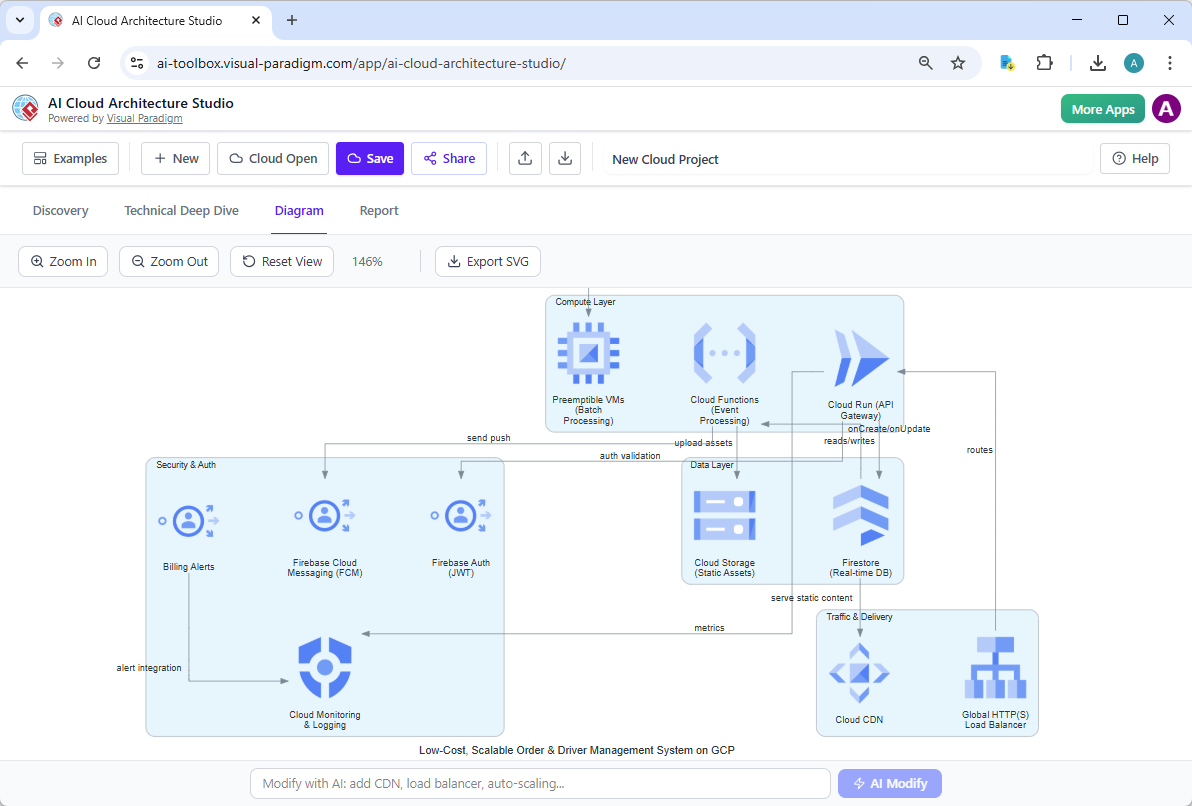
Launched in early 2026, Visual Paradigm’s AI Cloud Architecture Studio revolutionizes the diagramming workflow by eliminating the need to manually select icons and draw connections. Instead, users can describe their infrastructure needs in natural language.
Capabilities of the AI Studio
The AI tool transforms the creation of GCP diagrams through four primary capabilities:
-
Text-to-Diagram Generation
Simply describe your project in plain English. For example: “Create a GCP architecture diagram with a Kubernetes cluster connected to a BigQuery warehouse and a WebSocket frontend, using two compute zones.” The AI automatically generates a professional layout within seconds. -
Intelligent Discovery
Before finalizing the design, the AI analyzes your stated goals. If your description lacks critical details (e.g., missing a load balancer or data replication strategy), the AI will ask clarifying questions or suggest missing best-practice components to ensure the architecture is robust. -
AI-Powered Refinement
Once a diagram is generated, you can interact with the AI to modify it instantly. You can request changes such as:-
“Add a Cloud SQL instance behind the Application Load Balancer.”
-
“Rename the secondary database node to ‘Backup-DB’ and rewire the connections.”
-
The AI updates the visual layout and relationships dynamically without manual redrawing.
-
-
Automated Documentation
The tool goes beyond visuals by generating comprehensive architectural reports automatically. Based on the generated diagram, it creates documentation in Markdown format, which can be instantly rendered to PDF or hosted on a wiki, summarizing component roles, data flows, and connectivity models.
Example Use Case: Generating a Generative Workflow
User Prompt:
“Design a secure GCP architecture for a multi-tenant SaaS application. Include a VPC with private subnet for databases, a public subnet for web servers behind a GCP Router, and data replication to Storage Cloud. Ensure the Kubernetes engine is configured with mutual TLS.”
AI Output:
-
The system instantly draws the VPC diagram with the specified subnet splitting.
-
It places the Web Server group in the public zone and the Database group in the private zone, connected via the Router.
-
It automatically adds icons for Cloud Storage configured as replication targets.
-
It injects GKE icons showing Kubernetes nodes configured with mTLS.
-
It generates a sidebar explaining the network topology and security protocols.
Part 3: Conclusion & Next Steps
Whether you are relying on the precision of manual templates or the speed of AI generation, Visual Paradigm offers a complete ecosystem for GCP architects.
-
Need a specific template? Utilize the Firebase or Data Pipeline templates available in the library.
-
Looking to design quickly? Use the Text-to-Diagram feature to prototype in minutes.
-
Need documentation? Automate the report generation for your stakeholders.
If you are interested in exploring how other major cloud providers are similarly supported—such as AWS or Azure—Visual Paradigm offers dedicated tooling for those ecosystems as well.
Part 4: References
- What is Cloud Architecture: A guide to understanding the fundamental principles and components of designing robust cloud solutions on Google Cloud Platform.
- Google Cloud Platform Diagram Tool: An overview of the dedicated tool within Visual Paradigm designed to simplify the design of GCP infrastructure diagrams.
- GCP Diagram Software: Features and capabilities of the online diagram software for Google Cloud Platform, highlighting its collaboration tools and export options.
- VP Online GCP Support: News coverage regarding Visual Paradigm’s online platform supporting Google GCP diagramming capabilities.
- Firebase Diagram Template: Pre-developed templates for Google Cloud Firebase architectures, ready for immediate use.
- Free GCP Diagram Tool: Information on accessible solutions and free tiers offered by Visual Paradigm for creating GCP diagrams.
- YouTube: GCP Diagram Demo: Video demonstration showcasing how to create Google Cloud diagrams using Visual Paradigm.
- Revolutionizing Cloud Design: An in-depth analysis of Visual Paradigm’s AI Cloud Architecture Studio and its impact on modern cloud design.
- Value of VPD: Analysis of Visual Paradigm’s competitive advantage in the AI-aided architecture diagram generation space.
- AI Cloud Architecture Studio: The official home page for Visual Paradigm’s Generative AI tool specifically designed for end-to-end cloud architecture design.
- More Studio Features: Detailed breakdown of features within the AI Cloud Architecture Studio, including smart questioning and layout refinement.
- YouTube: AI Studio Showcase: Video presentation demonstrating the capabilities of the AI Cloud Architecture Studio in action.
- Generative Design & AI: Video tutorial exploring how AI is being used to automate diagram generation, refinement, and reporting processes.