
Transitioning from the tangible world of industrial design into the fluid landscape of user experience design represents a significant pivot in creative practice. Both disciplines share a foundational commitment to solving human problems, yet the mediums, constraints, and outcomes differ substantially. For professionals accustomed to handling mass, texture, and physical ergonomics, moving into digital interfaces requires a recalibration of mindset rather than a total reinvention of skills. This guide outlines the practical steps, cognitive shifts, and strategic considerations necessary to navigate this career evolution effectively.
The Shared Foundation: Problem Solving 🧩
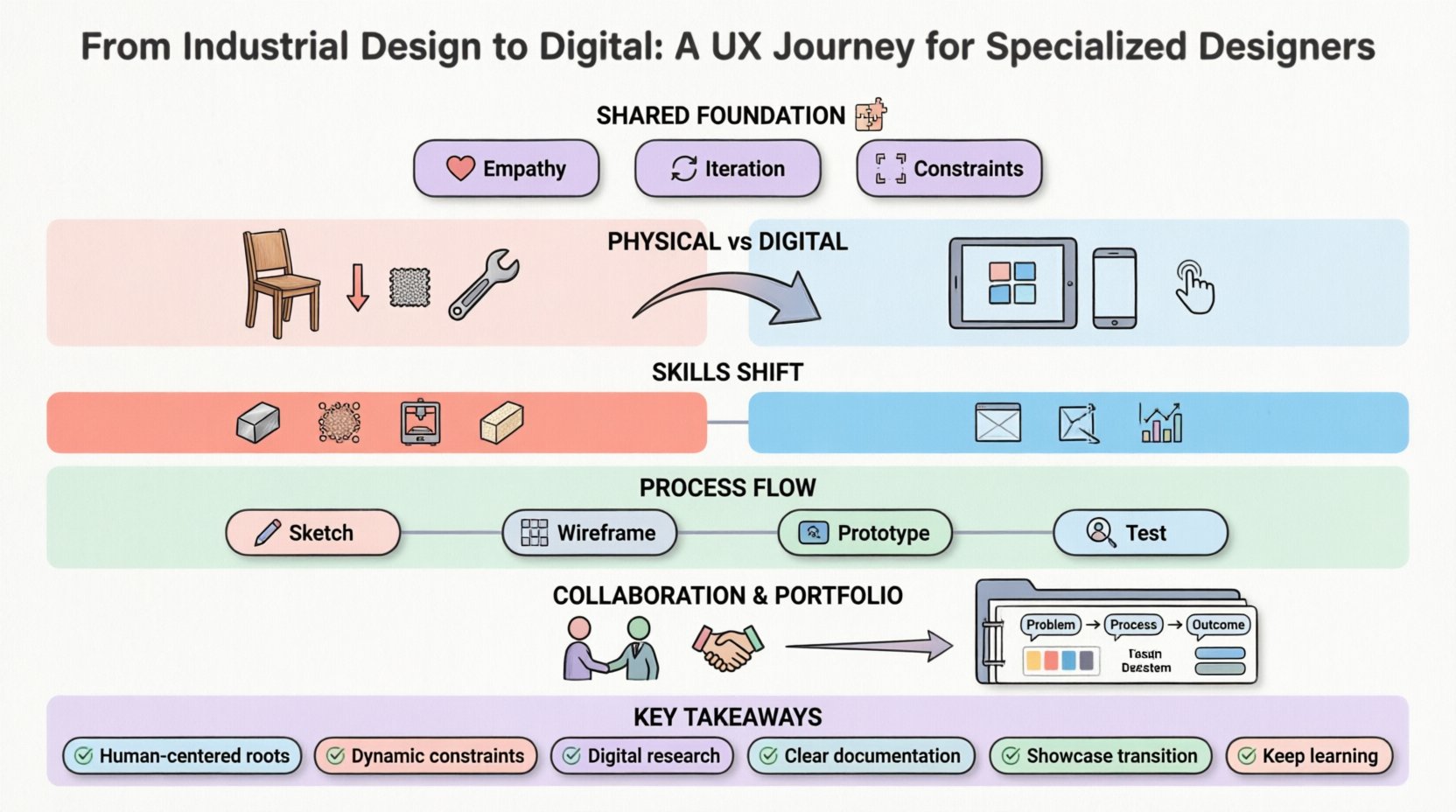
At the core, industrial design and UX design are not disparate fields but rather siblings born from the same parent: human-centered problem solving. In industrial design, the focus lies on how a physical object fits in a hand, fits into a space, and functions over time. In UX, the focus shifts to how a user navigates a system, how information is processed, and how the interaction feels across time.
- Empathy: Both paths require deep understanding of the end-user. In physical design, this means understanding biomechanics and environmental context. In digital, it means understanding cognitive load and behavioral patterns.
- Iteration: Prototyping is central to both. Whether carving wood, 3D printing a model, or sketching wireframes, the cycle of create-test-refine remains constant.
- Constraints: Physical design is bound by gravity, material cost, and manufacturing tolerances. Digital design is bound by screen real estate, browser capabilities, and network latency.
Recognizing these parallels allows designers to leverage existing strengths. The ability to visualize a three-dimensional object translates well to understanding the hierarchy of a two-dimensional interface. The tactile sense for weight and balance helps in judging the “heft” of information density on a screen.
Shifting Perspectives: Physical vs. Digital Constraints 🌐
The most profound adjustment involves the nature of constraints. In industrial design, constraints are often absolute. A door handle must be 40mm wide to fit a hand. A chair leg must support 100kg. In digital environments, constraints are often relative and dynamic. A button can be resized for a desktop or a mobile device. A layout can adapt to the orientation of the device.
Materiality and Feedback
Physical products offer immediate haptic feedback. When you press a button on a machine, you feel the click. Digital interfaces simulate this feedback through animation, sound, or color change. Understanding how to convey tactile sensations through pixels is a critical skill.
- Micro-interactions: Small animations that confirm an action.
- State Changes: Visual cues that indicate loading, success, or error.
- Visual Weight: Using contrast and size to imply importance without physical touch.
The Non-Linear Experience
Physical objects usually have a defined lifecycle. A car starts, runs, and stops. Digital products exist in a continuous loop of usage. Users may enter a system at any point, jump between tasks, or abandon a process entirely. Designing for this non-linearity requires a focus on mental models and clear navigation structures.
Core Competencies for the Transition 🛠️
To succeed in a digital environment, industrial designers must expand their toolkit. While the aesthetic eye remains valuable, specific technical and analytical skills become paramount. The table below outlines the shift in required competencies.
| Competency | Industrial Design Focus | UX Design Focus |
|---|---|---|
| Material Knowledge | Metals, plastics, wood, composites | Screen densities, resolution, touch targets |
| Manufacturing | Molds, assembly lines, CNC | Development frameworks, API limits |
| Prototyping | 3D printing, foam modeling, wax | Wireframing, clickable flows, code |
| Research | User testing with physical props | Usability testing, A/B testing, data analytics |
| Collaboration | Manufacturing engineers, suppliers | Developers, product managers, stakeholders |
Research and User Insights 🔍
While industrial designers conduct user research, the methods often differ. Digital UX relies heavily on quantitative data alongside qualitative insights. Understanding how to read analytics, interpret heatmaps, and conduct remote usability testing is essential. The goal is to validate assumptions before development begins.
- Contextual Inquiry: Observing users in their natural environment remains valid.
- Personas: Creating archetypes based on behavioral data.
- Journey Mapping: Visualizing the entire user path, not just the interaction point.
The Process: From Sketch to Screen 📐
The workflow in digital design often moves faster than physical prototyping. In industrial design, a change might require a new mold. In digital, a change might require a single click. This speed demands a different approach to decision-making.
Information Architecture
Organizing content is the backbone of digital products. Industrial designers are used to organizing physical space. Translating this to information architecture involves organizing data, navigation, and hierarchy. Sitemaps and flowcharts replace floor plans. Understanding how users group information mentally is crucial.
Wireframing and Prototyping
Wireframing is the digital equivalent of a rough sketch or a cardboard model. It strips away visual polish to focus on layout and function. The advantage of digital wireframing is the ability to test interactions without rendering. It allows for rapid iteration.
- Low-Fidelity: Black and white sketches to validate structure.
- High-Fidelity: Detailed visuals to test aesthetics and interactions.
- Interactive Prototypes: Simulating the final experience to test flow.
Collaboration in a Digital Context 🤝
Working with software development teams differs from working with manufacturing partners. Developers speak a language of logic, states, and edge cases. Designers must learn to communicate their intent clearly so that the code reflects the design without losing the essence.
Bridging the Gap
Documentation is key. Handoff specifications, asset libraries, and design systems ensure consistency. Clear communication about behavior (e.g., “what happens when the network fails?”) prevents friction during development.
- Design Systems: A collection of reusable components and standards.
- Developer Handoff: Providing specs, assets, and interaction details.
- Agile Sprints: Working in short cycles to deliver incremental value.
Building a Digital Portfolio 📂
When transitioning, the portfolio must demonstrate the new skillset while honoring the background. Physical product photos are valuable for showing 3D thinking, but digital case studies are required to prove UX capability.
Case Study Structure
A strong digital case study tells a story. It should not just show pretty pictures. It must explain the problem, the research, the process, and the outcome.
- Problem Statement: What issue was being solved?
- Process: Show the sketches, the wireframes, the iterations.
- Outcome: Did it work? What data supports this?
Showcasing the Transition
Do not hide the industrial design background. Frame it as a strength. The ability to think in three dimensions, understand manufacturing, and focus on form is a differentiator. Use the portfolio to show how physical thinking enhances digital product quality.
Common Challenges and Solutions ⚠️
Several hurdles often appear during this transition. Awareness of these pitfalls can help mitigate them.
Over-Designing
In physical design, beauty is often a primary function. In digital, function is paramount. A beautiful interface that is hard to use is a failure. Prioritize clarity and usability over aesthetic flair.
- Solution: Conduct usability tests early. Remove elements that do not serve a purpose.
Attachment to Form
Designers used to sculpting shapes may struggle with rigid grid systems. Digital interfaces rely heavily on grids and consistency. Flexibility is needed within a structured framework.
- Solution: Study grid systems and responsive design principles.
Imposter Syndrome
Entering a new field often brings feelings of inadequacy. Recognizing that skills are transferable helps. The core design thinking remains the same, even if the tools change.
- Solution: Focus on learning the new tools while leveraging existing strengths.
The Future of Product Design 🚀
The line between physical and digital is blurring. Internet of Things (IoT) devices, wearables, and smart home systems require designers who understand both worlds. The industrial designer who masters digital UX is uniquely positioned to lead in this emerging space. They can design the device and the interface that controls it.
- Smart Hardware: Combining physical form with digital intelligence.
- Wearables: Managing screen space on wrist or head.
- Automotive Interfaces: Designing dashboards and control systems.
Continuous Learning 📚
The digital landscape changes rapidly. New patterns emerge, and technologies evolve. Staying current requires a commitment to continuous education.
- Industry Blogs: Follow thought leaders for trends.
- Communities: Engage with other designers to share knowledge.
- Projects: Practice on personal projects to test new ideas.
The journey from industrial design to digital is not about abandoning the past. It is about expanding the toolkit to solve problems in new ways. By leveraging the deep understanding of human interaction gained from physical design, and applying it to the digital domain, designers can create products that are not only functional but also intuitive and delightful. The path requires patience, study, and practice, but the reward is a broader ability to shape the world.
Key Takeaways 📝
- Both disciplines share a root in human-centered problem solving.
- Digital constraints are dynamic, unlike physical constraints.
- Research methods must adapt to include digital analytics.
- Communication with developers requires clear documentation.
- Portfolio must showcase digital case studies alongside physical work.
- Continuous learning is essential due to rapid technological change.
Embrace the shift. The skills you have cultivated in the physical world are not lost; they are simply waiting to be applied in a new context. With the right mindset and dedication, the transition can be a powerful catalyst for professional growth.