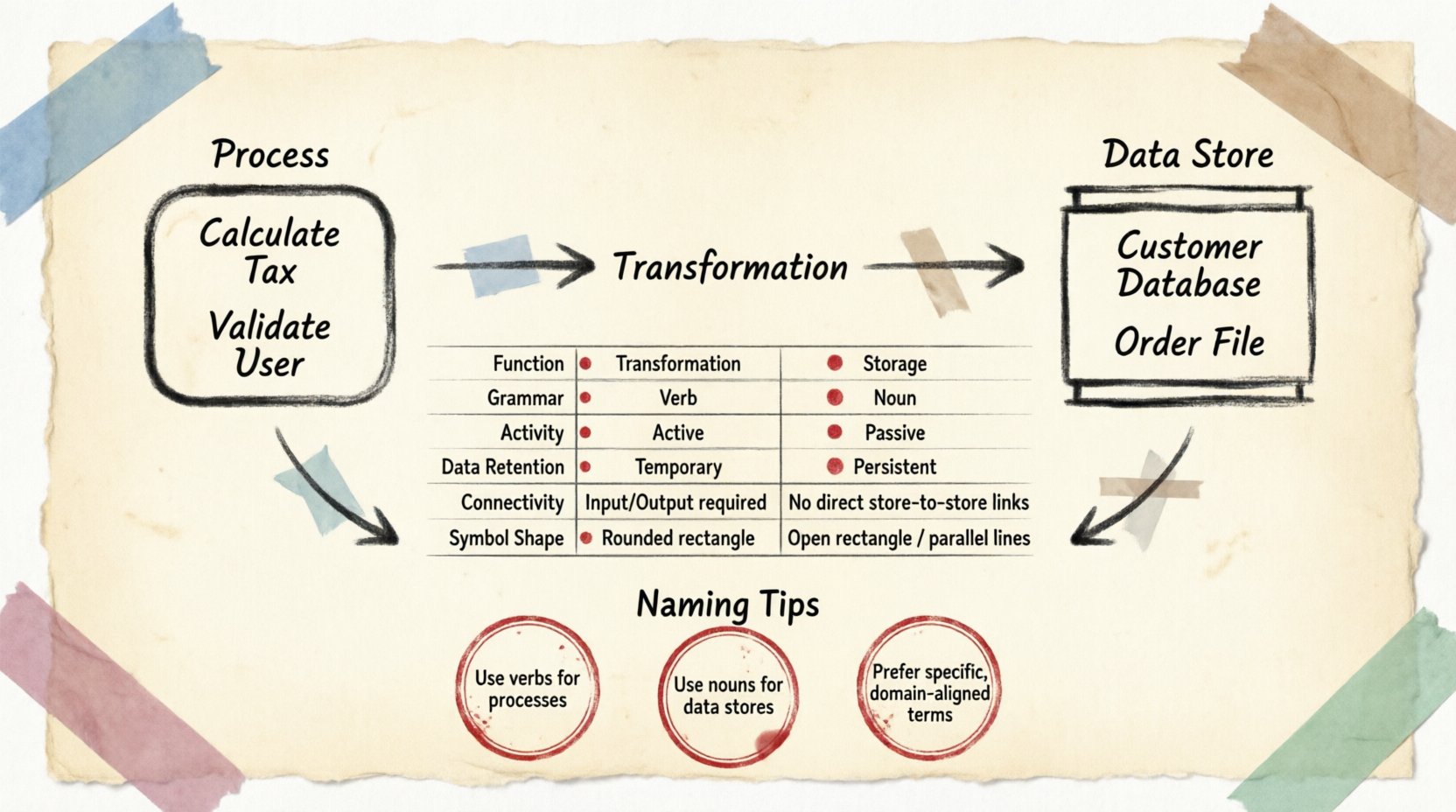
When modeling complex systems, clarity is the primary objective. Data Flow Diagrams (DFDs) serve as a foundational tool for visualizing how information moves through a system. Within this framework, two symbols dominate the landscape: the
Process and the
Data Store. While they interact frequently, they represent fundamentally different concepts regarding transformation and persistence. Understanding the distinction is critical for accurate system analysis and design.
This guide explores the functional roles, visual representations, and logical implications of these elements. By distinguishing between action and storage, analysts can construct diagrams that communicate system behavior without ambiguity.
🔄 Defining the Process
A process represents a unit of work or transformation. It is where data changes form, is calculated, or is filtered. Think of a process as a black box. You know what enters and what leaves, but the internal mechanism is defined by the transformation logic itself, not by the storage of that information.
🔹 Core Characteristics
- Transformation: The primary function is to modify data. Input data enters, rules or logic are applied, and output data exits.
- Temporal Nature: Processes are active only when triggered. They do not retain data between executions.
- Directionality: Data flows into and out of a process. A process without input or output is logically invalid in a DFD context.
- Verb Naming: Processes are typically labeled with verbs or verb phrases (e.g., Calculate Tax, Validate User, Generate Report).
🔹 The Black Box Concept
In high-level modeling, a process is a black box. The focus is on
what happens to the data, not
how it happens technically. For instance, a process named “Process Order” takes order details and creates a transaction record. It does not specify whether the calculation happens in memory, on a disk, or via a remote API. This abstraction allows stakeholders to focus on business logic rather than technical implementation.
However, as diagrams decompose into lower levels, the internal logic becomes more detailed. Even then, the process remains an active transformation engine. It consumes input, performs work, and produces output. It does not serve as a holding tank for that information.
🗄️ Defining the Data Store
A data store represents a repository where information rests. Unlike a process, a data store does not transform data. It waits. It holds data in a persistent state until a process retrieves it or a process places it there.
🔹 Core Characteristics
- Persistence: Data remains in a store even when no processes are active. This is the key differentiator from memory buffers or temporary variables.
- Passive Nature: Data stores do not initiate action. They require a process to read from or write to them.
- Noun Naming: Stores are typically labeled with nouns (e.g., Customer Database, Order File, Inventory Log).
- Open-Ended: Data flows can enter and leave a store. However, a store cannot connect directly to another store. Data must flow through a process to move between repositories.
🔹 The Repository Concept
Imagine a library. The books are the data. The shelves are the data stores. A librarian is the process. The librarian does not create the books; they organize them. The shelves do not move the books themselves; they hold them in place. When a patron requests a book, the librarian retrieves it (read operation). When a new book arrives, the librarian places it on the shelf (write operation).
In system architecture, a data store might represent a database table, a flat file, a queue, or a cloud bucket. The DFD symbol abstracts the technology. Whether it is a SQL table or a simple text file, the logical role is identical: it is a place where information is kept.
⚡ Interaction and Data Flow
The relationship between a process and a data store is governed by strict rules of data flow. Arrows in a DFD represent the movement of data. These arrows dictate the direction of information transfer.
🔹 The Read-Write Cycle
When a process needs information, it draws an arrow from a data store to the process. This indicates a read operation. The process extracts data to use in its transformation logic. Conversely, when a process generates new information, it draws an arrow from the process to a data store. This indicates a write operation. The data is now stored for future use.
Crucially, a data flow cannot connect two data stores directly. Information cannot migrate from one repository to another without being processed. This rule enforces the principle that data movement is always accompanied by some level of logic or control, even if that logic is a simple copy operation.
🔹 External Entities
External entities (sources or sinks) interact with processes, not directly with data stores. An external entity might be a human user, a third-party API, or another system. They send data to a process or receive data from a process. The process then decides whether to store that data in a repository or discard it.
📋 Comparison Table
To summarize the structural differences, consider the following breakdown of attributes.
| Attribute |
Process |
Data Store |
| Function |
Transformation / Action |
Storage / Memory |
| Grammar |
Verb (e.g., Update) |
Noun (e.g., User Table) |
| Activity |
Active (Runs when triggered) |
Passive (Sits until accessed) |
| Data Retention |
Temporary (During execution) |
Persistent (Long-term) |
| Connectivity |
Connects to Entities, Stores, Other Processes |
Connects only to Processes |
| Symbol Shape |
Rounded Rectangle or Circle |
Open Rectangle or Parallel Lines |
🧩 Naming Conventions
Consistency in naming prevents confusion during the review and implementation phases. Ambiguity often arises when the same term is used for both storage and action.
🔹 Process Naming
Names should describe the action being performed on the data. Avoid generic names like “Do It” or “Handle.” Instead, use specific descriptors. For example, “Validate Login Credentials” is superior to “Check Login.” This clarity helps developers understand the expected input and output requirements immediately.
🔹 Data Store Naming
Names should reflect the content held within. Use plural nouns or clear identifiers. “Orders” implies a collection of order records. “Order” might imply a single transaction instance. While context matters, plural nouns generally indicate a repository containing multiple records.
When naming data stores, consider the scope. A store named “Database” is too vague. “Customer Database” or “Transaction Log” provides necessary context. This granularity assists in mapping the diagram to physical storage structures later.
🧪 Decomposition and Levels
DFDs are hierarchical. A high-level diagram (Context Diagram) shows the system as a single process. As you decompose this into lower levels, the distinction between process and store becomes more critical.
🔹 Level 0 vs. Level 1
In a Context Diagram, the entire system is one process. In Level 0, this process is broken down into major sub-processes. Data stores are introduced here to show where major data components reside. In Level 1 and beyond, processes are further refined.
During decomposition, ensure that data stores are not duplicated unnecessarily. If a store exists at Level 0, it should generally persist through to Level 1 unless a specific sub-process requires a temporary cache (which would be a different store). Consistency across levels ensures traceability.
🔹 Balancing
A critical rule in decomposition is “Balancing.” The inputs and outputs of a parent process must match the inputs and outputs of the child processes in the lower-level diagram. Data stores must also align. If a store appears in the parent diagram, the child diagram must account for that data flow correctly. If a process is split, the data flow to the store must be maintained across the split.
⚠️ Logical Errors to Avoid
Certain structural mistakes can invalidate a diagram. Recognizing these errors early saves time during the development phase.
- Ghost Data Flows: An arrow leaving a process without an incoming data flow is impossible. A process cannot generate output from nothing. Every output must be derived from an input or stored data.
- Direct Store Connections: As mentioned, a store cannot connect to another store. Data must pass through a process. This ensures that all data movement is intentional and processed.
- Unconnected Processes: A process that has no incoming or outgoing data flows is isolated. It does not interact with the system and serves no purpose in the DFD.
- Confusing Entities and Stores: External entities are outside the system boundary. Data stores are inside. Do not place an external entity symbol inside the system boundary as if it were a database.
🛠️ Implementation Implications
The distinction between process and store influences how the system is built. Processes map to functions, methods, or microservices. Data stores map to tables, files, or object storage.
🔹 Database Design
When designing a database, the data stores in the DFD become the schema blueprint. The attributes within the data flow arrows define the columns. The relationships between stores (mediated by processes) define foreign keys or transactional links.
🔹 Workflow Automation
For workflow engines, processes represent the steps in a pipeline. Data stores represent the state of the workflow. A process might update the state in the store to mark a task as complete. Understanding the passive nature of the store ensures that the workflow engine waits for the correct state before proceeding.
🔍 Visual Representation Standards
Different methodologies use slightly different symbols, but the logic remains consistent.
- DeMarco & Yourdon: Uses rounded rectangles for processes and open-ended rectangles for data stores.
- Gane & Sarson: Uses rounded rectangles for processes and parallel lines for data stores.
Regardless of the notation chosen, the semantic meaning is identical. A process acts; a store holds. Consistency within the project documentation is more important than adhering to a specific standard, provided the team understands the chosen convention.
🎯 Summary of Roles
Building a robust system model requires discipline in assigning roles. The process is the actor. It performs the work. The data store is the stage. It holds the props. Without the actor, the stage is empty. Without the stage, the actor has nowhere to place their findings.
By maintaining a clear separation between transformation and storage, analysts create diagrams that are not only visually appealing but logically sound. These diagrams serve as a contract between business stakeholders and technical teams. They define the boundaries of responsibility and the flow of value.
When reviewing a DFD, ask two questions for every symbol: “Is this doing work?” (Process) or “Is this holding information?” (Store). If the answer is unclear, refine the label or the connection. Clarity is the ultimate goal of system modeling.
Adhering to these principles ensures that the resulting architecture is maintainable, scalable, and understandable. The distinction is simple, but its impact on system integrity is profound.