
In the landscape of Object-Oriented Analysis and Design, few tools provide as much clarity as the use case. This method bridges the gap between abstract business needs and concrete system behavior. Conducting a thorough use case analysis ensures that the resulting software architecture aligns with user goals and operational constraints. This guide details the process of analyzing use cases, focusing on structure, clarity, and accuracy without relying on specific tools.
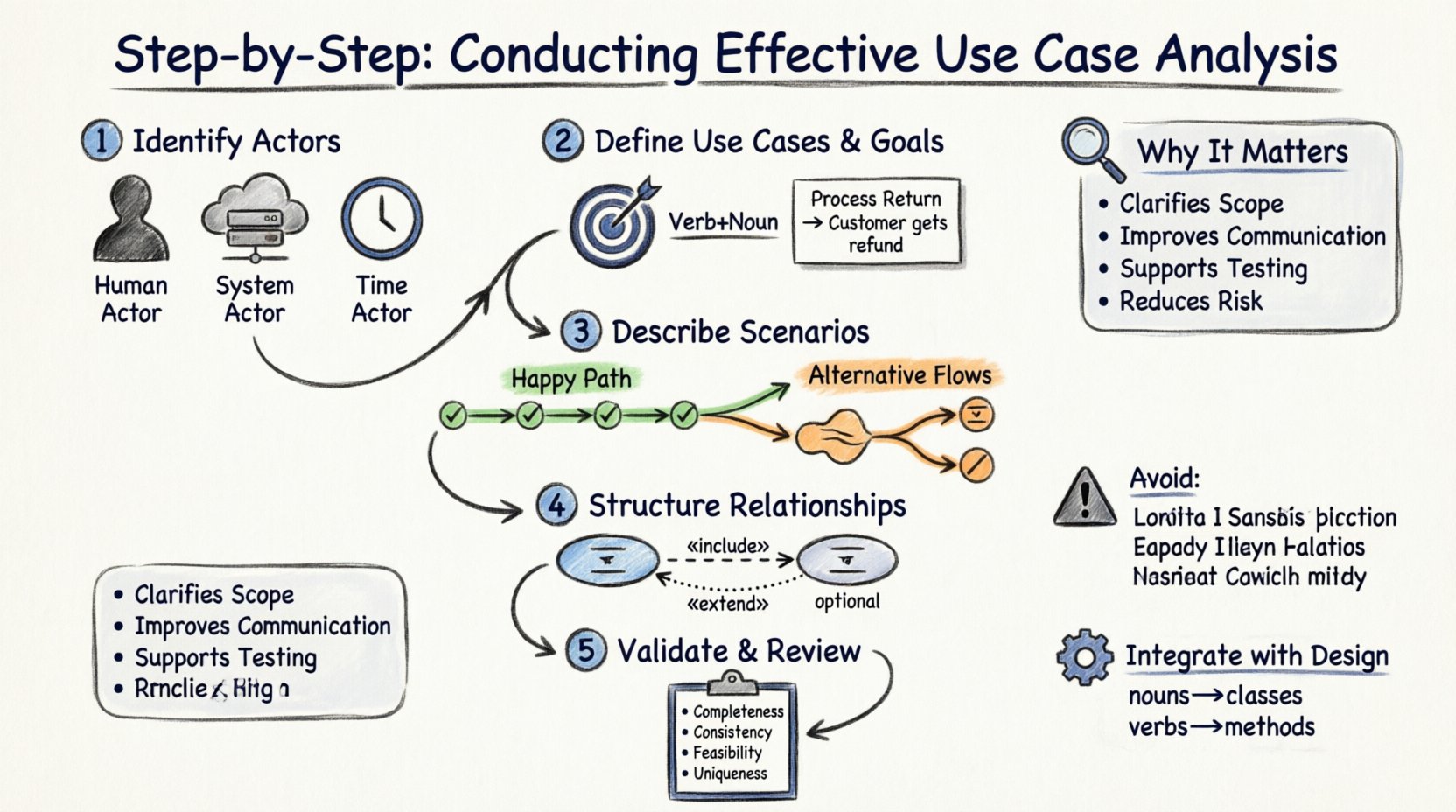
Why Use Case Analysis Matters 🔍
Before diving into the steps, it is crucial to understand the purpose of this analysis. A use case describes a sequence of actions that a system performs which yields an observable result of value to an actor. It is not merely a list of features; it is a behavioral contract.
- Clarifies Scope: It defines what the system does and, more importantly, what it does not do.
- Improves Communication: It serves as a common language between stakeholders, analysts, and developers.
- Supports Testing: Scenarios derived from use cases form the basis of functional testing strategies.
- Reduces Risk: Identifying edge cases early prevents costly changes during the implementation phase.
Without this analysis, projects often suffer from scope creep and misaligned expectations. The focus remains on the what rather than the how, keeping the design open to various technical solutions.
Preparation: Gathering Requirements 📝
Effective analysis begins before drawing a single diagram. You must gather raw information from stakeholders, domain experts, and existing documentation.
Key Inputs for Analysis
- Business Goals: What is the organization trying to achieve?
- User Stories: Narratives describing interactions from a user perspective.
- Regulatory Constraints: Legal or compliance requirements that dictate system behavior.
- Existing Processes: How the work is currently done manually or with legacy systems.
Collecting these inputs ensures that the use cases reflect reality. Do not rely solely on high-level summaries; seek detailed descriptions of daily workflows.
Step 1: Identifying Actors 👥
The first concrete step is identifying the actors. An actor represents a role played by a human, another system, or a time trigger that interacts with the system. Actors are external to the system boundary.
Types of Actors
| Actor Type | Description | Example |
|---|---|---|
| Human Actor | A person performing a role within the organization. | Admin, Customer, Auditor |
| System Actor | Another software system providing or consuming data. | Payment Gateway, Inventory DB |
| Time Actor | A trigger based on a specific time or schedule. | Nightly Backup, Monthly Report |
When identifying actors, avoid naming specific individuals. Focus on the role. For instance, use “Reviewer” instead of “John Doe”. This ensures the model remains valid even if personnel changes.
Common Pitfalls in Actor Identification
- Confusing Actors with Users: A user might play multiple roles. Identify the roles, not the people.
- Internal System Components: Do not list internal classes or modules as actors. They are part of the system, not external to it.
- Missing System Actors: Often, interactions with external APIs are overlooked. Ensure all data exchanges are accounted for.
Step 2: Defining Use Cases and Goals 🎯
Once actors are established, you must define the use cases themselves. A use case represents a goal-oriented interaction. It starts when an actor initiates an action and ends when a specific value is delivered.
Criteria for a Valid Use Case
- Value Deliverable: The interaction must provide value to the actor.
- Single Goal: While a use case may have multiple steps, it should serve one primary objective.
- System Boundary: The action must occur within the system’s control.
For each use case, assign a unique identifier and a clear name. Use the format Verb + Noun (e.g., “Process Return”, “Generate Report”). This naming convention promotes consistency across the documentation.
Describing the Goal
For every use case, write a brief description of the goal. This narrative explains the context of the interaction. It should answer: “What is the actor trying to achieve?” and “Why is this important?”.
Example:
Use Case: Process Return
Goal: Allow a customer to return a product for a refund.
Actor: Customer
This clarity prevents ambiguity during the design phase. If the goal is vague, the system implementation will likely be misaligned with user expectations.
Step 3: Describing Scenarios (Main & Alternate) 🔄
Scenarios define the specific steps taken during an interaction. They are the narrative flesh on the skeleton of the use case. You should document both the Main Success Scenario and the Alternative Flows.
Main Success Scenario
This path represents the ideal flow where everything proceeds without error. It is often called the “Happy Path”. Each step should be atomic, meaning it represents a single unit of work.
- Actor initiates the use case.
- System validates input.
- System updates internal state.
- System confirms completion to the actor.
Avoid technical details here. Do not say “SQL query executed”. Instead, say “System retrieves record”. The focus is on behavior, not implementation.
Alternative Flows
Real-world interactions often deviate from the ideal. Alternative flows cover exceptions, errors, and different choices the actor might make.
- Error Handling: What happens if the user enters invalid data?
- Branching: What if the user chooses a different option at a decision point?
- Termination: What happens if the user cancels the process?
Document these flows clearly. Reference the step number where the deviation occurs. This ensures developers know exactly where to place error handling logic.
Step 4: Structuring Relationships (Includes/Extends) 🔗
As the number of use cases grows, managing them becomes complex. Relationships help organize the model and reduce redundancy. The two primary relationships are Include and Extend.
Include Relationship
An Include relationship indicates that a use case incorporates the behavior of another use case. This is used to extract common functionality.
- When to use: When a set of steps is repeated across multiple use cases.
- Example: Both “Place Order” and “Process Return” require “Authenticate User”. You can include “Authenticate User” in both.
This reduces duplication and makes maintenance easier. If the authentication logic changes, it is updated in one place.
Extend Relationship
An Extend relationship indicates that a use case adds optional behavior to a base use case under specific conditions.
- When to use: When a behavior is optional or conditional.
- Example: “Apply Discount” extends “Place Order” only if the customer has a valid coupon code.
Use these relationships sparingly. Over-structuring can make the model harder to read. If a relationship is not strictly necessary for clarity, keep the use cases flat.
Step 5: Validating and Reviewing ✅
The analysis is not complete until it is validated. This step involves checking the use cases against the requirements and the actors.
Validation Checklist
- Completeness: Are all functional requirements covered by at least one use case?
- Consistency: Do actor names and use case names match throughout the document?
- Feasibility: Can the system realistically achieve the goals defined?
- Uniqueness: Are there duplicate use cases that could be merged?
Conduct reviews with stakeholders. Walk them through the scenarios. If they cannot follow the flow, the documentation is not clear enough. Revise based on feedback.
Common Mistakes to Avoid ⚠️
Even experienced analysts make errors. Being aware of common pitfalls helps maintain quality.
1. Mixing Levels of Abstraction
Do not mix high-level business goals with low-level technical steps. Keep the main flow focused on the user’s journey. Technical details belong in the design phase, not the use case description.
2. Ignoring Non-Functional Requirements
While use cases focus on functionality, they should note constraints. For example, a use case might require a response time of under 2 seconds. Document these as notes or constraints associated with the use case.
3. Over-Engineering the Diagram
A use case diagram is a map, not the territory. Do not try to capture every single detail in the visual model. Use the text description for the logic. The diagram should show relationships and actors, not complex logic flows.
4. Forgetting Pre- and Post-Conditions
Preconditions define what must be true before the use case starts. Postconditions define the state after it ends. These are critical for understanding the context.
| Condition Type | Definition | Example |
|---|---|---|
| Precondition | State required before execution. | User is logged in |
| Postcondition | State guaranteed after execution. | Order status is ‘Paid’ |
Integrating Use Cases with Design 🏗️
The final output of use case analysis is not just documentation; it is a blueprint for design. The use cases drive the creation of class diagrams and sequence diagrams.
From Behavior to Structure
Each step in a use case scenario often maps to a method or a class interaction. Actors may map to controller classes. The system actions map to domain objects.
- Identify Classes: Look for nouns in the use case description (e.g., “Order”, “Customer”, “Invoice”). These become candidate classes.
- Identify Methods: Look for verbs (e.g., “Calculate”, “Save”, “Validate”). These become candidate methods.
- Define Relationships: The interactions between actors and use cases suggest associations between classes.
This transition ensures that the architecture supports the requirements. If a use case cannot be easily mapped to a design element, it may indicate a design flaw or a missing requirement.
Traceability
Maintain traceability from the requirement to the use case to the design element. This allows you to verify that every requirement is implemented. If a use case is removed, check if the underlying requirement is still valid. This prevents orphaned code.
Summary of Key Concepts 📊
To wrap up, here is a quick reference for the core components of effective use case analysis.
- Actors: External entities (Human, System, Time).
- Use Case: A goal-oriented interaction with value delivery.
- Flow: The sequence of steps (Main, Alternative).
- Relationships: Include (mandatory) and Extend (optional).
- Conditions: Preconditions and Postconditions.
By adhering to these principles, you create a robust foundation for Object-Oriented Analysis. The result is a system that is easier to build, easier to test, and easier to maintain. Focus on the behavior of the system, keep the language clear, and validate frequently. This approach leads to successful software delivery without the need for buzzwords or hype.
Remember, the goal is clarity. If a stakeholder can read your use case and understand exactly what the system will do, the analysis has succeeded.