


Scenario Description
A new patron (student or member) visits the online library portal to create an account. They provide personal details (name, email, password), the system validates uniqueness (e.g., email not already registered), creates the account in the database, and sends a welcome/activation email. After successful registration, the user searches for a book by title/author, views availability, and reserves it if available (placing a hold). If the book is unavailable, the system offers to notify when it becomes available. The process ends with a confirmation message on the UI.
This flow is common in university/ public library systems and demonstrates user onboarding + core resource interaction.
Key Concepts in UML Sequence Diagrams (Relevant to This Example)
-
Lifeline — Vertical dashed line for participants (e.g., :User, :Browser, :LibraryApp).
-
Message — Arrows for calls: synchronous (solid with filled head →), reply (dashed <–), object creation (dashed arrow to new lifeline with «create»).
-
Activation bar — Shows when an object is processing (activate/deactivate).
-
Alt fragment — Conditional logic (e.g., [registration successful] vs [email already exists]).
-
Opt fragment — Optional behavior (e.g., [user chooses to reserve immediately]).
-
Loop — For iterative actions (e.g., refining search if no results).
-
Actor — The human user (stick figure).
-
Return messages — Dashed arrows carrying results back.
-
Time flows top to bottom.
Participants (lifelines):
-
Patron (Actor)
-
Browser (Frontend/UI)
-
LibraryApp (Application/Controller layer)
-
UserDB (Database for accounts)
-
BookCatalog (Database/service for books and reservations)
-
EmailService (External notification service)
PlantUML Code Example for the Sequence Diagram
This PlantUML script fully represents the case study. It includes account creation, validation, email send, post-registration book search/reservation with alt for availability, and opt for notification.
@startuml
title Online Library – New User Registration & Book Reservation Sequence Diagram
skinparam monochrome true
skinparam shadowing false
skinparam sequenceMessageAlign center
autonumber “[0]”
actor Patron
participant “Browser” as UI
participant “LibraryApp” as App
participant “UserDB” as UserDB
participant “BookCatalog” as Catalog
participant “EmailService” as Email
Patron -> UI: Access registration page
activate UI
UI -> App: submitRegistration(name, email, password)
activate App
App -> UserDB: checkEmailExists(email)
activate UserDB
UserDB –> App: exists = false / true
deactivate UserDB
alt Email Already Exists
App –> UI: returnError(“Email already registered. Please login or use different email.”)
UI –> Patron: Display error message
‘ Removed: destroy App → not needed + caused parser issue in alt branch
else Registration Valid
App -> UserDB: createUserAccount(name, email, hashedPassword)
activate UserDB
UserDB –> App: userId, accountCreated
deactivate UserDB
App -> Email: sendWelcomeEmail(userId, email, activationLink)
activate Email
Email –> App: emailSent
deactivate Email
App –> UI: returnSuccess(“Account created! Check email for activation.”, userId)
UI –> Patron: Show success & redirect to login/dashboard
‘ Post-registration: Book Reservation flow
opt User proceeds to reserve a book
Patron -> UI: Search book (title or author)
UI -> App: searchBooks(query)
activate App
App -> Catalog: queryBooks(query)
activate Catalog
Catalog --> App: listOfBooks (with availability)
deactivate Catalog

alt Books Found
  loop Refine search if needed
    App --> UI: displayResults(booksList)
    UI --> Patron: Show book list
    Patron -> UI: Select book & request reservation
    UI -> App: reserveBook(bookId, userId)
  end

  App -> Catalog: checkAvailability(bookId)
  Catalog --> App: available = true/false

  alt Available
    App -> Catalog: placeHold(bookId, userId, reservationDate)
    activate Catalog
    Catalog --> App: holdPlaced, reservationId
    deactivate Catalog

    App --> UI: displayConfirmation("Book reserved! Pickup when available.")
    UI --> Patron: Show success message
  else Not Available
    App --> UI: offerNotification("Book unavailable. Notify when ready?")
    Patron -> UI: Confirm notification
    UI -> App: subscribeNotification(bookId, userId)
    App -> Catalog: addToWaitlist(bookId, userId)
    Catalog --> App: waitlistAdded
    App --> UI: confirm("Notification set.")
  end
else No Books Found
  App --> UI: displayNoResults("No matches. Try different keywords.")
end
deactivate App
end
end
deactivate UI
@enduml
How to Use This PlantUML Code
-
Paste into https://www.plantuml.com/plantuml/uml/ for instant rendering.
-
In Visual Paradigm Desktop: New Sequence Diagram → Tools → Import → PlantUML → paste → generate & edit visually.
-
In VP Online or AI Chatbot: Use as base in prompts or import for AI refinement.
-
Customize: Add colors (
skinparam sequenceArrowThickness 2), participants stereotypes (<<database>>), or removemonochromefor styled output.
Entire Development Path Using Visual Paradigm’s AI Sequence Diagram Support
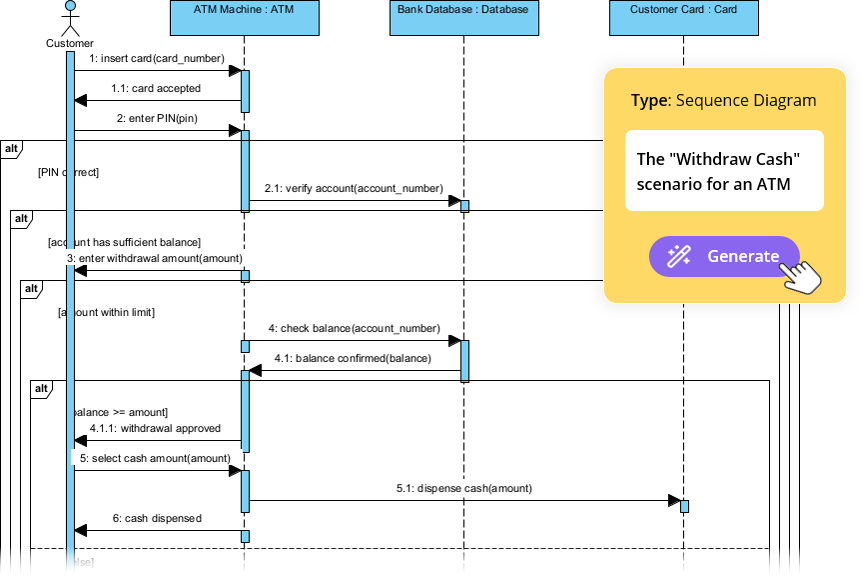
Step 1: Ideation & Initial Generation (Fastest: AI Chatbot – conversational)
-
Go to chat.visual-paradigm.com.
-
Use a detailed prompt (or paste the PlantUML above as starting point):
Generate UML sequence diagram for online library: new user registers with name/email/password, system checks email uniqueness, creates account in DB, sends welcome email. Then user searches/reserves book – if available place hold, else offer waitlist notification. Include alt for duplicate email, opt for reservation after signup, loop for search refinement.
-
AI outputs visual diagram + PlantUML code. Iterate:
-
“Add activation bars and notes for database operations.”
-
“Make BookCatalog external service with stereotype.”
-
Export PlantUML for next steps.
-
Step 2: Refine to Layered Architecture (AI Refinement Tool – Desktop)
-
Launch Visual Paradigm Desktop.
-
Create/import Sequence Diagram (paste PlantUML → generate).
-
Tools > Apps > Sequence Diagram Refinement Tool.
-
Prompt/refine: “Refine this library registration/reservation sequence into layered architecture: separate UI/View, Controller, Service (e.g., UserService, ReservationService), Repository/DB layers.”
-
AI expands lifelines (e.g., LibraryApp → RegistrationController → UserService → UserRepository; adds detailed calls like hashPassword(), validateInput()).
-
Edit: Add notes, stereotypes (<>, <>), adjust fragments.
Step 3: Integrate into Documentation & Collaboration (VP Online + OpenDocs)
-
Access online.visual-paradigm.com → Create OpenDocs page (“Library System – Onboarding & Reservation Flow”).
-
Insert diagram: Use AI generation or import PlantUML/refined version.
-
Embed: Add text sections (use case narrative, preconditions like “user not logged in”, postconditions “account active + reservation placed”).
-
Share: Invite team for comments, track versions.
Step 4: Final Polish & Validation (Desktop Full Editing)
-
In Desktop: Refine layout (auto-align), enable hierarchical numbering, add return types (e.g., :User user).
-
Link models: Trace to Use Case Diagram (“Register New Patron”, “Reserve Book”).
-
Export: PNG/PDF for specs, .vpp project for version control.
This new case study provides a fresh, education-focused example while showcasing Visual Paradigm AI tools for rapid, accurate UML modeling. Render the PlantUML code to visualize it right away—if you’d like variations (e.g., add librarian approval step), just ask!
UML Sequence Diagram and AI Support
- Comprehensive Guide to Sequence Diagrams in Software Design: This detailed handbook section explains the purpose, structure, and best practices for using sequence diagrams to model the dynamic behavior of systems.
- What Is a Sequence Diagram? – A UML Guide: An introductory guide for beginners that explains the role of sequence diagrams in visualizing object interactions over time.
- Animating Sequence Diagrams in Visual Paradigm – Tutorial: This tutorial provides instructions on how to create dynamic, animated sequence diagrams to more effectively visualize software workflows and system interactions.
- Visual Paradigm – AI-Powered UML Sequence Diagrams: This article demonstrates how the platform’s AI engine enables users to generate professional UML sequence diagrams instantly within the modeling suite.
- AI-Powered Sequence Diagram Refinement in Visual Paradigm: This resource explores how AI tools can transform use-case descriptions into precise sequence diagrams with minimal manual effort.
- Mastering Sequence Diagrams with Visual Paradigm: AI Chatbot Tutorial: A beginner-friendly tutorial that uses a real-world e-commerce chatbot scenario to teach conversational diagramming.
- Comprehensive Tutorial: Using the AI Sequence Diagram Refinement Tool: A step-by-step guide on leveraging specialized AI features to enhance the accuracy, clarity, and consistency of sequence models.
- How to Model MVC with UML Sequence Diagram: This guide teaches users how to visualize interactions between Model, View, and Controller components to improve system architectural clarity.
- Visual Paradigm: Separate Sequence Diagrams for Main and Exceptional Flows: This technical post explains how to model both main and alternative/exceptional flows using separate diagrams to maintain model readability.
- PlantUML Sequence Diagram Generator | Visual Builder Tool: An overview of a visual generator that allows users to define participants and messages using a step-by-step wizard to create PlantUML-based sequence diagrams.