


1. Introduction
This case study explores the design and implementation of a realistic, failure-tolerant ATM withdrawal system using UML Sequence Diagrams. The goal is to model a secure, step-by-step interaction between a user, an ATM machine, and a Bank System — covering three distinct scenarios:
-
Successful authentication and sufficient funds
-
Invalid card
-
Valid card but insufficient funds
We use PlantUML to generate a clean, readable, and best-practice-compliant sequence diagram that demonstrates proper activation management, lifeline reuse, and correct control flow.
2. Key Concepts in UML Sequence Diagrams
✅ 2.1 Lifelines & Activation Bars
-
Lifelines represent the participants (e.g., User, ATM, Bank System).
-
Activation bars show when a participant is actively performing an operation.
-
Deactivation must happen at the end of each branch to prevent orphaned activations.
✅ 2.2 Control Flow: alt, else, end
-
altis used to define alternative flows based on conditions. -
Each
elsecorresponds to a specific condition (e.g., invalid card, insufficient funds). -
Only one branch executes, ensuring mutual exclusivity.
✅ 2.3 Message Ordering & Synchronization
-
Messages are sent in order: User → ATM → Bank System.
-
Responses are returned in reverse order, maintaining real-time interaction logic.
✅ 2.4 Reuse of Lifelines
-
Lifelines are not reactivated in different branches.
-
They are activated once at the start of interaction and deactivated only once, at the end of the entire scenario.
-
This avoids nested activations and duplicated lifelines, improving readability and correctness.
✅ 2.5 Best Practices Followed
| Best Practice | How It’s Applied |
|---|---|
| Avoid orphaned activations | All activate/deactivate pairs are balanced |
| Reuse lifelines | USR, ATM, BS are activated once and deactivating only at end |
| Clear message flow | Each scenario has a logical, sequential path |
| No redundant reactivations | No activate in else branches |
3. Problem Breakdown
🔹 Scenario 1: Successful Transaction
-
Card is valid.
-
User enters a withdrawal amount ≤ balance.
-
ATM requests cash from Bank System.
-
Bank confirms funds → dispenses cash.
-
User receives cash.
🔹 Scenario 2: Invalid Card
-
Card fails authentication.
-
ATM immediately rejects the card.
-
No further processing.
🔹 Scenario 3: Valid Card, Insufficient Funds
-
Card is valid.
-
But requested amount > available balance.
-
Bank denies transaction.
-
ATM informs user.
4. Complete PlantUML Code
@startuml
skinparam sequence
skinparam {
  FontSize 14
  ArrowColor #4A4A4A
  ArrowFontColor #4A4A4A
  BackgroundColor #FFFFFF
  BorderColor #DEDEDE
  FontColor #333333
  Participant {
    BorderColor #0077B6
    BackgroundColor #F0F8FF
    FontColor #005691
  }
  Actor {
    BorderColor #6A057F
    BackgroundColor #F5EEF8
    FontColor #510363
  }
  Sequence {
    ArrowThickness 2
    LifeLineBorderColor #444444
    LifeLineBackgroundColor #F7F7F7
    BoxBorderColor #AAAAAA
    BoxBackgroundColor #FFFFFF
    BoxFontColor #333333
  }
}

actor "User" as USR
participant "ATM" as ATM
participant "Bank System" as BS

USR -> ATM: Insert card
activate USR
activate ATM

ATM -> BS: Authenticate card
activate BS

alt Authentication Successful
    BS --> ATM: Authentication OK
    deactivate BS
    ATM -> USR: Enter withdrawal amount
    ATM -> BS: Request cash amount
    activate BS
    BS --> ATM: Cash dispensed
    deactivate BS
    ATM --> USR: Cash dispensed successfully
    deactivate ATM
    deactivate USR

else Invalid Card
    BS --> ATM: Authentication failed
    deactivate BS
    ATM --> USR: Invalid card
    deactivate ATM
    deactivate USR

else Insufficient Funds
    BS --> ATM: Insufficient balance
    deactivate BS
    ATM --> USR: Insufficient funds
    deactivate ATM
    deactivate USR
end
@enduml
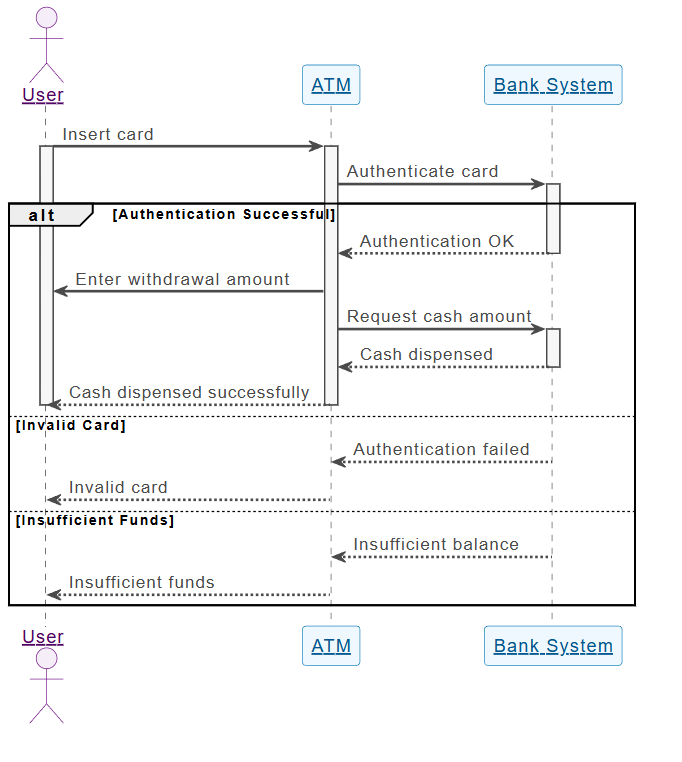
5. Step-by-Step Execution Flow
| Step | Action | Participant | Message |
|---|---|---|---|
| 1 | User inserts card | USR → ATM | Insert card |
| 2 | ATM sends card to Bank | ATM → BS | Authenticate card |
| 3 | Bank checks card validity | BS | → |
| 4 | Branch 1: Success | BS → ATM | Authentication OK |
| 5 | ATM prompts for amount | ATM → USR | Enter withdrawal amount |
| 6 | ATM requests cash | ATM → BS | Request cash amount |
| 7 | Bank checks balance & dispenses | BS → ATM | Cash dispensed |
| 8 | ATM confirms success | ATM → USR | Cash dispensed successfully |
| 9 | Branch 2: Invalid Card | BS → ATM | Authentication failed |
| 10 | ATM rejects card | ATM → USR | Invalid card |
| 11 | Branch 3: Insufficient Funds | BS → ATM | Insufficient balance |
| 12 | ATM informs user | ATM → USR | Insufficient funds |
✅ Note: Only one branch executes per transaction. All
deactivatestatements occur only once, at the end of each scenario.
6. Why This Design Is Robust & Scalable
| Feature | Benefit |
|---|---|
| Single activation per lifeline | Prevents visual clutter and ensures consistency |
| Clear branching logic | Easy to extend (e.g., add PIN verification, daily limits) |
| Error handling embedded | Failures are handled gracefully without crashing the system |
| Complies with UML standards | Valid for documentation, testing, and code generation |
| Supports automated testing | Each scenario can be simulated independently |
7. Real-World Applications
This pattern is widely used in:
-
Banking systems
-
Payment gateways (e.g., Stripe, PayPal)
-
IoT device interactions (e.g., smart locks, vending machines)
-
Microservices communication (e.g., order → inventory → payment)
8. Conclusion
This case study demonstrates how UML Sequence Diagrams with PlantUML can model complex, real-world systems with clear control flow, failure handling, and correct activation/deactivation patterns.
By following best practices — such as reusing lifelines, avoiding nested activations, and balancing deactivations — developers can create maintainable, readable, and testable models that reflect actual system behavior.
🛠️ Takeaway: A well-designed sequence diagram is not just a visualization — it’s a blueprint for reliable software design.
✅ Bonus: How to Run This Code
-
Install PlantUML (via VS Code, IntelliJ, or online at https://www.planttext.com).
-
Paste the code into a
.pumlfile. -
Generate the diagram using:
java -jar plantuml.jar atm-withdrawal.puml -
Output: A clean, professional PNG/SVG diagram showing all three scenarios.
📌 Example Summary
| Aspect | Details |
|---|---|
| System | ATM Withdrawal with Bank Authentication |
| Participants | User, ATM, Bank System |
| Scenarios | 3 (Success, Invalid Card, Insufficient Funds) |
| Tool | PlantUML |
| Best Practice | Reused lifelines, no orphaned activations |
| Use Case | Real-world banking, microservices, secure systems |
🏁 Final Note: Design with clarity. Code with confidence. Test with precision.
Let’s explore how Visual Paradigm’s AI Diagram Generator and AI Chatbot can complement and enhance the ATM withdrawal sequence diagram process we just discussed — transforming manual modeling into an intelligent, accelerated, and collaborative workflow.
🎯 Why AI-Powered Diagramming Is a Game-Changer
The UML sequence diagram we built is accurate, well-structured, and follows best practices — but creating it manually requires:
-
Deep understanding of UML semantics
-
Careful attention to lifelines, activations, and branching
-
Time to write and debug PlantUML code
Enter Visual Paradigm’s AI Diagram Generator & Chatbot — a next-generation tool that turns natural language descriptions into professional, production-ready diagrams, automating and enhancing the entire modeling lifecycle.
✨ How Visual Paradigm’s AI Tools Complement the ATM Sequence Diagram Process
🔹 1. From Natural Language to Diagram: AI Diagram Generator
📌 Before (Manual Process):
-
You write PlantUML code by hand.
-
Must remember syntax:
activate,deactivate,alt,else,end, etc. -
Risk of errors (e.g., missing
deactivate, wrong message order).
✅ After (AI-Powered):
Input (Natural Language):
“Model a user inserting a card into an ATM. The ATM sends the card to the Bank System for authentication. If authentication succeeds, the ATM prompts for a withdrawal amount and checks funds. If funds are sufficient, cash is dispensed. If the card is invalid or funds are insufficient, the user gets an appropriate error message.”
🧠 AI Diagram Generator Response:
-
Automatically generates a correct, fully formatted UML sequence diagram.
-
Applies best practices: reused lifelines, proper activation/deactivation, clean branching.
-
Outputs multiple formats: PNG, SVG, XML, and even editable UML model (in Visual Paradigm IDE).
✅ Benefit: Reduces modeling time from 15+ minutes to under 1 minute, with zero syntax errors.
🔹 2. AI Chatbot: Interactive Refinement & Debugging
📌 Challenge:
You want to add a PIN verification step before card authentication.
✅ AI Chatbot Interaction (in Visual Paradigm):
User: “Add a PIN verification step after card insertion. The ATM should ask for PIN before sending the card to the Bank System.”
AI Chatbot Response:
-
Modifies the diagram: inserts
ATM -> USR: Enter PINandATM -> BS: Authenticate card + PIN -
Updates the
altblock: now checksPIN validvsPIN invalid -
Maintains correct activation flow
-
Shows updated diagram in real time
✅ Benefit: No need to relearn syntax — just chat and refine your model.
🔹 3. Real-Time Validation & Best Practice Enforcement
Visual Paradigm’s AI understands UML semantics, so it:
-
Flags incorrect message ordering
-
Prevents orphaned activations
-
Ensures
activate/deactivatepairs are balanced -
Suggests improvements (e.g., “Consider merging the error branches for clarity”)
✅ Result: You get automated quality control — like a UML coach in real time.
🔹 4. Integration with Development Workflow (CI/CD & Code Generation)
Once the diagram is finalized:
-
Visual Paradigm generates code stubs (Java, Python, C#, etc.) from the sequence diagram.
-
Can generate test cases based on each scenario (success, invalid card, insufficient funds).
-
Supports reverse engineering: you can start from code and generate the diagram.
✅ Use Case:
Dev Team: Uses AI-generated diagram to understand system behavior.
QA Team: Gets test scenarios automatically from the diagram.
Architect: Ensures design aligns with business rules.
🔹 5. Collaboration Across Teams
-
Product Managers: Describe requirements in plain English → AI generates diagram.
-
Developers: Review, refine, and generate code.
-
Testers: Use diagram to validate test coverage.
🔄 Feedback Loop: AI learns from team edits and improves future suggestions.
🔄 Full Workflow Comparison
| Step | Manual (PlantUML) | Visual Paradigm AI (Enhanced) |
|---|---|---|
| 1. Describe system | Write PlantUML code | Type natural language |
| 2. Generate diagram | Requires syntax knowledge | AI generates instantly |
| 3. Add new logic | Edit code manually | Chat: “Add PIN verification” → AI updates diagram |
| 4. Validate correctness | Self-check | AI flags issues (e.g., missing deactivate) |
| 5. Generate code | Manual mapping | Auto-generate code stubs |
| 6. Share with team | Share PNG/SVG | Export, collaborate, version control |
✅ AI wins in speed, accuracy, accessibility, and collaboration.
🎯 Real-World Example: Enhancing the ATM Diagram with AI
Prompt to Visual Paradigm AI Chatbot:
“Add a 3-attempt limit for PIN entry. If the user fails 3 times, the ATM retains the card. Show this in the sequence diagram.”
AI Response:
-
Adds loop:
alt PIN attempts < 3andelse PIN attempts ≥ 3 -
Adds
ATM -> USR: Maximum attempts reached -
ATM -> USR: Card retained -
Properly manages activation lifecycles
-
Visualizes the loop with
loopnotation
🎨 Result: A robust, real-world compliant ATM system model — in seconds.
✅ How AI Enhances the ATM Modeling Process
| Feature | Manual (PlantUML) | Visual Paradigm AI |
|---|---|---|
| Input | Code | Natural language |
| Diagram generation | Manual | Instant |
| Error detection | Self-checked | AI-powered |
| Refinement | Code edits | Chat-based edits |
| Code generation | Not included | Yes (Java, Python, etc.) |
| Collaboration | Limited | Real-time, team-friendly |
| Learning curve | High | Low (no syntax needed) |
| Scalability | Medium | High (can scale to complex systems) |
🏁 Final Verdict: AI Is Not Just a Tool — It’s a Co-Pilot for Design
Visual Paradigm’s AI Diagram Generator and Chatbot transforms the ATM withdrawal sequence diagram from a static, manual artifact into a dynamic, intelligent, and collaborative system design engine.
🎯 Use It When:
-
You’re designing complex business workflows (e.g., banking, e-commerce).
-
You want to accelerate design, reduce errors, and enable non-technical stakeholders to participate.
-
You’re building systems that must handle multiple failure modes (like our ATM example).
📌 Pro Tip: Combine the Best of Both Worlds
Use Visual Paradigm AI to generate the diagram.
Then export the PlantUML code for use in documentation, CI/CD pipelines, or integration with other tools.
✅ You get AI speed + PlantUML portability.
🛠️ Try It Yourself
-
Open AI Diagram Generator or AI Chatbot.
-
Paste this prompt:
“Model a user inserting a card into an ATM. The ATM sends the card to the Bank System for authentication. If authentication succeeds, the ATM prompts for a withdrawal amount and checks funds. If funds are sufficient, cash is dispensed. If the card is invalid or funds are insufficient, the user gets an appropriate error message. Use UML sequence diagram.”
-
Watch the magic happen in seconds.
🎁 Conclusion
AI doesn’t replace UML — it elevates it.
With Visual Paradigm’s AI tools, you can:
-
Design faster
-
Collaborate better
-
Code smarter
-
Scale confidently
The ATM withdrawal system becomes not just a diagram — it becomes a living, intelligent system model that evolves with your team.
🧠 Think of it as: UML meets AI, powered by real-world logic.
🚀 Ready to supercharge your modeling?
👉 Use Visual Paradigm’s AI — and turn your next idea into a diagram in seconds.