


In the modern product development lifecycle, the siloed approach to design is obsolete. Successful user experiences are born from the convergence of physical craftsmanship and digital interaction logic. When Industrial Design (ID) and Human-Computer Interaction (HCI) teams align, they create cohesive products that feel intuitive in hand and logical to use on screen. This guide explores the mechanics of effective collaboration between these distinct yet interconnected disciplines.
Collaboration is not merely about sharing files or attending meetings. It is about establishing a shared language, respecting different constraints, and fostering a culture where diverse perspectives drive better outcomes. Whether you are building a smart home device, a medical instrument, or a consumer appliance, the bridge between form and function must be seamless.
Understanding the Distinct Disciplines 🔍
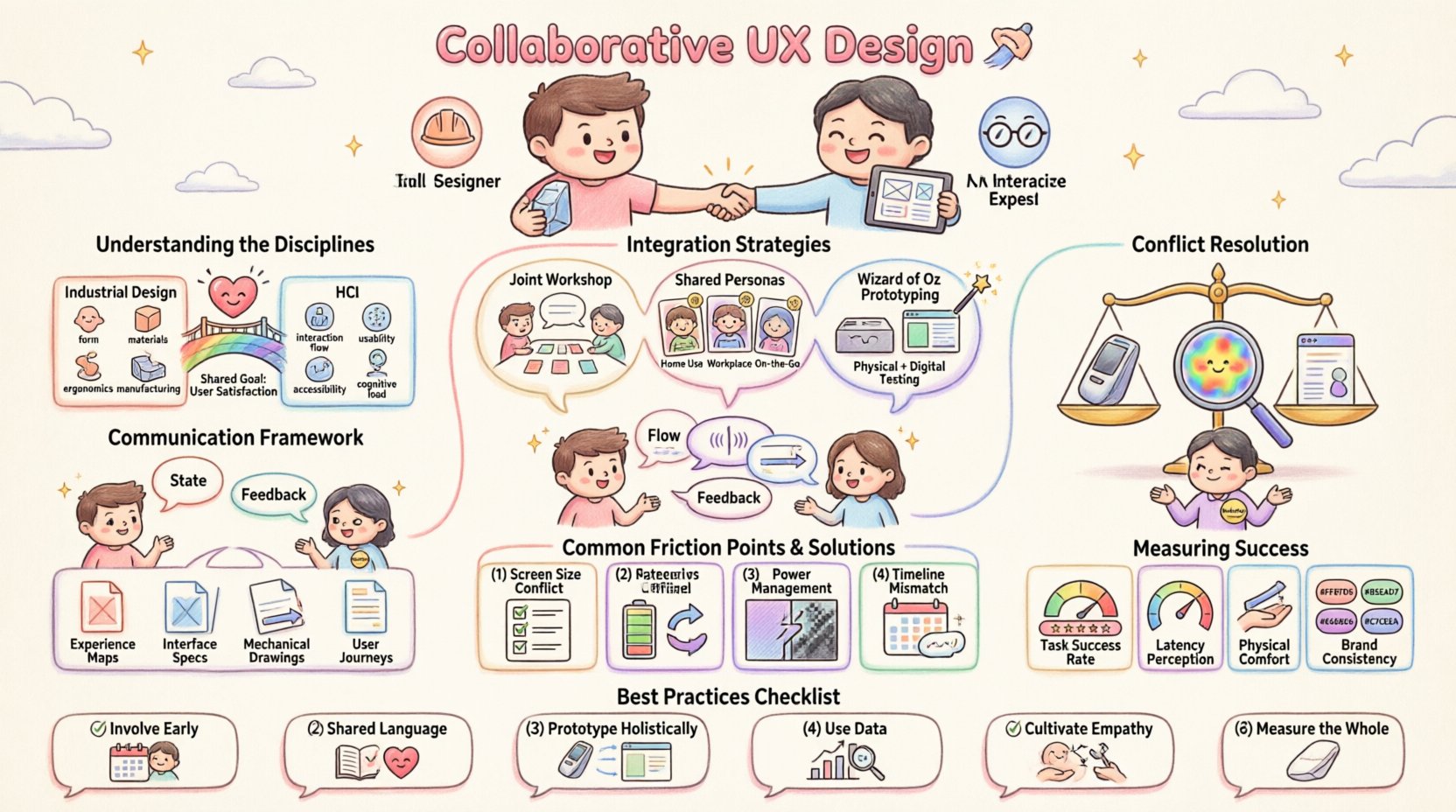
To collaborate effectively, one must first understand the unique focus of each team. Industrial Designers prioritize aesthetics, ergonomics, materials, and manufacturing constraints. They think about how a product feels in the hand, how it looks under natural light, and how it fits into a physical environment. Human-Computer Interaction specialists focus on the logic of interaction, information architecture, feedback loops, and digital behavior. They think about how a user navigates a menu, how a system responds to a command, and how data is presented.
While these focuses differ, the end goal remains the same: a satisfying user experience. The friction often arises when these goals conflict. For example, an Industrial Designer might prioritize a sleek, button-less surface, while an HCI specialist argues that tactile feedback is necessary for accessibility. Resolving this requires negotiation backed by user data, not just opinion.
Key Focus Areas
- Industrial Design: Form, material, ergonomics, manufacturing feasibility, durability.
- HCI: Interaction flow, usability, accessibility, cognitive load, digital feedback.
- Shared Goal: Usability, brand consistency, user satisfaction.
Bridging the Gap: Integration Strategies 🧩
Integration does not happen by accident. It requires deliberate processes that allow both physical and digital realities to inform each other from the earliest stages. Early involvement is critical. Waiting until the hardware is finalized to design the software interface often leads to compromises that degrade the experience.
Shared Discovery Phase
During the initial discovery phase, both teams should participate in user research. This ensures that the physical constraints identified by Industrial Design are weighed against the digital needs identified by HCI. When researchers observe users interacting with a prototype, they note both how the device is held and how the screen is navigated.
- Joint Workshops: Conduct brainstorming sessions where both disciplines sketch and map ideas together.
- Shared Personas: Develop personas that account for physical context (e.g., “working in low light”) and digital context (e.g., “short attention span”).
- Contextual Inquiry: Observe users in their natural environment to understand how the physical product fits into their daily routine.
Prototyping Together 🛠️
Prototyping is where collaboration becomes tangible. Instead of building a physical shell and then dressing it with software, teams should build “Wizard of Oz” prototypes. These allow the physical form to be tested alongside simulated digital interactions. This approach reveals friction points that might be invisible when working in isolation.
For instance, a button on a physical device might be positioned perfectly for ergonomics but too far for a thumb to reach a corresponding on-screen element. Identifying this early saves significant engineering time later.
Communication Frameworks for Seamless Workflow 🗣️
Communication breakdowns are the primary cause of friction in cross-disciplinary teams. Jargon creates barriers. Industrial Designers speak in terms of tolerances and finishes. HCI specialists speak in terms of latency and states. Translating between these languages is a key responsibility of the project lead.
Establishing a Shared Vocabulary
Teams should agree on terminology that bridges the gap. Instead of using technical jargon that excludes one group, define terms that apply to both physical and digital aspects. Create a glossary that is accessible to all stakeholders.
- State: Define what it means for a device to be “on,” “sleeping,” or “erroring” in both hardware status lights and software UI.
- Feedback: Clarify what constitutes feedback. Is it haptic vibration? Is it a sound? Is it a color change on a screen?
- Flow: Map the user journey from physical activation to digital completion.
Documentation Standards
Documentation serves as the single source of truth. Both teams must contribute to and reference the same artifacts. This ensures that changes in one domain are visible to the other.
| Artifact Type | Primary Audience | Collaboration Value |
|---|---|---|
| Experience Maps | Both | Visualizes the entire journey, highlighting physical and digital touchpoints. |
| Interface Specifications | Engineering & HCI | Details button mappings, LED behaviors, and screen states. |
| Mechanical Drawings | Engineering & ID | Shows physical constraints for screen placement and button depth. |
| User Journey Diagrams | Both | Aligns expectations on task completion time and steps. |
Conflict Resolution and Design Decisions ⚖️
Disagreements are inevitable. When an Industrial Designer argues for a thinner bezel and an HCI specialist argues for a larger touch target, decisions must be made. These decisions should not be based on hierarchy but on evidence.
Using Data to Drive Decisions
When opinions clash, bring in user data. If a usability test shows that users struggle to find a button on a sleek surface, the physical design must adapt. If a study shows that users prefer a certain interaction flow regardless of the physical layout, the software should adapt. Evidence removes ego from the room.
The Role of the Design Lead
The design lead acts as the arbitrator. Their role is to synthesize inputs from both sides and make a decision that serves the user best. This requires a deep understanding of both domains. The lead must be able to explain why a decision was made to both the engineering team and the product stakeholders.
- Facilitate Open Dialogue: Encourage both sides to explain their reasoning without interruption.
- Focus on the User: Constantly ask, “How does this affect the user?”
- Document Rationale: Record why a decision was made for future reference and onboarding.
Common Friction Points and Solutions 🛑
Understanding where friction typically occurs allows teams to prepare for it. Below are common scenarios and how to navigate them effectively.
| Friction Point | Why It Happens | Solution |
|---|---|---|
| Screen Real Estate | Hardware limits size; software needs space. | Define minimum viable UI elements early; prioritize critical actions. |
| Power Management | Hardware needs sleep modes; software needs responsiveness. | Coordinate wake-up sequences and background processing requirements. |
| Material vs. Pixel | Physical textures conflict with digital clarity. | Use digital elements that mimic physical affordances (e.g., shadows, depth). |
| Timeline Mismatches | Hardware iterations are slower than software updates. | Build flexible software that can adapt to hardware revisions. |
Building a Culture of Shared Ownership 🏗️
Long-term success relies on culture. If one team views the other as a vendor or a hurdle, collaboration will suffer. The goal is to create a culture where every member feels responsible for the entire product experience, not just their specific slice.
Cross-Training Opportunities
Encourage team members to learn about the other discipline. An Industrial Designer should understand the basics of software constraints. An HCI specialist should understand the basics of manufacturing. This empathy reduces frustration when constraints are encountered.
- Shadowing: Allow team members to spend time in the other discipline’s workflow.
- Joint Reviews: Conduct design reviews where both physical and digital aspects are critiqued together.
- Shared Metrics: Use the same success metrics for both teams (e.g., time to task completion, error rates).
Measuring Success Beyond Pixels 📊
How do we know if the collaboration worked? Metrics should reflect the holistic experience. Success is not just about code quality or material strength. It is about how the user perceives the product as a whole.
Key Performance Indicators
- Task Success Rate: Can users complete the intended action using both the physical interface and the screen?
- Latency Perception: Does the system feel responsive when the physical action triggers a digital response?
- Physical Comfort: Does the device remain comfortable during extended digital interaction?
- Brand Consistency: Does the physical design match the digital aesthetic?
The Future of Integrated Design 🚀
As technology becomes more embedded in our lives, the line between physical and digital continues to blur. Wearables, smart appliances, and automotive interfaces all require this deep integration. The teams that thrive will be those that treat Industrial Design and HCI not as separate departments, but as two sides of the same coin.
By focusing on shared goals, transparent communication, and evidence-based decision-making, teams can overcome the inherent challenges of cross-disciplinary work. The result is a product that feels right in the hand and works right in the mind.
Summary of Best Practices 📝
- Involve Both Early: Do not wait for hardware finalization to start software design.
- Speak the Same Language: Define shared terms and documentation standards.
- Prototype Holistically: Test physical and digital interactions together.
- Use Data: Let user research dictate design compromises.
- Cultivate Empathy: Understand the constraints and goals of the other discipline.
- Measure the Whole: Track metrics that reflect the combined experience.
The path to exceptional user experience is paved with collaboration. It requires patience, understanding, and a willingness to adapt. When Industrial Design and HCI teams work in harmony, they create products that are not just functional, but delightful.
Related posts:
 Mastering the Art of User Experience Design: A Complete Guide for CS and HCI Students
 From Industrial Design to Digital: A UX Journey for Specialized Designers
 The Beginner’s Roadmap to UX Design: Quick Start Strategies for Tech Students
 UX Design: Deep Dive into Human-Computer Interaction: Principles and Practices for Undergraduates