


From Concept to Cloud Architecture in Seconds
🔥 Imagine describing your cloud system in plain English—and getting a professional, UML-compliant deployment diagram in under 30 seconds.
No more manual dragging, aligning, or guessing.
No more mislabeled nodes or missing firewalls.
Just smart, accurate, and instantly deployable architecture visualizations—powered by AI.
Welcome to the future of system design.
In this comprehensive, step-by-step tutorial, we’ll walk you through everything you need to know about UML Deployment Diagrams, why they matter, when to use them, who benefits from them—and how Visual Paradigm’s AI Deployment Diagram Generator automates the entire process.
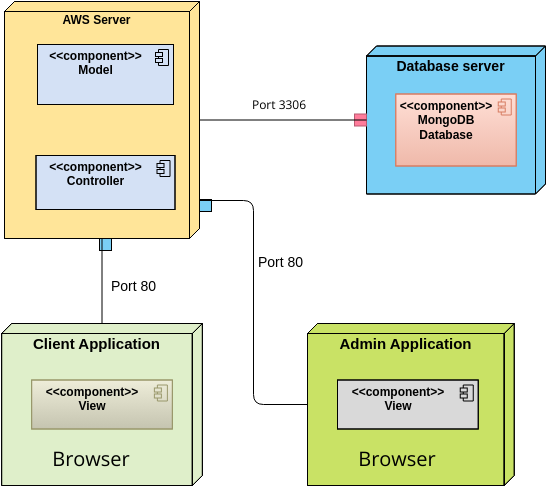
By the end, you’ll be able to design, validate, and share production-grade deployment diagrams in minutes—not days.
📌 What Is a UML Deployment Diagram?
A UML Deployment Diagram is a structural diagram in the Unified Modeling Language (UML) that visualizes the physical (runtime) architecture of a software system.
It answers the critical question:
“Where does this system run—and how do its parts connect?”
Unlike component or class diagrams (which focus on logic), deployment diagrams show:
-
Hardware (servers, devices, IoT nodes),
-
Software environments (VMs, containers, OS, runtime),
-
Deployed artifacts (executables, libraries, config files),
-
Communication paths (networks, protocols),
-
And security boundaries (firewalls, gateways).
✅ Use Case: Ideal for cloud systems, distributed apps, microservices, embedded systems, and hybrid infrastructure.
🔗 Learn the full definition and purpose: What is a Deployment Diagram? A Complete Guide to UML Deployment Diagrams
🧩 Key Elements of a Deployment Diagram (Explained with Examples)
Let’s break down the core building blocks—so you know what to include and how to model them correctly.
| Element | Description | Example |
|---|---|---|
| Node | A physical or logical computational resource. Use stereotypes for clarity. | <<server>>, <<cloud>>, <<device>>, <<container>>, <<executionEnvironment>> |
| Artifact | A software component deployed on a node (e.g., .jar, .exe, .json, .dockerfile) |
<<artifact>>, <<library>>, <<configurationFile>> |
| Deployment Relationship | Shows where an artifact runs. Dashed arrow with <<deploy>> stereotype. |
<<deploy>> from OrderService.jar to <<server>> |
| Communication Link | Physical or logical connection between nodes. Use protocol stereotypes. | <<TCP/IP>>, <<HTTPS>>, <<WebSocket>> |
| Nested Nodes | Hierarchical structure (e.g., container inside VM, VM inside physical server). | Kubernetes cluster inside AWS EC2 instance |
| Dependencies | Dashed arrow showing runtime reliance (e.g., app needs DB). | <<dependency>> from web service to database |
💡 Pro Tip: Always use stereotypes—they make diagrams instantly readable and standardized across teams.
🔗 See how to model these elements: How to Draw a Deployment Diagram in UML: Step-by-Step Tutorial
🕒 When Should You Use a Deployment Diagram?
Use a deployment diagram when you need to answer architectural questions like:
-
Where does the system run—on-premise, in the cloud, or on edge devices?
-
How are components connected (via API, message queue, direct DB access)?
-
What hardware or software environments are involved (e.g., Kubernetes, Docker, AWS EC2)?
-
How do we ensure high availability, failover, or security?
-
What middleware (e.g., Kafka, Redis, NGINX) is part of the runtime?
✅ Best for:
Cloud-native systems (AWS, Azure, GCP)
Microservices & distributed architectures
Embedded systems (IoT, robotics)
Hybrid or multi-region deployments
Security & compliance planning (firewalls, WAFs, encryption zones)
🔗 Explore real-world use cases: Deployment Diagram in the Software Design Handbook
👥 Who Uses Deployment Diagrams? (And Why They Need AI)
| Role | Why They Need Deployment Diagrams |
|---|---|
| Software Architects | Design scalable, secure, and maintainable systems |
| DevOps Engineers | Plan infrastructure, CI/CD pipelines, and deployment strategies |
| Cloud Architects | Optimize cloud costs, availability, and network topology |
| Security Teams | Identify attack surfaces, place firewalls, enforce segmentation |
| Product Managers | Communicate system complexity to stakeholders |
| Developers | Understand where their code runs and how it connects |
🚨 Problem: Traditional modeling is slow, error-prone, and hard to update.
✅ Solution: Visual Paradigm’s AI Deployment Diagram Generator turns this process into a conversational design session.
🤖 How Visual Paradigm’s AI Deployment Diagram Generator Works (Step-by-Step)
Let’s walk through a real-world example: Building a UML deployment diagram for a cloud-based e-commerce platform.
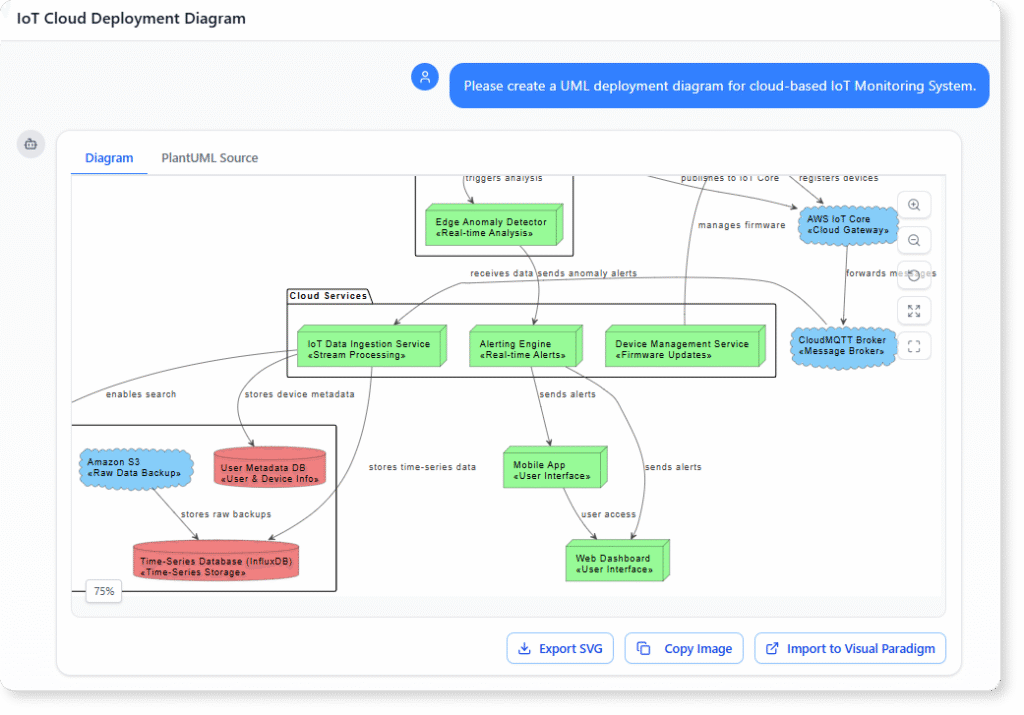
🎯 Step 1: Describe Your System in Plain English
Open Visual Paradigm’s AI Chatbot and type:
*”Create a UML deployment diagram for a cloud-based e-commerce system with:
AWS EC2 instances for web and API servers,
AWS Lambda for order processing,
Amazon DynamoDB for product and user data,
AWS S3 for storing product images,
An Application Load Balancer for traffic routing,
A WAF firewall in front of the load balancer,
And a Kubernetes cluster for future microservices.”*
✅ Result: In under 30 seconds, the AI generates a fully compliant UML diagram with:
Correct node stereotypes (
<<server>>,<<cloud>>,<<container>>,<<device>>)Proper
<<deploy>>relationshipsCommunication links with
<<HTTPS>>,<<TCP/IP>>Security boundaries (WAF in front of LB)
Nested structure (Kubernetes inside EC2)
🔗 See how it works: How to Create a UML Deployment Diagram for Cloud Apps with AI
🔄 Step 2: Iterate with Conversational Commands
No need to redraw. Just ask:
“Add a multi-region replication for DynamoDB to ensure high availability.”
✅ AI updates the diagram: Adds a second DynamoDB node in a different AWS region, with<<multi-region>>label.
“Move the database behind a private subnet and add a VPC.”
✅ AI adds a<<VPC>>node, hides the DB from public view, and adds network isolation.
“Show the Kubernetes cluster running on EC2 instances.”
✅ AI nests the<<container>>cluster inside the<<server>>EC2 node.
💬 This is iterative, intelligent design—not manual editing.
🔗 Learn more about dynamic updates: Comprehensive Tutorial on Deployment Diagrams with Visual Paradigm
📤 Step 3: Export & Share for Collaboration
Once satisfied, export your diagram in multiple formats:
-
PDF (for documentation and presentations)
-
PNG/SVG (for reports, wikis, slides)
-
HTML (for interactive web sharing)
You can also:
-
Link it to component diagrams (showing how code maps to runtime).
-
Integrate with C4 or ArchiMate models (for enterprise architecture).
-
Share the chat history with your team (for transparency and alignment).
🔗 Try the free version: Free Deployment Diagram Tool – Visual Paradigm Online
🛠️ Advanced Features That Make AI Work Even Better
Visual Paradigm doesn’t just generate diagrams—it enhances them with intelligence.
✅ 1. PlantUML Integration
Define your deployment model in PlantUML syntax, then visualize it instantly in the UI.
Example:
@startuml
‘ Optional: improve visual style (recommended for deployment diagrams)
skinparam nodesep 50
skinparam ranksep 50
‘ Top-level cloud container (groups the entire AWS environment)
cloud “AWS Cloud” as AWS {
‘ Load Balancer node inside AWS
node “Load Balancer” as LB <<load balancer>> {
‘ No artifacts typically deployed directly on a load balancer
}
‘ EC2 Web Server node with nested artifact
node “EC2 Web Server” as EC2 <<server>> {
artifact “WebApp.jar” as WebApp
}
‘ Database node
node “DynamoDB” as DB <<database>>
‘ Storage node
node “S3” as S3 <<storage>>
}
‘ Deployment: artifact is deployed on the EC2 node
‘ (this is optional if already nested, but explicit is clearer)
WebApp –> EC2 : <<deploy>>
‘ Communication paths (runtime connections)
EC2 –> LB : <<HTTPS>> : client requests
LB –> EC2 : <<HTTPS>> : forwarded requests ‘ bidirectional if needed
‘ Typical backend connections (e.g., app to database and storage)
EC2 –> DB : <<JDBC / AWS SDK>>
EC2 –> S3 : <<HTTPS / AWS SDK>>
@enduml
🔗 Use this powerful feature: PlantUML Deployment Diagram Builder – Visual Paradigm Integration
✅ 2. Real-Time Collaboration
Invite team members to view, comment, or co-edit the diagram in real time—perfect for distributed teams.
🔗 See collaboration features: Deployment Diagram Features in Visual Paradigm Software
✅ 3. Auto-Suggestions & Best Practices
The AI doesn’t just draw—it advises.
-
“Consider adding a reverse proxy for better security.”
-
“Multi-region DB replication improves failover.”
-
“Place the database in a private subnet.”
These suggestions help you avoid costly design flaws early.
🎯 Best Practices for High-Impact Deployment Diagrams
| Tip | Why It Matters |
|---|---|
| Start with purpose | Focus on architecture-critical elements (e.g., load balancers, firewalls, databases) |
| Use stereotypes | <<server>>, <<cloud>>, <<container>> improve clarity |
| Model nesting | Show containers inside VMs, VMs inside physical servers |
| Keep it layered | Use packages for environments (Prod/Staging), layers (Frontend/Backend) |
| Validate against requirements | Ensure high availability, security, and scalability are reflected |
| Avoid over-modeling | Don’t include every minor file—only what impacts architecture |
🔗 See a full guide: Visual Paradigm User Guide: Creating Deployment Diagrams
💰 Why This Saves Time, Money, and Stress
| Challenge | Traditional Approach | With AI in Visual Paradigm |
|---|---|---|
| Diagram creation | 3–5 hours | Under 1 minute |
| Error-prone | Manual mistakes common | AI ensures UML compliance |
| Iteration | Redraw every time | Update via conversation |
| Team alignment | Difficult to share | Real-time collaboration |
| Cost | High labor, rework | Lower overhead, fewer failures |
💥 Result: Teams can explore 10+ architecture options in a single afternoon—something impossible with manual tools.
🔗 See the cost-saving impact: Comprehensive Tutorial on Deployment Diagrams with Visual Paradigm
🎁 Bonus: Try It Yourself – Free & No Install Needed
You don’t need a license to get started.
👉 Visit: Free Deployment Diagram Tool – Visual Paradigm Online
-
No installation required.
-
Works in your browser.
-
Full AI-powered diagram generation.
-
Export to PDF, PNG, SVG, or HTML.
Perfect for:
-
Developers testing a new system.
-
Architects prototyping cloud designs.
-
Students learning UML.
🎯 Final Thoughts: The Future of System Design Is AI-Powered
Gone are the days of spending hours on diagramming.
Now, you can:
-
Describe your system in natural language,
-
Get a professional, UML-compliant diagram instantly,
-
Refine it with simple commands,
-
Share it with your team,
-
Link it to other models (component, C4, ArchiMate).
This isn’t just faster—it’s smarter, more accurate, and more collaborative.
✅ Visual Paradigm’s AI Deployment Diagram Generator isn’t just a tool.
It’s your AI co-architect—helping you design better systems, faster.
📌 Summary: Your Go-To Guide to AI-Powered Deployment Diagrams
| Feature | How Visual Paradigm Delivers It |
|---|---|
| 🚀 Speed | Generate diagrams in seconds |
| 🧠 Intelligence | AI suggests best practices and standards |
| 🤝 Collaboration | Share diagrams and chat histories |
| 🔗 Integration | Works with PlantUML, C4, ArchiMate |
| 📦 Export | PDF, PNG, SVG, HTML, and more |
| 💡 No Install | Free online version available |
🔗 All Resources in This Tutorial (Embedded for Easy Access)
-
What is a Deployment Diagram? A Complete Guide to UML Deployment Diagrams
-
How to Create a UML Deployment Diagram for Cloud Apps with AI
-
How to Draw a Deployment Diagram in UML: Step-by-Step Tutorial
-
Comprehensive Tutorial on Deployment Diagrams with Visual Paradigm
-
PlantUML Deployment Diagram Builder – Visual Paradigm Integration
-
Beginner’s Guide to Deployment Diagrams Using Visual Paradigm Online
🚀 Ready to Transform Your Architecture Workflow?
👉 Start now at chat.visual-paradigm.com
👉 Try the free online tool: Free Deployment Diagram Tool – Visual Paradigm Online
Whether you’re building a startup MVP, designing a global cloud platform, or teaching UML—AI is your new co-pilot in system design.
🌟 Design smarter. Build faster. Deploy with confidence.
The future of deployment diagrams is here—and it’s powered by AI.