
Introduction to Fliplify
Fliplify is a powerful flipbook maker available on VP Online’s robust platform, designed to transform static documents into engaging, interactive digital publications. Whether you’re a business analyst, marketer, designer, or business owner, Fliplify provides the tools to create stunning flipbooks that captivate your audience.


Your User Experience Journey
Stage 1: Discovery & Getting Started
The First Step
Your journey begins with understanding what Fliplify can do for you. The platform offers multiple entry points depending on your needs:
-
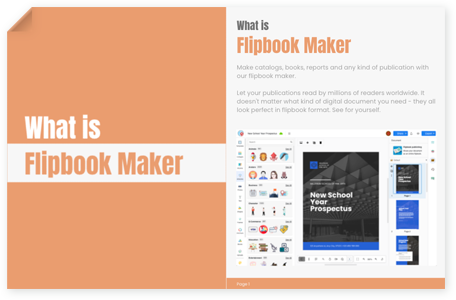
Create from scratch using the intuitive visual E-book designer
-
Convert existing files (PDFs, PowerPoint, Word documents) into flipbooks
-
Use pre-designed templates to accelerate your project

Stage 2: Creation & Design
The Online Flipbook Designer Experience
Fliplify’s drag-and-drop designer makes creation intuitive and enjoyable:
-
Visual Design Interface: Work with a user-friendly canvas that responds to your creative instincts
-
Rich Asset Library: Access thousands of illustrations, effects, and stock photos
-
Template Variety: Choose from professionally designed templates for:
-
Booklets
-
Photobooks
-
Catalogs
-
Lookbooks
-
Reports
-
Portfolios
-


File Conversion Made Simple
Already have content? Fliplify’s converter handles:
-
PDF documents
-
PowerPoint presentations
-
Word documents
-
E-books
The conversion process preserves your formatting while adding the magic of page-flipping interactivity.
Stage 3: Enhancement & Interactivity
Adding Life to Your Publication
Once your basic flipbook is created, enhance it with:
Animation Effects
-
Add animations to shapes, photos, and text
-
Animations play automatically as readers flip through pages
-
Create immersive, engaging reading experiences


Real-Time Annotations
-
Use pens and highlighters during presentations
-
Encourage audience participation
-
Point out specific areas for discussion
-
Allow attendees to write thoughts directly on slides
-
Foster active engagement during presentations


Stage 4: Publishing & Distribution
Multiple Publishing Options
Fliplify offers flexible publishing to meet different needs:
1. Cloud Publishing
-
Publish instantly to Fliplify’s servers
-
Get a shareable URL immediately
-
No technical setup required
2. Self-Hosted Solution
-
Host flipbooks on your own domain
-
Complete control over security and branding
-
Customization options for enterprise needs
-
Ideal for businesses with specific compliance requirements

3. The Pipeline to Display Hall
The seamless bridge between creation and showcase:
-
One-Click Transfer: Send your flipbook directly to Display Hall
-
No Downloads: Forget about managing files or embed codes
-
Drag-and-Drop: Simply drag your flipbook into professional web page layouts
-
Complete Platform: Transform from flipbook maker to digital publishing platform


Stage 5: Sharing & Engagement
Multi-Channel Distribution
Share your flipbooks across diverse platforms:
-
Direct URL: Share via simple link
-
Embed Codes: Insert into blogs and websites
-
Social Media: Post on Facebook, Twitter, LinkedIn, etc.
-
QR Codes: Perfect for print materials and events
-
Email: Send directly to readers
-
Password Protection: Secure sensitive content


Virtual Bookshelves
Catalog your publications beautifully:
-
Create stunning virtual bookshelves
-
Personalize with custom themes and styles
-
Organize multiple publications in one place
-
Provide professional browsing experience


Stage 6: Mobile Optimization
Reading On-the-Go
Fliplify ensures your content looks great everywhere:
-
Responsive design adapts to all screen sizes
-
Optimized for smartphones and tablets
-
Touch-friendly page flipping
-
Consistent experience across devices
Feature Deep Dive
Key Features Overview
1. Create Online Flipbooks
Design visually appealing e-books, reports, and various documents online with our intuitive visual E-book designer.
2. Convert Files into Flipbooks
Transform your PDFs, PowerPoint presentations, Word documents, and E-books into captivating flipbooks.
3. Publish and Share Effortlessly
Share your flipbooks seamlessly through channels such as links, social platforms, embedded books, QR codes, and more.
4. Self-Hosted Flipbooks
Take control of your publications by self-hosting them on your own domain.
5. Annotate with Ease
Add annotations to your content in real-time as you present, utilizing tools like pens, highlighters, and more.
6. 1-Click Publishing to Display Hall
Send your flipbook through the Pipeline to drag it directly into your Display Hall layout—no downloads required.

User Reviews & Testimonials
Business Analyst Perspective
“We use Visual Paradigm’s digital flipbook platform to create engaging business presentations, business proposals and impactful reports. The platform comes with so many professional templates and graphic assets, which saves me a lot of time and effort in designing.”
Key Benefits for Business Analysts:
-
Professional report creation
-
Data visualization in flipbook format
-
Easy sharing with stakeholders
-
Template library for consistency
Marketer’s Experience
“Probably the best flipbook maker on the market… We use Visual Paradigm to reach our target audiences by publishing our product catalogs, digital brochures and other marketing materials as online flipbooks. It’s the most flexible and comprehensive flipbook solution we found.”
“We use Visual Paradigm to create all of our marketing materials, including catalogs, brochures, and more. Both the site traffic and sales inquiries increase dramatically in a short time.”
Marketing Advantages:
-
Increased engagement rates
-
Better lead generation
-
Professional brand presentation
-
Multi-channel distribution
Designer’s View
“I consider Visual Paradigm one of the best tools to present myself as a creative one worldwide.”
Designer Benefits:
-
Creative freedom with drag-and-drop
-
Rich asset library
-
Portfolio showcase capabilities
-
Professional presentation
HR Professional’s Take
“It’s often difficult to share information within our teams, but with Visual Paradigm, we can publish reports, onboarding materials, handbooks and other private documents available to our employees as flipbooks.”
HR Use Cases:
-
Employee handbooks
-
Onboarding materials
-
Training documents
-
Internal communications
-
Password-protected sensitive content
Business Owner’s Success
“We use Visual Paradigm to create all of our marketing materials, including catalogs, brochures, and more. Both the site traffic and sales inquiries increase dramatically in a short time.”
Business Impact:
-
Increased website traffic
-
Higher sales inquiries
-
Professional brand image
-
Cost-effective marketing
Template Gallery Showcase
Fliplify offers stunning templates across multiple categories:
Reports
-
Water Manufacture Annual Reports
-
Purple And Red Digital Media Annual Report
Catalogs
-
Kitchen & Food Catalog
-
Real Estate Catalog
-
Jewelry Catalog
Booklets
-
Hospital Booklet
-
Music Night Concert Booklet
Photo Books
-
Good To Be Home Family Photo Book
-
Romantic Wedding Anniversary Photo Book
-
Romantic Memory Wedding Photo Book
Portfolios
-
Art Portfolio
-
Wedding Photography Business Portfolio
Lookbooks
-
Denim Jacket Lookbook
-
Classy Dress Lookbook
Real-World Success Stories
Sample Sites
1. Catalyst Solutions
A corporate platform showcasing diverse flipbooks, presentations, and reports for business audiences.
2. Maplewood University
An educational platform with diverse resources including handouts, notes, and readings on various subjects.
3. Maya Harper
An artist’s portfolio fusing traditional art with modern technology in dynamic, interactive creations.
4. Flavor Fiesta
A culinary platform featuring an extensive collection of recipes spanning various cuisines, from traditional classics to innovative fusion creations.
Getting Started Guide
Step-by-Step Process
Step 1: Create a Flipbook
-
Upload and convert a document, OR
-
Design from scratch using the visual designer
Step 2: Customize & Enhance
-
Add animations
-
Include interactive elements
-
Apply annotations if needed
Step 3: Publish
-
Choose cloud publishing for instant access, OR
-
Select self-hosted for complete control
Step 4: Share
-
Distribute via URL
-
Embed on website
-
Share on social media
-
Generate QR codes
-
Send via email
Use Cases by Profession
For Business Analysts
-
Create professional reports
-
Design business proposals
-
Develop analytical presentations
-
Share findings interactively
For Marketers
-
Build product catalogs
-
Create digital brochures
-
Design marketing materials
-
Launch campaign flipbooks
For HR Professionals
-
Develop employee handbooks
-
Create onboarding materials
-
Design training documents
-
Share company policies
For Designers
-
Build creative portfolios
-
Showcase design work
-
Present case studies
-
Create lookbooks
For Business Owners
-
Publish company reports
-
Create sales materials
-
Design product catalogs
-
Develop brand presentations
Advanced Features
Self-Hosted Solution
With self-hosting, you gain:
-
Complete Control: Full ownership of your content
-
Enhanced Security: Protect sensitive business information
-
Custom Branding: Match your corporate identity
-
Domain Integration: Use your own domain name
-
Seamless Animations: Professional page-flipping effects
-
Unforgettable Experience: Premium reading experience
Display Hall Integration
Transform your flipbooks into a professional showcase:
-
Curate multiple publications
-
Create custom layouts
-
Build your online library
-
Professional presentation
-
Easy navigation
Mobile Optimization
Experience convenience anywhere:
-
Responsive design
-
Touch-friendly interface
-
Optimized loading
-
Cross-device compatibility
-
Consistent quality
Tips for Success
Maximizing Engagement
-
Use Animations Wisely
-
Add subtle animations to key elements
-
Don’t overdo it – maintain professionalism
-
Test on multiple devices
-
-
Optimize for Mobile
-
Preview on mobile devices
-
Ensure text is readable
-
Test touch interactions
-
-
Leverage Templates
-
Start with professional templates
-
Customize to match your brand
-
Maintain consistency
-
-
Use Annotations in Presentations
-
Engage your audience actively
-
Highlight key points
-
Encourage participation
-
-
Choose the Right Publishing Option
-
Cloud for quick sharing
-
Self-hosted for control and security
-
Display Hall for professional showcases
-
Conclusion
Fliplify transforms the way you create, share, and present digital content. From the initial creation stage through to publication and distribution, the platform provides a comprehensive solution that meets the needs of businesses, educators, creatives, and professionals across industries.
Whether you’re converting existing documents or creating from scratch, Fliplify’s intuitive tools, rich templates, and powerful features ensure your publications stand out. With options for cloud publishing, self-hosting, and seamless integration with Display Hall, you have the flexibility to choose the solution that best fits your needs.
Join thousands of satisfied users who have elevated their digital publications with Fliplify. Start your journey today and create flipbooks that captivate, engage, and inspire your audience.
Reference List
- Fliplify Official Website: Main platform for creating online flipbooks with comprehensive features and tools
- Visual Paradigm Online Flipbook Designer: Access the visual E-book designer for creating flipbooks from scratch
- Flipbook Templates Gallery: Browse professional templates for various flipbook types including reports, catalogs, and portfolios
- Flipbook Converter Tool: Convert PDFs, PowerPoint, Word documents, and E-books into interactive flipbooks
- Sample Bookshelf: View examples of virtual bookshelves for organizing multiple publications
- Self-Hosted Flipbook Service: Learn about hosting flipbooks on your own domain with complete control and security
- Pipeline Feature: Seamless bridge between flipbook creation and Display Hall showcase
- Display Hall Platform: Professional web page layout editor for showcasing flipbooks in curated collections
- Featured Flipbook Templates: Browse featured templates for various publication types
- Booklet Templates: Professional templates specifically designed for booklets and brochures
- Photobook Templates: Templates for creating stunning photo books and albums
- Catalog Templates: Product catalog templates for businesses and retailers
- Lookbook Templates: Fashion and design lookbook templates
- Report Templates: Professional templates for annual reports and business documents
- Water Manufacture Annual Report: Sample annual report flipbook for manufacturing industry
- Purple And Red Digital Media Annual Report: Example of digital media company annual report
- Kitchen & Food Catalog: Product catalog for kitchen and food items
- Real Estate Catalog: Property listing catalog for real estate business
- Jewelry Catalog: Product showcase for jewelry and accessories
- Travel Flipbook Demo: Interactive demo of travel-themed flipbook
- Pet Flipbook Demo: Sample flipbook for pet-related content
- Sport Flipbook Demo: Sports-themed flipbook demonstration
- Catalyst Solutions: Corporate flipbook showcase featuring business presentations and reports
- Maplewood University: Educational platform with flipbooks for handouts, notes, and readings
- Maya Harper Portfolio: Artist portfolio showcasing fusion of traditional art with modern technology
- Flavor Fiesta: Culinary flipbook collection featuring diverse recipes and cuisines